Features Page
GitHub
Features Page
Marketing
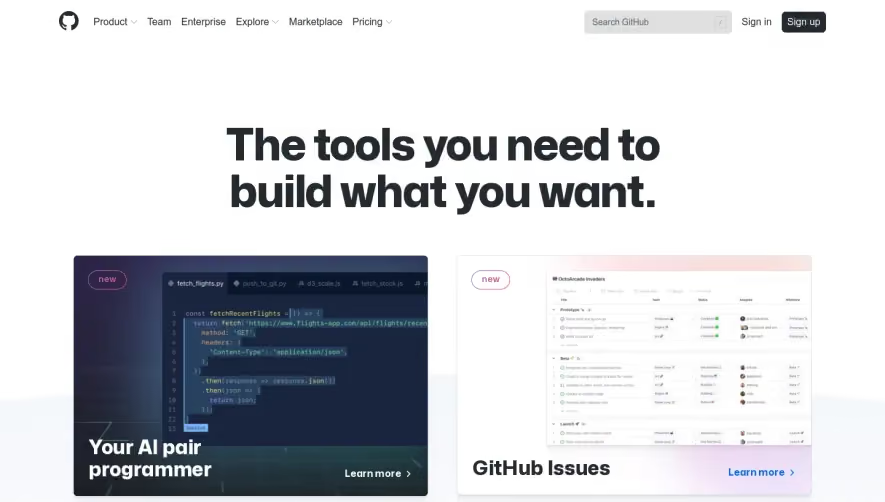
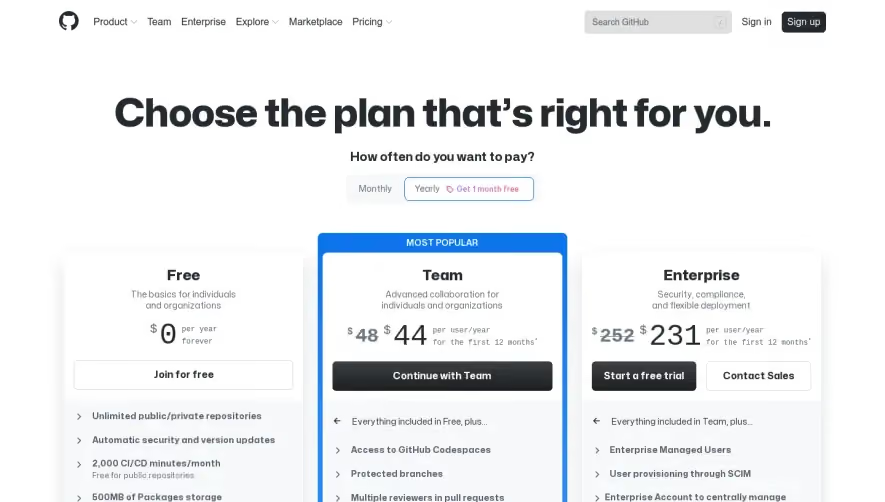
Product new 7 Team Enterprise Explore Marketplace Pricing Search GitHub Sign in Sign up The tools you need to build what you want. tetch_flights.py PW JS d3_scaIejs 'S tetch_stock.is JS const fetchRecentFIights - O return fetch( 'https://*".flights—app.com/api/flights/recer, method: 'GET', headers: { ' application/json' , 'Content—Type : response.json()) . then' response . them 'son return json: Your A1 pair programmer new GitHub Issues Collaborative Coding Automation & Cl /CD Security Learn more > Client Apps Project Management iheanyi 3 minutes ago Team Administration Collaborative Coding Contribute to projects quickly with automatic environment setup. Make sure you see the changes you care Learn more > Community require canst {versicnDeprecations, selectorDeprecgtions Commit suggestion Add suggestion to batch s} O O O O O O O o rwnfoo 3 minute ago OF! Nice catch a ampinsk I minute ago Sweet! for teamwork! Ihis is looking great about. Build community around your code. Codespaces Visual Studio Code backed by high performance VMS that start in seconds. Learn more > Discussions Dedicated space for your community to come together, ask and answer questions, and have open-ended conversations. Learn more > Code review assignments Assign code reviews to make it clear which team members should submit their review for a pull request. Learn more > Protected branches Enforce restrictions on how code branches are merged, including requiring reviews, or allowing only specific contributors to work on a particular branch. Learn more > Multiple assignees Assign up to 10 people to work on a given issue or pull request, letting you more easily track who's working on what. Learn more > Public repositories Work with any GitHub member on code in a public repository you control. Make changes, open a pull request, create an issue, and more. Learn more > Resolve corwersation Copilot With GitHub Copilot, get suggestions for whole lines or entire functions right inside your editor. Learn more > Notifications Get updates on the GitHub activity you've subscribed to. Use the notifications inbox to customize, triage, and manage your updates. Learn more > Code owners Automatically request reviews-or require approval—by selected contributors when changes are made to sections of code that they own. Learn more > Team discussions Post and discuss updates within your entire GitHub organization, or just your team. Notify participants with updates, and link from anywhere. Learn more > Multiple reviewers Request review from multiple contributors. Requested reviewers will be notified that you've asked for their review. Learn more > Dark mode Choose how you experience GitHub with theme settings. Swap to dark theme or default to your system preferences. Learn more > value Pull requests Allow contributors to easily notify you of changes they've pushed to a repository - with access limited to the contributors you specify. Easily merge changes you accept. Learn more > Code review Review new code, see visual code changes, and confidently merge code changes with automated status checks. Learn more > Draft pull requests Usea pull request as a way to discuss and collaborate, without submitting to formal review or risking an unwanted merge Learn more > Team reviewers Request a team on GitHub to review your pull request. Members of the team will get a notification indicating that you've asked for their review. Learn more > Multi-line comments Clarify code reviews by referencing or commenting on multiple lines at once in a pull request diff view. Automation and CI/CD Automate everything: CI/CD, testing, planning, project management, issue labeling, approvals, onboarding, and more. Standardize and scale best practices, security, and compliance across your organization. Get started quickly with thousands of actions from partners and the community. Build Learn more > Run ESLint Run PhantomJS APIs Deploy v e Deploy web app us-I Deploy web app eu-l e Deploy DB us-I Deploy DB eu-l Actions Automate all your software development workflows. Write tasks and combine them to build, test, and deploy faster from GitHub. Learn more > GitHub Pages Create and publish websites about yourself, your organization, or your project directly from a GitHub repository. Learn more > Hosted runners Move automation to the cloud with on-demand Linux, Windows, and MacOS environments for your workflow runs, hosted by GitHub. Learn more > Environments Meet security and compliance requirements for delivery with secrets and protection rules. Learn more > Workflow templates Standardize and scale best practices and processes with preconfigured workflow templates shared across your organization. Learn more > Security Secure code as you write it. Automatically review every change to your codebase and identify vulnerabilities before they reach production. Understand and address any vulnerabilities in your open source dependencies. Automatically detect and deactivate secrets committed to your repos. Private repos Host code that you don't want to share with the world in private GitHub repos only accessible to you and people you share them with. Learn more > Required status checks Ensure that all required Cl tests are passing before collaborators can make changes to a protected branch. Learn more > Dependency graph See the packages your project depends on, the repositories that depend on them, and any vulnerabilities detected in their dependencies. Learn more > Dependency review Understand the security impact of newly introduced dependencies during pull requests, before they get merged. Learn more > GPG commit signing verification Use GPG or S/MIME to sign tags and commits locally. These are marked as verified on GitHub so other people know the changes come from a trusted source. Learn more > Packages Host your own software packages or use them as dependencies in other projects. Both private and public hosting available. Learn more > GitHub Marketplace Start with thousands of actions and applications from our community to help you build, improve, and accelerate your automated workflows. Learn more > Self-hosted runners More environments and fuller control with labels, groups, and policies to manage runs on your own machines. Plus, the runner application is open source Learn more > Deployments View which version of your code is running in an environment, including when and why, plus logs for review. Learn more > Policies Manage Actions usage and permissions by repository and organizations, with additional policies for fork pull requests. Learn more > src\indexjs Create calls to get all the data and events you need within GitHub, and automatically kick off and advance your software workflows. Learn more > Webhooks Dozens of events, and a Webhooks APL help you integrate with and automate work for your repository, organization, or application. Learn more > Secrets management Share, update, and automatically sync secrets across multiple repositories to increase security and reduce workflow failures. Learn more > Workflow visualization Map workflows, track their progression in real time, understand complex workflows, and communicate status with the rest of the team. Learn more > Cross-scripting vulnerability due to user-provided value. codeQL 2FA Add an extra layer of security with two-factor authentication (2FA) when logging into GitHub. Require 2FA and choose from TOT P apps, security keys, and more. Learn more > Code scanning Find vulnerabilities in custom code using static analysis. Prevent new vulnerabilities from being introduced by scanning every pull request. Learn more > Dependabot alerts Get notified when there are new vulnerabilities affecting your repositories. GitHub detects and alerts users to vulnerable dependencies in public and private repos. Learn more > GitHub Security Advisories Privately discuss, fix, and publish information about security vulnerabilities found in your repository. Learn more > Security audit log Quickly review the actions performed by members of your organization. Your audit log includes details like who performed an action and when. Learn more > Enterprise Security Additional features available to GitHub Enterprise customers. Contact Sales SAML Control and secure access to organization resources like repos, issues, and pull requests with SAML. And allow users to authenticate with their existing GitHub usernames. Learn more > GitHub Connect Share features and workflows between your GitHub Enterprise Server instance and GitHub Enterprise Cloud. Learn more > Client Apps LDAP Centralize repository management. LDAP is one of the most common protocols used to integrate third party software with large company user directories. Learn more > Audit log API Keep copies of audit log data to ensure secure IP and maintain compliance for your organization. Learn more > Inbox Required reviews Ensure that pull requests have a specific number of approving reviews before collaborators can make changes to a protected branch. Learn more > Secret scanning Find secrets hard-coded in your public and private repositories. Revoke them to keep access to the services you use secure. Learn more > Dependabot security and version updates Keep your supply chain secure and up-to-date by automatically opening pull requests that update vulnerable or out-of-date dependencies. Learn more > GitHub Advisory Database Browse or search for the vulnerabilities that GitHub knows about. The database contains all curated CVEs and security advisories on the GitHub dependency graph. Learn more > IP allow list Limit access to enterprise assets to an allowed set of source IPs. The allow list will block access for any IP addresses not included via the web, APL and frit. Learn more > Merge Changes approved Take GitHub with you on any connected device. Skip the visual IJI with a quick, powerful text interface. Access GitHub from your macOS or Windows Fix XSS in this make. d I e —tivity mtargeting Got th.s on Twitter. Fix login screen This is-:u,., have passed 8 ul CBCCkS No conflict With base branch Merging can be vertormea Merge Pull Request desktop. GitHub Mobile Take your GitHub projects, ideas, and code to go with a fully-native mobile and tablet experience Triage, review, and merge from anywhere Learn more > Project GitHub CLI Bring GitHub to the command line Manage issues and pull requests from the terminal, where you're already working with Git and your code Learn more > Project board GitHub Desktop Simplify your development workflow with a GUL Visualize commit, and push changes without ever touching the command line Learn more > Shipoed Product new 7 Team Enterprise Explore Marketplace Pricing Search GitHub Sign in Sign up The tools you need to build what you want. tetch_flights.py PW JS d3_scaIejs 'S tetch_stock.is JS const fetchRecentFIights - O return fetch( 'https://*".flights—app.com/api/flights/recer, method: 'GET', headers: { ' application/json' , 'Content—Type : response.json()) . then' response . them 'son return json: Your A1 pair programmer new GitHub Issues Collaborative Coding Automation & Cl /CD Security Learn more > Client Apps Project Management iheanyi 3 minutes ago Team Administration Collaborative Coding Contribute to projects quickly with automatic environment setup. Make sure you see the changes you care Learn more > Community require canst {versicnDeprecations, selectorDeprecgtions Commit suggestion Add suggestion to batch s} O O O O O O O o rwnfoo 3 minute ago OF! Nice catch a ampinsk I minute ago Sweet! for teamwork! Ihis is looking great about. Build community around your code. Codespaces Visual Studio Code backed by high performance VMS that start in seconds. Learn more > Discussions Dedicated space for your community to come together, ask and answer questions, and have open-ended conversations. Learn more > Code review assignments Assign code reviews to make it clear which team members should submit their review for a pull request. Learn more > Protected branches Enforce restrictions on how code branches are merged, including requiring reviews, or allowing only specific contributors to work on a particular branch. Learn more > Multiple assignees Assign up to 10 people to work on a given issue or pull request, letting you more easily track who's working on what. Learn more > Public repositories Work with any GitHub member on code in a public repository you control. Make changes, open a pull request, create an issue, and more. Learn more > Resolve corwersation Copilot With GitHub Copilot, get suggestions for whole lines or entire functions right inside your editor. Learn more > Notifications Get updates on the GitHub activity you've subscribed to. Use the notifications inbox to customize, triage, and manage your updates. Learn more > Code owners Automatically request reviews-or require approval—by selected contributors when changes are made to sections of code that they own. Learn more > Team discussions Post and discuss updates within your entire GitHub organization, or just your team. Notify participants with updates, and link from anywhere. Learn more > Multiple reviewers Request review from multiple contributors. Requested reviewers will be notified that you've asked for their review. Learn more > Dark mode Choose how you experience GitHub with theme settings. Swap to dark theme or default to your system preferences. Learn more > value Pull requests Allow contributors to easily notify you of changes they've pushed to a repository - with access limited to the contributors you specify. Easily merge changes you accept. Learn more > Code review Review new code, see visual code changes, and confidently merge code changes with automated status checks. Learn more > Draft pull requests Usea pull request as a way to discuss and collaborate, without submitting to formal review or risking an unwanted merge Learn more > Team reviewers Request a team on GitHub to review your pull request. Members of the team will get a notification indicating that you've asked for their review. Learn more > Multi-line comments Clarify code reviews by referencing or commenting on multiple lines at once in a pull request diff view. Automation and CI/CD Automate everything: CI/CD, testing, planning, project management, issue labeling, approvals, onboarding, and more. Standardize and scale best practices, security, and compliance across your organization. Get started quickly with thousands of actions from partners and the community. Build Learn more > Run ESLint Run PhantomJS APIs Deploy v e Deploy web app us-I Deploy web app eu-l e Deploy DB us-I Deploy DB eu-l Actions Automate all your software development workflows. Write tasks and combine them to build, test, and deploy faster from GitHub. Learn more > GitHub Pages Create and publish websites about yourself, your organization, or your project directly from a GitHub repository. Learn more > Hosted runners Move automation to the cloud with on-demand Linux, Windows, and MacOS environments for your workflow runs, hosted by GitHub. Learn more > Environments Meet security and compliance requirements for delivery with secrets and protection rules. Learn more > Workflow templates Standardize and scale best practices and processes with preconfigured workflow templates shared across your organization. Learn more > Security Secure code as you write it. Automatically review every change to your codebase and identify vulnerabilities before they reach production. Understand and address any vulnerabilities in your open source dependencies. Automatically detect and deactivate secrets committed to your repos. Private repos Host code that you don't want to share with the world in private GitHub repos only accessible to you and people you share them with. Learn more > Required status checks Ensure that all required Cl tests are passing before collaborators can make changes to a protected branch. Learn more > Dependency graph See the packages your project depends on, the repositories that depend on them, and any vulnerabilities detected in their dependencies. Learn more > Dependency review Understand the security impact of newly introduced dependencies during pull requests, before they get merged. Learn more > GPG commit signing verification Use GPG or S/MIME to sign tags and commits locally. These are marked as verified on GitHub so other people know the changes come from a trusted source. Learn more > Packages Host your own software packages or use them as dependencies in other projects. Both private and public hosting available. Learn more > GitHub Marketplace Start with thousands of actions and applications from our community to help you build, improve, and accelerate your automated workflows. Learn more > Self-hosted runners More environments and fuller control with labels, groups, and policies to manage runs on your own machines. Plus, the runner application is open source Learn more > Deployments View which version of your code is running in an environment, including when and why, plus logs for review. Learn more > Policies Manage Actions usage and permissions by repository and organizations, with additional policies for fork pull requests. Learn more > src\indexjs Create calls to get all the data and events you need within GitHub, and automatically kick off and advance your software workflows. Learn more > Webhooks Dozens of events, and a Webhooks APL help you integrate with and automate work for your repository, organization, or application. Learn more > Secrets management Share, update, and automatically sync secrets across multiple repositories to increase security and reduce workflow failures. Learn more > Workflow visualization Map workflows, track their progression in real time, understand complex workflows, and communicate status with the rest of the team. Learn more > Cross-scripting vulnerability due to user-provided value. codeQL 2FA Add an extra layer of security with two-factor authentication (2FA) when logging into GitHub. Require 2FA and choose from TOT P apps, security keys, and more. Learn more > Code scanning Find vulnerabilities in custom code using static analysis. Prevent new vulnerabilities from being introduced by scanning every pull request. Learn more > Dependabot alerts Get notified when there are new vulnerabilities affecting your repositories. GitHub detects and alerts users to vulnerable dependencies in public and private repos. Learn more > GitHub Security Advisories Privately discuss, fix, and publish information about security vulnerabilities found in your repository. Learn more > Security audit log Quickly review the actions performed by members of your organization. Your audit log includes details like who performed an action and when. Learn more > Enterprise Security Additional features available to GitHub Enterprise customers. Contact Sales SAML Control and secure access to organization resources like repos, issues, and pull requests with SAML. And allow users to authenticate with their existing GitHub usernames. Learn more > GitHub Connect Share features and workflows between your GitHub Enterprise Server instance and GitHub Enterprise Cloud. Learn more > Client Apps LDAP Centralize repository management. LDAP is one of the most common protocols used to integrate third party software with large company user directories. Learn more > Audit log API Keep copies of audit log data to ensure secure IP and maintain compliance for your organization. Learn more > Inbox Required reviews Ensure that pull requests have a specific number of approving reviews before collaborators can make changes to a protected branch. Learn more > Secret scanning Find secrets hard-coded in your public and private repositories. Revoke them to keep access to the services you use secure. Learn more > Dependabot security and version updates Keep your supply chain secure and up-to-date by automatically opening pull requests that update vulnerable or out-of-date dependencies. Learn more > GitHub Advisory Database Browse or search for the vulnerabilities that GitHub knows about. The database contains all curated CVEs and security advisories on the GitHub dependency graph. Learn more > IP allow list Limit access to enterprise assets to an allowed set of source IPs. The allow list will block access for any IP addresses not included via the web, APL and frit. Learn more > Merge Changes approved Take GitHub with you on any connected device. Skip the visual IJI with a quick, powerful text interface. Access GitHub from your macOS or Windows Fix XSS in this make. d I e —tivity mtargeting Got th.s on Twitter. Fix login screen This is-:u,., have passed 8 ul CBCCkS No conflict With base branch Merging can be vertormea Merge Pull Request desktop. GitHub Mobile Take your GitHub projects, ideas, and code to go with a fully-native mobile and tablet experience Triage, review, and merge from anywhere Learn more > Project GitHub CLI Bring GitHub to the command line Manage issues and pull requests from the terminal, where you're already working with Git and your code Learn more > Project board GitHub Desktop Simplify your development workflow with a GUL Visualize commit, and push changes without ever touching the command line Learn more > Shipoed Project Management Keep feature requests, bugs, and more organized with GitHub Issues — engineered for software teams. Coordinate initiatives big and small with project board project tables, boards, and tasks lists. Track what you deliver down to the commit. Projects Visually track issues, pull requests, and notes as cards that you can arrange to suit your workflow. Learn more > Issues Track bugs, enhancements, and other requests, prioritize work, and communicate with stakeholders as changes are proposed and merged. Learn more > Org dependency insights With dependency insights you can view vulnerabilities, licenses, and other important information for the open source projects your organization depends on. Learn more > Team Labels Organize and prioritize your work. Apply labels to issues and pull requests to signify priority, category, or any other information you find useful. Learn more > Unified Contribution Graph See all of your contributions to GitHub Enterprise and GitHub.com in one place: your profile's contribution graph. Learn more > Repo insights Use data about activity and contributions within your repositories, including trends, to make data-driven improvements to your development cycle. Learn more > Administration. Simplify access and penmissions management across your projects and teams. Update permissions, add new users as you grow, and give everyone the exact penmissions they need. Sync with Okta and Azure Active Directory. Who has access Joyce Lau Ohjoycelau Manage access Organizations Set up groups of user accounts that own repositories. Manage access on a team-by-team, or individual user, basis. Learn more > Custom roles Define users' level of access to your code, data and settings based on their role in your organization. Learn more > Repo creation restriction Restrict repository creation permissions to organization owners only—or allow members to create public and private repositories. Learn more > GitHub Marketplace Install apps that integrate directly with GitHub's API to customize and optimize your workflows - build your own for private use or publication in the GitHub Marketplace Electron Invitations Easily add GitHub members to your repositories using their GitHub username or email address, and require them to confirm access. Learn more > Domain verification Verify your organization's identity on GitHub and display that verification through a profile badge Learn more > Notification restriction Protect information about what your team is working on by restricting email notifications to approved email domains. Learn more > Community GitHub Sponsors Financially support the open source projects your code depends on. Sponsor a contributor, maintainer, or project with one time or recurring contributions. Atom Write cross-platform desktop applications using JavaScript, HTML and CSS with the Electron framework, based on Node.js and Chromium. Atom is a hackable text editor built on Electron—deeply customizable but still approachable using the default configuration. Ready to get started? Free The basics for individuals and organizations per year forever Join for free View pricing and plans > Team Advanced collaboration for individuals and organizations $48 $44 per user/year for the first 12 Continue with Team months Shipoed C Tablet support touch drag and drop nunfoo c? Weekly tracker: 12/16/21 - 12/20/21 I linked pull request Make the dialog respond to touches on mobile fm Sukoonmusic @ Changes approved Milestones Track progress on groups of issues or pull requests in a repository, and map groups to overall project goals. Learn more > Org activity graph See visualizations of your entire organization or specific repositories, including issue and pull request activity, top languages used, and member activity data Learn more > Wikis Host documentation for projects in a wiki within your repository. Contributors can easily edit documentation on the web or locally. Learn more > NO role Set. Only C 10 Role: Admin Choose role Can read Clone this repository. Can also and on issues pull Triage Can read and clone this repository. Can also manage issues and pull requests. Write Can read. clone, and push to this repository. Can also manage issues and pull requests. Maintain Can read. Clone. and push to this They Can also manage issues, pull requests. and repository Admin Can read, clone. and push to this repository. Can also manage issues, pull requests, and repository settings, including adding collaborators. Team sync Enable team synchronization between your identity provider and your organization on GitHub, including Azure AD and Okta. Learn more > Audit Log API Quickly review the actions performed by members of your organization. Monitor access, permission changes, user changes, and other events. Learn more > GitHub Skills Learn new skills by completing tasks and projects directly within GitHub, guided by our friendly bot. in O Enterprise Security, compliance, and flexible deployment $252 231 per user 'year for the first 12 months • GitHub @ 2022 GitHub, Inc. Site Map Product Features Security Team Enterprise Customer stories The ReadME Project Pricing Resources Roadmap What is Git? Platform Developer API Partners Atom Electron GitHub Desktop Start a free trial Support Docs Community Forum Professional Services Skills Status Contact GitHub Contact Sales Company About Blog Careers Press Inclusion Social Impact Shop Terms Privacy (Updated 08/2022)
Light
.webp)