 SaaSFrame

✅ Checklist: design guide
A SaaS checklist makes a set of tasks visible and gives each item an understandable completion state. It can support onboarding, a recurring workflow, or everyday task management. The design should explain what completion means and how smaller tasks relate to the larger goal.
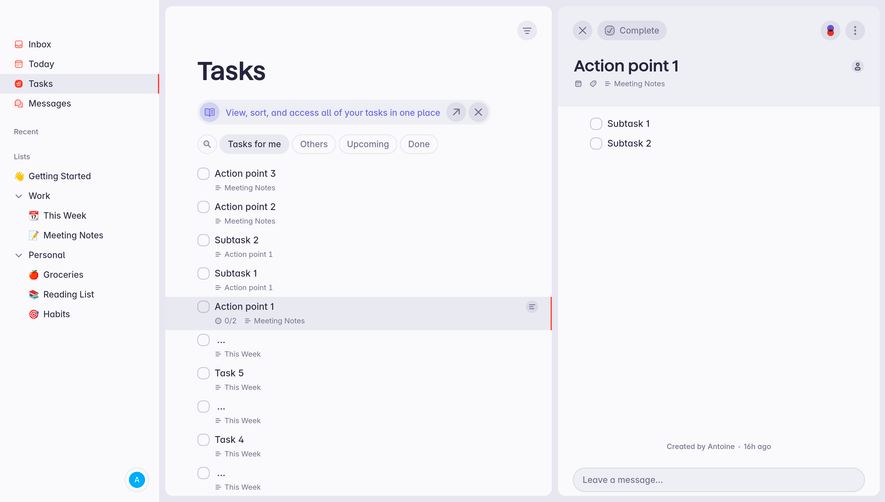
The SaaSFrame reference in this category shows a task-management interface with a selected parent task and subtasks. It is useful for studying hierarchy and progress; it should not be presented as proof of a product's onboarding sequence or automated completion rules.
Define the purpose of the list
An onboarding checklist introduces required or useful first actions. A recurring checklist supports a repeatable process. A general task list organizes work created by users. These purposes require different ordering and completion rules.
State the goal through the heading and surrounding context. Users should understand whether the list is a suggested route, a mandatory sequence, or a record of independent tasks.
Choose items that describe outcomes rather than vague activity. A task such as connecting a data source is easier to verify than a broad instruction to explore the product.
Make parent and child tasks legible
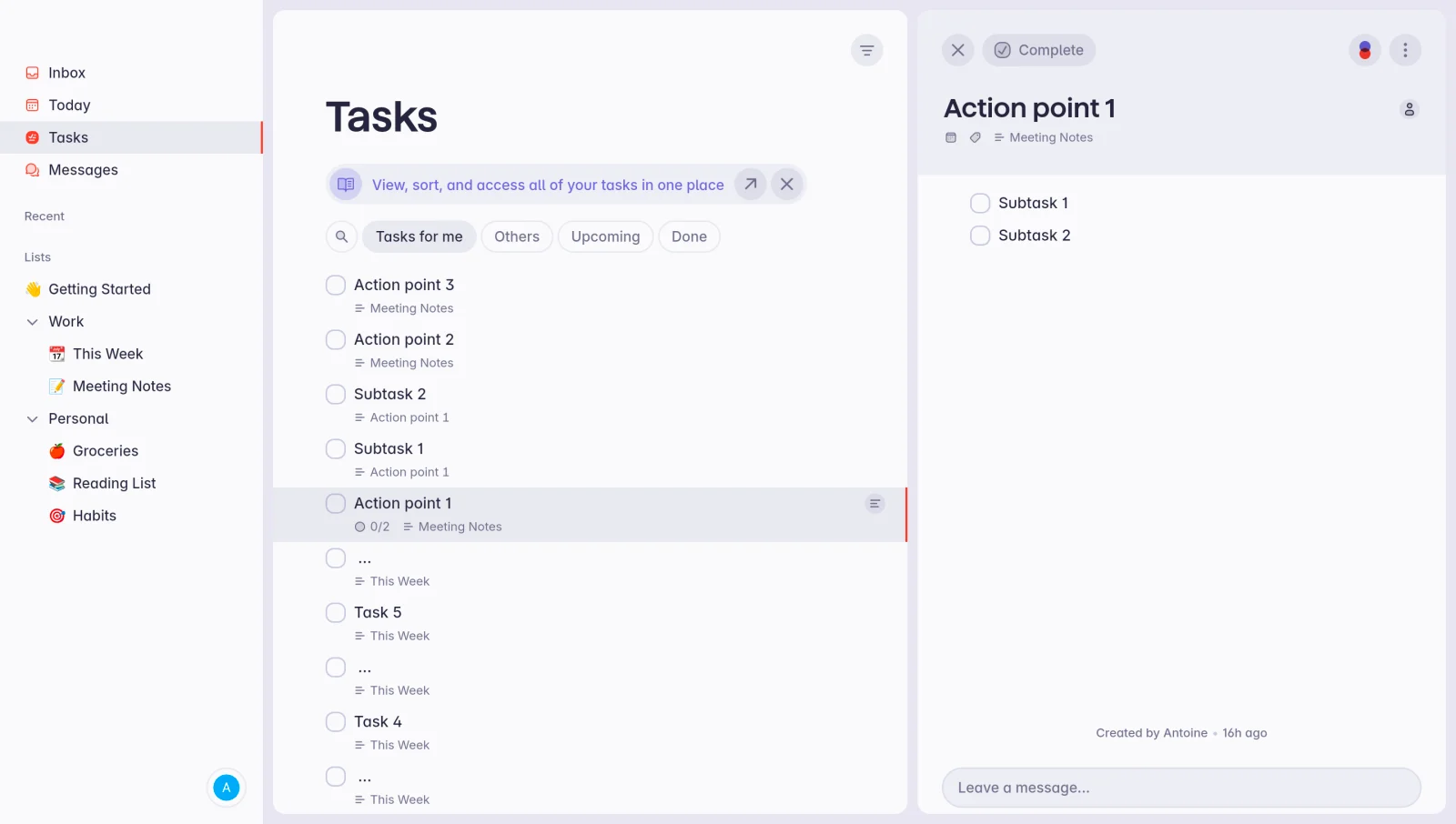
The Superlist capture shows a central Tasks view and a selected task's detail panel. The parent row includes a zero-of-two progress indicator, while the detail panel displays two unchecked subtasks.
This connects the summary to the work that produces it. Users can inspect the smaller actions without losing the parent task's position in the main list.
The screenshot does not establish whether completing both subtasks automatically completes the parent. For your product, define that relationship and make it understandable rather than assuming users share the implementation's rule.
Make completion mean something specific
A checkbox can represent a user's acknowledgement or a system-verified result. Choose the model based on the task and communicate the distinction where it matters.
For a manual checklist, users decide when the task is done. For a verified setup step, the interface may need to wait for an integration or configuration result. Avoid marking a task complete merely because its action button was clicked.
If a completed item becomes invalid later, decide how the checklist reflects that change. A data connection that stops working and a one-time tutorial that was read may need different treatment.
Keep progress connected to useful work
A fraction or progress bar should reflect meaningful items. Splitting trivial actions into many steps can create apparent progress without helping users reach a useful outcome.
When subtasks contribute to a parent, expose the relationship in the summary and detail. If optional items exist, clarify whether they affect the total.
Avoid implying that all tasks have equal effort simply because they count equally. A progress indicator can describe item completion without pretending to estimate time remaining.
Preserve the source and context of tasks
The Superlist reference identifies source context beneath tasks, including a meeting-notes origin and a weekly list. This helps distinguish similarly named work in a combined view.
A checklist assembled from several places should preserve enough source information for users to understand ownership and purpose. Otherwise, a compact title may lose the context that made the task actionable.
Keep links to related detail useful. Opening a task should explain the relevant work rather than requiring users to search through an unrelated document.
Organize current and completed work
The captured interface includes task-view choices such as upcoming and done. Those routes make status part of navigation as well as a control on individual rows.
A completed view can provide a useful record without cluttering current work. Preserve a predictable way to review or reopen items when the product supports that action.
Distinguish an empty current list from a filtered result with no matches. The former may indicate finished work; the latter may require changing the scope.
Use ordering to support the task
A suggested sequence can help onboarding when later steps depend on earlier ones. Independent tasks may be better ordered by priority, due date, or a user's own preference.
Explain dependencies instead of merely disabling a later item. Users should understand which prerequisite is missing and how to resolve it.
Avoid forcing a strict order when it does not serve the process. A checklist should guide work, not create artificial barriers around actions that could reasonably happen independently.
Keep task detail close to action
A detail panel can hold subtasks, ownership, notes, and discussion while keeping the main list compact. Decide which information is necessary for scanning and which belongs after selection.
Use descriptive controls for completion, reopening, and editing. If the same row opens detail and toggles completion, make those targets distinct and usable.
On smaller devices, preserve list position when moving between task and detail views. Returning to a different place makes repeated checklist work unnecessarily difficult.
Review the checklist lifecycle
Test creating or receiving tasks, inspecting subtasks, completing work, changing filters, and reviewing completed items. Include long titles and tasks with different amounts of detail.
Check keyboard use, focus, and non-color status cues. A checkbox and a progress indicator should have meaning available to assistive technology.
Explore SaaSFrame's checklist reference to study the connection between parent tasks and detailed work. Adapt that hierarchy to the outcome your checklist is intended to support.
Checklist design questions
Should completion be manual or automatic?
Use manual acknowledgement for user-defined work and verified completion when the system can establish the required result. Make the chosen model clear.
Do all checklists need a progress bar?
No. A short task list may communicate status through its items alone. Add a summary when it helps users understand the larger goal.
Should subtasks automatically complete the parent?
Either model can work, but the relationship must be explicit. Do not let a progress fraction imply a rule the product does not implement.