AI Chat
13
A conversational interface for interacting with an AI assistant inside a product.
.webp)
An AI chat gives users a conversational way to ask questions, refine a request, and inspect a response. In a SaaS product, its usefulness depends on more than a familiar message feed. The conversation needs a clear purpose, understandable context, and a way to turn the answer into useful work. A general text box can feel inviting while leaving users unsure what information the assistant can access or which tasks it can complete.
Start by defining the chat's scope. An assistant for product analytics serves a different purpose from a general writing assistant or a customer-support bot. The interface should communicate that difference through its name, initial guidance, available context, and response formats. Users should not have to discover the boundaries only after receiving an irrelevant answer.
A good conversation also preserves control. It distinguishes a proposed answer from an action, exposes important assumptions, and provides a recoverable path when a response is incomplete. The goal is to make the user's task easier to understand and complete, rather than to reproduce a messaging interface without adapting it to the product.
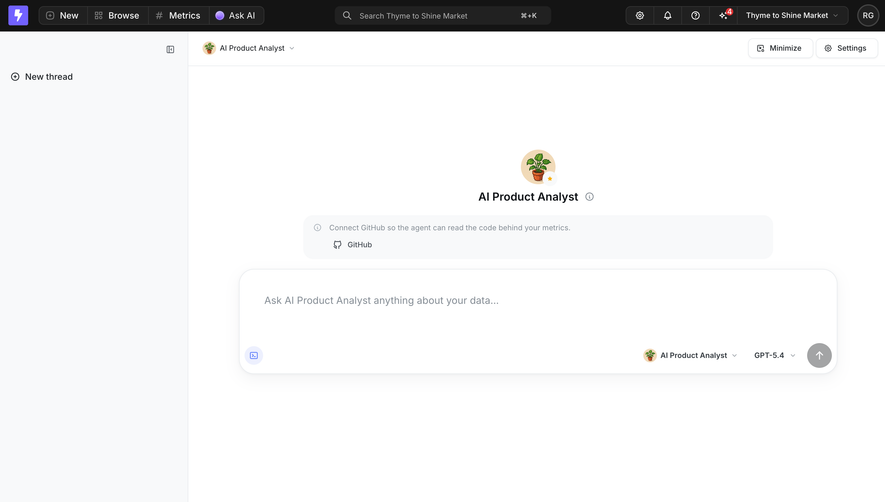
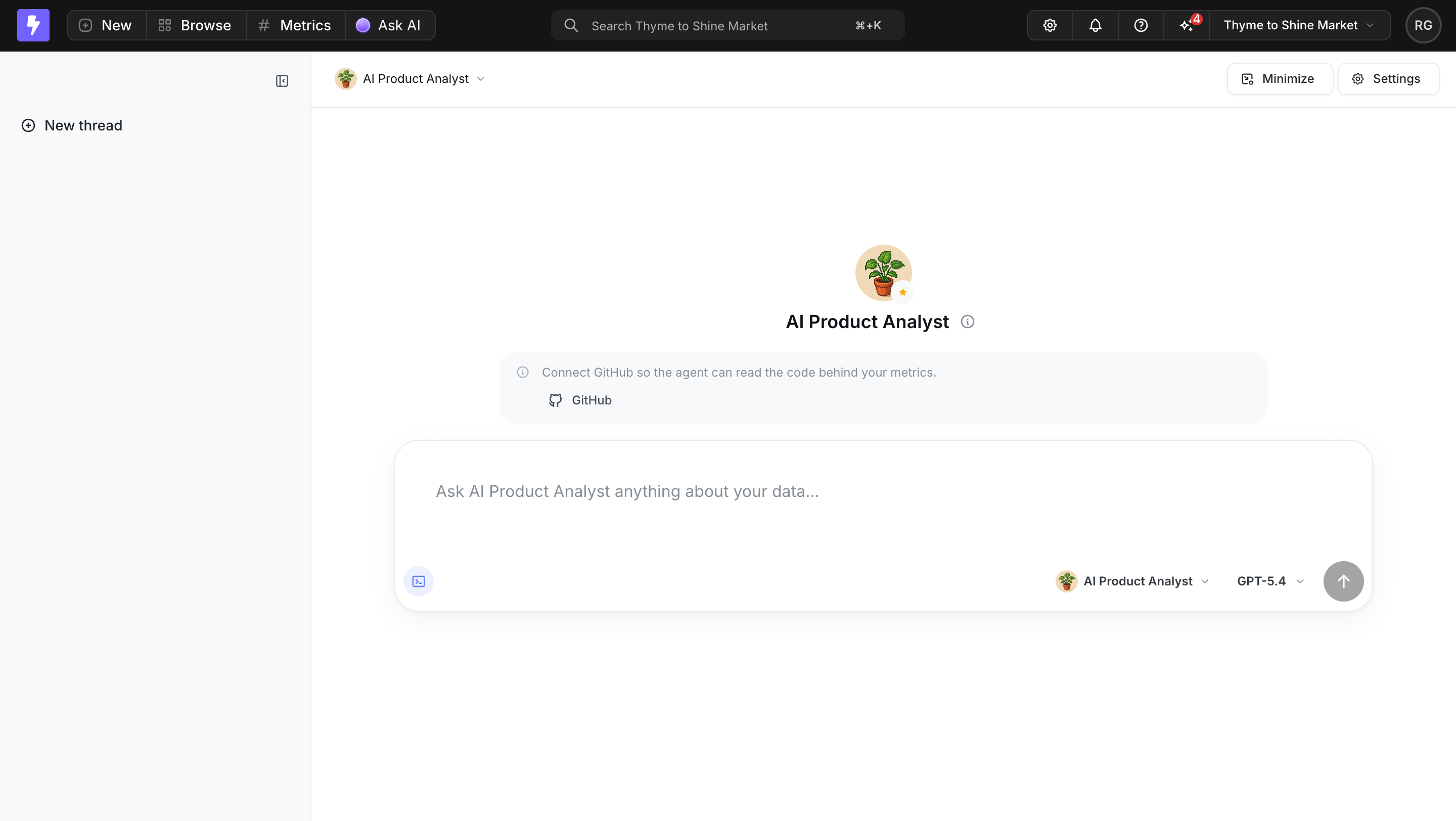
Lightdash's captured empty conversation names an AI Product Analyst and invites questions about the user's data. A separate message offers a GitHub connection so the agent can read code behind metrics. The composer includes agent and model selectors. Together, these elements identify a domain and expose a context connection rather than presenting the assistant as an unexplained universal capability.
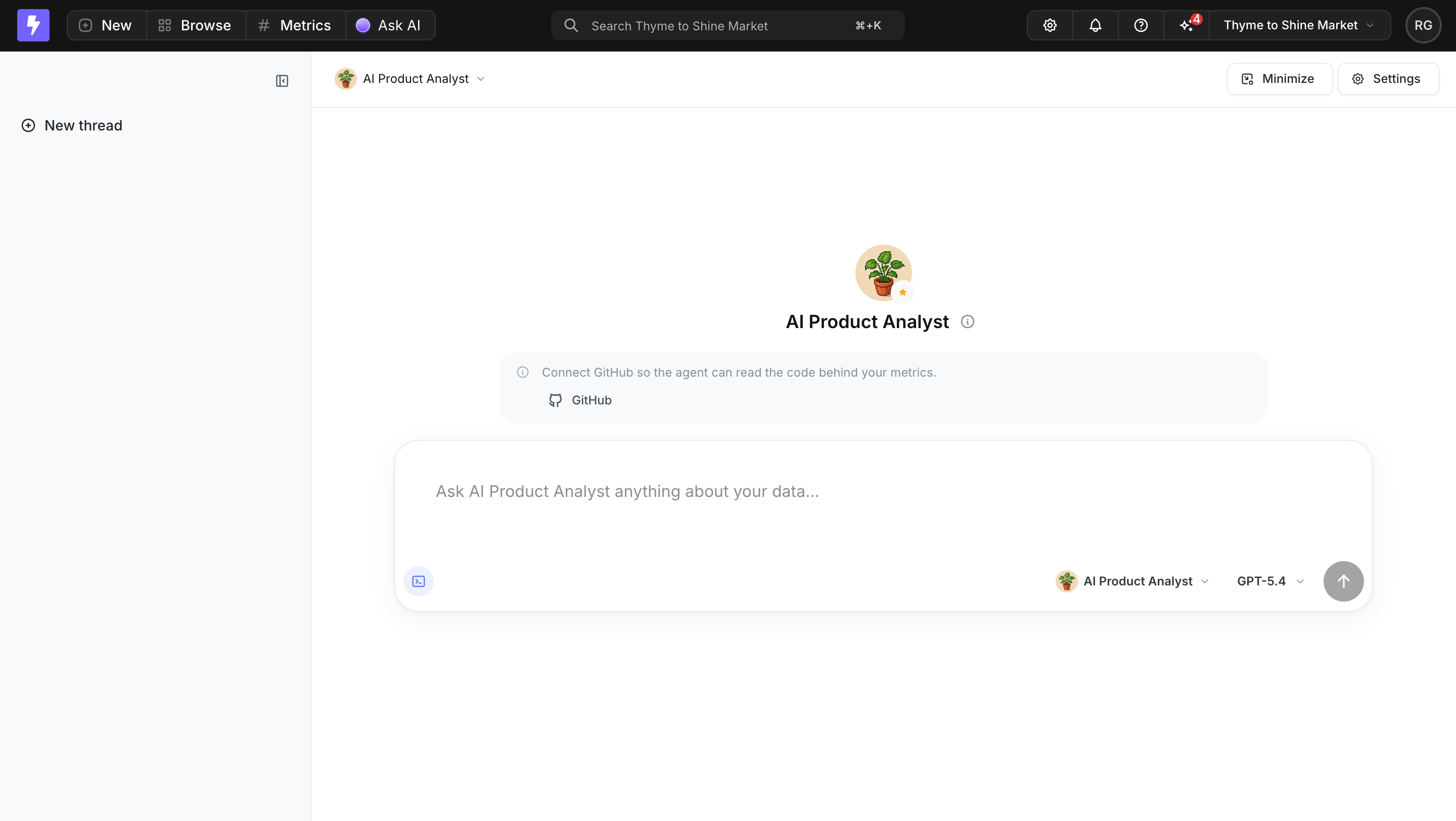
The connection message is useful because it explains why a source might matter. An integration button without a purpose would ask users to authorize access before understanding its benefit. A comparable interface should explain what context a connection supplies and how that context relates to the task, while keeping the actual access boundaries accurate.
Initial suggestions can help users begin, but they should be representative of supported work. Avoid prompts that imply access to unavailable information. An empty state should also work for returning users who already know what to ask: guidance must not overwhelm the input or become a mandatory tutorial before every conversation.
The composer is where the user's intention becomes a request. It may support attachments, model selection, agent selection, or context sources. Each option adds a decision. Keep the basic writing and submission path clear, then expose additional controls according to their practical importance. A row of unexplained icons can make a simple question feel like configuring a tool.
Explain selected context where it affects the answer. An attached document, a chosen project, or an active workspace should remain identifiable. Users need a way to remove an accidental attachment or change scope before submitting. If a selection persists into later requests, make that persistence visible rather than allowing an old choice to silently shape a new answer.
Submission behavior needs deliberate testing. Distinguish sending a message from inserting a line break, preserve a draft when a request fails, and provide a useful message when an input cannot be processed. The static Lightdash capture shows visible controls, but it does not establish their keyboard behavior or the permissions behind the connection option.
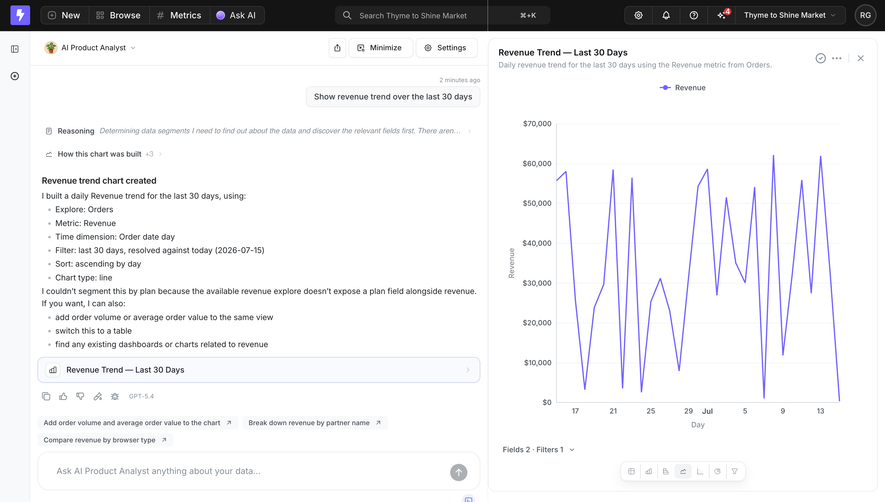
Lightdash's captured analysis conversation shows a request for a revenue trend over the last 30 days. The response names the explored data, metric, time dimension, date filter, sort order, and chart type. A chart appears beside the conversation. This links the conversational answer to an inspectable output and explains important choices that produced it.
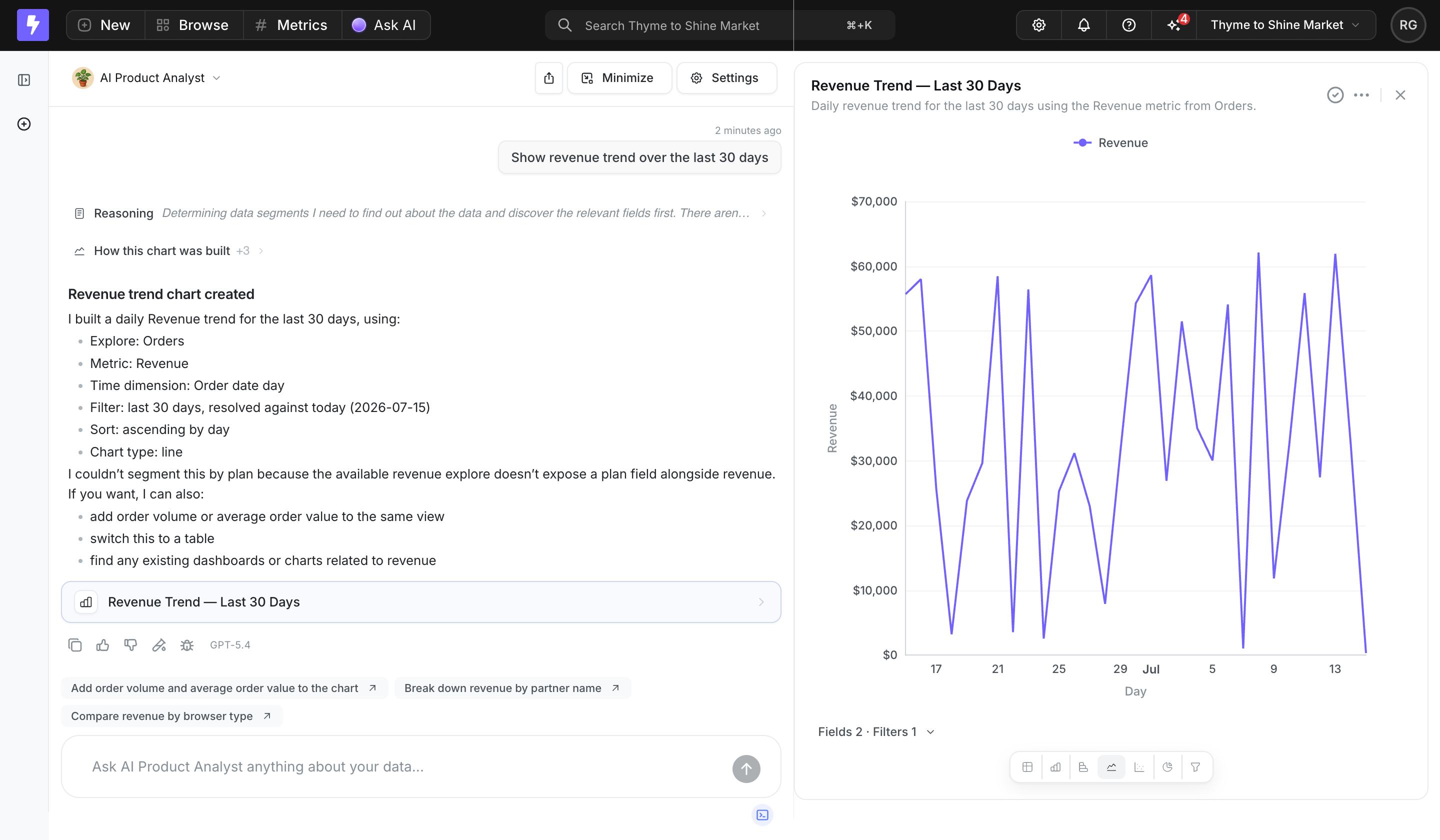
The response also states that a requested segmentation could not be completed because the available data did not expose the relevant field. That limitation is more useful than silently omitting the requested breakdown. It helps the user distinguish a completed part of the task from an unsupported part and decide how to continue.
For other domains, the basis may be source passages, selected documents, input assumptions, or filters. Show what helps users evaluate the result. Avoid confusing a long explanation of internal processing with evidence that the answer is correct. A concise account of data and assumptions often supports inspection better than an elaborate narrative with no checkable reference.
A conversation makes refinement possible: change the date range, ask for another format, clarify a term, or challenge an assumption. The interface should preserve enough context for users to understand which answer a follow-up modifies. If an output changes, keep the relationship between the new request and the revised artifact clear.
The Lightdash analysis view offers suggested follow-ups related to the chart. These prompts reduce the effort of discovering possible refinements, but suggestions need to stay grounded in the result and available data. A prompt that implies an unsupported field or unavailable action can create avoidable disappointment immediately after an otherwise useful answer.
Consider what happens when users edit an earlier message, regenerate a response, or start a new thread. These actions can alter the conversation's context. Make changes understandable and avoid replacing a useful result without a route to recover it. A thread title and history can help orientation, but their behavior should reflect the actual conversation rather than a stale initial request.
Some answers are best read as text. Others become a chart, document, query, table, or reusable object. The chat should connect to the appropriate product surface rather than trapping every result inside a message bubble. A separate artifact area can preserve room for inspection while keeping the request and explanation nearby.
In the captured Lightdash analysis, the conversation and chart occupy adjacent areas. The response also contains a named chart entry. This arrangement makes the artifact identifiable as an output of the exchange. The screenshot does not establish whether it is saved, shared, or editable; those states need clear treatment in an implementation.
Distinguish previewing from committing a result. If a generated query will update records or a draft will be sent externally, use an explicit action with a clear consequence. Copying text, saving an artifact, and executing a change are different levels of commitment. Users should not need to infer which one occurred from the assistant's conversational wording.
Keep the artifact's identity stable across refinements. If a later request creates another version, distinguish it from the earlier result and show which one is currently open. A clear name, status, and relationship to the thread help users return to useful work without reconstructing the entire exchange.
AI responses can take time, arrive progressively, or fail after partial output. A useful waiting state acknowledges the request and explains the kind of work underway without inventing progress. Keep the user's prompt available and provide an appropriate stop or recovery route when the product supports it. A spinner alone gives little information during a longer task.
Preserve completed work when one part fails. If a chart was created but an additional comparison could not be produced, say so near the result. Avoid replacing the whole conversation with a generic error. Users should understand whether they need to retry, revise the request, supply missing context, or use another product route.
Test interruption during streaming, network loss after submission, repeated requests, and returning to a thread after leaving the page. Define whether a task continues after navigation and how its state is restored. These behaviors determine reliability, even though the default conversation screenshot may show none of them.
Source references help when users can inspect what supports a claim. Place references close to the relevant content and label them meaningfully. A source list should not imply that every sentence is verified when only part of the answer is grounded in it. If the assistant relies on a selected subset of documents, explain that scope where it matters.
Permissions need to apply to retrieved context and generated output, not only to the chat entry point. A user should not gain access to another workspace's information through a conversational response. Account switching, shared threads, and connected sources require particular attention because they can change who can see or act on the conversation.
Use uncertainty language that helps the task. A specific limitation, such as an unavailable field in the Lightdash example, tells the user what could not be done. A permanent generic disclaimer cannot replace that explanation. Give users a route to inspect, correct, or supply context when the result depends on information the assistant lacks.
Evaluate AI chat with realistic tasks and imperfect inputs. Ask users to find an answer, inspect its basis, revise the request, and use the output. Include an unsupported question and a failed request. Observe whether users understand the assistant's scope and whether they can recover without losing their work.
Useful measures include successful use of the result, correction effort, source inspection, and recovery from failures. A large message count can indicate productive iteration or repeated misunderstanding. Pair interaction data with task observations. The important question is whether conversation improves the work the product exists to support.
Review this checklist:
Only where conversation improves the task. Direct controls remain useful for predictable actions and precise configuration. Chat can help formulate a request or explore an unfamiliar dataset, while the resulting artifact may still need the product's conventional inspection and editing tools.
A clear scope, an easy-to-find composer, and enough guidance to begin. Relevant example prompts or context connections can help, provided they describe supported work. Keep the screen usable for returning users and make selected context visible before the first message is submitted.
Identify what it completed, what it could not complete, and why that limitation matters. Preserve useful output and offer a realistic next step. A specific explanation gives users more control than a generic apology or an answer that silently ignores part of the request.
Explore the SaaSFrame AI chat examples to compare empty states, conversational explanations, and interfaces that connect answers to usable artifacts.