Generate a new design based on this screen using your own content.
Thank you! Your submission has been received!
Oops! Something went wrong while submitting the form.
# Design from Reference: Unkey Rate Limites Settings
Create an original, high-fidelity visual design inspired by the reference. Prioritize composition, typography, colors, spacing, and component styling over technical implementation.
## Reference
- **Product:** Unkey
- **Category:** Empty State
- **Screenshot:** https://cdn.prod.website-files.com/5e9dc792e1210c5325f7ebbc/697b760d072dc050f684f061_TopNTWreSGyk4rwaj5a2jVnxSMLtF-HGEPs0eyWHc8U.avif
Analyze the screenshot first. If inaccessible, request it rather than guessing.
## Content
{{content.instructions}}
{{content.data}}
Preserve essential messaging and factual accuracy. Adapt structure and copy length for visual balance; never invent product claims.
## Visual Design
Use this context to reproduce the reference's visual language: layout, typography, colors, spacing, borders, radii, and distinctive elements. The screenshot takes priority if descriptions conflict.
## Direction
{{preferences.fidelityInstructions}}
## Output
{{output.instructions}}
Deliver a polished, cohesive design with precise alignment, hierarchy, and spacing. Produce the requested visual artifact, not just a description. If unsupported, explain the limitation.
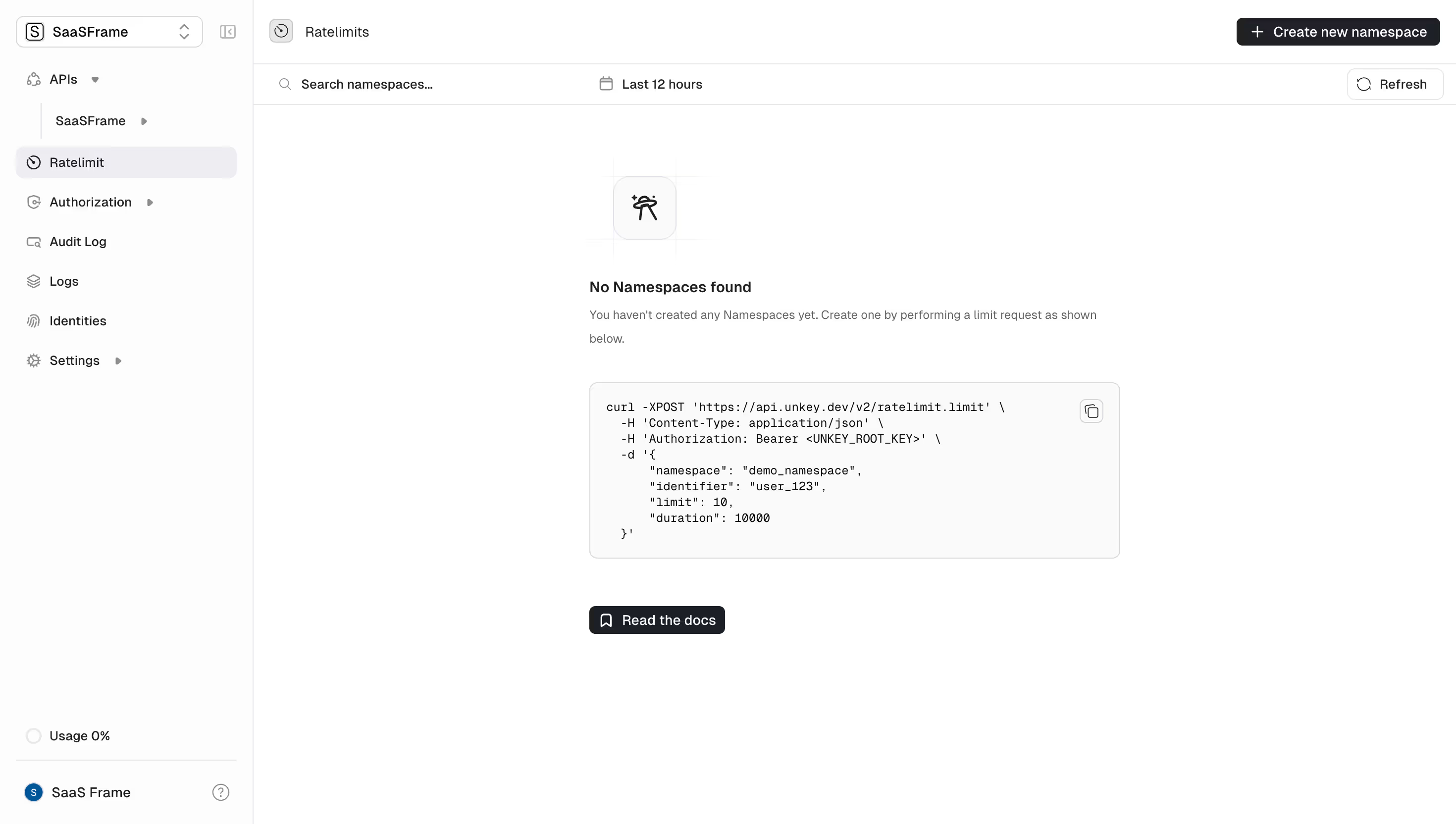
This is Unkey's Ratelimits dashboard and honestly the empty state here is doing heavy lifting. Instead of just slapping a "nothing here" message, they drop a fully formatted curl command right in the middle of the page. That's functional onboarding baked into the UI. Smart.
Clean Without Being Boring
The layout is dead simple. Left sidebar with clear nav hierarchy, main content area that breathes. Everything sits on a white background with just enough contrast from the light gray code block to draw your eye exactly where it needs to go. The monospace font in the code snippet feels natural against the sans-serif UI text. Typography pairing is quiet but intentional.
Little Things That Matter
The copy button tucked in the corner of the code block. The "Read the docs" CTA with a bookmark icon sitting below. The usage indicator at 0% in the bottom left corner. These small touches show someone actually thought about the new user journey. The "+ Create new namespace" button in the top right gives you two clear paths forward. No confusion, no clutter.
.webp)



.avif)