Design with AI
Generate a new design based on this screen using your own content.
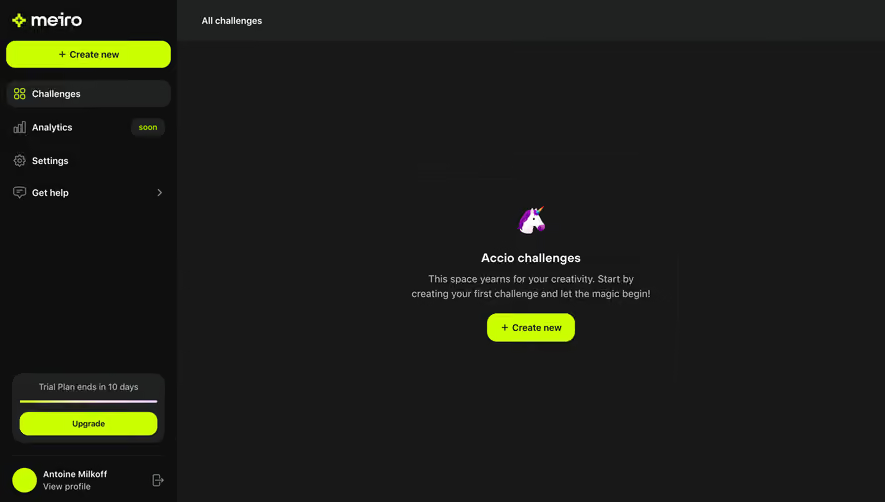
# Design from Reference: Meiro Empty Dashboard
Create an original, high-fidelity visual design inspired by the reference. Prioritize composition, typography, colors, spacing, and component styling over technical implementation.
## Reference
- **Product:** Meiro
- **Category:** Empty State
- **Screenshot:** https://cdn.prod.website-files.com/5e9dc792e1210c5325f7ebbc/6acbcc52e13ab9df8f05336b_6acbcafe0f0c77113b5b882c_cms-9c68144471c9e57a77110e1e.webp
Analyze the screenshot first. If inaccessible, request it rather than guessing.
## Content
{{content.instructions}}
{{content.data}}
Preserve essential messaging and factual accuracy. Adapt structure and copy length for visual balance; never invent product claims.
## Visual Design
### Overall aesthetic
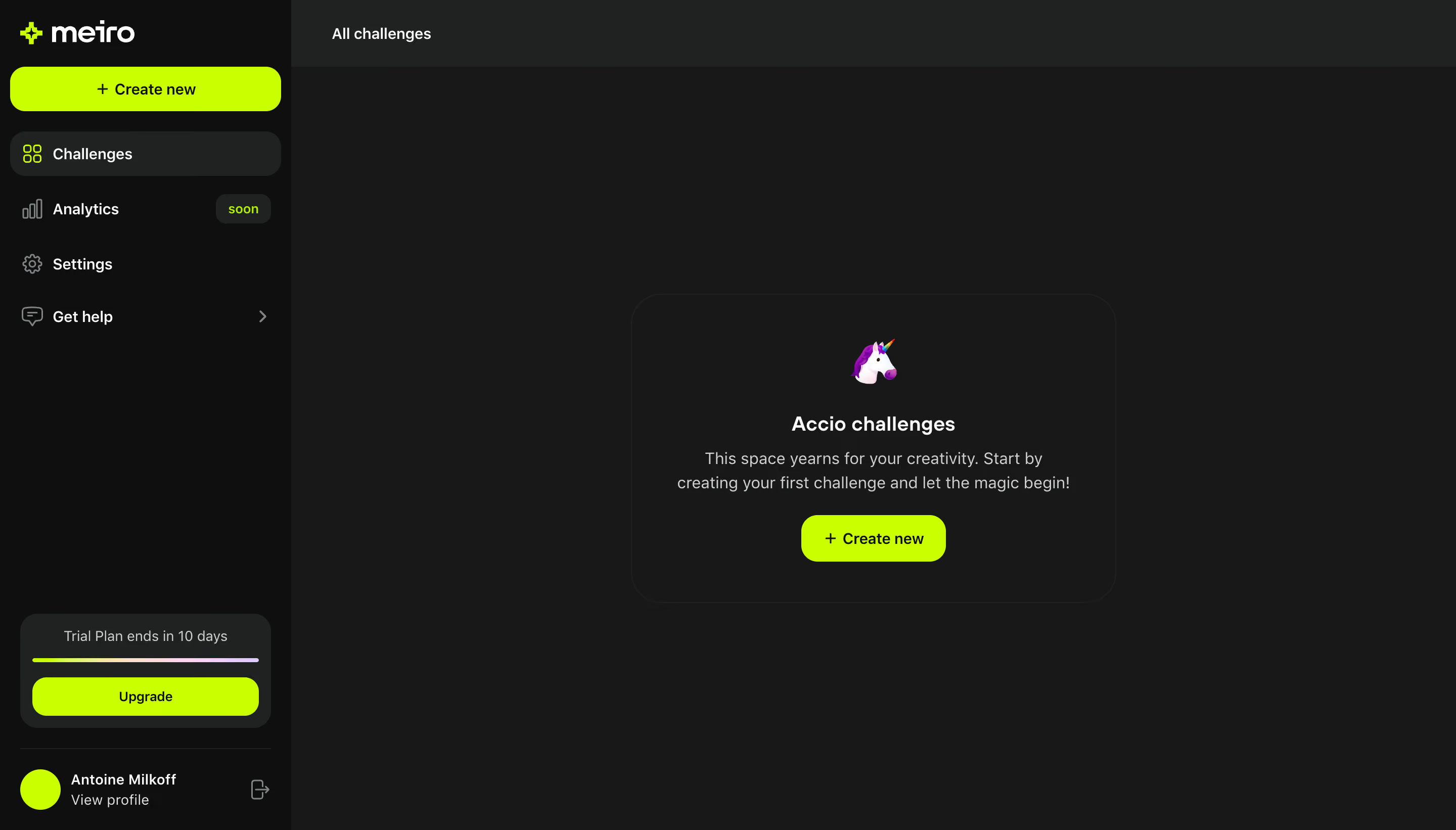
- **Character:** A dark empty dashboard with acid-lime actions and a small playful unicorn illustration.
- **Focus:** A single centered creation prompt dominates an otherwise sparse workspace.
### Page composition
- **Capture scale:** The source measures 2880 × 1642 pixels. A roughly 1440 × 821 CSS-pixel viewport at 2× scale is plausible but unverified.
- **Shell:** A roughly 288-pixel estimated CSS sidebar contains branding, Create new, navigation, trial upgrade and profile utilities.
- **Main area:** A narrow All challenges header spans the top; the remaining workspace is largely empty.
- **Empty state:** A faintly outlined rounded panel around 480 × 305 estimated CSS pixels centers a unicorn, heading, two-line explanation and lime creation button.
### Information hierarchy
- **Navigation:** Challenges is selected with a darker rounded row and lime icon. Analytics has a small soon badge.
- **Empty message:** The unicorn leads into “Accio challenges,” followed by concise guidance to create the first challenge.
- **Primary action:** Create new appears both in the sidebar and central empty state.
- **Plan utility:** A lower-sidebar trial card contains a timeline/progress line and lime Upgrade button.
### Typography
- **Family:** A rounded sans serif is visible; exact identity is unverified.
- **Empty heading:** Approximately 20 estimated CSS pixels, semibold.
- **Explanation:** Around 16 pixels with 24-pixel line height, centered and muted.
- **Navigation/actions:** Around 14–16 pixels, with medium-weight labels and black text on lime buttons.
- **Utility text:** Trial/profile details are slightly smaller and quieter.
### Colors & surfaces
- **Measured palette:** ICC-aware sRGB samples include canvas #171818, sidebar #0E0F0F, raised surfaces #202222 and lime #CAFF00.
- **Foregrounds:** White #FFFFFF, light gray #CDD1D1 and muted #7F8484 establish hierarchy; #464A4A supports low-emphasis lines.
- **Edges:** The central panel has a very subtle dark outline and approximately 32-pixel estimated CSS corners. No heavy shadow is visible.
### Components
- **Empty-state panel:** A centered vertical stack has broad internal padding and a small colorful unicorn graphic at top.
- **Creation button:** Approximately 144 × 46 estimated CSS pixels, lime, with a plus icon and rounded corners around 18 pixels.
- **Sidebar navigation:** Icon-and-label rows repeat at generous intervals; a chevron accompanies help.
- **Trial card:** A rounded charcoal block includes a small caption, thin multicolor line and full-width Upgrade action.
- **Profile block:** A lime avatar and two-line identity sit beneath a divider, with logout at right.
### Visual rhythm
- **Whitespace:** The large empty canvas keeps the central prompt prominent without extra decoration.
- **Alignment:** The empty panel centers within the workspace rather than the full viewport, accounting for the sidebar.
- **Repetition:** Lime creation/upgrade actions and rounded charcoal surfaces unify the shell and empty state.
### Responsive
- **Recommendation:** Collapse the sidebar and let the central panel fill the available width with 20–24 CSS-pixel gutters.
- **Recommendation:** Preserve the concise centered message and large creation target, moving trial utilities into a secondary area on phones. No mobile state is shown.
### Adaptation guidance
- **Preserve:** Retain one clear first-use action, small illustrative personality and restrained empty-state copy.
- **Implement:** Give duplicate creation actions consistent labels/behavior and provide accessible status text for the trial meter.
- **Content:** Use generic profile values in examples and treat the shown trial duration as captured state rather than a current offer.
Use this context to reproduce the reference's visual language: layout, typography, colors, spacing, borders, radii, and distinctive elements. The screenshot takes priority if descriptions conflict.
## Direction
{{preferences.fidelityInstructions}}
## Output
{{output.instructions}}
Deliver a polished, cohesive design with precise alignment, hierarchy, and spacing. Produce the requested visual artifact, not just a description. If unsupported, explain the limitation.
.webp)



.avif)