Design with AI
Generate a new design based on this screen using your own content.
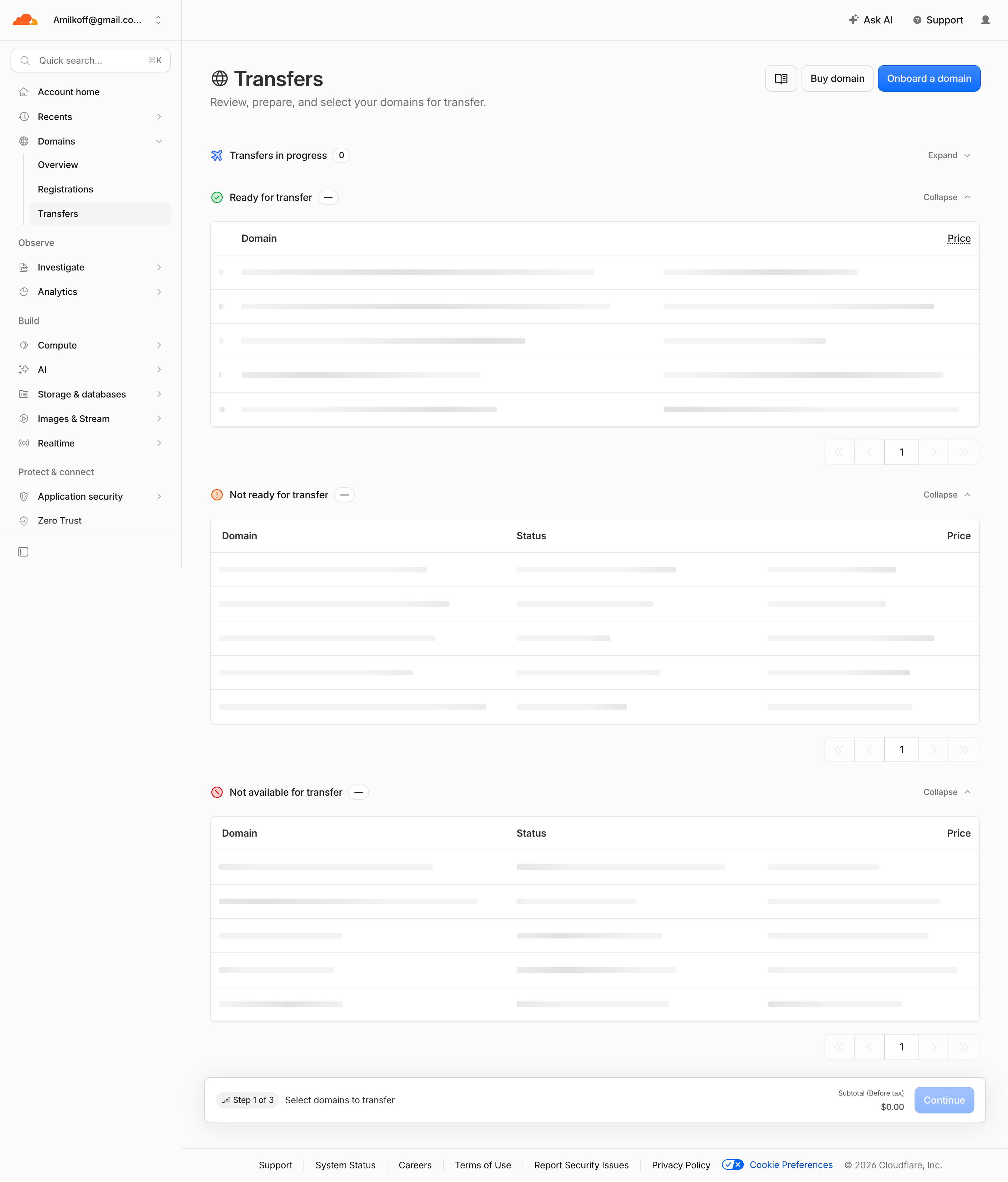
# Design from Reference: Cloudflare Transfers List
Create an original, high-fidelity visual design inspired by the reference. Prioritize composition, typography, colors, spacing, and component styling over technical implementation.
## Reference
- **Product:** Cloudflare
- **Category:** Table
- **Screenshot:** https://cdn.prod.website-files.com/5e9dc792e1210c5325f7ebbc/6acad128b2165b6c7fffac92_6acad0b1fc7b168033f4ee74_cms-82e85677caeeea01fcdddfdd.webp
Analyze the screenshot first. If inaccessible, request it rather than guessing.
## Content
{{content.instructions}}
{{content.data}}
Preserve essential messaging and factual accuracy. Adapt structure and copy length for visual balance; never invent product claims.
## Visual Design
### Overall aesthetic
- **Character:** A domain-transfer dashboard uses white/light-gray surfaces, compact black typography, blue actions and gray placeholder-like table bars.
- **Evidence:** The source is 2880 × 3378 pixels. Both readable portions were inspected; CSS sizes assume an unverified 2× capture density.
### Page composition
- **Shell:** A roughly 260-pixel account sidebar contains grouped navigation with Domains expanded and Transfers selected.
- **Header:** Transfers title/subtitle sit opposite documentation, buy-domain and onboarding actions.
- **Sections:** Transfers in progress is collapsed; Ready, Not ready and Not available groups show tables and individual pagination.
- **Bottom:** A wide step/subtotal/Continue strip precedes a compact legal footer.
### Information hierarchy
- **Task:** Large title and concise subtitle explain the transfer-selection workflow.
- **Readiness groups:** Colored icons distinguish in-progress, ready, warning and unavailable categories.
- **Tables:** Headers identify domain/status/price, but cells display gray bars rather than readable domain data.
- **Progression:** Step 1 of 3 and a zero subtotal accompany the final continuation action.
### Typography
- **Heading:** Approximately 32 pixels semibold.
- **Sections/body:** Around 14–16 pixels; table headers are semibold.
- **Footer/step details:** Approximately 12–13 pixels. The sans-serif identity is unverified.
### Colors & surfaces
- **Measured palette:** ICC-to-sRGB sampling identifies #FBFBFB as canvas, #FFFFFF as tables and #F3F4F6 as placeholder surfaces.
- **Measured support:** #E7E7E7 supplies outlines, with #FAFAFA/#FDFDFD nearby neutral variations.
- **Accents:** Blue marks primary actions; green/orange/red distinguish readiness icons.
- **Depth:** Tables use thin borders and small radii; the lower step strip has a soft shadow.
### Components
- **Group headers:** Icon, label and small count/status chip align left, with Expand/Collapse text and chevron right.
- **Tables:** Five placeholder-like rows appear per expanded group, divided by thin rules.
- **Pagination:** Compact first/previous/page/next/last controls sit right beneath each table.
- **Step strip:** A rounded white panel combines step badge, instruction, subtotal and pale-blue Continue action.
### Visual rhythm
- **Repeated structure:** Group header, table and pagination repeat at regular vertical intervals.
- **Alignment:** Main title, groups and tables share a left content edge; prices/pagination align right.
- **Density:** The long table stack contrasts with a compact header and thin footer.
### Responsive
- **Observed scope:** One desktop placeholder/loading-like state is shown; actual domain values and completion behavior are not visible.
- **Recommended layout:** Collapse navigation, retain table scrolling and keep step/subtotal controls accessible.
- **Recommended state:** Expose loading semantics if these bars are placeholders, without presenting them as real domain records.
### Adaptation guidance
- **Transfer pattern:** Group domains by readiness and retain clear progress/subtotal context.
- **Evidence fidelity:** Do not invent domain names, prices or statuses hidden by gray bars.
- **Implementation:** Verify fonts/density and define loaded, empty, selection and error states explicitly.
Use this context to reproduce the reference's visual language: layout, typography, colors, spacing, borders, radii, and distinctive elements. The screenshot takes priority if descriptions conflict.
## Direction
{{preferences.fidelityInstructions}}
## Output
{{output.instructions}}
Deliver a polished, cohesive design with precise alignment, hierarchy, and spacing. Produce the requested visual artifact, not just a description. If unsupported, explain the limitation.
.webp)



.avif)