.webp)
Thank you! Your submission has been received!
Oops! Something went wrong while submitting the form.
Get SaaSFrame Pro
Monthly
$18
Quarterly
$48
Yearly
$180
Upgrade to access this feature
Browse all screens & flows
Filter and search screens & flows
Access Figma files
Access mobile versions
Bookmark screens & flows
Join now
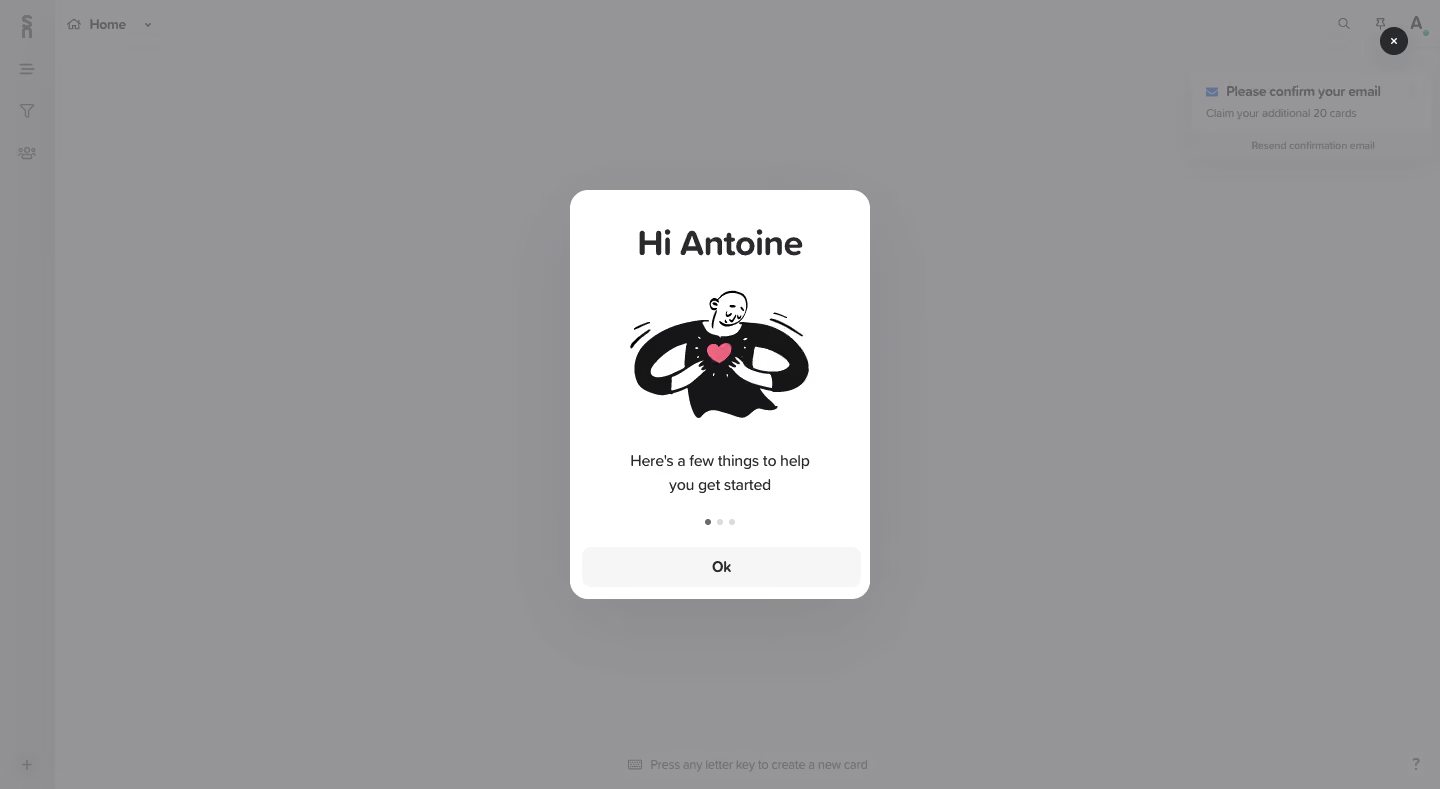
Supernotes Sign Up Flow

Supernotes
Collect your thoughts
Designed by
No items found.

Bookmark
Bookmark

Design with AI
Thank you! Your submission has been received!
Oops! Something went wrong while submitting the form.
# Design from Reference: Supernotes Sign Up Flow
Create an original, high-fidelity visual design inspired by the reference. Prioritize composition, typography, colors, spacing, and component styling over technical implementation.
## Reference
- **Product:** Supernotes
- **Category:** Account Setup
- **Screenshot:** https://cdn.prod.website-files.com/5e9dc792e1210c5325f7ebbc/6acbc9411790037d3e05916c_6acbc655dee1c6055e76a01c_cms-b6f428b4fe5db4ceb1145cf7.webp
Analyze the screenshot first. If inaccessible, request it rather than guessing.
## Content
{{content.instructions}}
{{content.data}}
Preserve essential messaging and factual accuracy. Adapt structure and copy length for visual balance; never invent product claims.
## Visual Design
### Overall aesthetic
- **Character:** A friendly welcome modal combines a narrow white card, rounded handwritten-style heading, black-and-white character illustration, pink heart accent, and a dimmed application backdrop.
- **Tone:** The illustration and short copy make the introduction feel personal and lightweight.
- **Observed scale:** The source measures 1440 × 789 pixels. Sizes below refer to approximate image pixels; CSS estimates assume an unverified 1× capture.
- **Capture scope:** The actual image shows a welcome/onboarding overlay inside the application, not a signup form.
### Page composition
- **Backdrop:** A mostly empty notes workspace is covered by a uniform gray scrim. A narrow left icon rail, Home header, utility icons, and a bottom typing hint remain visible.
- **Modal:** A centered white card approximately 300 × 410 pixels begins near x=570 and y=190, with corners around 18 pixels.
- **Content stack:** A personalized greeting sits above a large character illustration, a centered two-line introduction, three progress dots, and a full-width pale Ok button.
- **Close control:** A dark circular x control sits near the page’s upper-right corner, outside the card.
- **Background notice:** An email-confirmation notice appears in the upper-right workspace beneath the scrim.
### Information hierarchy
- **Greeting:** The large bold rounded heading is the modal’s first text anchor.
- **Illustration:** A figure holding a pink heart supplies the main visual focus.
- **Purpose:** A short two-line sentence introduces a few getting-started tips.
- **Progress:** Three small dots indicate a short sequence; the first dot is darker than the others.
- **Action:** Ok is the only visible control within the card.
- **State limit:** Later slides, email confirmation success, and completed onboarding are not shown.
### Typography
- **Heading appearance:** A very rounded, playful sans-serif is used for the greeting. Exact font identity is unverified.
- **Greeting size:** Approximately 34–36 pixels, bold, with a compact line-height.
- **Body:** Around 15–16 pixels, regular sans-serif, with approximately 24-pixel line-height.
- **Button:** Approximately 15-pixel semibold dark text, centered.
- **Background text:** Smaller neutral interface labels are muted by the scrim and remain subordinate to the modal.
### Colors & surfaces
- **Measured scrim appearance:** #959497 dominates the dimmed canvas, with nearby #939295 and #969597 variations.
- **Measured modal:** #FFFFFF supplies the central card.
- **Foreground contrast:** Heading, body, and illustration use dark charcoal/black. The heart provides a small pink accent.
- **Controls:** The Ok button is very pale gray, while progress dots use dark and light gray.
- **Depth:** A soft broad shadow separates the rounded card from the dimmed application.
### Components
- **Welcome card:** A compact white rounded panel has generous top padding and tight side gutters.
- **Character artwork:** A black-and-white person holds a pink heart at chest level, with small motion lines around the arms.
- **Progress dots:** Three tiny circles form a centered row; the first is visibly active/darker.
- **Ok button:** Approximately 280 × 40 pixels, pale gray, with rounded corners and a centered label.
- **Close button:** A roughly 28-pixel dark circle contains a white x near the top-right of the viewport.
- **Background shell:** The notes application has a thin icon rail, Home selector, upper utility icons, and a lower keyboard-creation hint.
- **Confirmation notice:** A small background panel asks for email confirmation and offers a resend action. It is not the foreground task.
- **Unshown behavior:** Dismissal, next-slide transitions, keyboard focus, and confirmation delivery are not established.
### Visual rhythm
- **Centered vertical path:** Greeting, illustration, copy, dots, and action align to one central spine.
- **Illustration emphasis:** The graphic occupies the largest interior area, with clear space around it.
- **Compact close:** Dots and button sit close together at the card’s lower edge.
- **Layered focus:** The gray scrim suppresses background controls and leaves the white card as the only bright region.
### Responsive
- **Evidence limit:** Only a desktop modal is captured. Mobile behavior and focus management are unverified.
- **Recommended sizing:** Keep the card fluid within safe gutters and allow internal scrolling on short screens.
- **Recommended action:** Preserve a usable button hit area and accessible progress description.
- **Recommended modal behavior:** Label the dialog, manage focus, support close/escape as appropriate, and restore focus on dismissal.
- **Recommended background:** Make dimmed application controls inert while the modal is active.
### Adaptation guidance
- **Preserve the welcome moment:** Use a personal greeting, approachable illustration, brief purpose, short progress indicator, and one forward action.
- **Avoid inventing slides:** Define later onboarding content separately; only the first visible state is established.
- **Use safe personalization:** Replace the captured name with actual user data or a neutral fallback.
- **Separate confirmation:** Keep email verification state distinct from welcome-slide completion.
- **Use accessible artwork:** Provide suitable alternative text or mark decorative illustration appropriately, while keeping all meaningful copy live.
- **Standardize the overlay:** White rounded card, gray scrim, soft shadow, and restrained pink accent are sufficient.
Use this context to reproduce the reference's visual language: layout, typography, colors, spacing, borders, radii, and distinctive elements. The screenshot takes priority if descriptions conflict.
## Direction
{{preferences.fidelityInstructions}}
## Output
{{output.instructions}}
Deliver a polished, cohesive design with precise alignment, hierarchy, and spacing. Produce the requested visual artifact, not just a description. If unsupported, explain the limitation.

.avif)
Category
Patterns
No items found.
Tech Stack


Added on
February 4, 2023


Similar screens



Upgrade to SaaSFrame Pro now to see similar examples.
Monthly
$18 /month
Billed $18 monthly
Browse all screens & flows
Filter and search screens & flows
Search text in screenshots
Access Figma files
Access mobile versions
Join now
Quarterly
$16 /month
Billed $48 quarterly
Browse all screens & flows
Filter and search screens & flows
Search text in screenshots
Access Figma files
Access mobile versions
Join now
Yearly
$15 /month
Billed $180 yearly
Browse all screens & flows
Filter and search screens & flows
Search text in screenshots
Access Figma files
Access mobile versions
Join now