.webp)
Thank you! Your submission has been received!
Oops! Something went wrong while submitting the form.
Get SaaSFrame Pro
Monthly
$18
Quarterly
$48
Yearly
$180
Upgrade to access this feature
Browse all screens & flows
Filter and search screens & flows
Access Figma files
Access mobile versions
Bookmark screens & flows
Join now


Supernotes Landing Page

Supernotes
Collect your thoughts
Designed by
No items found.

Bookmark
Bookmark

Design with AI
Thank you! Your submission has been received!
Oops! Something went wrong while submitting the form.
# Design from Reference: Supernotes Landing Page
Create an original, high-fidelity visual design inspired by the reference. Prioritize composition, typography, colors, spacing, and component styling over technical implementation.
## Reference
- **Product:** Supernotes
- **Category:** Landing Page
- **Screenshot:** https://cdn.prod.website-files.com/5e9dc792e1210c5325f7ebbc/62eca44b08e2d8f93429f3c5_1659675166137-62ec9cad8ef10867d50f3db6_screenshot-device-a0dfcbdf0bc58c1e62a19f9e0e44c4f2-1659619060805.webp
Analyze the screenshot first. If inaccessible, request it rather than guessing.
## Content
{{content.instructions}}
{{content.data}}
Preserve essential messaging and factual accuracy. Adapt structure and copy length for visual balance; never invent product claims.
## Visual Design
### Overall aesthetic
- **Character:** A gentle, editorial product landing page pairs exceptionally rounded dark headings with pink conversion controls, hand-drawn characters, and pale interface demonstrations. It feels approachable and reflective.
- **Surface language:** Mostly white backgrounds, faint cool section fills, diffuse shadows, and lightly tinted feature areas make the page feel spacious. Small pastel icons supply variety.
- **Observed scale:** The source is 1440 × 7902 pixels. Approximate image dimensions below are observations at that scale; CSS suggestions assume an unverified 1× capture.
- **Capture appearance:** Much of the middle and lower content appears pale and low contrast relative to the hero. Preserve that observation without assuming it is an intentional final opacity or a particular animation state.
### Page composition
- **Header:** A wide horizontal header has the symbol and wordmark at left, seven compact product/community links across the middle, and Log in plus a pink Sign up button at right. The content spans approximately 1300 pixels.
- **Hero:** A centered two-line headline sits above two lines of explanatory copy, an email signup row, and small reassurance text. A black-and-white character holding a pink heart bridges the copy and the product screenshot.
- **Initial product demonstration:** A broad rounded application panel, approximately 1120 pixels wide, shows a narrow icon rail, a collections/outline sidebar, and a main column of notecards. A second illustrated character overlaps its lower-right edge.
- **Audience band:** A centered caption is followed by three rows of occupation labels with monochrome icons. These sit on a very pale cool surface beneath the application panel.
- **Feature narrative:** A centered annotated notecard introduces the format. Two subsequent rows alternate image-left/text-right and text-left/image-right to explain organization and collaboration.
- **Feature inventory and devices:** A centered efficiency heading introduces twelve small feature tiles in four columns and three rows. A laptop and phone demonstration follows, with three grouped platform-icon captions beneath.
- **Social proof:** A warm pale introduction with a smiley icon leads into a spacious three-column testimonial layout. Some quotes span two columns inside pale yellow rounded panels.
- **Closing conversion and footer:** A thin divider precedes a centered signup section repeating the email control. The footer has brand/legal details and four link columns, then a final horizontal signup strip.
### Information hierarchy
- **Hero dominance:** “Free Your Thoughts” uses two short stacked lines and the largest type on the page. Its narrow centered shape creates a strong entry point.
- **Action hierarchy:** Pink buttons are the clearest interactive emphasis. The email field and Get Started action are combined in one softly shadowed horizontal unit.
- **Feature introduction:** Small icon-led eyebrow labels precede larger headings. Short body paragraphs and understated “Try it now” links follow the hierarchy beneath.
- **Product teaching:** Arrows around the example notecard identify parent relationships, inline links, collaboration, and tags. Later screenshots isolate specific interface details rather than repeating the full application.
- **Supporting evidence:** The twelve-tile grid gives breadth; the device illustration signals platform availability; testimonial names and migration references are small secondary lines.
- **Commercial interpretation:** Free-tier allowances and other product claims are captured historical copy. Their current accuracy is unverified.
### Typography
- **Display face:** The headline and section headings use a strongly rounded, heavy sans-serif with soft terminals. Exact font identity is unverified.
- **Hero size:** Approximately 80–86 image pixels with a line-height around 115 pixels and near-neutral tracking. The unusually round forms give the headline its distinctive tone.
- **Section titles:** Around 46–50 pixels, bold, generally with 60-pixel line-height. The final signup heading is smaller, approximately 34 pixels.
- **Body text:** Hero copy is approximately 20–22 pixels. Feature explanations are around 18–20 pixels with 30–32-pixel line-height and moderate line lengths.
- **Compact roles:** Navigation, eyebrow labels, button text, and feature-tile titles are roughly 16–18 pixels. Tile descriptions, testimonial attributions, and footer links use smaller 13–16-pixel text.
- **Text alignment:** Hero, notecard introduction, efficiency heading, device labels, and closing signup are centered. Alternating feature rows, testimonials, and footer columns are left aligned.
- **Emphasis:** Testimonial passages sometimes have pale marker-like highlighting; attributions use lighter text and underlined product references.
### Colors & surfaces
- **Measured neutrals:** Dominant image samples include #FFFFFF and cool off-white #F9FBFC. The hero display text includes sampled #2B2B2D.
- **Measured pink:** The hero action contains sampled #FF6683, with nearby #FF6685 variations. Lower footer controls include the lighter sampled pink #FFAFBE. These are image values rather than verified source design tokens.
- **Warm highlights:** Sampled #FFFEEF appears in warm pale regions. Testimonial panels and selected phrases use a cream/yellow tint, contrasting gently with cool product sections.
- **Pastel system:** Mint, soft blue, lavender, peach, yellow, and pink identify feature themes and circular icons. The annotated notecard uses mint callouts; collaboration uses light blue.
- **Depth:** The email control has a broad soft shadow. Application panels and isolated card demonstrations use diffuse shadows with lightly rounded frames.
- **Borders:** Dividers and interface boundaries are thin and pale. Main marketing sections rely more on whitespace and subtle fill changes than boxed outlines.
- **Sampling limits:** Large pale regions include gradients and near-white variations. Do not force every sampled shade into a separate implementation token.
### Components
- **Email signup unit:** Approximately 440 pixels wide and 58 pixels high, with a pale input, muted placeholder, inset pink button, rounded corners around 16 pixels, and a large shadow. The button occupies about one third of the width.
- **Header controls:** The compact Sign up button has roughly 10–12-pixel corner rounding. Navigation links are muted and evenly spaced; Community includes an outward arrow.
- **Application screenshot:** A narrow left rail precedes a sidebar with selected collection, nested outline, and item counts. The main area contains a day selector, heading, creation field, and stacked rich notecards.
- **Annotated notecard:** A white rounded card contains title, category, formatted paragraph, and a compact footer of reactions, participants, tags, and overflow. Four mint captions and curved arrows explain its structure.
- **Organization demonstration:** A hierarchical collection list is paired with a small overlapping sorting menu. Indentation, chevrons, icons, and counts establish parent-child relationships.
- **Collaboration demonstration:** A task notecard includes checkboxes, reactions, and participants. Two comments appear underneath in a lighter continuation area.
- **Feature tiles:** Twelve softly rounded tiles use an icon circle above a bold short title and two or three lines of small explanation. The grid is approximately 920 pixels wide, with compact, consistent gaps.
- **Device group:** A large laptop dominates the center-left, while a narrower phone sits to its right. Browser, desktop, and mobile platform marks form three separate groups below.
- **Testimonial modules:** A three-column rhythm alternates unboxed short quotes with pale yellow wide cards. Paragraph length varies; attribution remains below each quote rather than using large avatar treatments.
- **Footer structure:** Product, Resources, Social, and Company groups form four columns. Social links include small icons. A final ruled strip pairs a short slogan at left with a pink signup control at right.
- **Unshown states:** Focus, validation, hover, successful signup, menus opened by the marketing page, and loading behavior are not established by this static capture.
### Visual rhythm
- **Macro spacing:** Major regions have approximately 90–150 pixels of vertical breathing room. Text-and-image feature rows use broad side margins and balanced column widths.
- **Hero sequence:** The display headline, paragraph, signup row, reassurance, character, and application panel create a deliberate stepped vertical path.
- **Alternating composition:** Centered teaching sections give way to alternating feature rows, then a regular four-column grid, then a more varied testimonial grid.
- **Consistent micro spacing:** Eyebrow labels sit close to headings; paragraphs sit further below. Feature-tile icons, titles, and descriptions align consistently.
- **Illustration overlap:** The two hero characters overlap the product frame without enclosing the marketing copy. Their pink details echo the primary action color.
- **Density management:** Compact interface screenshots are surrounded by generous whitespace, while testimonials use varied widths to avoid a uniform wall of text.
### Responsive
- **Evidence limit:** The screenshot shows a desktop landing page. Embedded phone imagery demonstrates the product and does not verify the website’s mobile behavior.
- **Recommended header:** Collapse the many navigation items into an accessible menu while retaining a visible signup action.
- **Recommended hero:** Reduce the display heading to around 44–56 CSS pixels on narrow screens and allow the email control to stack when needed. Maintain an explicit accessible input label.
- **Recommended feature layout:** Stack alternating image/text rows in a consistent reading order. Change the twelve-tile grid to two columns and then one if descriptions become cramped.
- **Recommended demonstrations:** Scale screenshots proportionally, but offer larger views or focused crops when interface text becomes unreadable. Keep callout captions within viewport bounds.
- **Recommended testimonials and footer:** Convert the quote grid to one column, remove wide-column spans, and stack footer groups with enough space for touch targets.
### Adaptation guidance
- **Preserve the product-led story:** Connect the emotional headline to a real product view, teach the notecard model, explain organization and collaboration, then support the message with capability breadth and testimonials.
- **Create a small visual system:** Use rounded display typography, a clean body face, measured pink for actions, charcoal for primary text, and a restrained set of pale section fills.
- **Rebuild structure accessibly:** Implement signup as a real labeled form, not a composite image. Use semantic headings, lists, links, keyboard focus, and clear error feedback.
- **Use focused demonstrations:** Keep annotations tied to visible interface elements. Prefer a few legible product details over a large unreadable screenshot.
- **Verify pale text:** The captured lower sections are unusually faded. Check final contrast independently before adopting those apparent tones or opacity levels.
- **Keep evidence authentic:** Use approved testimonials and current product information. Preserve the layout role of quotes and plan copy without treating screenshot statements as verified current facts.
Use this context to reproduce the reference's visual language: layout, typography, colors, spacing, borders, radii, and distinctive elements. The screenshot takes priority if descriptions conflict.
## Direction
{{preferences.fidelityInstructions}}
## Output
{{output.instructions}}
Deliver a polished, cohesive design with precise alignment, hierarchy, and spacing. Produce the requested visual artifact, not just a description. If unsupported, explain the limitation.

.avif)
Category
Patterns
No items found.
Tech Stack


Added on
October 16, 2020
Similar screens
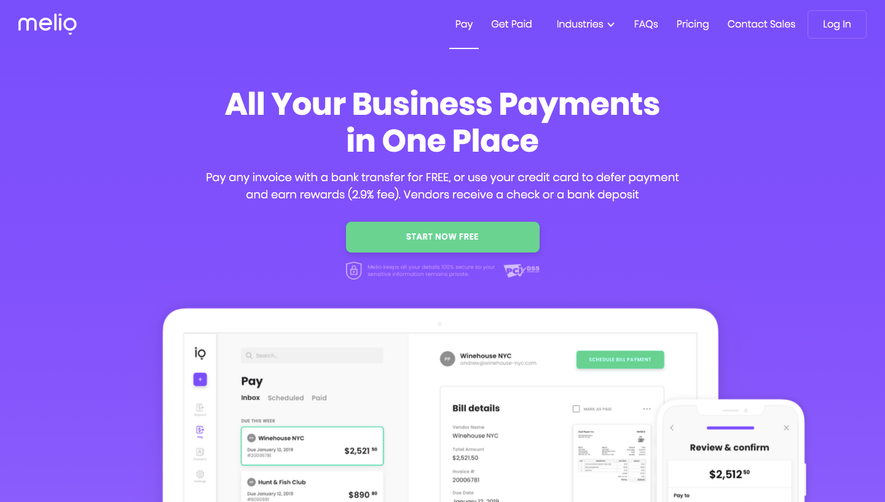






Upgrade to SaaSFrame Pro now to see similar examples.
Monthly
$18 /month
Billed $18 monthly
Browse all screens & flows
Filter and search screens & flows
Search text in screenshots
Access Figma files
Access mobile versions
Join now
Quarterly
$16 /month
Billed $48 quarterly
Browse all screens & flows
Filter and search screens & flows
Search text in screenshots
Access Figma files
Access mobile versions
Join now
Yearly
$15 /month
Billed $180 yearly
Browse all screens & flows
Filter and search screens & flows
Search text in screenshots
Access Figma files
Access mobile versions
Join now