Design with AI
Generate a new design based on this screen using your own content.
# Design from Reference: SavvyCal User Onboarding
Create an original, high-fidelity visual design inspired by the reference. Prioritize composition, typography, colors, spacing, and component styling over technical implementation.
## Reference
- **Product:** SavvyCal
- **Category:** User Onboarding
- **Screenshot:** https://cdn.prod.website-files.com/5e9dc792e1210c5325f7ebbc/6acc0dcebdced1ed19045209_6acc09cab6b4c9dbd0547b1d_cms-96f708c0fcde4930f6bbd17c-v3.webp
Analyze the screenshot first. If inaccessible, request it rather than guessing.
## Content
{{content.instructions}}
{{content.data}}
Preserve essential messaging and factual accuracy. Adapt structure and copy length for visual balance; never invent product claims.
## Visual Design
### Overall aesthetic
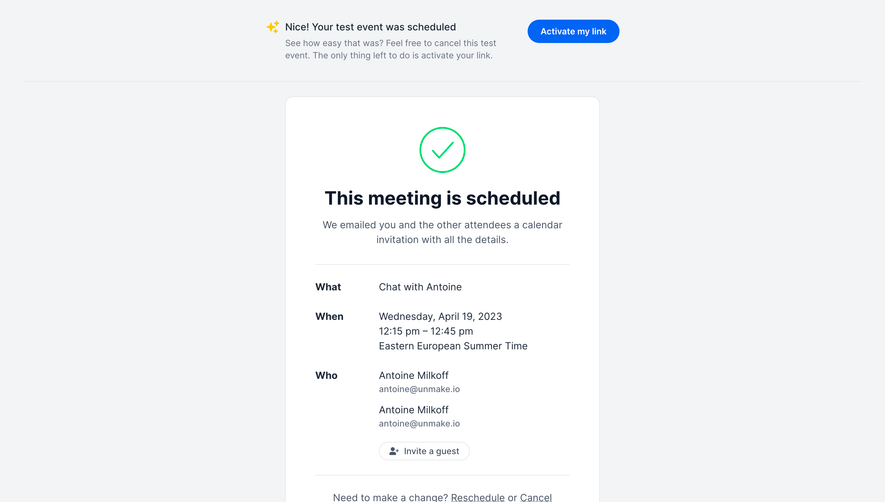
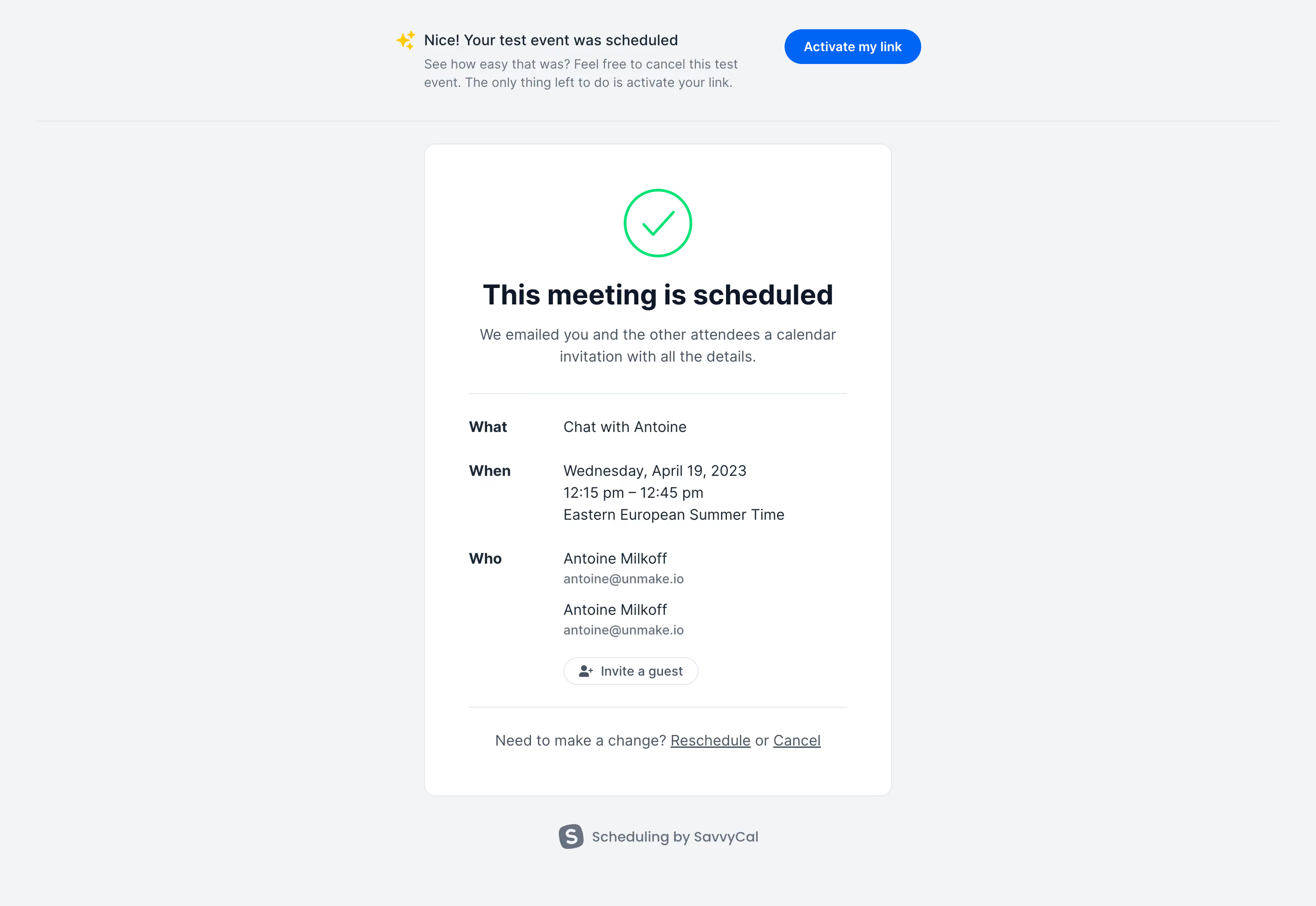
- **Character:** A calm scheduling confirmation screen with a light-gray canvas, a centered white summary card and restrained green/blue success accents.
- **Evidence scale:** Original 2880 × 1982 pixels; CSS estimates assume an unverified 2× capture scale. Colors are sampled after sRGB conversion.
### Page composition
- **Top notice:** A narrow centered message with sparkle icon sits above a full-width divider; a blue activation button is aligned to its right.
- **Confirmation card:** Approximately 512 × 714 px, beginning around y158, centered in the page.
- **Card regions:** Green outlined check, large centered confirmation heading, two-line explanation, divider, labeled meeting details, guest invitation control and a final change-links row.
- **Footer:** A small gray SavvyCal attribution and icon sit below the card.
### Information hierarchy
- **Success:** The large checkmark and bold scheduled-state heading dominate the card.
- **Details:** Bold What, When and Who labels form a left column; values occupy a wider right column, with time information wrapping over three lines.
- **People:** Two attendee blocks use darker names above smaller muted email addresses.
- **Secondary actions:** Invite a guest is a small outlined pill; Reschedule and Cancel are underlined text links below a divider.
- **Onboarding notice:** The separate top banner introduces link activation without competing with the confirmation heading.
### Typography
- **Heading:** Unverified sans-serif, approximately 30–32 px bold with 38 px line height.
- **Body and values:** Approximately 16 px regular, 24 px line height.
- **Detail labels:** Approximately 16 px bold; email addresses and attribution about 14 px in muted gray.
- **Top notice:** Around 16 px medium for its first line and 14 px regular for supporting copy; neutral tracking throughout.
### Colors & surfaces
- **Canvas:** Measured #F3F4F6.
- **Card:** White #FFFFFF with a fine cool border, including sampled #E3E7EB.
- **Primary text:** Deep navy #0F1828 and dark #1C2938; secondary copy uses #687281 and #495564.
- **Accents:** Blue #0065F4 marks the activation action; vivid green #00E275 marks the outlined success icon.
### Components
- **Card shell:** Approximately 12 px radius, thin border and no strong shadow; about 48 px horizontal padding.
- **Success icon:** Roughly 72 px outlined circle with a simple green check, centered near the top.
- **Details grid:** Approximately 104 px label column and 310 px value column; larger gaps separate the meeting description, date/time and attendee groups.
- **Guest control:** Small white pill with thin border and person-plus icon.
- **Activation button:** Approximately 150 × 40 px blue pill with centered white medium-weight text.
- **Change row:** Centered muted sentence with underlined actions; separated from details by a light horizontal rule.
### Visual rhythm
- **Card header:** Approximately 24 px separates the success icon and title; supporting text follows closely.
- **Detail spacing:** About 28–32 px separates major detail groups; attendee blocks have a smaller internal gap.
- **Outer spacing:** The card sits about 24 px below the top divider, with approximately 32 px before the attribution.
- **Alignment:** Centered success messaging transitions to left-aligned structured details, then back to centered change actions.
### Responsive
- **Observed limit:** Desktop confirmation only; mobile rendering is unverified.
- **Recommendation:** Keep the card fluid within narrow gutters and stack the detail labels above their values when space is limited.
- **Banner handling:** Allow the activation notice and button to wrap into separate rows, preserving the confirmation as the primary content.
### Adaptation guidance
- **Retain:** Use one unmistakable success symbol followed by a scannable labeled summary and quiet correction actions.
- **Implement:** Combine thin cool borders, generous card padding and restrained accent colors.
- **Verify:** Confirm fonts, timezone handling and action behavior separately. This is a captured confirmation state; no invitation, activation or cancellation was performed.
Use this context to reproduce the reference's visual language: layout, typography, colors, spacing, borders, radii, and distinctive elements. The screenshot takes priority if descriptions conflict.
## Direction
{{preferences.fidelityInstructions}}
## Output
{{output.instructions}}
Deliver a polished, cohesive design with precise alignment, hierarchy, and spacing. Produce the requested visual artifact, not just a description. If unsupported, explain the limitation.
.webp)



.avif)