Design with AI
Generate a new design based on this screen using your own content.
# Design from Reference: Height User Onboarding
Create an original, high-fidelity visual design inspired by the reference. Prioritize composition, typography, colors, spacing, and component styling over technical implementation.
## Reference
- **Product:** Height
- **Category:** User Onboarding
- **Screenshot:** https://cdn.prod.website-files.com/5e9dc792e1210c5325f7ebbc/6acbba89d01e364847659829_6acb71d7267b78cb7279f2cc_cms-a62d16891f7c71c4ac21ac07.webp
Analyze the screenshot first. If inaccessible, request it rather than guessing.
## Content
{{content.instructions}}
{{content.data}}
Preserve essential messaging and factual accuracy. Adapt structure and copy length for visual balance; never invent product claims.
## Visual Design
### Overall aesthetic
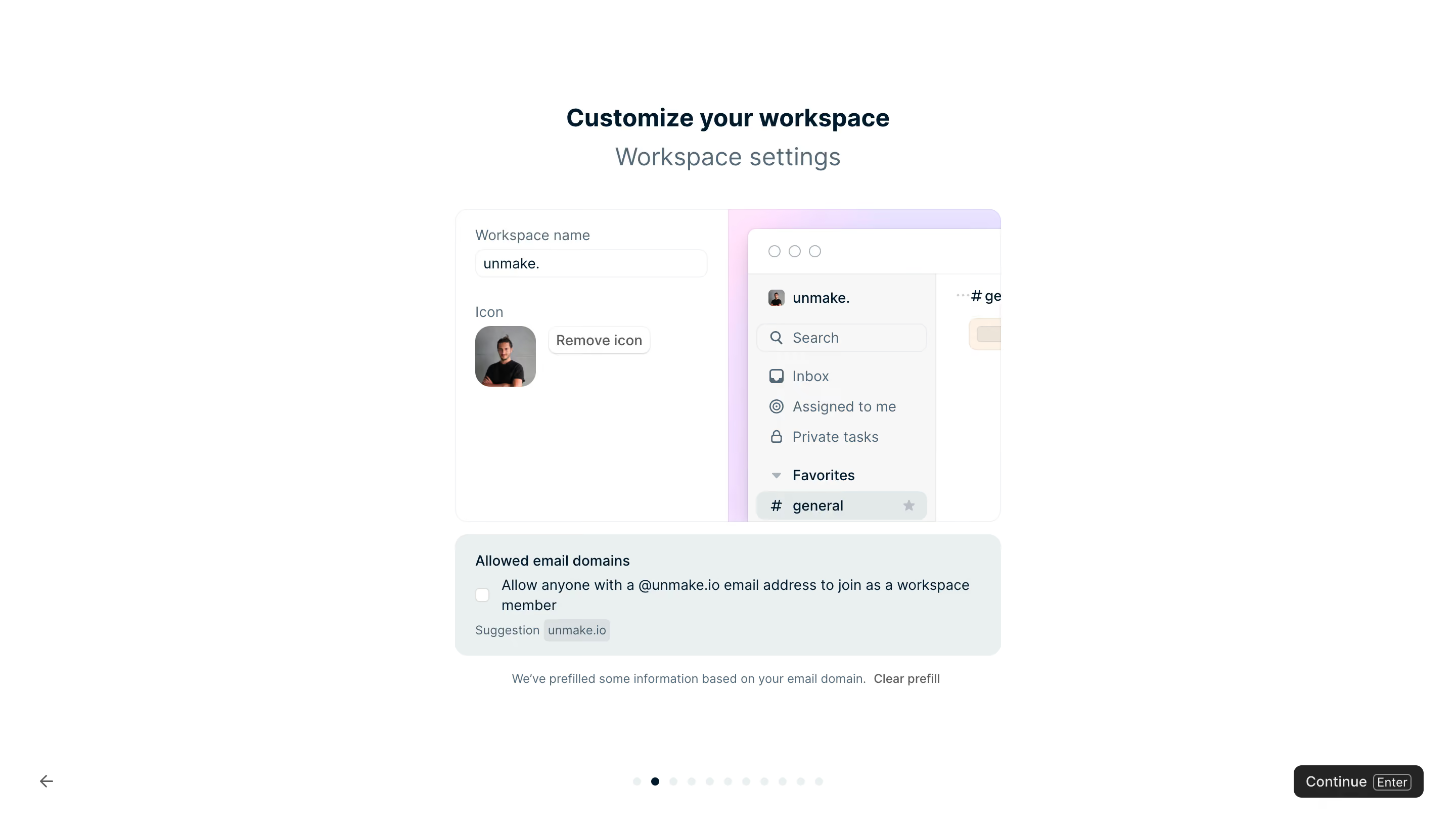
- **Character:** Airy workspace onboarding with a small product preview and a friendly, structured configuration form.
### Page composition
- **Canvas:** 2880 × 1642 screenshot pixels; CSS estimates assume approximately 2× scale.
- **Structure:** Centered heading and subtitle above a roughly 540px-wide settings composition. Navigation controls occupy a separate lower band.
### Information hierarchy
- **Priority:** Workspace customization title, settings card, allowed-domain option, then Continue.
- **Preview:** A miniature application window demonstrates how the workspace identity will appear.
### Typography
- **Family:** Neutral sans-serif; exact family is unverified.
- **Scale:** Estimated CSS heading 24–28px bold, subtitle 20–24px regular, form labels 13–14px and helper text 12px.
### Colors & surfaces
- **Sampled palette:** White #FFFFFF; pale blue-gray #EAEFF0 and #E3E8E9; near-white #F7F7F7; dark text #242424 and blue-black #00192B.
- **Accents:** The product preview uses a soft pink/lavender backdrop. Continue is a high-contrast dark button.
### Components
- **Settings:** Rounded bordered card splits workspace name/avatar controls on the left from an application preview on the right.
- **Domain panel:** A tinted rounded block contains checkbox, explanatory copy and a small domain suggestion chip.
- **Geometry:** Estimated 12px card radii, 8px input radii and 20–24px padding.
### Visual rhythm
- **Spacing:** Generous blank margins frame the compact central composition; roughly 16–24px separates its functional groups.
- **Navigation:** Back arrow, small progress dots and Continue are spread across the lower edge rather than crowded into the card.
### Responsive
- **Guidance:** Mobile is not shown. Stack preview below settings, allow the domain chip to wrap and retain clear progress/navigation spacing.
### Adaptation guidance
- **Transfer:** Preserve the live-preview relationship and distinct optional-domain panel. Replace identity examples with the target workspace content.
Use this context to reproduce the reference's visual language: layout, typography, colors, spacing, borders, radii, and distinctive elements. The screenshot takes priority if descriptions conflict.
## Direction
{{preferences.fidelityInstructions}}
## Output
{{output.instructions}}
Deliver a polished, cohesive design with precise alignment, hierarchy, and spacing. Produce the requested visual artifact, not just a description. If unsupported, explain the limitation.
.webp)



.avif)