.webp)
Thank you! Your submission has been received!
Oops! Something went wrong while submitting the form.
Get SaaSFrame Pro
Monthly
$18
Quarterly
$48
Yearly
$180
Upgrade to access this feature
Browse all screens & flows
Filter and search screens & flows
Access Figma files
Access mobile versions
Bookmark screens & flows
Join now
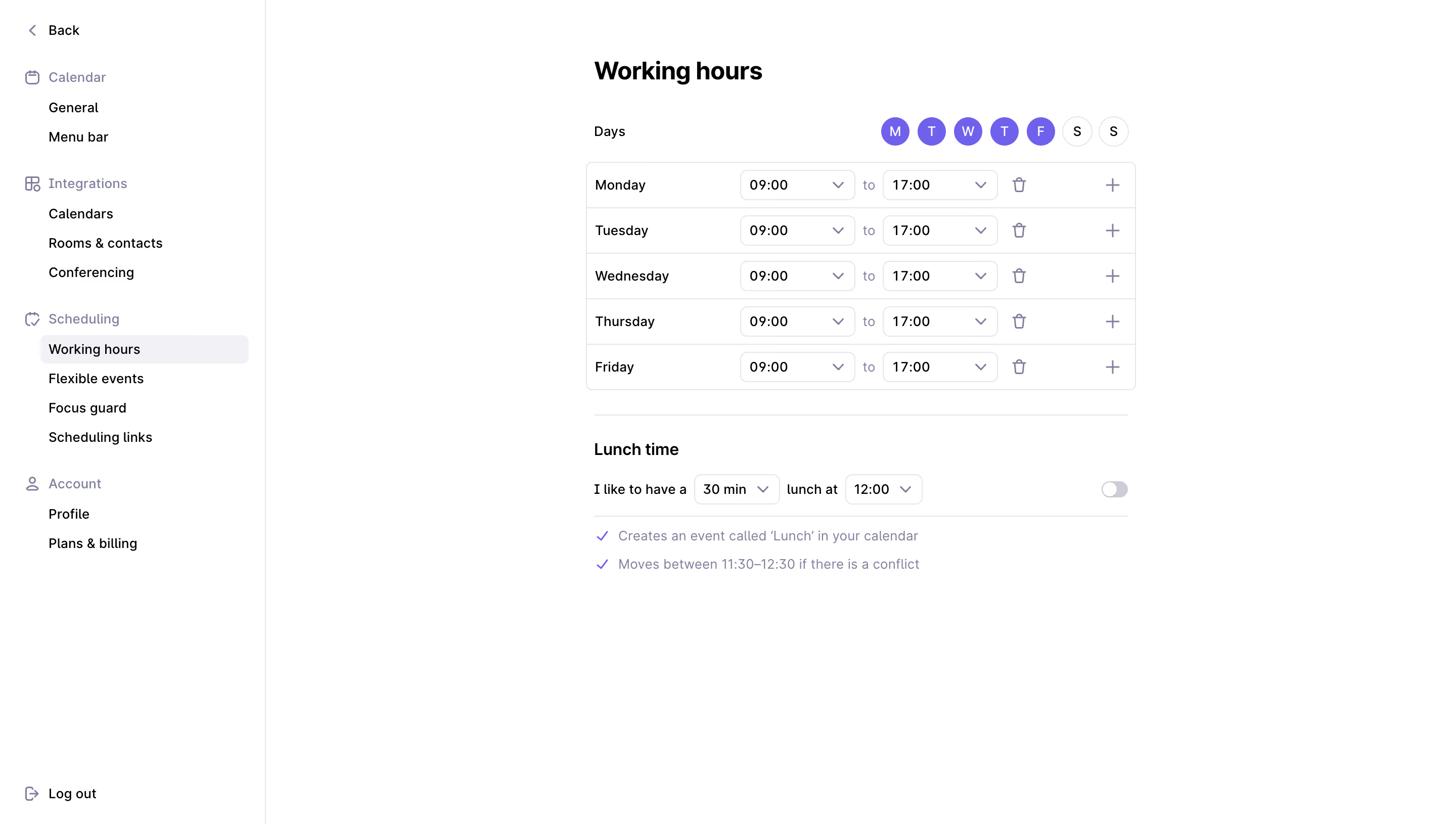
Rise Working Hours Settings

Rise
The calendar that works for you
Designed by
No items found.

Bookmark
Bookmark

Design with AI
Thank you! Your submission has been received!
Oops! Something went wrong while submitting the form.
# Design from Reference: Rise Working Hours Settings
Create an original, high-fidelity visual design inspired by the reference. Prioritize composition, typography, colors, spacing, and component styling over technical implementation.
## Reference
- **Product:** Rise
- **Category:** Settings
- **Screenshot:** https://cdn.prod.website-files.com/5e9dc792e1210c5325f7ebbc/6acadb65494a081980ea0694_6acad9e9fbf1299940ab70f1_cms-eb9d77f203018499d05dd7de.webp
Analyze the screenshot first. If inaccessible, request it rather than guessing.
## Content
{{content.instructions}}
{{content.data}}
Preserve essential messaging and factual accuracy. Adapt structure and copy length for visual balance; never invent product claims.
## Visual Design
### Overall aesthetic
- **Style:** Sparse calendar-settings screen with a white canvas, fine lavender-gray rules and compact time controls.
- **Character:** Violet selected-day circles and muted lavender icons add a calm product identity to an otherwise functional form.
- **Capture:** The screenshot measures 2880 × 1630 pixels. CSS estimates assume a 2× capture, equivalent to approximately 1440 × 815 CSS pixels; actual scale and font identity are unverified.
### Page composition
- **Sidebar:** An approximately 263-CSS-pixel rail contains Back, grouped settings links and a bottom logout action.
- **Main form:** A roughly 544-pixel-wide settings column begins around x580, with a large working-hours heading above it.
- **Day controls:** A small Days label sits left while seven circular weekday selectors align right.
- **Schedule grid:** Five horizontal rows show weekdays, start/end time dropdowns, removal icons and add-interval icons.
- **Lunch module:** A thin divider separates a lunch heading, sentence-style controls, right-aligned toggle and two explanatory lines.
- **Whitespace:** The remaining right and lower canvas is largely empty.
### Information hierarchy
- **Location:** Working hours is highlighted under the Scheduling group in the sidebar.
- **Main task:** The bold page heading leads the central column; the weekday table carries most interaction density.
- **Selected days:** Monday through Friday are violet-filled; weekend circles remain outlined.
- **Time values:** Each weekday shows the same 09:00-to-17:00 interval in paired controls.
- **Secondary preference:** Lunch settings form a separate lower module with duration, time and an off-position toggle.
- **Supporting behavior:** Two checkmarked explanatory lines describe calendar creation and conflict movement beneath the lunch controls.
### Typography
- **Family:** A clean UI sans-serif is visible; exact font identity is unverified.
- **Page heading:** Approximately 24-pixel CSS size, bold, with around 30-pixel line height.
- **Lunch heading:** Approximately 16 pixels and semibold.
- **Labels and controls:** Approximately 14 pixels with 20-pixel line height.
- **Sidebar:** Approximately 14 pixels; group labels use muted lavender-gray while individual links are dark.
- **Helper text:** Approximately 14 pixels in a subdued lavender-gray, with a relaxed 28-pixel row rhythm.
### Colors & surfaces
- **Measured canvas:** White #FFFFFF fills nearly the entire interface.
- **Measured accent:** Violet #7360F4 appears in selected weekday controls and small emphasis marks.
- **Measured supporting text:** #7D819D is a prominent muted lavender-gray sample.
- **Measured boundaries:** #E5E5EA outlines the sidebar and controls; #F2F2F5 supports the selected navigation row.
- **Measured text:** Black #000000 carries principal labels and time values.
- **Depth:** The screen is flat, with no visible shadows; fine borders and selected fills provide structure.
### Components
- **Sidebar groups:** Calendar, Integrations, Scheduling and Account use small outline icons and indented child links.
- **Selected link:** A pale-gray rounded row, approximately 206 × 28 CSS pixels, marks Working hours.
- **Weekday circles:** Approximately 29 pixels in diameter with narrow gaps; selected circles have white initials.
- **Schedule container:** Approximately 544 × 226 pixels with 6-pixel corners and thin grid rules.
- **Time dropdowns:** Approximately 114 × 30 pixels, white with fine outlines, small corners and right-aligned chevrons.
- **Row actions:** A trash icon follows each interval; a plus icon aligns near the far right for adding another interval.
- **Lunch controls:** A 30-minute duration dropdown and noon-time dropdown are embedded in a sentence.
- **Toggle:** A small gray switch at the far right appears off, with its white thumb positioned left.
- **Helper rows:** Violet checkmarks precede two muted explanatory statements.
- **State scope:** No dropdown is open and no save, validation or added-interval state is visible.
### Visual rhythm
- **Sidebar spacing:** Group sections are separated by larger gaps than their tightly stacked child links.
- **Main alignment:** The page title, day grid and lunch section share a stable central-column edge.
- **Schedule cadence:** Five equal rows around 45 pixels high repeat labels, time controls and icons consistently.
- **Module break:** Roughly 24 pixels and a thin rule separate working intervals from lunch preferences.
- **Whitespace:** The narrow form and broad blank margins keep the screen focused on a small set of scheduling choices.
### Responsive
- **Recommendation — navigation:** Collapse the sidebar into a settings menu on small screens.
- **Recommendation — grid:** Let weekday intervals wrap into label and control rows when the fixed horizontal structure becomes too narrow.
- **Recommendation — day selector:** Preserve clear selected/unselected states and adequate touch targets.
- **Recommendation — lunch sentence:** Stack duration, time and toggle controls while retaining explicit labels.
- **Recommendation — actions:** Provide accessible names and sufficient hit areas for add/remove icons. No mobile layout is evidenced.
### Adaptation guidance
- **Preserve interval logic:** Keep selected days separate from each day's editable time intervals.
- **Reuse compact tokens:** Maintain fine lavender-gray boundaries, violet selection and a restrained white canvas.
- **Keep secondary preferences distinct:** Separate lunch scheduling and its explanatory behavior from the core working-hours grid.
- **Make icon actions explicit:** Label add/remove controls for assistive technology and clarify their effects.
- **Define unseen states:** Specify dropdown selection, multiple intervals, conflicts and persistence feedback separately.
- **Avoid inferring autosave:** The screenshot does not establish how changes are saved.
Use this context to reproduce the reference's visual language: layout, typography, colors, spacing, borders, radii, and distinctive elements. The screenshot takes priority if descriptions conflict.
## Direction
{{preferences.fidelityInstructions}}
## Output
{{output.instructions}}
Deliver a polished, cohesive design with precise alignment, hierarchy, and spacing. Produce the requested visual artifact, not just a description. If unsupported, explain the limitation.

.avif)
Category
Patterns
Tech Stack


Added on
September 19, 2023
Similar screens






Upgrade to SaaSFrame Pro now to see similar examples.
Monthly
$18 /month
Billed $18 monthly
Browse all screens & flows
Filter and search screens & flows
Search text in screenshots
Access Figma files
Access mobile versions
Join now
Quarterly
$16 /month
Billed $48 quarterly
Browse all screens & flows
Filter and search screens & flows
Search text in screenshots
Access Figma files
Access mobile versions
Join now
Yearly
$15 /month
Billed $180 yearly
Browse all screens & flows
Filter and search screens & flows
Search text in screenshots
Access Figma files
Access mobile versions
Join now