Design with AI
Generate a new design based on this screen using your own content.
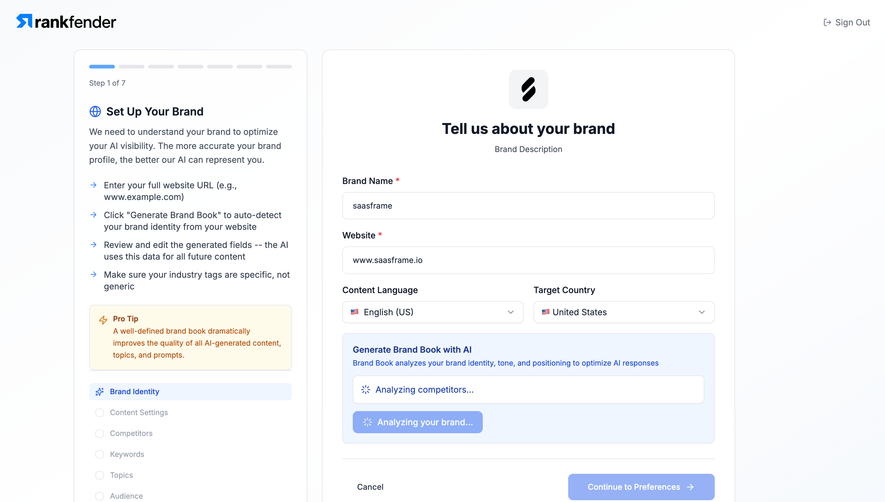
# Design from Reference: Rankfender Generate Brand Book
Create an original, high-fidelity visual design inspired by the reference. Prioritize composition, typography, colors, spacing, and component styling over technical implementation.
## Reference
- **Product:** Rankfender
- **Category:** Account Setup
- **Screenshot:** https://cdn.prod.website-files.com/5e9dc792e1210c5325f7ebbc/6acad345d5603a17eba5b75e_6acad10b135f2125f428f81d_cms-e62b80dcf74cb52d6d9a8221.webp
Analyze the screenshot first. If inaccessible, request it rather than guessing.
## Content
{{content.instructions}}
{{content.data}}
Preserve essential messaging and factual accuracy. Adapt structure and copy length for visual balance; never invent product claims.
## Visual Design
### Overall aesthetic
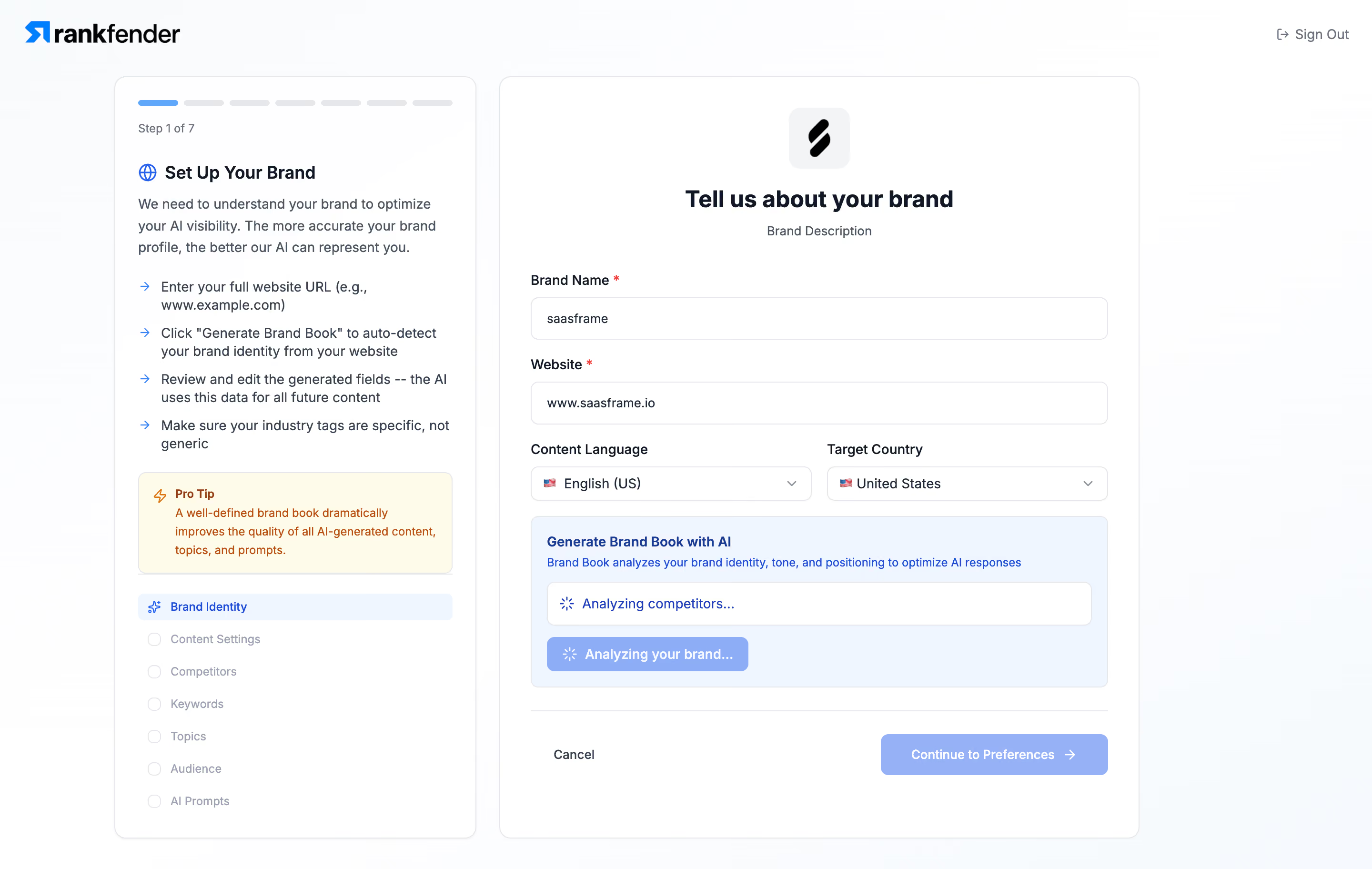
- **Character:** Light, instructional SaaS setup wizard with white rounded panels, blue progress accents and a pale yellow advice box.
- **Evidence scale:** Original image 2880 × 1824 pixels. Estimated CSS dimensions assume an unverified 2× scale; color samples are sRGB-converted pixels.
### Page composition
- **Header:** Rankfender branding sits at upper left and a small Sign Out utility at upper right.
- **Workspace:** Two aligned panels begin around 80 px down inside a centered approximately 1080 px region. The left panel is about 380 px wide; the right about 672 px, separated by 24 px.
- **Left panel:** Seven-segment progress, step count, explanatory title and paragraph, four arrow-led instructions, advice box and a seven-item checklist.
- **Right panel:** Centered emblem and heading lead into stacked brand fields, paired language/country selectors, a blue analysis area and a bottom action row.
### Information hierarchy
- **Main task:** A centered bold brand-description heading introduces the form, while the left column explains the larger workflow.
- **State emphasis:** The first progress segment and Brand Identity checklist row are blue; later steps are muted.
- **Processing:** The analysis panel contains a white status strip and a spinner-bearing action. Pale blue actions visually communicate reduced emphasis, but their functional enabled state is unverified.
### Typography
- **Main heading:** Unverified sans-serif, approximately 24 px bold, 30 px line height and slightly tight spacing.
- **Sidebar heading:** Approximately 18 px semibold with a blue globe icon; instructional copy is around 14 px with 22 px line height.
- **Form labels:** Approximately 14 px medium/semibold, with red required markers on the first two fields.
- **Secondary roles:** Step count and checklist labels are about 12 px; action labels about 14 px semibold.
### Colors & surfaces
- **Base:** White #FFFFFF panels sit on an extremely pale cool background; sampled neighboring whites include #FEFEFF and #FCFDFE.
- **Analysis surface:** Pale blue #F0F6FF separates the generation status from ordinary inputs.
- **Advice surface:** Pale cream #FFFBEB supports orange-brown advice text and a lightning icon.
- **Accents:** Saturated blue appears in the logo, arrows and active navigation; the analyzing and continuation buttons use a visibly softer periwinkle fill.
- **Structure:** Light cool-gray borders surround panels and inputs; dark navy text and slate supporting copy maintain hierarchy.
### Components
- **Panel shells:** Approximately 12 px radii and 1 px cool-gray borders; the sidebar has a very subtle lower shadow.
- **Progress:** Seven short rounded tracks, roughly 42 × 6 px each, with one blue and six gray.
- **Fields:** Full-width brand name and website inputs are around 44 px tall with 8 px radii and 16 px horizontal padding.
- **Selectors:** Two equal columns with flags, selected text and trailing chevrons; about 36 px high with a 16 px gutter.
- **Analysis card:** Rounded pale-blue container with title, helper line, white bordered status strip and a compact progress button. Two spinner symbols are visible.
- **Footer actions:** A divider separates Cancel at left from a wide Continue to Preferences button at right, approximately 240 × 44 px.
### Visual rhythm
- **Insets:** Left panel uses roughly 24 px padding; right form roughly 32 px.
- **Form spacing:** Labels sit about 8 px above controls, with approximately 20 px between field groups.
- **Sidebar cadence:** Arrows align in one narrow column; multi-line instruction text aligns consistently beside them. Checklist items follow an even approximately 34 px pitch.
### Responsive
- **Observed limit:** Desktop only; no responsive behavior is evidenced.
- **Recommendation:** Stack the instructional panel above the form when the two columns cannot retain readable widths.
- **Form handling:** Collapse paired selectors to one column on narrow screens and allow the action row to wrap while preserving field and status order.
### Adaptation guidance
- **Retain:** Separate workflow guidance from immediate input and keep the current step visible in both progress and checklist forms.
- **Implement:** Use distinct neutral, blue-status and yellow-advice surfaces, reserving strong blue for active landmarks.
- **Verify:** Confirm real fonts, responsive breakpoints and loading/disabled semantics in implementation; do not infer generated brand data from this processing snapshot.
Use this context to reproduce the reference's visual language: layout, typography, colors, spacing, borders, radii, and distinctive elements. The screenshot takes priority if descriptions conflict.
## Direction
{{preferences.fidelityInstructions}}
## Output
{{output.instructions}}
Deliver a polished, cohesive design with precise alignment, hierarchy, and spacing. Produce the requested visual artifact, not just a description. If unsupported, explain the limitation.
.webp)



.avif)