Design with AI
Generate a new design based on this screen using your own content.
# Design from Reference: Prelude Integrations
Create an original, high-fidelity visual design inspired by the reference. Prioritize composition, typography, colors, spacing, and component styling over technical implementation.
## Reference
- **Product:** Prelude
- **Category:** Integrations
- **Screenshot:** https://cdn.prod.website-files.com/5e9dc792e1210c5325f7ebbc/697b765383a3c28b4dc03e6d_ZZPtcrVLp66f1T8qNyJKT_LJ75-MJ3opILu5ZTD2QB4.avif
Analyze the screenshot first. If inaccessible, request it rather than guessing.
## Content
{{content.instructions}}
{{content.data}}
Preserve essential messaging and factual accuracy. Adapt structure and copy length for visual balance; never invent product claims.
## Visual Design
### Overall aesthetic
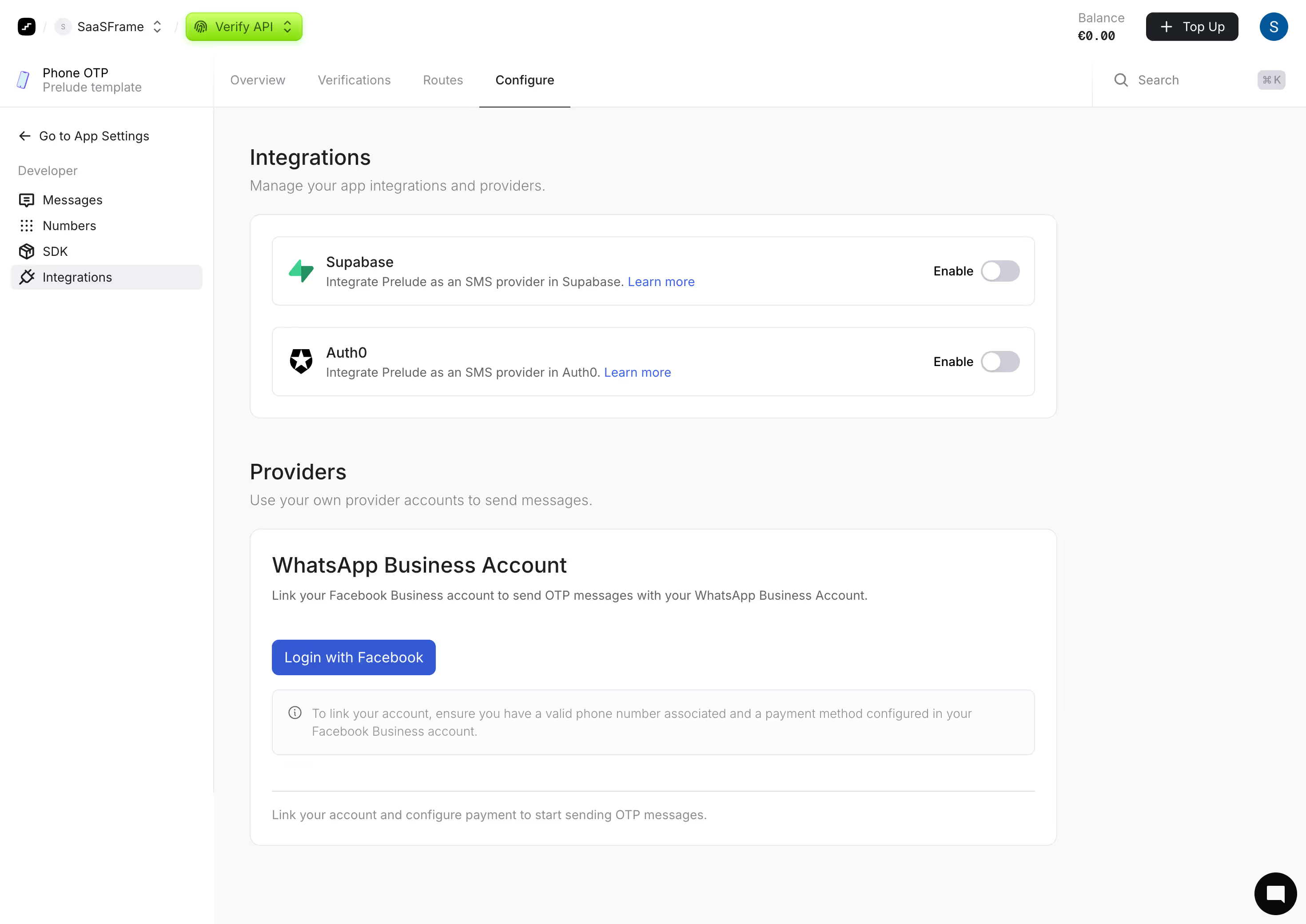
- **Style:** A clean developer-settings page uses white shell regions, a very pale workspace and outlined integration panels.
- **Character:** Compact provider logos, gray toggles and a restrained blue linking action keep the interface practical.
### Page composition
- **Capture:** The source measures 2940 × 2080 pixels. Measurements below refer to the 1400-pixel-wide inspection rendition, not verified CSS dimensions.
- **Header:** Workspace/product selection sits left; balance, Top Up and account avatar align right.
- **Secondary bar:** App identity occupies the left rail, while four product tabs and search span the remaining width.
- **Sidebar:** A back-to-settings route precedes a Developer label and four icon-led destinations, with Integrations selected.
- **Main content:** A heading/helper introduces a white integration container with two provider rows.
- **Providers:** A second heading/helper precedes a large account-linking panel with title, explanation, blue login button, informational note and divided footer text.
- **Utility:** A black circular chat launcher sits bottom right.
### Information hierarchy
- **Page headings:** Integrations and Providers divide the two tasks.
- **Integration rows:** Provider names lead short descriptions and Learn more links; Enable labels/toggles align right.
- **Account linking:** A larger provider title and explanation lead the blue login action.
- **Guidance:** A pale informational box and lower muted instruction remain secondary.
- **State:** Configure has a dark underline; Integrations has a pale sidebar highlight.
### Typography
- **Family:** Neutral sans serif; exact identity is unverified.
- **Headings:** Approximately 24 inspection pixels, medium weight.
- **Row titles:** Around 16 pixels, medium.
- **Body:** Approximately 14 pixels with 20-pixel leading.
- **Utilities:** Sidebar/header text around 14 pixels; muted notes around 13 pixels.
### Colors & surfaces
- **Measured base:** White #FFFFFF and pale #F9F9FB define the screen.
- **Borders:** Light #E8E8EC appears in outlines; near-white #FCFCFD in secondary surfaces.
- **Ink:** Dark #1C2024 supplies titles.
- **Action:** Blue #3359D3 is sampled in the linking-action system.
- **Other accents:** A bright lime product selector and green provider logo add localized color.
- **Depth:** Mostly flat surfaces with fine borders and minimal shadows.
### Components
- **Integration container:** Broad white rounded panel with two inset outlined rows.
- **Provider rows:** Small logo left, two-line text group center and gray off-position toggle right.
- **Toggle:** A small pale-gray capsule with white knob at left; both visible integrations appear off.
- **Account panel:** Large rounded white surface with generous padding and a blue rectangular login action.
- **Info box:** Thin outlined pale rectangle with small information icon and two-line helper text.
- **Tabs:** Four text labels over a thin divider; Configure uses a dark selected rule.
- **Top action:** A dark Top Up button with plus icon sits beside balance text.
### Visual rhythm
- **Grouping:** A large gap separates integration rows from provider-account setup.
- **Insets:** Titles, descriptions, action and notes share consistent main-panel alignment.
- **Whitespace:** Empty right-side canvas balances the broad settings panels.
### Responsive
- **Evidence:** Only desktop is observed; provider enabling and login results are unverified.
- **Recommended shell:** Collapse the sidebar and let tabs scroll or wrap.
- **Rows:** Stack toggle controls beneath provider copy if needed while retaining clear labels.
- **Panels:** Make widths fluid and allow notes to wrap naturally.
### Adaptation guidance
- **Preserve:** Keep the pale shell, outlined provider rows and clear linking-action hierarchy.
- **Implementation:** Separate integration toggles from external account linking.
- **Content:** Use actual provider requirements rather than treating screenshot text as current configuration guidance.
- **Behavior:** Define authentication, enablement and feedback states explicitly; no account connection is demonstrated.
Use this context to reproduce the reference's visual language: layout, typography, colors, spacing, borders, radii, and distinctive elements. The screenshot takes priority if descriptions conflict.
## Direction
{{preferences.fidelityInstructions}}
## Output
{{output.instructions}}
Deliver a polished, cohesive design with precise alignment, hierarchy, and spacing. Produce the requested visual artifact, not just a description. If unsupported, explain the limitation.
.webp)



.avif)