Design with AI
Generate a new design based on this screen using your own content.
# Design from Reference: Pirsch Analytics Integration Settings
Create an original, high-fidelity visual design inspired by the reference. Prioritize composition, typography, colors, spacing, and component styling over technical implementation.
## Reference
- **Product:** Pirsch Analytics
- **Category:** Settings
- **Screenshot:** https://cdn.prod.website-files.com/5e9dc792e1210c5325f7ebbc/6acb699b5e515b69c7964ee4_6acb67c655968e6fef87b621_cms-b2fe7e9fd9f75c779dfe0e64.webp
Analyze the screenshot first. If inaccessible, request it rather than guessing.
## Content
{{content.instructions}}
{{content.data}}
Preserve essential messaging and factual accuracy. Adapt structure and copy length for visual balance; never invent product claims.
## Visual Design
### Overall aesthetic
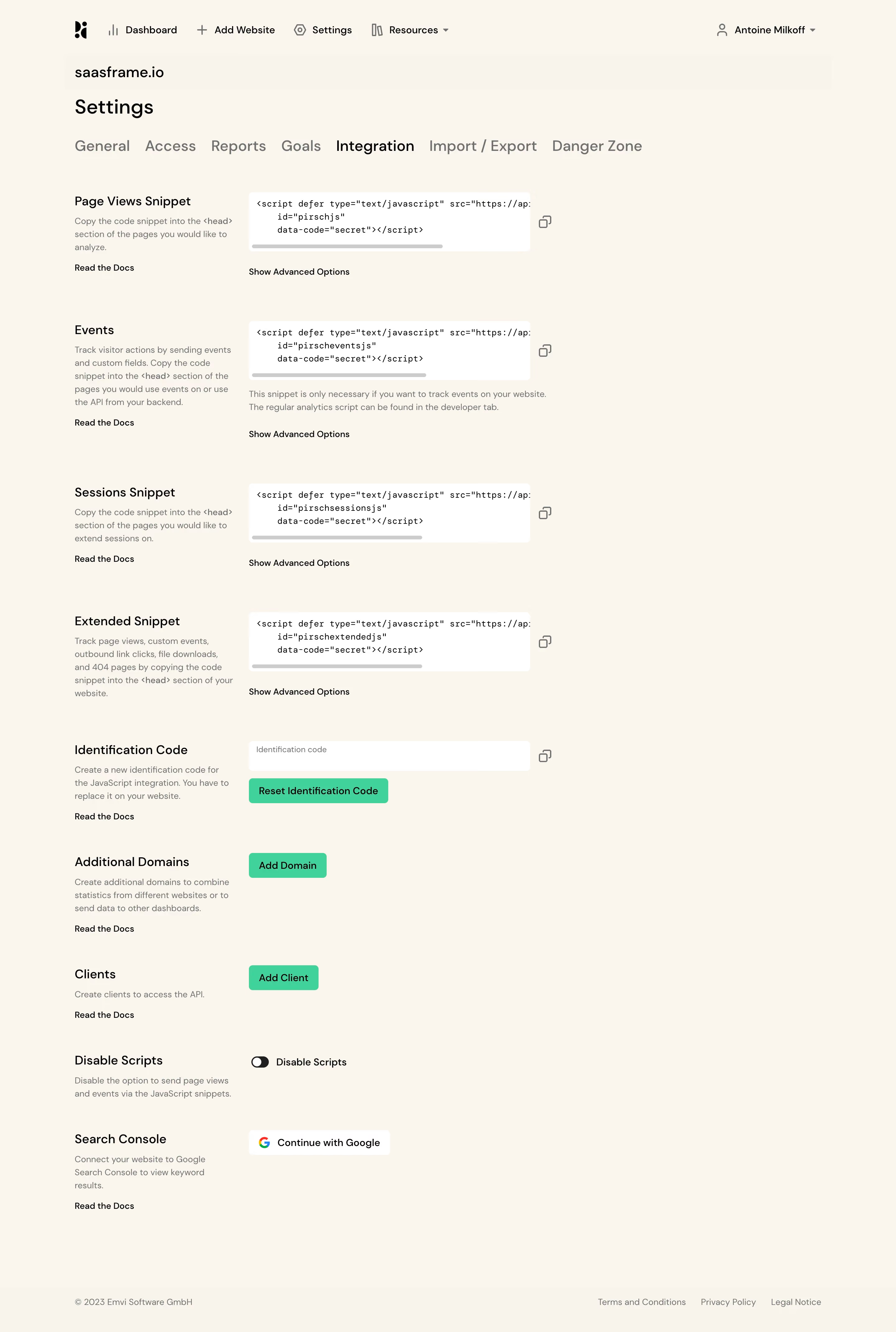
- **Style:** A warm cream analytics-settings page with plain typography, white code boxes, and mint-green administrative actions.
- **Character:** Sparse and technical, using a left explanation/right control pattern rather than enclosing every setting in a card.
### Page composition
- **Capture and scale:** 2880 × 4282 screenshot pixels, consistent with estimated 2× capture. Following dimensions are estimated CSS pixels.
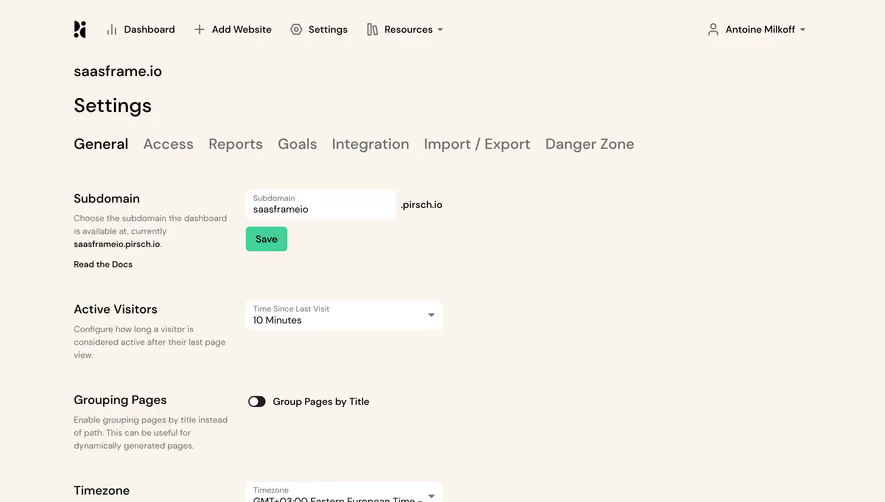
- **Header:** Global navigation and account identity precede website identity, Settings heading, and a horizontal seven-tab row with Integration emphasized.
- **Settings:** Nine vertically spaced groups cover page-view, events, session and extended snippets, identification code, domains, clients, script disabling, and Search Console.
- **Columns:** A roughly 260 px explanation column sits beside a roughly 450 px control column, leaving substantial open space right. A small legal footer closes the page.
### Information hierarchy
- **Sections:** Each group has a medium heading, muted explanation, and optional documentation link left.
- **Technical focus:** White horizontally scrollable code blocks and adjacent copy icons dominate the first four groups.
- **Actions:** Mint buttons identify reset/add operations; a small toggle and Google provider control serve later groups.
### Typography
- **Family:** Neutral sans serif plus monospace code; exact identities unverified.
- **Roles:** Settings title approximately 32 px; tabs around 24 px; group headings 20 px.
- **Body:** Explanations are about 14 px with 21 px leading; code 13–14 px. Documentation/advanced-option links are compact dark text.
### Colors & surfaces
- **Foundation:** Sampled sRGB cream #F9F5EC and #F7F5EC define the page; #FFFFFF the fields/code boxes.
- **Actions:** Sampled mint #41D199 fills reset/add buttons.
- **Ink:** Black #000000 and gray #707070 distinguish headings and descriptions; #CCCCCC supports scrollbars/borders.
### Components
- **Code boxes:** Small-radius white rectangles contain short script snippets with visible horizontal scrollbars. Copy icons sit just outside right edges.
- **Advanced options:** Plain text controls appear below each snippet, without visible expansion.
- **Administrative controls:** A white identification field, mint reset/add buttons, dark small switch, and white Google action align to the same control column.
- **Navigation:** Tabs use dark active text and gray inactive text, without a heavy pill background.
### Visual rhythm
- **Spacing:** Allow roughly 70–90 px between snippet groups and 45–65 px between simpler settings.
- **Alignment:** Maintain stable explanation/control columns and consistent copy-icon placement.
### Responsive
- **Observed state:** Desktop only.
- **Recommended reflow:** Stack each explanation above controls, make code blocks fluid with internal scrolling, and wrap long tab navigation.
### Adaptation guidance
- **Preserve:** Retain the warm neutral surface, two-column settings pattern, simple code evidence, and mint administrative accents.
- **Adapt:** Use real snippets, identifiers, and integration options.
- **Avoid:** Do not copy sensitive identifiers or infer expanded options and connection outcomes.
Use this context to reproduce the reference's visual language: layout, typography, colors, spacing, borders, radii, and distinctive elements. The screenshot takes priority if descriptions conflict.
## Direction
{{preferences.fidelityInstructions}}
## Output
{{output.instructions}}
Deliver a polished, cohesive design with precise alignment, hierarchy, and spacing. Produce the requested visual artifact, not just a description. If unsupported, explain the limitation.
.webp)



.avif)