Design with AI
Generate a new design based on this screen using your own content.
# Design from Reference: PandaDoc User Onboarding
Create an original, high-fidelity visual design inspired by the reference. Prioritize composition, typography, colors, spacing, and component styling over technical implementation.
## Reference
- **Product:** PandaDoc
- **Category:** User Onboarding
- **Screenshot:** https://cdn.prod.website-files.com/5e9dc792e1210c5325f7ebbc/6acbc74e7369a31d47fc6cf8_6acbc5c580dd38e7e75761a1_cms-b90f4a63b22fba6a048fbbdb.webp
Analyze the screenshot first. If inaccessible, request it rather than guessing.
## Content
{{content.instructions}}
{{content.data}}
Preserve essential messaging and factual accuracy. Adapt structure and copy length for visual balance; never invent product claims.
## Visual Design
### Overall aesthetic
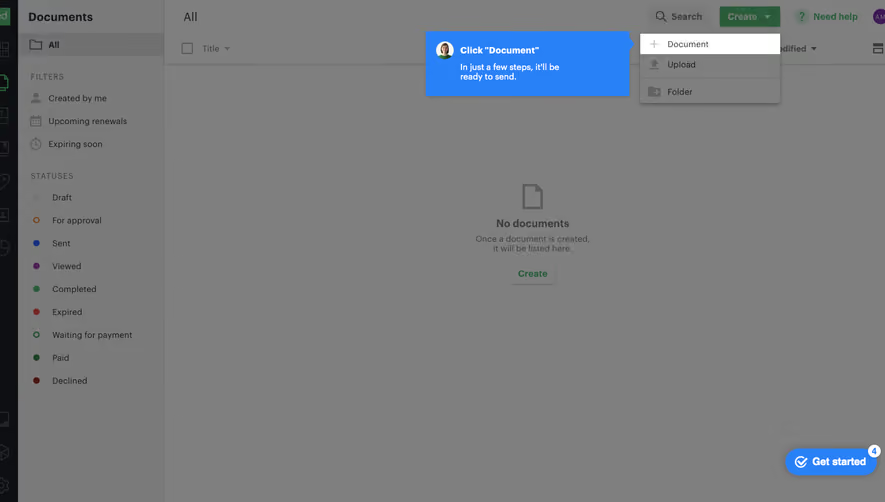
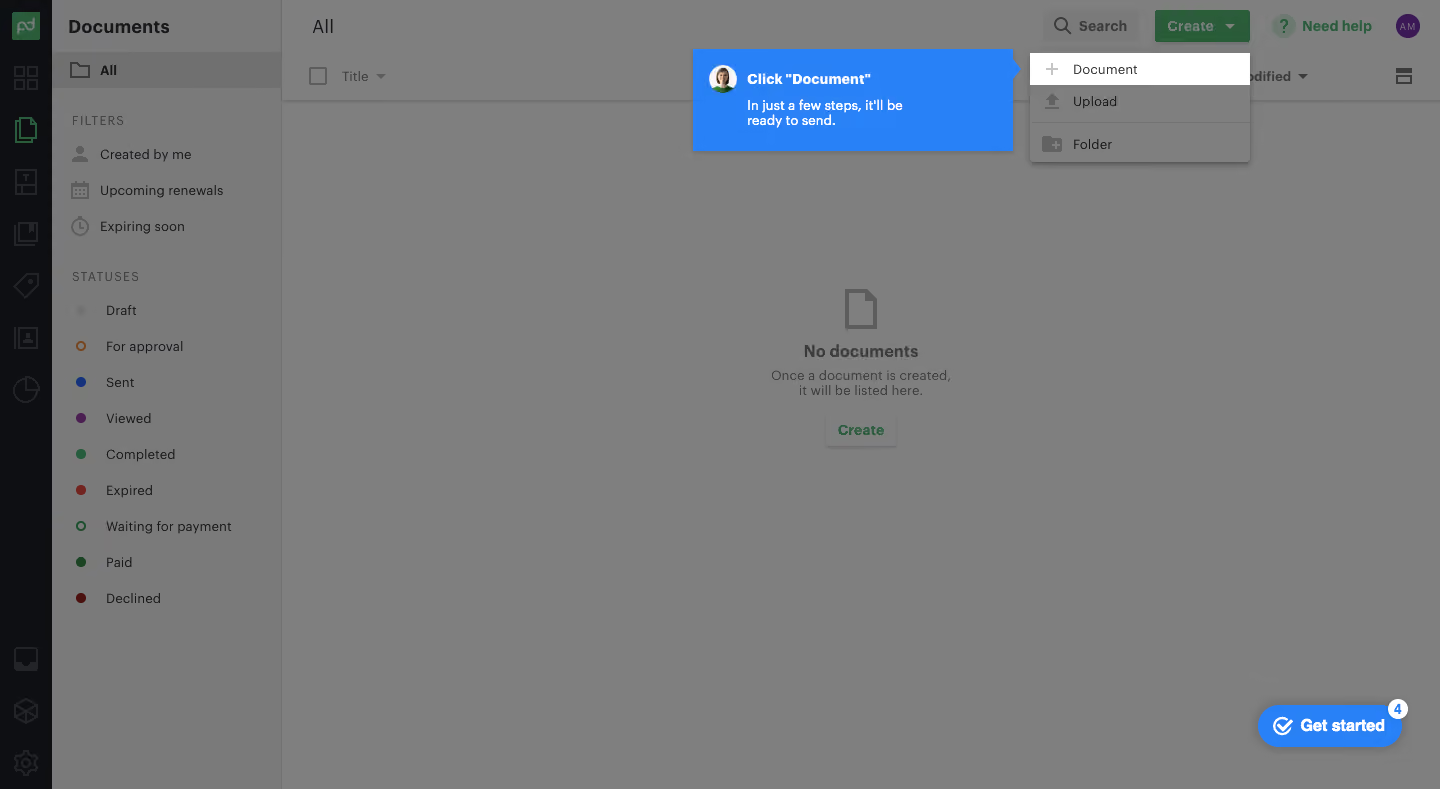
- **Character:** A guided onboarding overlay dims a document-management workspace and uses a saturated blue coachmark to highlight the next step.
- **Contrast:** The bright blue instruction and undimmed white menu item stand apart from a largely gray application background.
### Page composition
- **Capture:** The source is 1440 × 789 pixels. Dimensions are approximate image pixels; CSS scale is unverified.
- **Application shell:** A narrow dark icon rail sits left of a wider Documents navigation/filter column. The main area contains a table header and centered empty-document message.
- **Top actions:** Search, a green Create dropdown, help and avatar appear at the upper right.
- **Tour focus:** The Create menu is open; its Document row is highlighted. A blue speech panel sits immediately to its left with a pointer aimed at that row.
- **Progress widget:** A rounded blue Get started control with a small count badge sits at bottom right.
### Information hierarchy
- **Tour instruction:** A bold short heading and two-line supporting sentence make the blue coachmark the primary reading target.
- **Target action:** The white Document menu row is the clearest destination in the otherwise dimmed menu.
- **Background context:** The empty-state icon, heading, helper text and Create button explain the underlying document screen without competing with the tour.
### Typography
- **Family:** A practical sans serif is used throughout; exact identity is unverified.
- **Navigation:** Documents is about 20 pixels and bold; filter/status items are around 14 pixels.
- **Coachmark:** The instruction is approximately 14–15 pixels, bold white, with smaller semibold supporting copy and compact leading.
- **Empty state:** A roughly 16-pixel bold label sits above smaller centered gray helper text.
### Colors & surfaces
- **Measured overlay:** Gray #7F7F7F dominates the dimmed canvas, with #7A7A7A and #707070 in related subdued regions.
- **Measured focus:** Saturated blue #2981F8 marks the coachmark and onboarding launcher; white #FFFFFF highlights the target row and text.
- **Measured dark:** #0D0F12 appears in the left navigation rail.
- **Accent relationship:** Green creation/help controls and colored status dots remain visible through the overlay, with reduced prominence.
### Components
- **Coachmark:** Approximately 320 × 102 pixels with a right-pointing notch, subtle shadow, small circular avatar and inset white text.
- **Dropdown:** A compact vertical menu contains Document, Upload and Folder rows with leading icons; the first row is white and the others dimmed.
- **Empty state:** A large outline document icon precedes a centered heading and two-line helper; a small raised Create button follows.
- **Sidebar filters:** Three date/ownership filters sit above a vertical status list with distinct colored dots.
- **Tour launcher:** A blue pill combines a completion-style icon, label and a small white badge at its top-right edge.
### Visual rhythm
- **Shell widths:** The icon rail is roughly 52 pixels wide and the adjacent navigation column about 230 pixels.
- **Sidebar cadence:** Filter and status entries use approximately 36-pixel row spacing with uppercase group labels.
- **Focus placement:** The instruction and menu share a top alignment, while the rest of the empty content area provides substantial negative space.
### Responsive
- **Observed state:** Only a wide desktop tour state is supplied; compact behavior is unverified.
- **Recommended tour:** Reposition the coachmark below or above its target when horizontal space is limited and prevent viewport clipping.
- **Recommended shell:** Collapse secondary navigation as necessary while retaining the highlighted action and readable instruction.
### Adaptation guidance
- **Preserve focus:** Keep a clear contrast difference between the tour target, blue guidance and dimmed background.
- **Match the state:** Reproduce the open Create dropdown and highlighted Document row without executing or inferring later onboarding steps.
- **Copy constraints:** Keep the coachmark short enough for its compact panel and avoid covering the target.
- **Accessibility:** Associate the instruction with its target, support keyboard dismissal and keep tour focus order predictable.
Use this context to reproduce the reference's visual language: layout, typography, colors, spacing, borders, radii, and distinctive elements. The screenshot takes priority if descriptions conflict.
## Direction
{{preferences.fidelityInstructions}}
## Output
{{output.instructions}}
Deliver a polished, cohesive design with precise alignment, hierarchy, and spacing. Produce the requested visual artifact, not just a description. If unsupported, explain the limitation.
.webp)



.avif)