Design with AI
Generate a new design based on this screen using your own content.
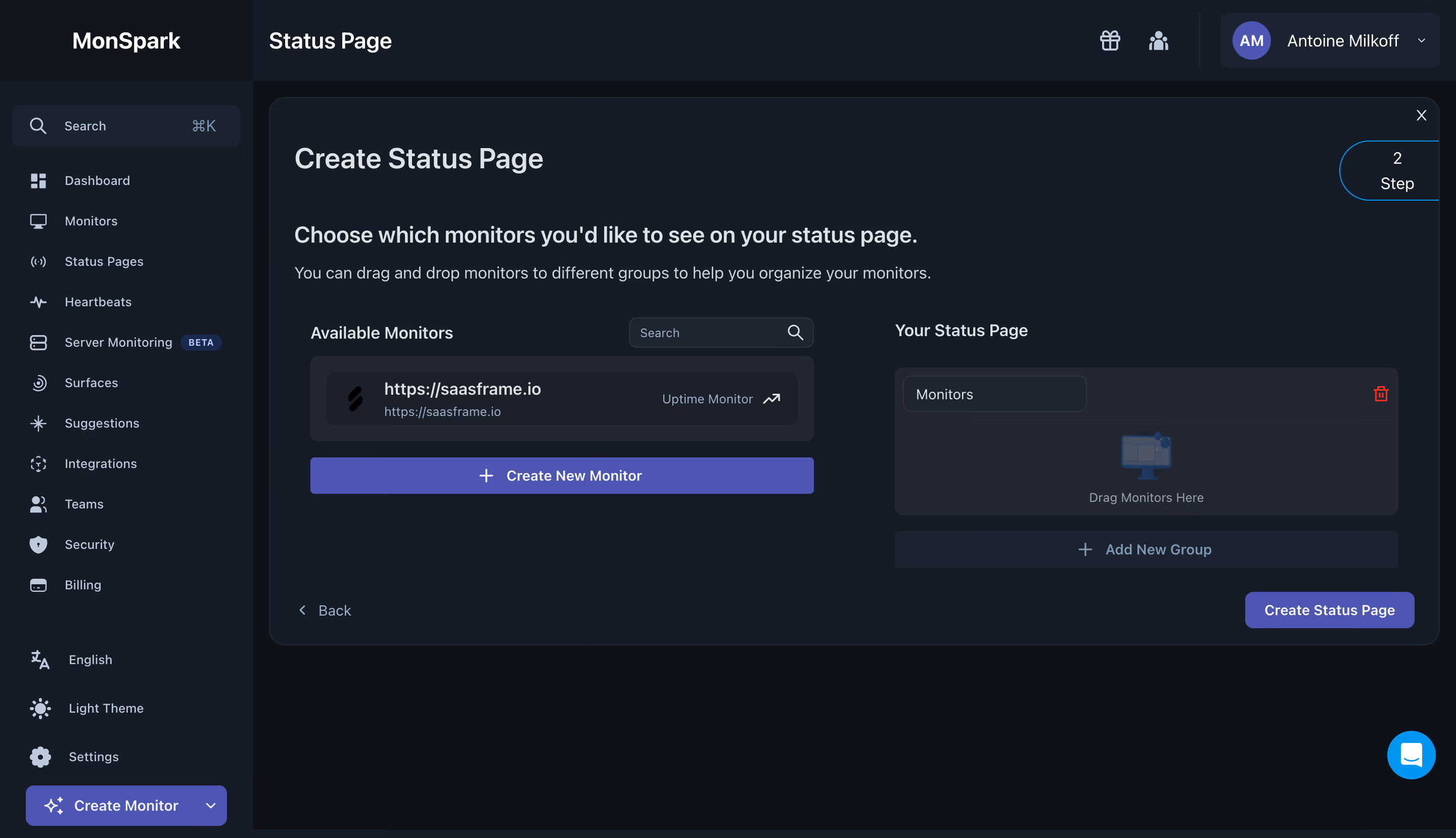
# Design from Reference: MonSpark Create Status Page
Create an original, high-fidelity visual design inspired by the reference. Prioritize composition, typography, colors, spacing, and component styling over technical implementation.
## Reference
- **Product:** MonSpark
- **Category:** Add & Edit
- **Screenshot:** https://cdn.prod.website-files.com/5e9dc792e1210c5325f7ebbc/6acb65c4b206c0d3f8f0f645_6acb6507ecc5bd4d93093244_cms-dad6585eb633111ca2fe2837.webp
Analyze the screenshot first. If inaccessible, request it rather than guessing.
## Content
{{content.instructions}}
{{content.data}}
Preserve essential messaging and factual accuracy. Adapt structure and copy length for visual balance; never invent product claims.
## Visual Design
### Overall aesthetic
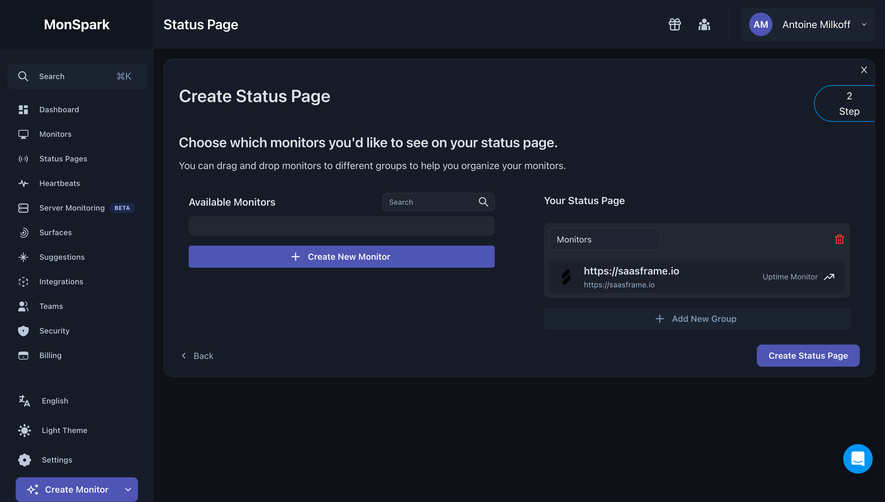
- **Style:** Dark monitoring setup workspace with indigo actions and a two-column drag-and-drop configuration area.
### Page composition
- **Canvas:** 2880 × 1658 image px; CSS estimates assume an unverified 2× capture.
- **Sidebar:** Approximately 250 CSS px wide.
- **Main:** Status Page header, large rounded setup panel, title/instruction, available monitors left and target groups right.
- **Footer actions:** Back left and Create Status Page right.
### Information hierarchy
- **Primary:** Create Status Page title and monitor-selection instruction.
- **Sources:** Searchable available-monitor list.
- **Target:** Empty monitor-group drop area with Add New Group.
- **Progress:** Small Step 2 marker upper-right.
### Typography
- **Family:** Neutral sans serif; exact identity unverified.
- **Title:** Approximately 28 CSS px, semibold.
- **Instruction:** Approximately 22px.
- **Body/controls:** Approximately 14–16px.
- **Precision:** Metrics and scale are estimates.
### Colors & surfaces
- **Main surface:** #0E1118.
- **Panel/sidebar:** #161C27.
- **Group surfaces:** #222732 and #1B2331.
- **Indigo:** #4E55B3.
- **Secondary dark:** #1B202B.
- **Text:** Light gray with muted blue-gray helpers.
- **Precision:** Flat screenshot samples.
### Components
- **Panel radius:** Approximately 16px CSS.
- **Source row:** Dark inset card with icon, URL/title, monitor type, and external arrow.
- **Target:** Rounded group with editable name, trash icon, and centered empty-state illustration.
- **Actions:** Wide indigo Create New Monitor, muted Add New Group, compact final submit.
- **Sidebar:** Outline icons, search, settings, theme, and create action.
### Visual rhythm
- **Spacing:** Broad panel padding, symmetric columns, and clear bottom action row.
- **Hierarchy:** Large empty target communicates required arrangement.
- **Contrast:** Indigo highlights progression and creation.
### Responsive
- **Observed:** Desktop only.
- **Recommendation:** Stack source and target areas with explicit add/move controls instead of relying only on drag.
- **Navigation:** Collapse sidebar and keep final action visible.
### Adaptation guidance
- **Preserve:** Source/target grouping, clear instruction, and progress indicator.
- **Content:** Use supplied monitors and groups.
- **Behavior:** Drag/drop, creation, and deletion are not demonstrated.
Use this context to reproduce the reference's visual language: layout, typography, colors, spacing, borders, radii, and distinctive elements. The screenshot takes priority if descriptions conflict.
## Direction
{{preferences.fidelityInstructions}}
## Output
{{output.instructions}}
Deliver a polished, cohesive design with precise alignment, hierarchy, and spacing. Produce the requested visual artifact, not just a description. If unsupported, explain the limitation.
.webp)


.avif)