.webp)
Thank you! Your submission has been received!
Oops! Something went wrong while submitting the form.
Get SaaSFrame Pro
Monthly
$18
Quarterly
$48
Yearly
$180
Upgrade to access this feature
Browse all screens & flows
Filter and search screens & flows
Access Figma files
Access mobile versions
Bookmark screens & flows
Join now
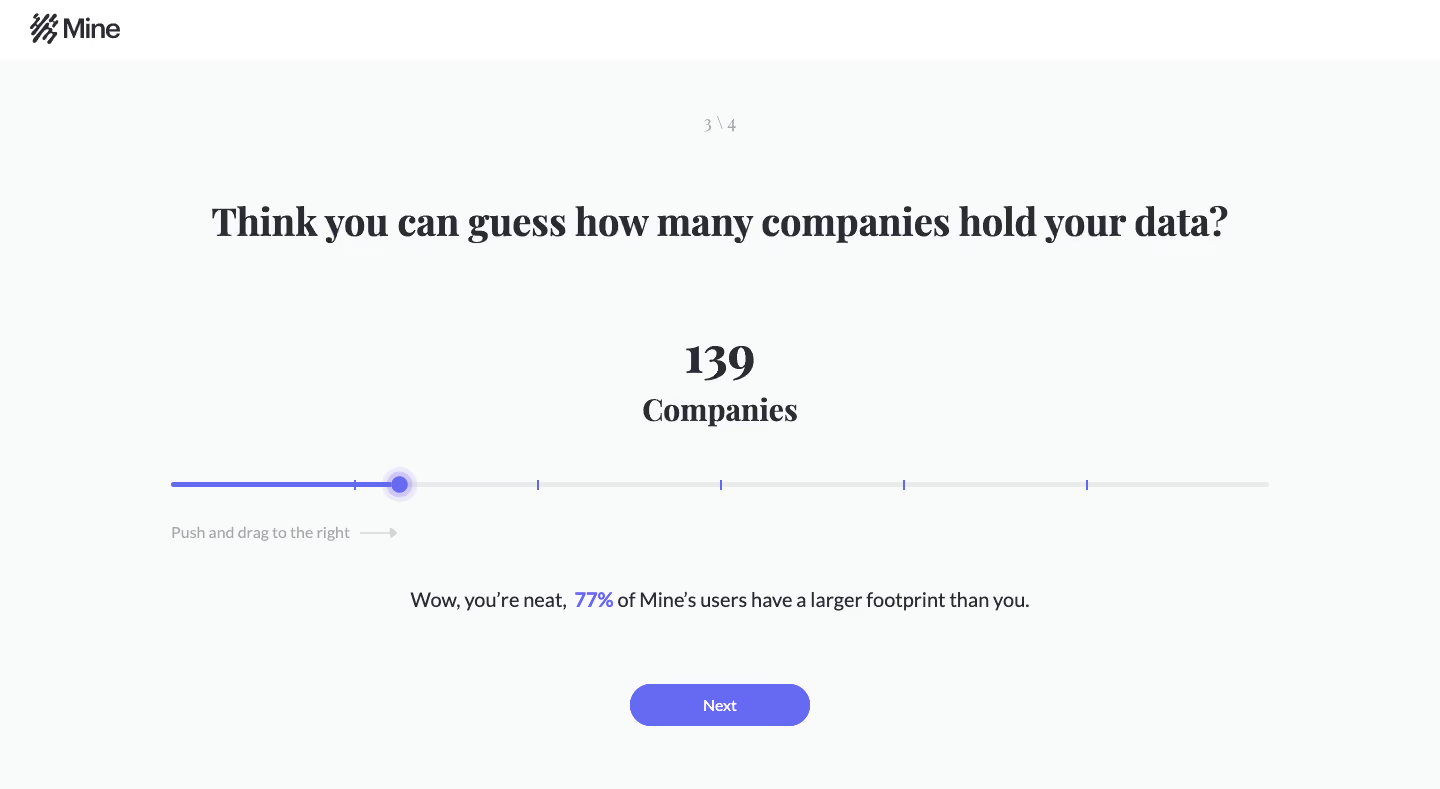
Mine User Onboarding

Mine
Data ownership
Designed by
No items found.

Bookmark
Bookmark

Design with AI
Thank you! Your submission has been received!
Oops! Something went wrong while submitting the form.
# Design from Reference: Mine User Onboarding
Create an original, high-fidelity visual design inspired by the reference. Prioritize composition, typography, colors, spacing, and component styling over technical implementation.
## Reference
- **Product:** Mine
- **Category:** User Onboarding
- **Screenshot:** https://cdn.prod.website-files.com/5e9dc792e1210c5325f7ebbc/6acbca3c8313d4c6c0cc4124_6acbc83b1790037d3e053241_cms-56ce7cfce03ca0dcb06d1840.webp
Analyze the screenshot first. If inaccessible, request it rather than guessing.
## Content
{{content.instructions}}
{{content.data}}
Preserve essential messaging and factual accuracy. Adapt structure and copy length for visual balance; never invent product claims.
## Visual Design
### Overall aesthetic
- **Character:** A minimal onboarding question uses a pale cool canvas, dark editorial serif headings, a long violet slider, and one centered pill button.
- **Tone:** Large open areas and a conversational prompt make the screen feel reflective rather than form-heavy. A serif/sans-serif contrast gives the otherwise sparse layout personality.
- **Observed scale:** The capture measures 1440 × 789 pixels. Dimensions below are approximate image pixels; CSS scale assumes an unverified 1× capture.
### Page composition
- **Header:** A white strip approximately 60 pixels high contains the Mine symbol and wordmark at the far left, around 30 pixels from the edge.
- **Progress marker:** A small muted 3-of-4 indicator is centered near the top of the pale content area.
- **Question:** A large one-line serif prompt spans the upper middle, centered with broad side margins.
- **Value display:** A large numeric value and a smaller Companies label form a centered two-line block below the question.
- **Slider region:** A horizontal track roughly 1100 pixels long stretches across most of the page. Its handle sits left of center, with a violet filled segment and a light gray remainder.
- **Lower guidance:** A drag instruction and right-pointing arrow sit below the track at left. A centered comparison sentence appears beneath, followed by the Next button near the bottom.
### Information hierarchy
- **Question first:** The large serif prompt is the primary reading anchor.
- **Selected estimate:** The centered number is the next strongest element, directly connected to its Companies unit.
- **Interaction:** The broad slider makes the numeric estimate adjustable in the visible design. The image does not establish its range, step values, or update behavior.
- **Comparison feedback:** A percentage in the lower sentence is emphasized in violet while the rest remains dark, connecting the feedback to the slider accent.
- **Progression:** Next is the only visible continuation action. No back control or additional onboarding step is shown.
- **Data interpretation:** The displayed count and percentage are captured example state, not verified information about the viewer or a current user population.
### Typography
- **Display appearance:** The question, value, and unit use a bold serif with pronounced thick/thin strokes. Exact font family is unverified.
- **Question size:** Approximately 40 pixels with a line-height near 50 pixels and compact tracking.
- **Value and unit:** The number is roughly 44 pixels and the unit around 32 pixels, both bold and centered.
- **Supporting copy:** The comparison sentence uses a neutral sans-serif around 20 pixels; the drag instruction is about 15–16 pixels and lighter gray.
- **Small roles:** The progress marker is around 16 pixels. The button uses approximately 15-pixel medium white sans-serif text.
- **Contrast of roles:** Serif type establishes the question and result; sans-serif type handles guidance and action.
### Colors & surfaces
- **Measured canvas:** #F9FBFB fills most of the screen; #FFFFFF forms the header.
- **Measured text:** #2A2B35 appears in the dark heading and copy treatment.
- **Measured accent:** #666AF3 supplies the violet slider/button family.
- **Secondary neutrals:** Sampled #E9EAEB and #E9EBEC contribute to light neutral track/boundary tones. The instruction and step marker are muted gray.
- **Flat composition:** No cards, shadows, or enclosing form borders are visible. A translucent violet halo gives the slider handle the only notable layered treatment.
### Components
- **Brand lockup:** A dark abstract striped symbol sits immediately beside the Mine wordmark in the white header.
- **Step indicator:** A small centered fraction-like marker communicates the third stage of four without a progress bar.
- **Numeric summary:** The number and unit are stacked with tight spacing, positioned directly above the track.
- **Slider track:** Approximately 5 pixels high with rounded ends. Several small violet vertical tick marks divide the track, but no numeric tick labels are visible.
- **Slider thumb:** A violet circular knob around 18 pixels in diameter sits within a larger translucent halo around 34 pixels wide.
- **Directional hint:** A short text instruction is followed by a thin pale arrow, aligned beneath the slider’s left portion.
- **Comparison sentence:** A single centered line includes a bold violet percentage amid dark regular-weight text.
- **Next control:** A violet pill approximately 180 × 42 pixels has fully rounded ends and a centered white label.
- **Unshown states:** Keyboard focus, dragging, minimum/maximum values, loading, and later-step content are not visible.
### Visual rhythm
- **Centered spine:** Progress, question, value, comparison, and CTA share a central axis.
- **Broad intervals:** Large vertical gaps separate the question, numeric summary, slider, feedback, and action, emphasizing one decision at a time.
- **Wide interaction:** The slider spans much more horizontal space than the button or numeric block, making it the main interactive region.
- **Accent repetition:** Violet links the track, thumb, percentage, and continuation button without adding decorative color.
- **Sparse header:** The small left logo balances an otherwise empty white strip without introducing navigation distractions.
### Responsive
- **Evidence limit:** Only a desktop onboarding screen is shown. Mobile wrapping and slider interaction are unverified.
- **Recommended question:** Allow the long prompt to wrap into two or three centered lines, reducing it to around 28–32 CSS pixels on narrow screens.
- **Recommended slider:** Use fluid width with safe side gutters, a larger invisible touch target, accessible range semantics, and keyboard support.
- **Recommended feedback:** Permit the comparison sentence to wrap without separating the emphasized percentage from its meaning.
- **Recommended vertical flow:** Reduce large desktop gaps on shorter screens and keep the Next control reachable without covering the slider.
### Adaptation guidance
- **Preserve one-task focus:** Keep the question, adjustable estimate, immediate contextual feedback, and continuation action as a single clear sequence.
- **Use real range semantics:** Provide a programmatic label, current value, unit, limits, and keyboard controls. The screenshot’s tick marks alone are insufficient specification.
- **Avoid unsupported personalization:** Compute any count or comparison from approved data; do not reuse the captured values as facts.
- **Retain typographic distinction:** Use a verified serif for the editorial prompt and a clear sans-serif for guidance and controls.
- **Validate accessibility:** Check violet contrast, focus visibility, touch targets, and understandable feedback announcements in a working implementation.
Use this context to reproduce the reference's visual language: layout, typography, colors, spacing, borders, radii, and distinctive elements. The screenshot takes priority if descriptions conflict.
## Direction
{{preferences.fidelityInstructions}}
## Output
{{output.instructions}}
Deliver a polished, cohesive design with precise alignment, hierarchy, and spacing. Produce the requested visual artifact, not just a description. If unsupported, explain the limitation.

.avif)
Category
Patterns
No items found.
Tech Stack


Added on
February 4, 2023



Similar screens





Upgrade to SaaSFrame Pro now to see similar examples.
Monthly
$18 /month
Billed $18 monthly
Browse all screens & flows
Filter and search screens & flows
Search text in screenshots
Access Figma files
Access mobile versions
Join now
Quarterly
$16 /month
Billed $48 quarterly
Browse all screens & flows
Filter and search screens & flows
Search text in screenshots
Access Figma files
Access mobile versions
Join now
Yearly
$15 /month
Billed $180 yearly
Browse all screens & flows
Filter and search screens & flows
Search text in screenshots
Access Figma files
Access mobile versions
Join now