Design with AI
Generate a new design based on this screen using your own content.
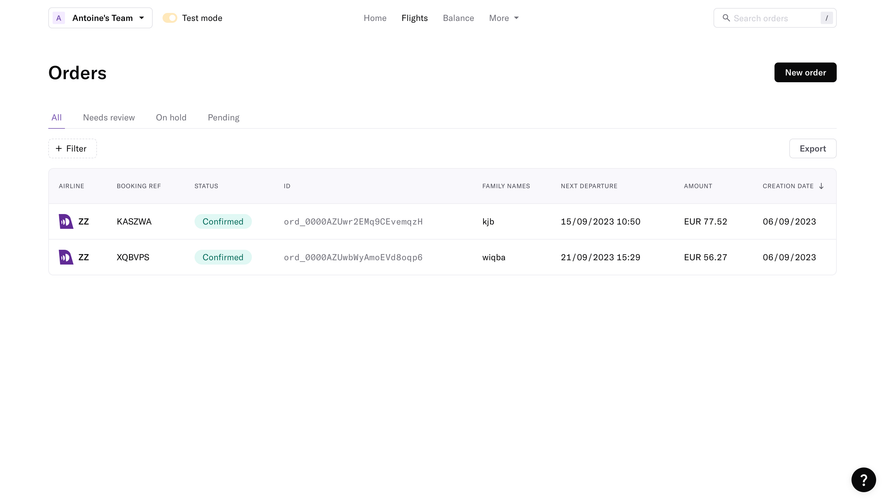
# Design from Reference: Duffel Empty Orders Dashboard
Create an original, high-fidelity visual design inspired by the reference. Prioritize composition, typography, colors, spacing, and component styling over technical implementation.
## Reference
- **Product:** Duffel
- **Category:** Empty State
- **Screenshot:** https://cdn.prod.website-files.com/5e9dc792e1210c5325f7ebbc/6acadb77494a081980ea08e1_6acada953a2a243ca5f5d36e_cms-791d380cf8e0243fa5c9f2f2.webp
Analyze the screenshot first. If inaccessible, request it rather than guessing.
## Content
{{content.instructions}}
{{content.data}}
Preserve essential messaging and factual accuracy. Adapt structure and copy length for visual balance; never invent product claims.
## Visual Design
### Overall aesthetic
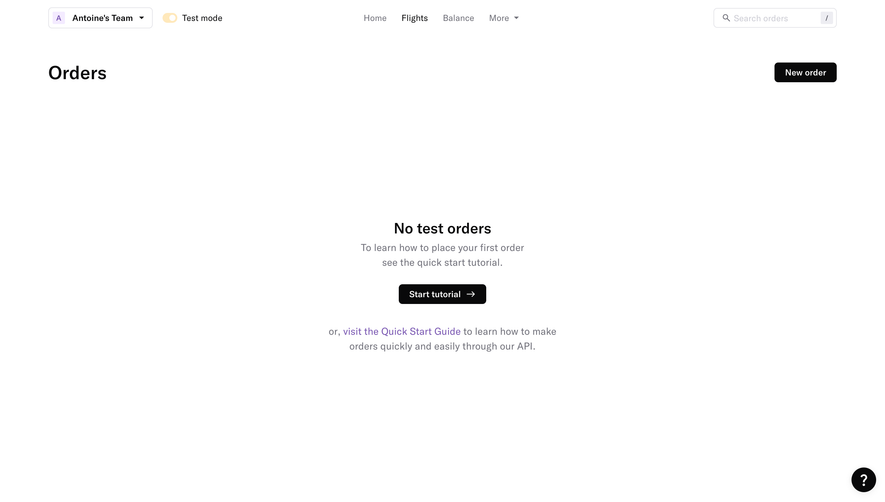
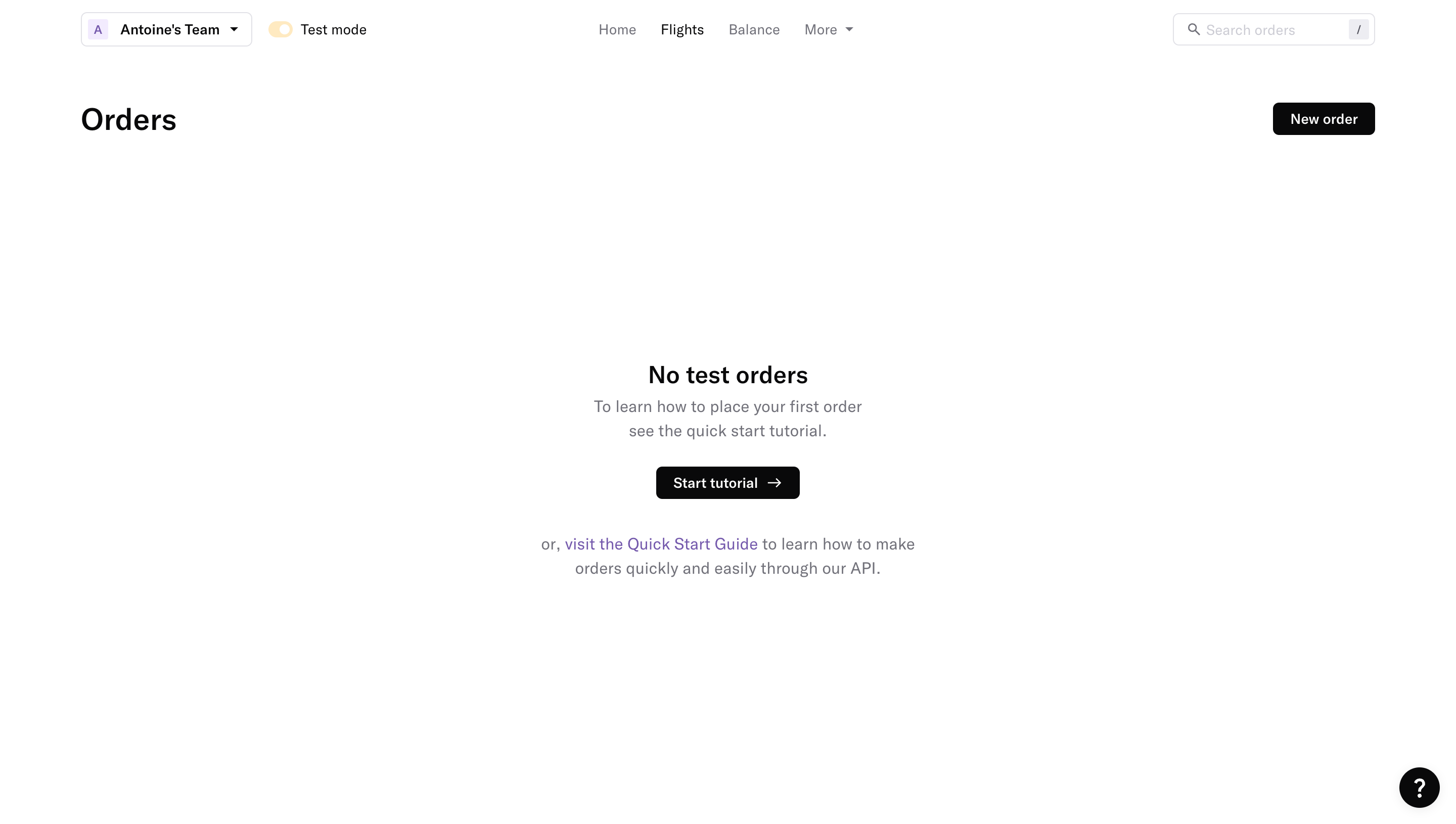
- **Character:** A highly minimal orders dashboard uses a white canvas, black actions and a centered instructional empty state.
- **Capture scale:** The screenshot measures 2880 × 1630 image pixels. Approximate CSS dimensions assume a 1440 × 815 viewport at 2× density; the scale is unverified.
- **Tone:** Sparse navigation and broad blank space make the absence of test orders explicit.
### Page composition
- **Top controls:** A workspace dropdown and test-mode toggle sit left; Home, Flights, Balance and More align centrally; order search sits right.
- **Page header:** Orders is left aligned below the top bar, with New order at the opposite edge.
- **Empty state:** A centered text group occupies the middle of the workspace, containing a short heading, two-line tutorial explanation, dark action and secondary guide link.
- **Utility:** A small black circular help button sits at the lower-right corner.
### Information hierarchy
- **Page context:** Orders identifies the area, while the active test-mode switch explains the empty-state wording.
- **Empty-state heading:** No test orders is bold and larger than its supporting copy.
- **Primary guidance:** Start tutorial is the most prominent action in the central group.
- **Alternative path:** A purple Quick Start Guide link appears in a separate two-line sentence below.
- **Creation action:** New order remains available at the page header, distinct from instructional guidance.
### Typography
- **Family:** A clean sans-serif is visible; exact identity is unverified.
- **Page heading:** Approximately 30px CSS, semibold, around 38px line-height.
- **Empty heading:** Approximately 24px semibold.
- **Supporting copy:** Approximately 16px regular with 24px line-height, in muted gray.
- **Buttons and navigation:** Approximately 14px medium.
- **Search:** Approximately 13–14px pale text with a small keyboard-shortcut badge.
### Colors & surfaces
- **Canvas:** Sampled #FFFFFF supplies almost the whole interface.
- **Primary ink:** Sampled #09090A supplies headings and filled actions.
- **Secondary text:** Sampled #71717B supplies navigation and explanatory copy.
- **Borders:** Sampled #E2E2E7 and #EDEDF2 supply pale outlines.
- **Guide accent:** Sampled #7958B1 contributes to the purple guide-link treatment.
- **Workspace accent:** Sampled #F4EBFF supplies the pale lavender initials tile; the test toggle is pale amber.
### Components
- **Workspace selector:** A compact white bordered rectangle contains an initials tile, workspace label and chevron.
- **Test switch:** A small amber pill with white thumb sits beside its text label.
- **Search:** A roughly 200 × 32px CSS field has a magnifying-glass icon and small slash shortcut badge.
- **Primary buttons:** New order and Start tutorial are black compact rectangles with white text, around 32px high and 5px radii; the tutorial includes a right arrow.
- **Help button:** A roughly 40px black circle contains a white question mark.
- **Empty-state group:** Text sits directly on white without an enclosing card or illustration.
### Visual rhythm
- **Outer gutters:** Approximately 80px CSS side margins align header controls and page title.
- **Central spacing:** Roughly 24px separates support copy from the tutorial action, with a larger break before the guide sentence.
- **Open canvas:** Extensive blank space above and below isolates the empty-state group.
- **Alignment:** Central text and action share one axis; page-level controls use a separate wide horizontal grid.
### Responsive
- **Evidence limit:** Only the desktop empty state is visible; tutorial, order creation and mobile behavior are unverified.
- **Header recommendation:** Wrap workspace/test controls and collapse secondary navigation as width decreases.
- **Empty-state recommendation:** Use a fluid centered column with 20–24px padding and readable line length.
- **Action recommendation:** Keep both tutorial and order-creation paths accessible without overlapping the help launcher.
### Adaptation guidance
- **State design:** Distinguish test-order and production-order empty states explicitly.
- **Guidance:** Preserve a concise explanation, one primary tutorial action and one secondary documentation path.
- **Minimal styling:** Retain the white canvas and restrained use of purple/amber accents.
- **Accessibility:** Label search and test-mode controls, provide clear link destinations and visible keyboard focus.
Use this context to reproduce the reference's visual language: layout, typography, colors, spacing, borders, radii, and distinctive elements. The screenshot takes priority if descriptions conflict.
## Direction
{{preferences.fidelityInstructions}}
## Output
{{output.instructions}}
Deliver a polished, cohesive design with precise alignment, hierarchy, and spacing. Produce the requested visual artifact, not just a description. If unsupported, explain the limitation.
.webp)



.avif)