.avif)

1. Header: The page starts with a header containing the Mailchimp logo on the left-hand side, a "Sign Up" button on the right, and a navigation menu with links to various sections of the website, including "Integrations." 2. Hero section: This section has a title "Connect Mailchimp and Mixpanel," with a subheading "Create targeted email campaigns using Mixpanel data." There's also a short description of the integration, a green "Connect Mailchimp to Mixpanel" button, and a visual representation of the integration. 3. Overview section: This section provides a more detailed look at the Mailchimp-Mixpanel integration's capabilities, including how it can help you create targeted email campaigns, import Mixpanel data into Mailchimp, and more. There are also several visual aids, such as screenshots and illustrations, to help illustrate the integration. 4. Features section: This section contains a list of features available with the integration, including "Automatically Create Segments," "Trigger Emails Based on Mixpanel Data," "Personalize Campaigns with Mixpanel Data," and more. Each feature has a short description and a visual aid. 5. How It Works section: This part of the page outlines how the integration works, starting with how to authorize Mailchimp and Mixpanel. There's a step-by-step guide, including screenshots, for creating and sending targeted email campaigns using Mixpanel data. 6. Benefits section: This section discusses the benefits of using the Mailchimp-Mixpanel integration, including "Improved Customer Engagement," "Increased Revenue and ROI," and "Save time and effort." Each benefit has a short description and a visual aid. 7. Getting Started section: This section provides a quick overview of how to get started with the Mailchimp-Mixpanel integration, including how to install it and connect it with your Mixpanel and Mailchimp accounts. There's also a green "Connect Mailchimp to Mixpanel" button. 8. Bottom CTA: The page ends with a button for viewers to sign up to Mailchimp and create an account.
.webp)
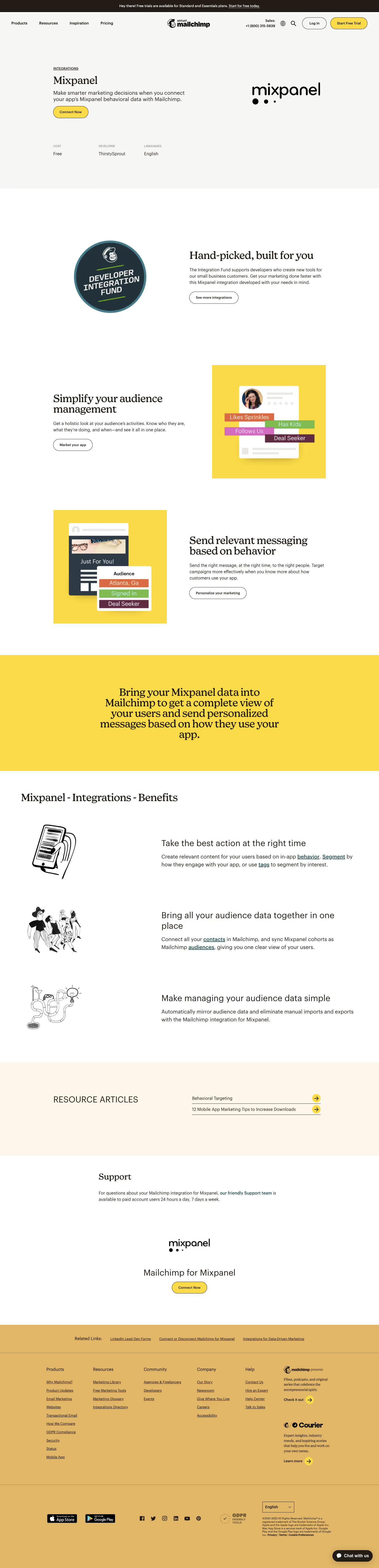

Mailchimp Integrations Page

Mailchimp
Smart all-in-one Marketing Platform
Designed by
No items found.
Category
Patterns
No items found.
Tech Stack
Added on
March 17, 2023