Design with AI
Generate a new design based on this screen using your own content.
# Design from Reference: Lightspark Password Reset Request
Create an original, high-fidelity visual design inspired by the reference. Prioritize composition, typography, colors, spacing, and component styling over technical implementation.
## Reference
- **Product:** Lightspark
- **Category:** Login
- **Screenshot:** https://cdn.prod.website-files.com/5e9dc792e1210c5325f7ebbc/6aca263afe95dabb920563a9_6aca230edd6a0d90f0d40914_cms-fad628264b7a28c3051efbc1.webp
Analyze the screenshot first. If inaccessible, request it rather than guessing.
## Content
{{content.instructions}}
{{content.data}}
Preserve essential messaging and factual accuracy. Adapt structure and copy length for visual balance; never invent product claims.
## Visual Design
### Overall aesthetic
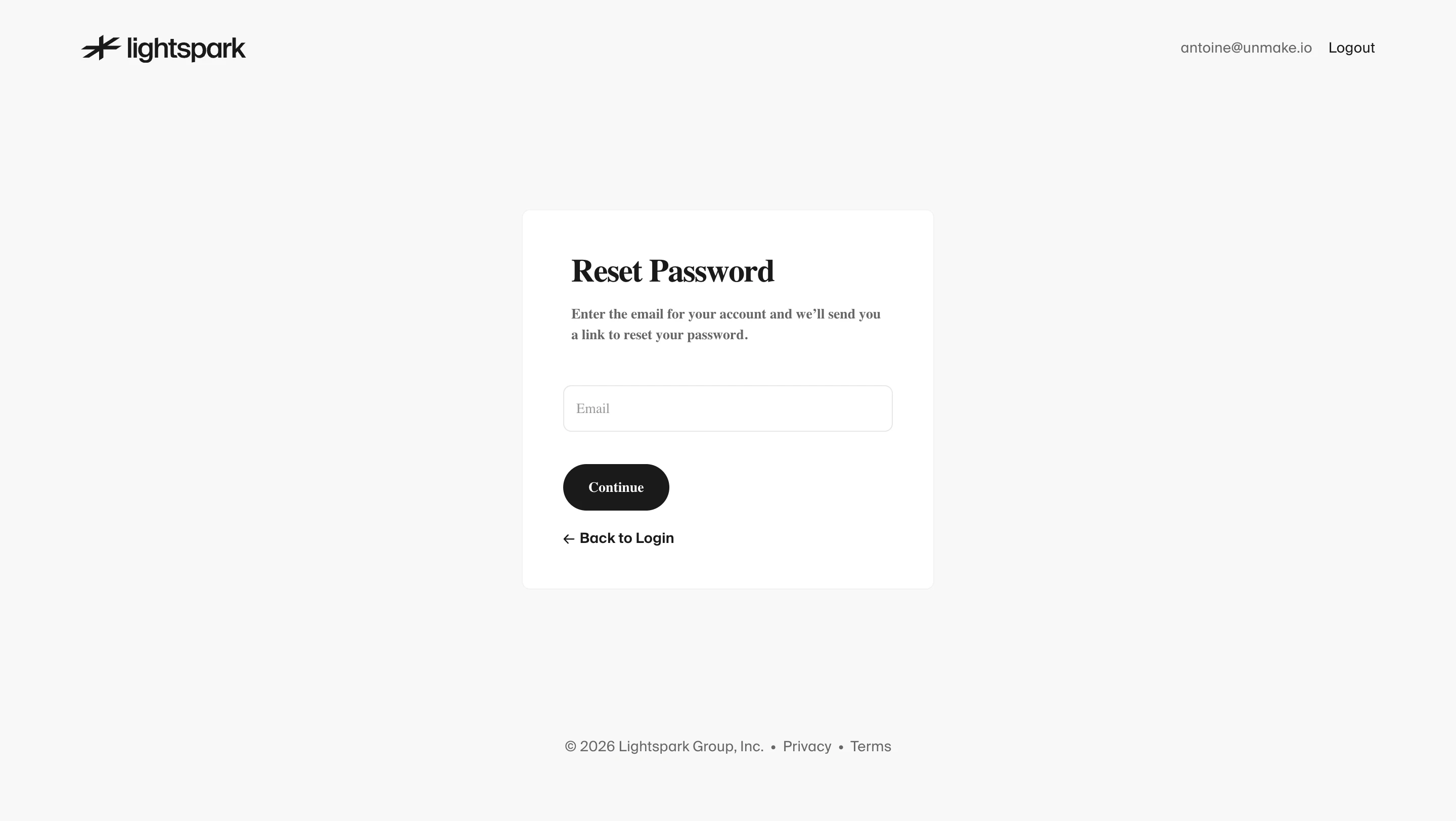
- **Character:** Minimal monochrome password-reset screen with warm off-white ground, small white card and an editorial serif form hierarchy.
- **Evidence and scale:** Screenshot measures 2880 × 1624 image pixels. Sizes estimate a 1440 × 812 CSS viewport at 2× capture scale; actual DPR and exact font identities remain unverified.
### Page composition
- **Header:** Black brand mark at upper-left; muted account text and Logout link at upper-right.
- **Reset card:** A compact white panel approximately 406 × 375px CSS is centered horizontally and positioned slightly above vertical center.
- **Form stack:** Serif Reset Password heading, two-line explanation, empty email input, dark pill Continue button and left-arrow Back to Login link.
- **Footer:** Small centered copyright/privacy/terms line sits near the bottom with substantial empty space above.
### Information hierarchy
- **Task:** Large serif heading leads immediately to the instruction explaining email-link recovery.
- **Single field:** One email input keeps the task focused.
- **Action hierarchy:** Dark Continue pill is primary; bold text Back to Login is the secondary escape route.
- **Utilities:** Account/logout and footer links remain peripheral to the recovery task.
### Typography
- **Heading:** Approximately 32px CSS bold serif with compact leading.
- **Instruction:** Around 14px bold-to-medium serif, approximately 20px line height.
- **Field/button:** Email placeholder around 14px serif; Continue around 14px bold serif.
- **Navigation/footer:** Back link and outer utilities use sans-serif around 14px. Exact serif/sans family names and computed weights are unverified.
### Colors & surfaces
- **Measured ground:** Warm near-white #F8F8F7 fills the page; white #FFFFFF forms the card/input.
- **Measured foreground:** Near-black #1A1A1A supports heading/button/brand.
- **Measured secondary:** Gray #666666 supports account/footer/instructions, with #525251 in intermediate text pixels.
- **Measured boundaries:** Pale #E6E6E6 and #F2F2F2 support fine borders. No saturated accent is present.
### Components
- **Card shell:** Approximately 406 × 375px, thin very pale border, radius near 8px and roughly 40–48px padding; no prominent shadow.
- **Email input:** Approximately 326 × 45px, white fill, thin gray outline, radius near 8px and about 12px horizontal inset.
- **Continue:** Content-width dark pill around 105 × 47px, white label and fully rounded ends.
- **Back link:** Dark arrow and bold sans-serif label aligned to the input/button left edge.
- **Footer:** Compact centered inline links separated by small dots, without a separate colored footer region.
### Visual rhythm
- **Whitespace:** Large open margins isolate the reset card and reduce distraction.
- **Form spacing:** Heading/instruction are close; a larger roughly 40px interval precedes the input, followed by about 32px before Continue.
- **Alignment:** All internal content shares a consistent left edge, while header and footer use the full-page frame.
- **Type contrast:** Serif form content and sans-serif outer utilities create distinction without adding color.
### Responsive
- **Observed limit:** Only desktop empty reset form is shown; validation, email delivery and confirmation are unobserved.
- **Recommended layout:** Use a fluid capped card with 20–24px side margins, reducing padding only enough to preserve input width.
- **Recommended header:** Allow account/logout to wrap or simplify on phones while keeping the brand visible.
- **Recommended accessibility:** Provide an explicit email label rather than relying solely on the placeholder, and maintain touch-sized actions.
### Adaptation guidance
- **Preserve focus:** Use one recovery field, one primary action and a clear return route.
- **Keep visual restraint:** Warm off-white, white and near-black are sufficient; serif typography can supply the brand character.
- **Implementation:** Use email input semantics, visible focus and accessible feedback without exposing account existence. The screenshot does not establish successful reset submission or delivery.
Use this context to reproduce the reference's visual language: layout, typography, colors, spacing, borders, radii, and distinctive elements. The screenshot takes priority if descriptions conflict.
## Direction
{{preferences.fidelityInstructions}}
## Output
{{output.instructions}}
Deliver a polished, cohesive design with precise alignment, hierarchy, and spacing. Produce the requested visual artifact, not just a description. If unsupported, explain the limitation.
.webp)



.avif)