.webp)
Thank you! Your submission has been received!
Oops! Something went wrong while submitting the form.
Get SaaSFrame Pro
Monthly
$18
Quarterly
$48
Yearly
$180
Upgrade to access this feature
Browse all screens & flows
Filter and search screens & flows
Access Figma files
Access mobile versions
Bookmark screens & flows
Join now
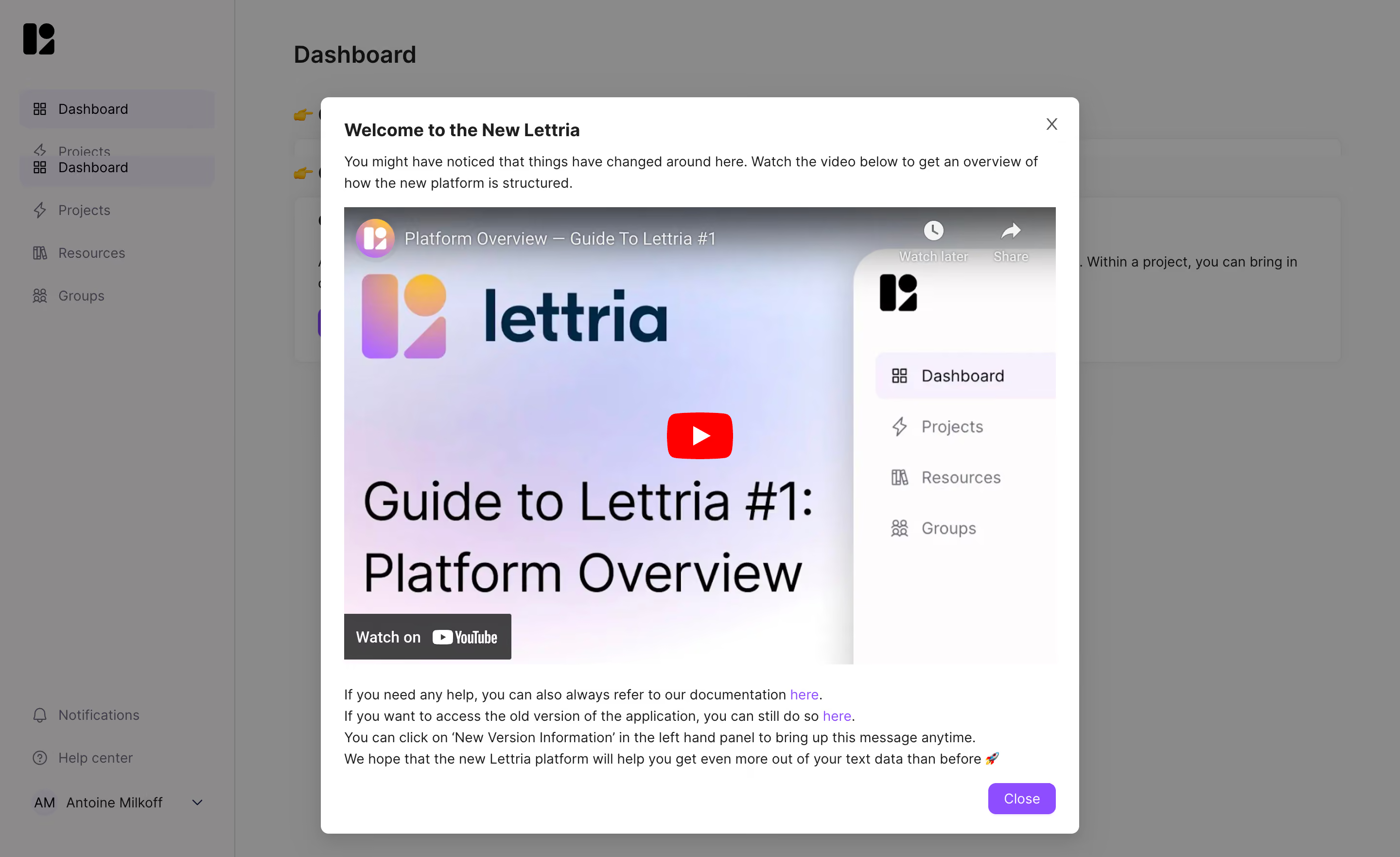
Lettria Welcome Screen

Lettria
The no-code AI platform for text
Designed by
No items found.

Bookmark
Bookmark

Design with AI
Thank you! Your submission has been received!
Oops! Something went wrong while submitting the form.
# Design from Reference: Lettria Welcome Screen
Create an original, high-fidelity visual design inspired by the reference. Prioritize composition, typography, colors, spacing, and component styling over technical implementation.
## Reference
- **Product:** Lettria
- **Category:** Welcome Screen
- **Screenshot:** https://cdn.prod.website-files.com/5e9dc792e1210c5325f7ebbc/6acb6e932837b9f3168fb2e3_6acb6c7cbaddc9f317e006d8_cms-790215c5807284c4d41a9fa5.webp
Analyze the screenshot first. If inaccessible, request it rather than guessing.
## Content
{{content.instructions}}
{{content.data}}
Preserve essential messaging and factual accuracy. Adapt structure and copy length for visual balance; never invent product claims.
## Visual Design
### Overall aesthetic
- **Style:** Light application dashboard covered by a large white welcome modal and a neutral-gray backdrop.
- **Character:** A prominent embedded overview video, pastel thumbnail and violet links/action make the announcement instructional and approachable.
- **Capture:** The image measures 2880 × 1762 pixels. CSS estimates assume a 2× capture, equivalent to approximately 1440 × 881 CSS pixels; actual scale and font identity are unverified.
### Page composition
- **Background shell:** An approximately 242-CSS-pixel sidebar contains dashboard, project, resource and group navigation, with help/account utilities below.
- **Modal placement:** A white panel approximately 780 × 757 pixels begins near x330, y100.
- **Introduction:** A bold welcome title and two-line explanation sit above the video.
- **Video area:** A large landscape player fills most of the modal width, with a platform-overview thumbnail.
- **Supporting copy:** Four compact lines below the video provide documentation, legacy-version and reopening guidance.
- **Actions:** A small X sits upper right; a violet Close button aligns at lower right.
### Information hierarchy
- **Announcement:** The bold title establishes a new-platform welcome.
- **Learning path:** The introduction directs attention to the overview video.
- **Dominant media:** The video is much larger than the surrounding text and carries the main instructional weight.
- **Secondary routes:** Violet inline links provide documentation and older-version access.
- **Dismissal:** The lower Close button is the primary visible action outside the player.
- **State scope:** The video is paused on its thumbnail; no playback or dismissed state is shown.
### Typography
- **Family:** A neutral sans-serif is visible; exact identity is unverified.
- **Modal title:** Approximately 20-pixel CSS size, bold, with 28-pixel line height.
- **Body:** Approximately 14 pixels with 22-pixel line height.
- **Video artwork:** Large thumbnail text belongs to the media and is separate from the modal's UI scale.
- **Links:** Violet phrases retain normal body size.
- **Close label:** Approximately 14 pixels, white and centered.
### Colors & surfaces
- **Measured foreground:** White #FFFFFF fills the modal.
- **Measured overlay appearance:** Gray #8A8A8A and #8C8A8B dominate the dimmed background; these are composited image colors.
- **Measured pale media:** #FEFCFD and related near-white/pastel colors occur in the thumbnail.
- **Accent roles:** Violet marks links and the Close button; the player uses a red central play control.
- **Text:** Dark gray/black supports the modal copy.
- **Depth:** A subtle modal shadow and the uniform scrim separate the welcome content from the dashboard.
### Components
- **Modal frame:** Approximately 8-pixel corners with 24-pixel padding.
- **Video player:** Approximately 732 × 470 pixels in the captured presentation, with title overlay, play control, watch-later/share icons and platform branding.
- **Thumbnail:** Pastel gradient branding and a miniature sidebar illustrate the platform overview.
- **Resource links:** Two inline violet destinations appear in the supporting paragraphs.
- **Dismissal controls:** A gray X and a roughly 69 × 32-pixel violet rounded button provide two close routes.
- **Background navigation:** Icon-label rows and pale selected fills remain visible beneath the overlay.
- **State scope:** No video interaction, resource destination or new-version settings panel is visible.
### Visual rhythm
- **Shared edges:** Title, introduction, player and supporting text align to the same modal inset.
- **Media emphasis:** The player occupies the central majority of the panel.
- **Compact footer copy:** Short line spacing groups the secondary guidance below the large media block.
- **Action separation:** The Close control sits below the text with a small right-aligned gap.
- **Backdrop quieting:** Dimmed margins keep attention inside the modal.
### Responsive
- **Recommendation — width:** Use a fluid modal with safe side gutters.
- **Recommendation — media:** Preserve the player's aspect ratio and readable controls.
- **Recommendation — height:** Allow scrolling on short viewports so supporting links and dismissal remain reachable.
- **Recommendation — accessibility:** Label the dialog, manage focus and provide video captions/alternative guidance.
- **Recommendation — dismissal:** Keep both close routes clear. No mobile state is evidenced.
### Adaptation guidance
- **Preserve the instructional focus:** Introduce the platform change, then offer a concise overview video.
- **Keep fallback routes:** Retain documentation and legacy-access guidance as secondary links.
- **Separate media typography:** Do not use thumbnail text sizes as modal UI tokens.
- **Reuse restrained styling:** White surface, dark copy, violet links/action and soft overlay are sufficient.
- **Define replay access separately:** The copy references reopening the message, but that control's location/state is not shown.
- **Avoid inferring playback content:** Only the video thumbnail and player controls are visible.
Use this context to reproduce the reference's visual language: layout, typography, colors, spacing, borders, radii, and distinctive elements. The screenshot takes priority if descriptions conflict.
## Direction
{{preferences.fidelityInstructions}}
## Output
{{output.instructions}}
Deliver a polished, cohesive design with precise alignment, hierarchy, and spacing. Produce the requested visual artifact, not just a description. If unsupported, explain the limitation.

.avif)
Category
Patterns
Tech Stack


Added on
April 28, 2023
Similar screens






Upgrade to SaaSFrame Pro now to see similar examples.
Monthly
$18 /month
Billed $18 monthly
Browse all screens & flows
Filter and search screens & flows
Search text in screenshots
Access Figma files
Access mobile versions
Join now
Quarterly
$16 /month
Billed $48 quarterly
Browse all screens & flows
Filter and search screens & flows
Search text in screenshots
Access Figma files
Access mobile versions
Join now
Yearly
$15 /month
Billed $180 yearly
Browse all screens & flows
Filter and search screens & flows
Search text in screenshots
Access Figma files
Access mobile versions
Join now