Design with AI
Generate a new design based on this screen using your own content.
# Design from Reference: Hugo Sign Up Flow
Create an original, high-fidelity visual design inspired by the reference. Prioritize composition, typography, colors, spacing, and component styling over technical implementation.
## Reference
- **Product:** Hugo
- **Category:** Account Setup
- **Screenshot:** https://cdn.prod.website-files.com/5e9dc792e1210c5325f7ebbc/6acbc93b1790037d3e05907a_6acbc6508356f50744ae7509_cms-ca9b1a9d445257b53c434c4c.webp
Analyze the screenshot first. If inaccessible, request it rather than guessing.
## Content
{{content.instructions}}
{{content.data}}
Preserve essential messaging and factual accuracy. Adapt structure and copy length for visual balance; never invent product claims.
## Visual Design
### Overall aesthetic
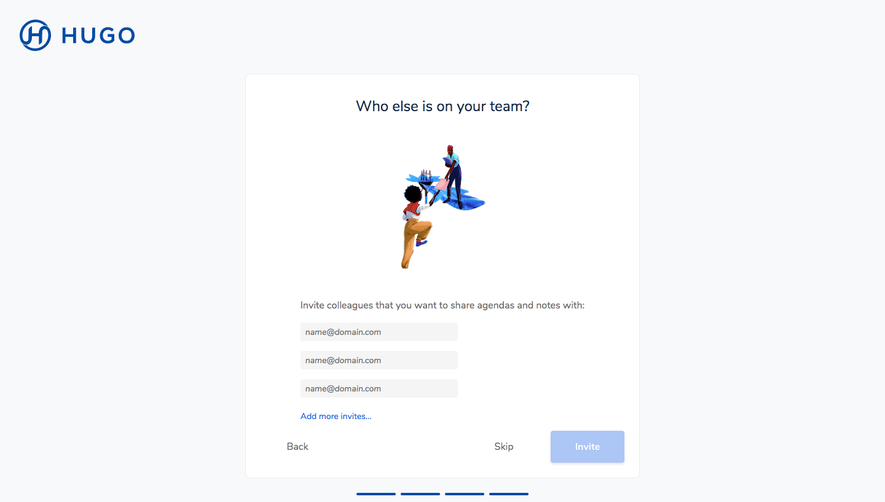
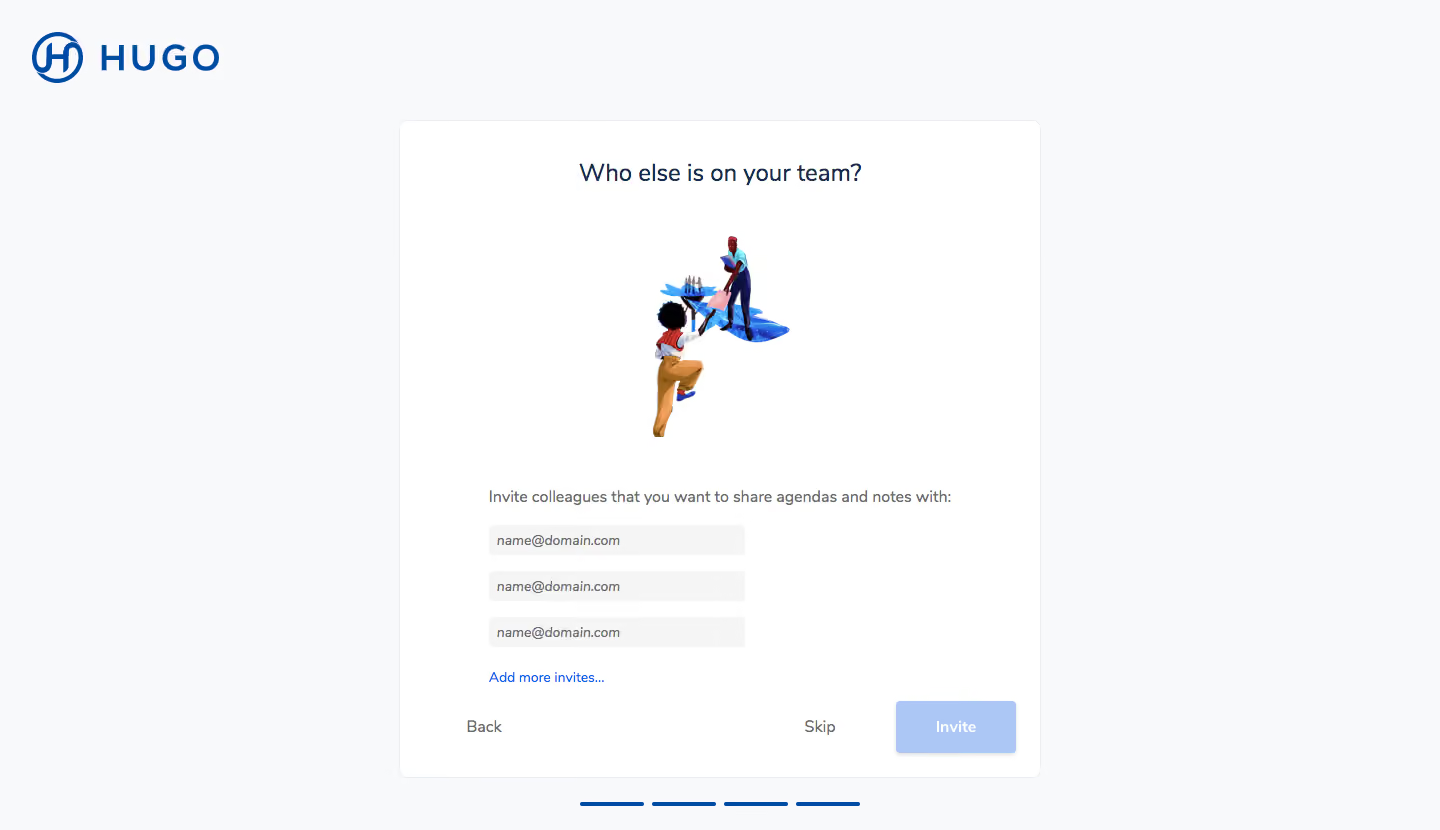
- **Character:** Calm team-invitation onboarding screen with a pale-gray canvas, white bordered card and blue brand accents.
- **Visual tone:** A small colorful human illustration softens an otherwise straightforward form.
- **Scale:** The screenshot is 1440 × 830 image px. Dimensions below are image estimates; CSS scale is unverified.
### Page composition
- **Brand:** Large blue HUGO wordmark sits at the upper left.
- **Card:** A centered approximately 640 × 660 px white panel contains a question heading, illustration, instruction and invitation fields.
- **Form:** Three narrow email inputs stack beneath the explanatory line, followed by Add more invites.
- **Footer actions:** Back sits left, Skip near the right and a pale-blue Invite button at the far right.
- **Progress:** Four short blue segments sit centered below the card.
### Information hierarchy
- **Question:** The centered heading asks who else is on the team.
- **Illustration:** A small teamwork scene sits between heading and instruction.
- **Invitation task:** A sentence explains sharing agendas/notes, then three email placeholders provide entry points.
- **Alternatives:** Add more invites expands the task, while Skip and Back offer secondary navigation.
- **State:** Fields are empty and Invite appears disabled; no invitations are sent or confirmed.
### Typography
- **Family:** Neutral sans-serif; exact identity is unverified.
- **Heading:** Approximately 24–26 image px, regular-to-medium, dark navy.
- **Instruction:** Around 16 px, muted.
- **Inputs/links:** Approximately 14 px; placeholders appear italic.
- **Actions:** Around 16 px, with bold white text on the invite button.
### Colors & surfaces
- **Measured base:** ICC-aware sRGB sampling yields #F8F9FA for the canvas and #FFFFFF for the card.
- **Measured action tones:** #004BA5 is a strong blue; pale #ACC6F5 appears in disabled action treatment.
- **Measured neutral:** #EBECF0 defines subtle borders and #6C6C6C muted text.
- **Measured foreground:** #172B4D is a dark navy tone.
- **Depth:** The card uses a fine outline and small corners; the Invite button has a faint shadow.
### Components
- **Card header:** Plain centered question with generous white space.
- **Illustration:** Two stylized people collaborate around a blue abstract surface.
- **Email fields:** Three approximately 255 × 30 image px pale-gray rectangles align left within the card's lower half.
- **Expansion link:** Blue text beneath the inputs offers additional invitations.
- **Invite action:** Approximately 120 × 52 px pale-blue rounded rectangle.
- **Progress segments:** Four short equal blue rules indicate a multi-step flow without visible text labels.
### Visual rhythm
- **Vertical spacing:** Large gaps around the illustration contrast with tightly stacked inputs.
- **Alignment:** Instruction, inputs and expansion link share a left axis, while heading/artwork are centered.
- **Footer:** Navigation spans the card width, separated from the inputs by a moderate gap.
- **Whitespace:** Broad margins isolate the onboarding task.
### Responsive
- **Evidence limit:** Only desktop is shown; recommendations follow.
- **Card:** Use fluid width with reduced padding on mobile.
- **Fields:** Expand email inputs to available width and maintain visible labels.
- **Navigation:** Wrap actions without losing Skip or progress orientation.
### Adaptation guidance
- **Reusable pattern:** Invite teammates after account setup with optional expansion and an explicit skip path.
- **State clarity:** Distinguish empty/invalid email state from a sent invitation.
- **Accessibility:** Add programmatic field labels, announce extra fields and expose progress semantically.
- **Visual restraint:** Keep illustration secondary to the invitation task.
Use this context to reproduce the reference's visual language: layout, typography, colors, spacing, borders, radii, and distinctive elements. The screenshot takes priority if descriptions conflict.
## Direction
{{preferences.fidelityInstructions}}
## Output
{{output.instructions}}
Deliver a polished, cohesive design with precise alignment, hierarchy, and spacing. Produce the requested visual artifact, not just a description. If unsupported, explain the limitation.
.webp)



.avif)