Design with AI
Generate a new design based on this screen using your own content.
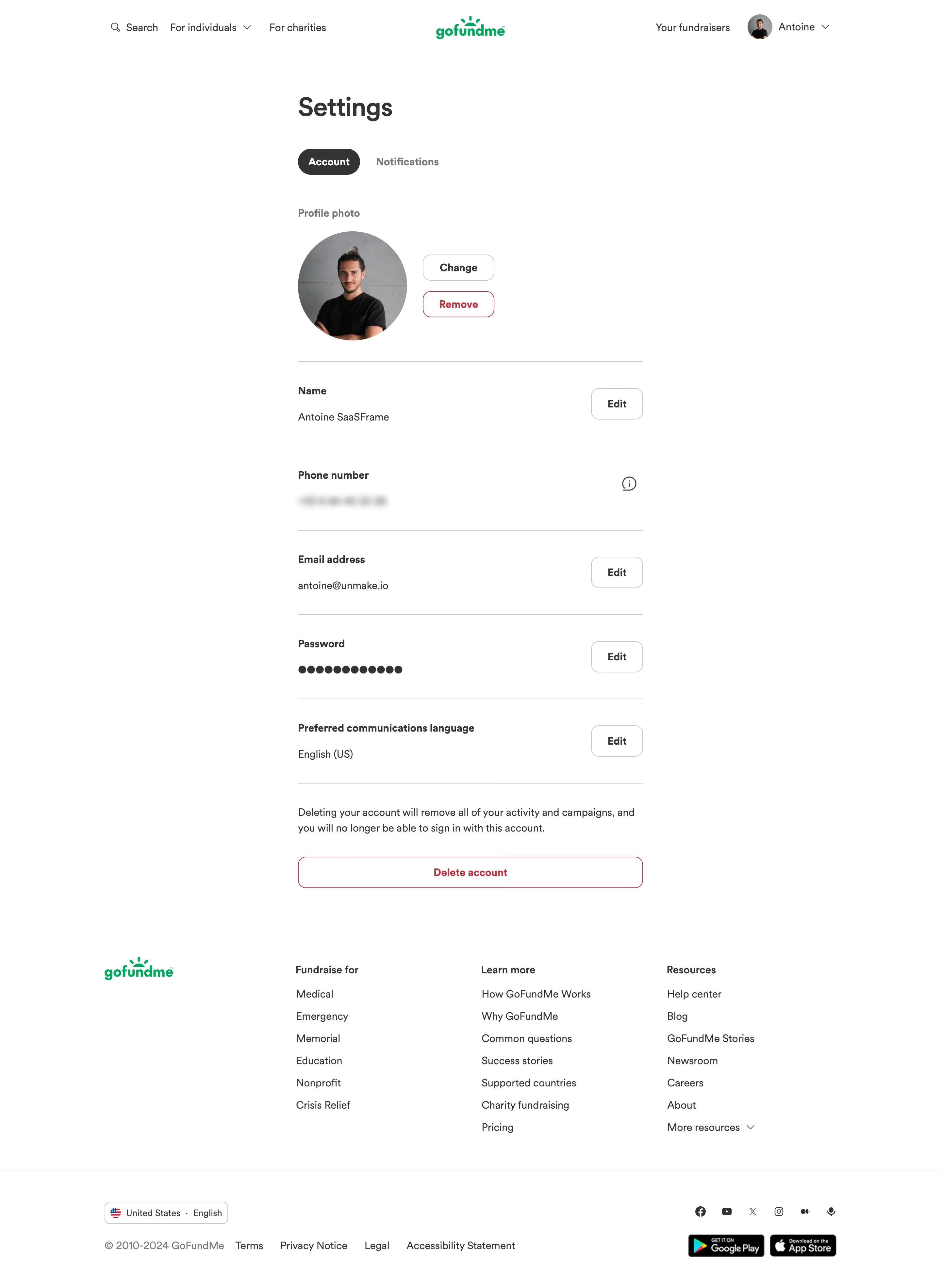
# Design from Reference: GoFundMe Account Settings
Create an original, high-fidelity visual design inspired by the reference. Prioritize composition, typography, colors, spacing, and component styling over technical implementation.
## Reference
- **Product:** GoFundMe
- **Category:** Settings
- **Screenshot:** https://cdn.prod.website-files.com/5e9dc792e1210c5325f7ebbc/6acad5235a5fdf4c30310ed9_6acad448c910b3adf9e4a32f_cms-182485f91d950fe33edc08fa.webp
Analyze the screenshot first. If inaccessible, request it rather than guessing.
## Content
{{content.instructions}}
{{content.data}}
Preserve essential messaging and factual accuracy. Adapt structure and copy length for visual balance; never invent product claims.
## Visual Design
### Overall aesthetic
- **Character:** A plain, spacious account-settings page with rounded controls, thin gray separators and restrained green branding.
- **Emphasis:** Dark text and white space define ordinary settings, while red outlines distinguish photo removal and account deletion.
### Page composition
- **Capture scale:** The source measures 2880 × 3942 pixels. A roughly 1440 × 1971 CSS-pixel page at 2× scale is plausible but unverified; both readable portions were inspected.
- **Header:** Search/audience links sit left, the green GoFundMe wordmark centers, and fundraiser/account utilities sit right.
- **Settings column:** A narrow roughly 528-pixel estimated CSS column is centered beneath the Settings heading and Account/Notifications tabs.
- **Content:** Profile photo controls precede separated rows for identity/contact, password and preferred language, then explanatory deletion copy and a full-width destructive action.
- **Footer:** A full-width ruled footer includes brand, three link columns, locale control, legal links, social icons and app-store badges.
### Information hierarchy
- **Page title:** Settings is the largest text, followed by a dark selected Account pill and muted Notifications tab.
- **Profile:** A large circular photo and Change/Remove controls precede the textual setting rows.
- **Rows:** Bold labels lead into regular values, with right-aligned Edit buttons or an information icon.
- **Destructive area:** A short explanation separates the deletion action from ordinary settings. Personal values are visible in the capture but need not be reproduced.
### Typography
- **Family:** A rounded sans serif is visible; exact identity is unverified.
- **Heading:** Approximately 40 estimated CSS pixels, bold, with compact line height.
- **Settings text:** Labels and buttons are around 16 pixels, semibold; values/descriptions are around 16 pixels with 24-pixel line height.
- **Footer:** Link labels remain around 16 pixels; secondary legal text uses muted gray.
### Colors & surfaces
- **Measured palette:** ICC-aware sRGB sampling yields white #FFFFFF, dark gray #333333, divider gray #C8C8C8, muted #767676, green #00AB53 and destructive red #CD193C.
- **Selection:** The Account tab uses a dark charcoal fill with white text.
- **Flat structure:** The page has no enclosing settings card or heavy shadow; horizontal rules and whitespace provide grouping.
### Components
- **Photo group:** A circular portrait around 168 estimated CSS pixels wide sits beside two compact rounded outlined controls.
- **Settings rows:** Approximately 128-pixel vertical groups align labels/values at left and rounded Edit buttons near the right boundary.
- **Password:** A row of dark masking dots represents the password; no password characters are visible.
- **Delete action:** A full-width white button around 48 pixels high uses red text, thin red outline and approximately 12-pixel corners.
- **Footer controls:** A compact outlined locale selector and store badges accompany the lower utility row.
### Visual rhythm
- **Spacing:** The title, tabs and profile group have generous separation; repeated setting rules establish a calm vertical cadence.
- **Alignment:** All settings labels, dividers and deletion controls share the same narrow column edges.
- **Scale contrast:** The narrow form area expands into a broad multi-column footer after a large visual break.
### Responsive
- **Recommendation:** Keep the settings column fluid with 20–24 CSS-pixel gutters and allow edit controls to move below values when necessary.
- **Recommendation:** Stack footer groups and keep photo/removal actions distinct on phones. No mobile rendering is shown.
### Adaptation guidance
- **Preserve:** Retain the simple label/value/edit pattern, restrained dividers and clearly separated destructive region.
- **Implement:** Use accessible labels and confirmation handling for destructive actions; the screenshot establishes appearance, not behavior.
- **Privacy:** Use generic placeholders in reusable examples and preserve masking for sensitive contact/password information.
Use this context to reproduce the reference's visual language: layout, typography, colors, spacing, borders, radii, and distinctive elements. The screenshot takes priority if descriptions conflict.
## Direction
{{preferences.fidelityInstructions}}
## Output
{{output.instructions}}
Deliver a polished, cohesive design with precise alignment, hierarchy, and spacing. Produce the requested visual artifact, not just a description. If unsupported, explain the limitation.
.webp)


.avif)