.webp)
Thank you! Your submission has been received!
Oops! Something went wrong while submitting the form.
Get SaaSFrame Pro
Monthly
$18
Quarterly
$48
Yearly
$180
Upgrade to access this feature
Browse all screens & flows
Filter and search screens & flows
Access Figma files
Access mobile versions
Bookmark screens & flows
Join now
Frame Verification

Frame
Unified suite of collaboration apps for teams
Designed by
No items found.

Bookmark
Bookmark

Design with AI
Thank you! Your submission has been received!
Oops! Something went wrong while submitting the form.
# Design from Reference: Frame Verification
Create an original, high-fidelity visual design inspired by the reference. Prioritize composition, typography, colors, spacing, and component styling over technical implementation.
## Reference
- **Product:** Frame
- **Category:** Verification
- **Screenshot:** https://cdn.prod.website-files.com/5e9dc792e1210c5325f7ebbc/6acad9c9a43009b06fe6c071_6acad956567bc9a3079be684_cms-53f7d4b74f1cc0cb63cc84b9.webp
Analyze the screenshot first. If inaccessible, request it rather than guessing.
## Content
{{content.instructions}}
{{content.data}}
Preserve essential messaging and factual accuracy. Adapt structure and copy length for visual balance; never invent product claims.
## Visual Design
### Overall aesthetic
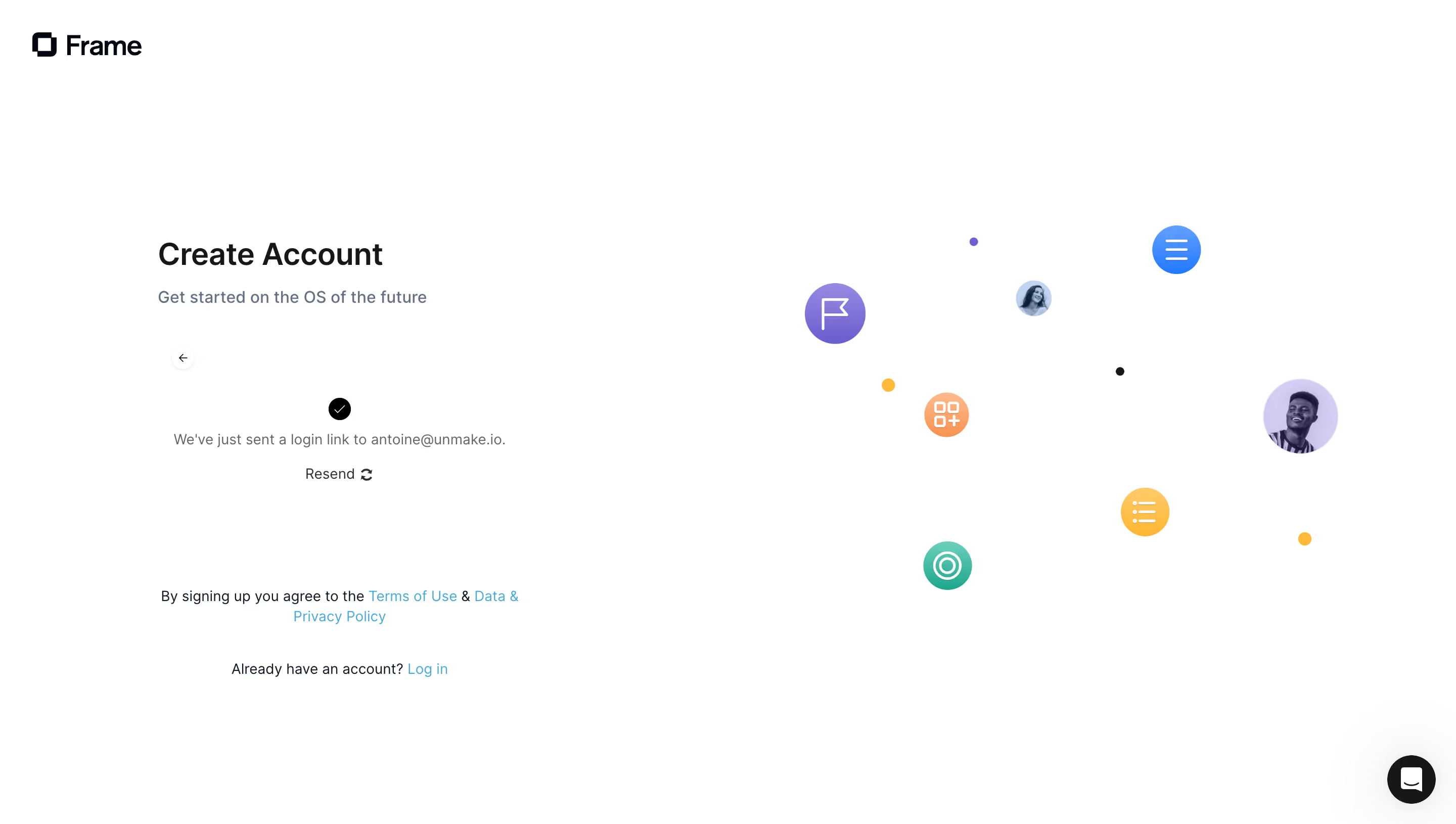
- **Style:** Minimal account-creation confirmation screen with a sparse left-hand message area and a playful cluster of floating icons on the right.
- **Character:** White canvas, dark neutral title, muted blue-gray supporting copy and bright cyan links. Colorful circular symbols and portraits provide most of the visual expression.
- **Surface treatment:** No enclosing form card or heavy dividers. Small circular controls and decorative discs float directly on white.
### Page composition
- **Capture scale:** 2880 × 1630 image px. CSS estimates assume an unverified 2× capture, corresponding to approximately 1440 × 815 CSS px.
- **Brand:** Frame wordmark and overlapping-square symbol sit near the upper-left corner, approximately 32 px from the left and top.
- **Content column:** A roughly 360 px-wide region begins around x=156, y=235 CSS px. Create Account and a one-line tagline lead the section.
- **Back control:** Small circular left arrow sits below the heading area, aligned near the content column's left edge.
- **Confirmation block:** Centered black check disc, sent-link message and Resend action occupy the middle of the left column.
- **Legal and login:** A centered two-line legal sentence appears well below confirmation, followed by a separate existing-account login line.
- **Decorative region:** The right half contains scattered circular feature symbols, two small portrait discs and tiny colored dots, with substantial white gaps.
- **Support launcher:** Black circular chat control sits at the lower-right corner.
### Information hierarchy
- **Primary heading:** Create Account remains the main title, while the confirmation block communicates that a login link has already been sent.
- **Confirmation emphasis:** A small black checkmark disc precedes the muted status message; no input field is visible in this captured state.
- **Recovery action:** Resend, paired with a circular-arrow symbol, is the immediate secondary action for the sent-link flow.
- **Alternate route:** Log in appears in cyan beneath the legal text.
- **Evidence limit:** The screenshot does not show delivery success beyond the interface message, link expiry, resend feedback or the next authentication screen.
### Typography
- **Family:** Neutral modern sans serif; exact identity is unverified.
- **Heading:** Approximately 30–32 CSS px, semibold, with 38 px leading.
- **Tagline:** Approximately 16 px with 24 px leading, muted blue-gray.
- **Confirmation and actions:** Approximately 14 px, regular weight, with 20 px leading.
- **Legal/login text:** Approximately 14 px with 20 px leading; links are distinguished primarily by cyan color.
- **Brand wordmark:** Approximately 26–28 px, heavier than surrounding small text. All values are visual CSS estimates under the assumed 2× capture.
### Colors & surfaces
- **Canvas:** Sampled sRGB #FFFFFF dominates the screen.
- **Primary ink:** Sampled #171717 supplies a near-black reference for strong text and circular controls.
- **Brand ink:** Sampled #050714 provides a dark navy-black reference among brand/text details.
- **Muted text:** Sampled #647087 supplies a blue-gray reference for supporting copy.
- **Decorative lavender:** Sampled #D2CBF5 appears among the soft purple portrait/disc tones.
- **Other accents:** Saturated purple, blue, orange, yellow, teal and cyan appear in floating symbols and links. Their exact values are not established by the dominant-color sample.
- **Depth:** Some decorative discs use subtle gradients; the chat control has a soft shadow, while the main text area stays flat.
### Components
- **Confirmation symbol:** Small black circle, approximately 22 px across, containing a thin white check.
- **Resend control:** Text action with a compact refresh symbol, centered below the message. No filled button surface is visible.
- **Back button:** Small faintly outlined white circle with a thin left arrow.
- **Decorative discs:** Approximately 45–75 px circles, containing line symbols such as a flag, list, grid and target, plus portrait images.
- **Small dots:** Tiny purple, yellow and black circles create visual rhythm between the larger discs.
- **Legal links:** Cyan inline text integrated into a centered sentence, with natural wrapping.
- **Chat launcher:** Approximately 48 px black circle with white speech icon, inset near the lower-right edge.
- **Brand symbol:** Dark overlapping rectangular outlines to the left of the Frame wordmark.
### Visual rhythm
- **Asymmetry:** A compact functional column balances a wider, airy decorative field.
- **Vertical spacing:** Large gaps separate heading, confirmation, legal copy and alternate login route.
- **Decorative rhythm:** Differing disc sizes and scattered dots suggest movement without a strict grid.
- **Focus restraint:** The bright artwork remains away from the confirmation text, preserving a clear reading area.
### Responsive
- **Evidence limit:** Only desktop is shown; recommendations below are not observed behavior.
- **Layout recommendation:** Prioritize the confirmation column on phones, centering it with 20–24 px side padding.
- **Decoration recommendation:** Reduce or hide peripheral discs so they cannot crowd status, legal or resend controls.
- **Message recommendation:** Allow long recipient identifiers to wrap safely without reproducing personal data in design examples.
- **Touch recommendation:** Provide larger effective hit areas for back, resend and chat controls.
- **Accessibility recommendation:** Announce status and resend feedback and provide clear keyboard focus; these behaviors are not verified by the image.
### Adaptation guidance
- **Preserve state clarity:** Explain that the next step occurs through the user's email and provide a clear resend route.
- **Use actual flow content:** Replace recipient information and legal destinations from the target product; do not copy personal identifiers from the reference.
- **Retain simplicity:** Keep one clear heading, concise status, recovery action and alternate-login route.
- **Adapt visual expression:** Use a coherent set of brand symbols or portraits while maintaining the open white composition.
- **Avoid invented behavior:** Do not imply timers, automatic redirection or successful delivery unless supported by the target implementation.
Use this context to reproduce the reference's visual language: layout, typography, colors, spacing, borders, radii, and distinctive elements. The screenshot takes priority if descriptions conflict.
## Direction
{{preferences.fidelityInstructions}}
## Output
{{output.instructions}}
Deliver a polished, cohesive design with precise alignment, hierarchy, and spacing. Produce the requested visual artifact, not just a description. If unsupported, explain the limitation.

.avif)
Category
Patterns
Tech Stack

Added on
October 2, 2023



Similar screens






Upgrade to SaaSFrame Pro now to see similar examples.
Monthly
$18 /month
Billed $18 monthly
Browse all screens & flows
Filter and search screens & flows
Search text in screenshots
Access Figma files
Access mobile versions
Join now
Quarterly
$16 /month
Billed $48 quarterly
Browse all screens & flows
Filter and search screens & flows
Search text in screenshots
Access Figma files
Access mobile versions
Join now
Yearly
$15 /month
Billed $180 yearly
Browse all screens & flows
Filter and search screens & flows
Search text in screenshots
Access Figma files
Access mobile versions
Join now