.avif)



1. Header: The page features a header section that contains the Dynaboard logo at the top left corner, the navigation menu at the top right corner, and a call-to-action button labeled "Join for Free" at the center of the header. The header is sticky, meaning it remains visible as the user scrolls down the page. 2. Hero Section: The hero section features a banner with a background image of a team in a meeting room. The banner has a heading that reads "Features" and sub-headings that briefly describe the different features of Dynaboard. 3. Features Section: The features section contains six main features of Dynaboard, each with a title that describes the feature and a paragraph that explains how the feature works. They are presented in two columns. 4. Testimonials Section: The testimonials section features testimonials from satisfied Dynaboard users. Each testimonial includes a photo of the user, their name, and their quote. 5. Call-to-Action Section: The call-to-action section encourages users to sign up for Dynaboard by highlighting the benefits of doing so. The section features a brief paragraph that explains the benefits of using Dynaboard and a call-to-action button labeled "Join for Free." 6. Footer: The footer contains links to important pages such as the privacy policy, terms of service, and contact page. It also contains social media links and a brief description of Dynaboard. Overall, the page has a clean and organized layout with clear headings and easy-to-read text. The use of images, testimonials, and a call-to-action button helps to engage the user and encourage them to sign up for Dynaboard.
.webp)
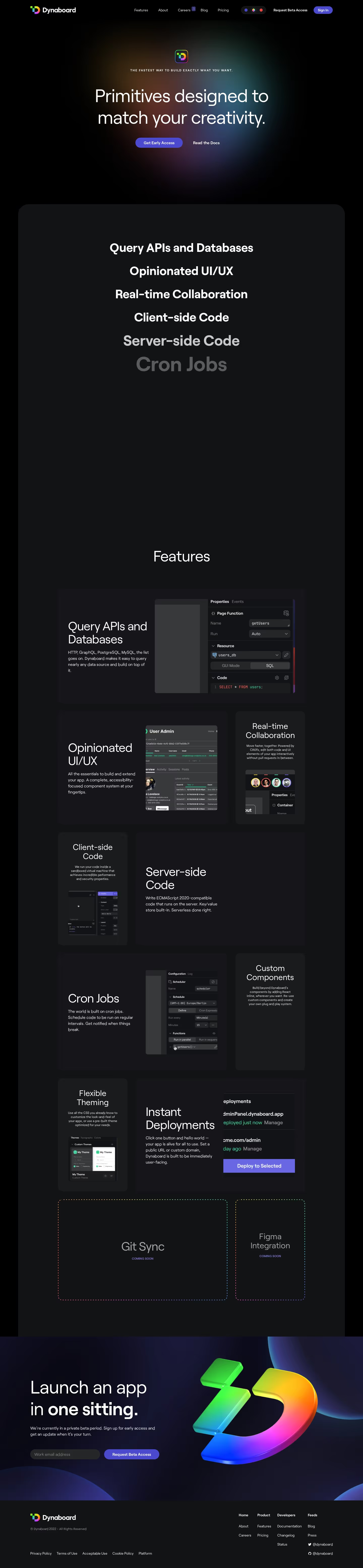

Dynaboard Features Page

Dynaboard
Develop fast, powerful web apps
Designed by
No items found.
Category
Patterns
No items found.
Tech Stack
Added on
August 10, 2022