Design with AI
Generate a new design based on this screen using your own content.
# Design from Reference: Dokably Text Editor
Create an original, high-fidelity visual design inspired by the reference. Prioritize composition, typography, colors, spacing, and component styling over technical implementation.
## Reference
- **Product:** Dokably
- **Category:** Text Editor
- **Screenshot:** https://cdn.prod.website-files.com/5e9dc792e1210c5325f7ebbc/6acb6c0d5391d62536b6711f_6acb6aae672175f31f248bfd_cms-a76b3b7320b778cdd152d428.webp
Analyze the screenshot first. If inaccessible, request it rather than guessing.
## Content
{{content.instructions}}
{{content.data}}
Preserve essential messaging and factual accuracy. Adapt structure and copy length for visual balance; never invent product claims.
## Visual Design
### Overall aesthetic
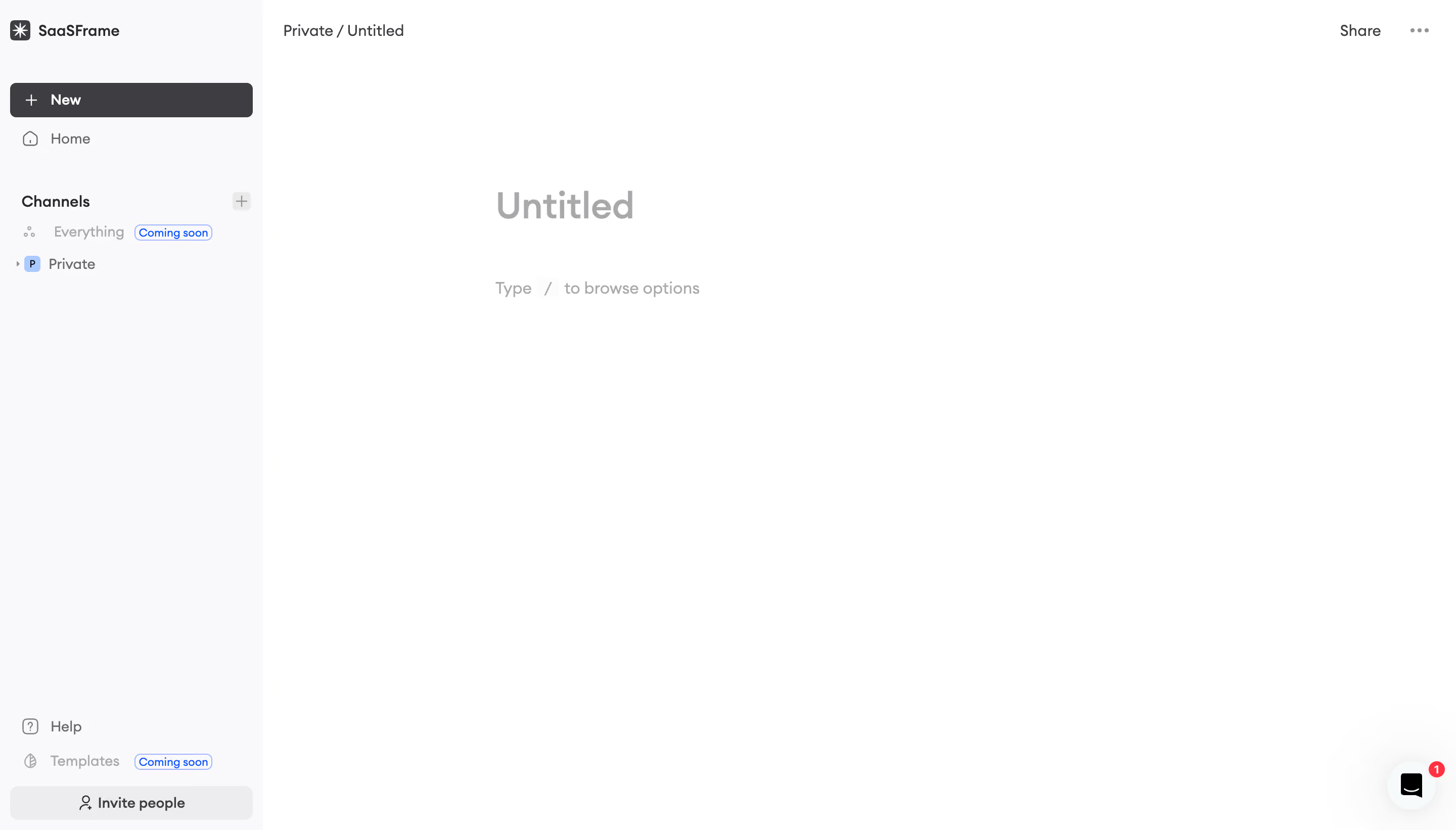
- **Character:** A sparse document editor with a pale navigation sidebar, white writing canvas and subdued empty-document placeholders.
- **Focus:** The design leaves almost all of the workspace blank, with only title and slash-command guidance in the writing column.
### Page composition
- **Capture scale:** The source measures 2880 × 1642 pixels. A roughly 1440 × 821 CSS-pixel viewport at 2× scale is plausible but unverified.
- **Sidebar:** A roughly 260-pixel estimated CSS rail contains workspace identity, New, Home, channel navigation and bottom utilities.
- **Top bar:** A Private / Untitled breadcrumb sits at left of the main area; Share and overflow controls sit at right.
- **Editor:** A large Untitled placeholder begins about 230 pixels inside the main canvas, with a slash-command hint below.
- **Utilities:** Help, unavailable template navigation and Invite people sit at sidebar bottom; a chat launcher with badge floats lower right.
### Information hierarchy
- **Document:** The large gray Untitled placeholder is the main canvas focus.
- **Guidance:** “Type / to browse options” appears below in smaller gray text.
- **Creation/navigation:** A dark New button is the strongest sidebar action; channel labels and Private hierarchy provide context.
- **Availability:** Small blue outlined Coming soon badges mark unavailable sidebar destinations.
### Typography
- **Family:** A rounded sans serif is visible; exact identity is unverified.
- **Title placeholder:** Approximately 36 estimated CSS pixels, bold, in light gray.
- **Body hint:** Around 16 pixels with 24-pixel line height.
- **Navigation:** Around 14 pixels, regular to medium; section labels and New are heavier.
- **Badges:** Small compact blue text around 11–12 pixels.
### Colors & surfaces
- **Measured palette:** ICC-aware sRGB sampling yields white #FFFFFF, sidebar #F9F9FA, dark #3E3E41, pale row #EDEDEE and placeholder gray #A9A9AB.
- **Accents:** Blue appears in small status badges and channel icon details; red marks the chat notification.
- **Treatment:** The interface is flat, with minimal borders and small rounded corners on buttons/selected surfaces.
### Components
- **New button:** A nearly sidebar-wide dark rounded rectangle combines a plus sign and bold label.
- **Channel tree:** A Channels heading has a right-side plus affordance; rows use small icons and an expandable Private entry.
- **Editor placeholders:** A large title field and smaller slash-command line communicate the empty state without a separate welcome card.
- **Top controls:** Plain Share text and a three-dot overflow menu remain understated.
- **Bottom utilities:** A wide light Invite people row is separated from Help/Templates links above.
### Visual rhythm
- **Whitespace:** The writing canvas is intentionally almost empty, maximizing focus on document creation.
- **Alignment:** Breadcrumb, editor content and sidebar navigation each follow their own consistent column.
- **Sidebar pacing:** Broad gaps distinguish workspace navigation, channels and lower help/invitation utilities.
### Responsive
- **Recommendation:** Collapse the sidebar into a drawer and reduce the editor's large left inset to comfortable phone gutters.
- **Recommendation:** Keep Share/overflow reachable and preserve the slash-command hint without crowding the title. No mobile state is captured.
### Adaptation guidance
- **Preserve:** Retain the quiet writing canvas, clear title placeholder and compact creation/navigation shell.
- **Implement:** Provide accessible editor labeling, keyboard command discovery and visible focus states; behavior is not verified.
- **Availability:** Keep unavailable features clearly labeled and visually subordinate to usable navigation.
Use this context to reproduce the reference's visual language: layout, typography, colors, spacing, borders, radii, and distinctive elements. The screenshot takes priority if descriptions conflict.
## Direction
{{preferences.fidelityInstructions}}
## Output
{{output.instructions}}
Deliver a polished, cohesive design with precise alignment, hierarchy, and spacing. Produce the requested visual artifact, not just a description. If unsupported, explain the limitation.
.webp)


.avif)