Generate a new design based on this screen using your own content.
Thank you! Your submission has been received!
Oops! Something went wrong while submitting the form.
# Design from Reference: Claude Recent Chats
Create an original, high-fidelity visual design inspired by the reference. Prioritize composition, typography, colors, spacing, and component styling over technical implementation.
## Reference
- **Product:** Claude
- **Category:** Empty
- **Screenshot:** https://cdn.prod.website-files.com/5e9dc792e1210c5325f7ebbc/69971bfc8603da12e1e631fe_RqVigk3jMpRk1cX2IBbJGHKTHtKtx1nuFVJtvyk0ABk.avif
Analyze the screenshot first. If inaccessible, request it rather than guessing.
## Content
{{content.instructions}}
{{content.data}}
Preserve essential messaging and factual accuracy. Adapt structure and copy length for visual balance; never invent product claims.
## Visual Design
Use this context to reproduce the reference's visual language: layout, typography, colors, spacing, borders, radii, and distinctive elements. The screenshot takes priority if descriptions conflict.
## Direction
{{preferences.fidelityInstructions}}
## Output
{{output.instructions}}
Deliver a polished, cohesive design with precise alignment, hierarchy, and spacing. Produce the requested visual artifact, not just a description. If unsupported, explain the limitation.
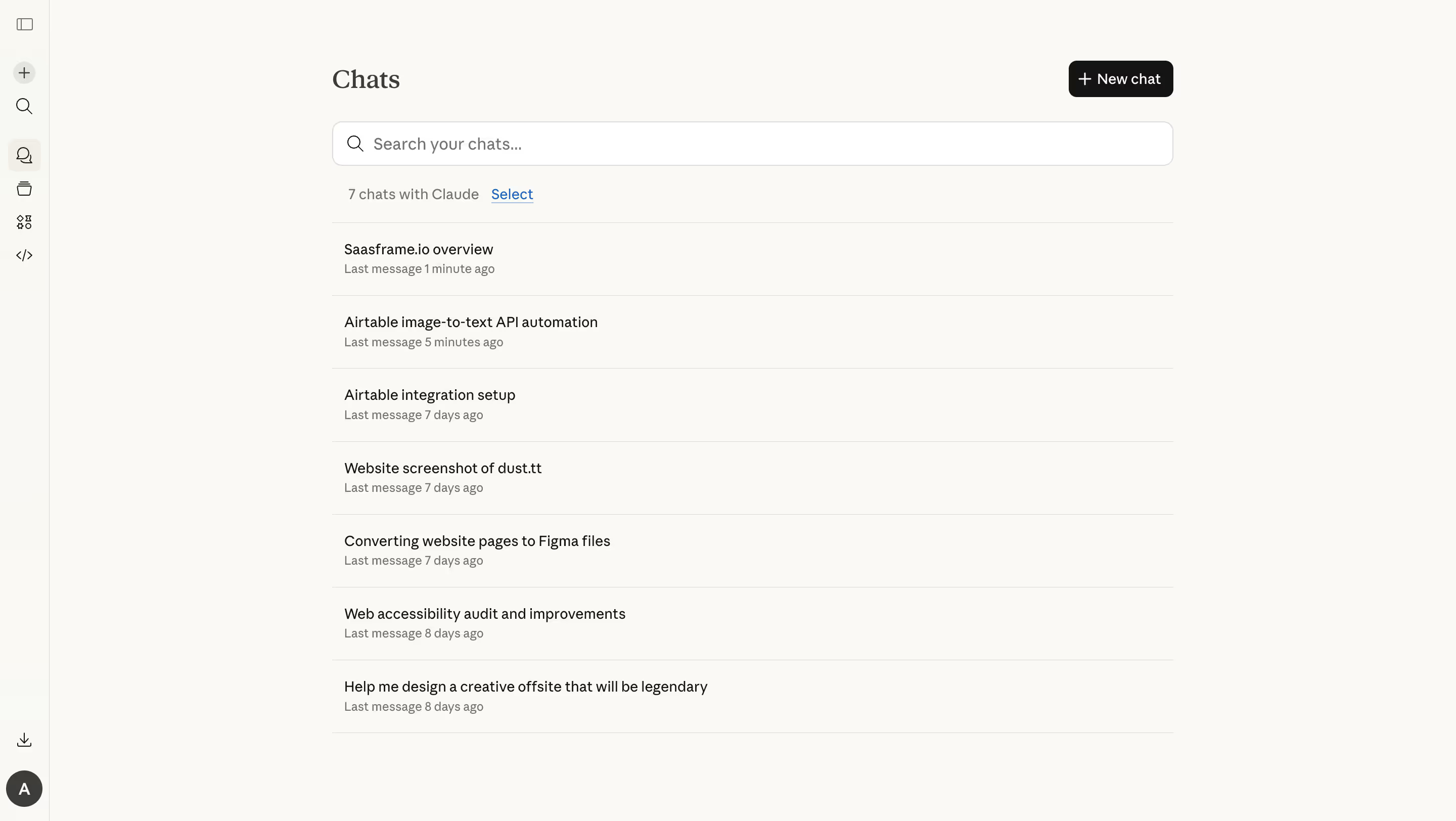
First thing you notice is how quiet this page is. Cream background, minimal chrome, zero visual noise. The chat list reads like a clean notebook. Each conversation gets a title and a soft gray timestamp. That's it. No avatars, no badges, no unread counts screaming at you. It feels intentionally restrained.
Typography Doing the Heavy Lifting
The type hierarchy is dead simple. Bold dark titles, lighter secondary text beneath. The "7 chats with Claude" counter paired with that blue "Select" link is a small but smart touch. It tells you where you are and what you can do without cluttering the header. The search bar is generous in width and has that understated placeholder text that just works.
What Makes It Stick
That left sidebar is worth studying. Tiny icon-only navigation, no labels. It trusts users to explore. The "New chat" button sits top right in solid black, impossible to miss. The whole page feels like it was designed by someone who actually uses chat tools daily and got tired of the mess.
.webp)



.avif)