Generate a new design based on this screen using your own content.
Thank you! Your submission has been received!
Oops! Something went wrong while submitting the form.
# Design from Reference: Claude Projects Dashboard
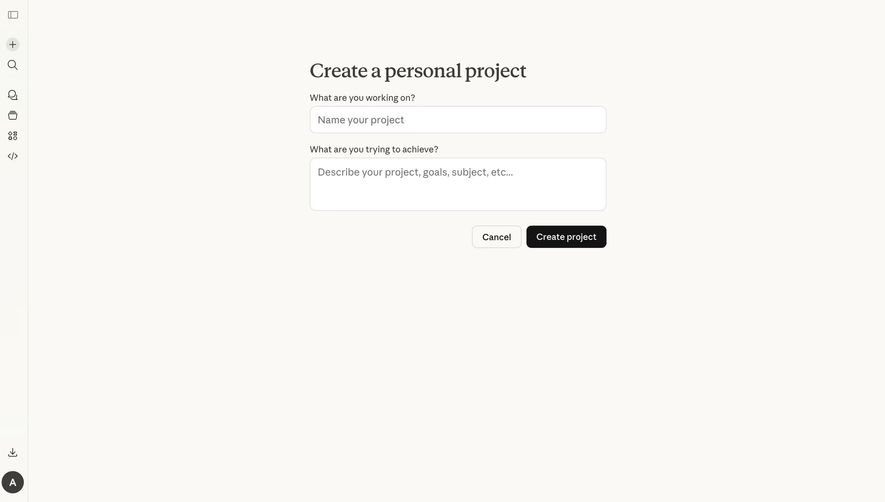
Create an original, high-fidelity visual design inspired by the reference. Prioritize composition, typography, colors, spacing, and component styling over technical implementation.
## Reference
- **Product:** Claude
- **Category:** Empty
- **Screenshot:** https://cdn.prod.website-files.com/5e9dc792e1210c5325f7ebbc/69971c04067aa09c7e132e4b_BnXJQoAOE7ljvvYj7vPGzE7P5QsJ0tBeZmX3XtX8DGY.avif
Analyze the screenshot first. If inaccessible, request it rather than guessing.
## Content
{{content.instructions}}
{{content.data}}
Preserve essential messaging and factual accuracy. Adapt structure and copy length for visual balance; never invent product claims.
## Visual Design
Use this context to reproduce the reference's visual language: layout, typography, colors, spacing, borders, radii, and distinctive elements. The screenshot takes priority if descriptions conflict.
## Direction
{{preferences.fidelityInstructions}}
## Output
{{output.instructions}}
Deliver a polished, cohesive design with precise alignment, hierarchy, and spacing. Produce the requested visual artifact, not just a description. If unsupported, explain the limitation.
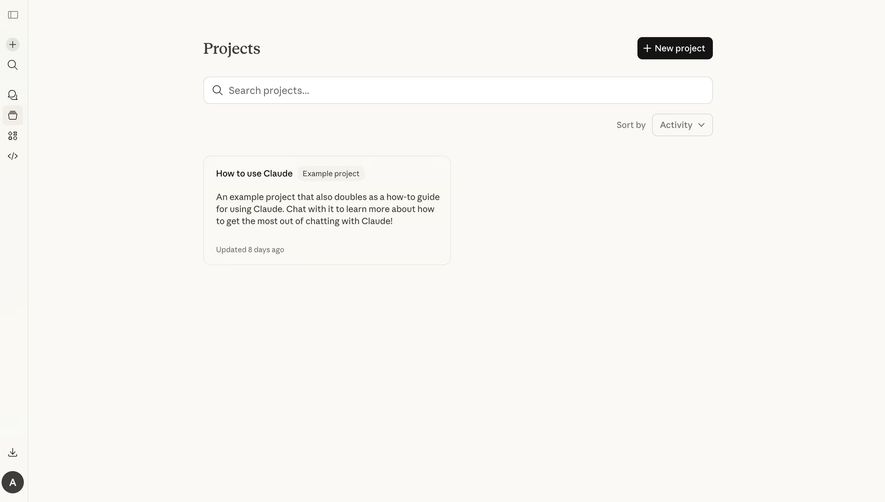
First thing you notice is how much breathing room this page has. The Projects view from Claude (Anthropic's AI) is almost aggressively minimal. Warm off-white background, zero visual clutter. The single project card sitting there with its soft border and generous padding feels intentional, not empty.
Typography Does the Heavy Lifting
The bold "Projects" header paired with that big search field immediately tells you where you are and what to do. No icons competing for attention. The "How to use Claude" card uses a subtle "Example project" tag in a muted pill shape. Smart way to label without screaming. The description text is set in a readable size with comfortable line height.
What Makes It Stand Out
That left sidebar is dead simple. Tiny monochrome icons, no labels. It trusts users to explore. The black "New project" button in the top right is the only high-contrast element on the entire page, making the primary action obvious. The "Sort by Activity" dropdown feels like a thoughtful detail for a page that could easily skip it at this stage.
.webp)




.avif)