Design with AI
Generate a new design based on this screen using your own content.
# Design from Reference: Cal.com Upload Avatar
Create an original, high-fidelity visual design inspired by the reference. Prioritize composition, typography, colors, spacing, and component styling over technical implementation.
## Reference
- **Product:** Cal.com
- **Category:** Account Setup
- **Screenshot:** https://cdn.prod.website-files.com/5e9dc792e1210c5325f7ebbc/6acad8acd05a3f53c0a74dd8_6acad8288b7c605a8f58042e_cms-d5d8869870e5a05da2e33a73.webp
Analyze the screenshot first. If inaccessible, request it rather than guessing.
## Content
{{content.instructions}}
{{content.data}}
Preserve essential messaging and factual accuracy. Adapt structure and copy length for visual balance; never invent product claims.
## Visual Design
### Overall aesthetic
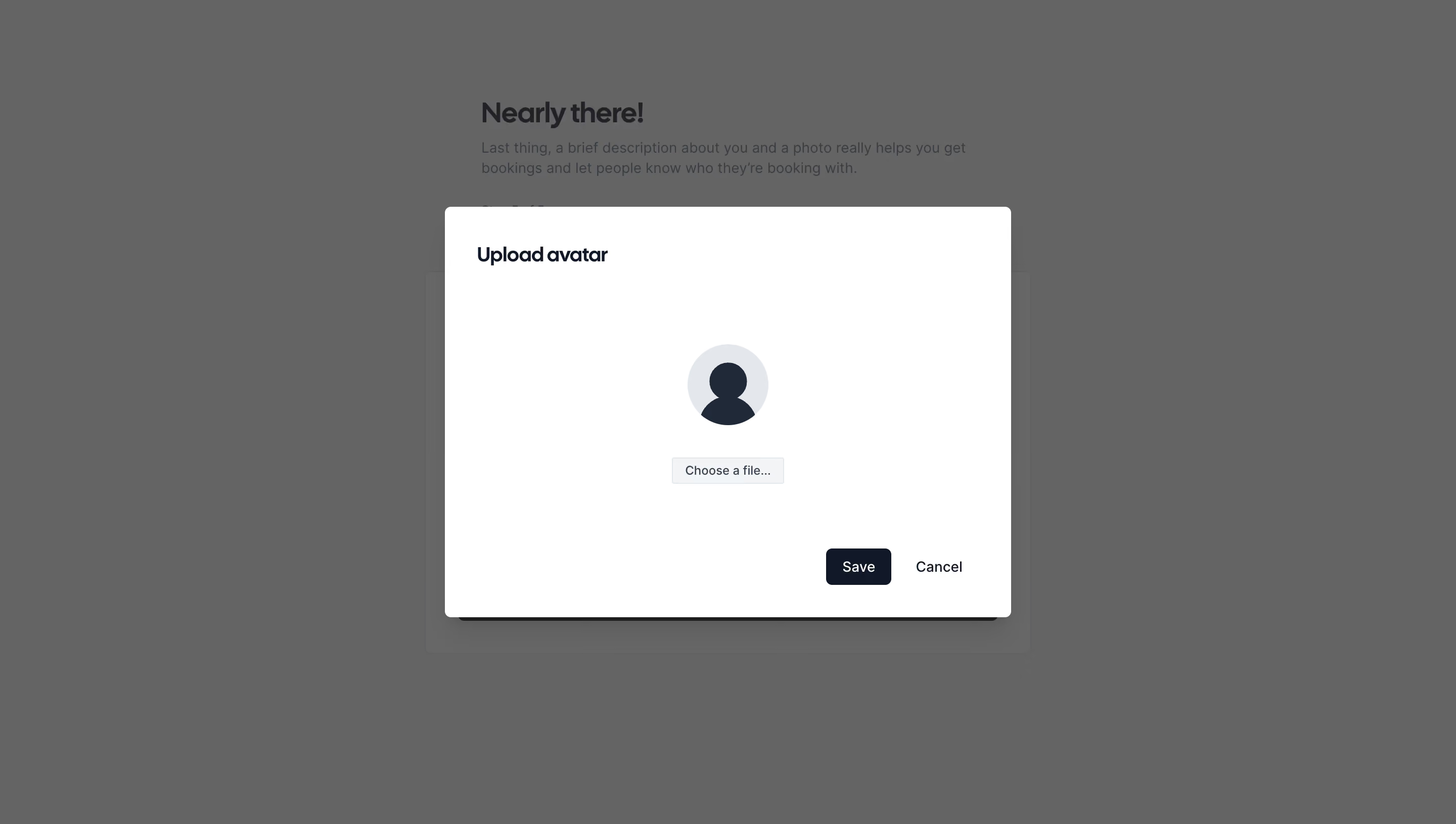
- **Style:** Minimal avatar-upload dialog over a dimmed onboarding form.
- **Character:** White modal, dark navy text, neutral avatar placeholder, and restrained actions.
### Page composition
- **Canvas:** 2880 × 1630 image px; CSS estimates assume an unverified 2× capture.
- **Modal:** Approximately 1120 × 810 image px / 560 × 405 CSS px, centered.
- **Header:** Upload avatar title aligned left near the top.
- **Body:** Centered circular avatar placeholder above a small file chooser.
- **Actions:** Save and Cancel aligned at lower right.
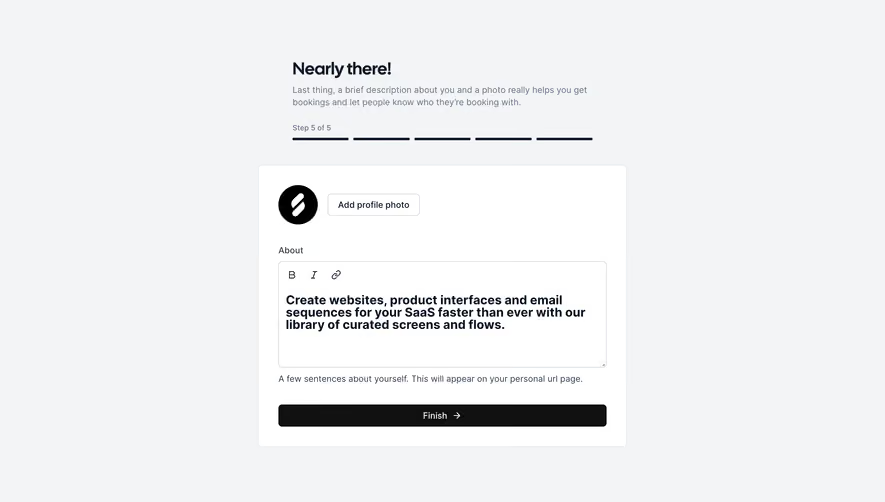
- **Background:** Nearly there! onboarding heading, explanatory copy, and form panel remain visible behind gray overlay.
### Information hierarchy
- **Primary:** Upload avatar title.
- **Input focus:** Large centered placeholder indicates the object being changed.
- **Selection:** Small Choose a file control below the avatar.
- **Commit:** Dark Save button followed by quiet Cancel text.
### Typography
- **Family:** Compact sans serif with rounded heading character; exact family unverified.
- **Title:** Approximately 20 CSS px, semibold under assumed 2×.
- **Action labels:** Approximately 14px.
- **File chooser:** Approximately 12px.
- **Background heading:** Approximately 28px.
- **Precision:** Font values and 2× scale are reconstruction estimates.
### Colors & surfaces
- **Modal:** #FFFFFF.
- **Primary text and Save fill:** Approximately #0F1828.
- **Avatar disc:** #E3E7EB.
- **File-control fill:** #F3F4F6.
- **Dimmed background:** Approximately #636464.
- **Other visible background grays:** #666666 and #656565.
- **Shadow:** Soft dark elevation below modal.
- **Precision:** Background grays include overlay; sampled screenshot colors were profile-converted where applicable.
### Components
- **Modal corners:** Approximately 6 CSS px under assumed 2×.
- **Padding:** Approximately 32 CSS px.
- **Avatar:** Approximately 80 CSS px diameter with dark head-and-shoulders silhouette.
- **File chooser:** Compact light-gray bordered button.
- **Save:** Dark rounded rectangle approximately 64 × 36 CSS px.
- **Cancel:** Text-only secondary action beside Save.
- **Close:** No visible top-right X in this frame.
### Visual rhythm
- **Whitespace:** Large vertical gap between header and avatar, with another broad gap before actions.
- **Alignment:** Title and footer use consistent insets; input controls are centered.
- **Hierarchy:** Minimal body content keeps attention on choosing an image.
- **Background:** Dimming makes onboarding context subordinate.
### Responsive
- **Observed:** Desktop only.
- **Recommendation:** Use viewport side margins and maximum width around the reconstructed 560px, with reduced vertical whitespace on small screens.
- **Controls:** Keep file selection and actions reachable; allow modal scrolling if needed.
### Adaptation guidance
- **Preserve:** Clear upload title, recognizable placeholder, compact selection control, and Save/Cancel hierarchy.
- **Content:** Use supplied avatar or fallback assets.
- **Behavior:** No crop, preview, validation, or upload progress is shown; do not invent those as observed components.
- **Scale:** Treat dimensions as approximate under assumed 2×.
Use this context to reproduce the reference's visual language: layout, typography, colors, spacing, borders, radii, and distinctive elements. The screenshot takes priority if descriptions conflict.
## Direction
{{preferences.fidelityInstructions}}
## Output
{{output.instructions}}
Deliver a polished, cohesive design with precise alignment, hierarchy, and spacing. Produce the requested visual artifact, not just a description. If unsupported, explain the limitation.
.webp)



.avif)