Design with AI
Generate a new design based on this screen using your own content.
# Design from Reference: Blobr Add Product
Create an original, high-fidelity visual design inspired by the reference. Prioritize composition, typography, colors, spacing, and component styling over technical implementation.
## Reference
- **Product:** Blobr
- **Category:** Add & Edit
- **Screenshot:** https://cdn.prod.website-files.com/5e9dc792e1210c5325f7ebbc/6acb6e139b286159c4671159_6acb6ab427f191c7ced07fec_cms-5ebcd8b73ade9d455db20e24.webp
Analyze the screenshot first. If inaccessible, request it rather than guessing.
## Content
{{content.instructions}}
{{content.data}}
Preserve essential messaging and factual accuracy. Adapt structure and copy length for visual balance; never invent product claims.
## Visual Design
### Overall aesthetic
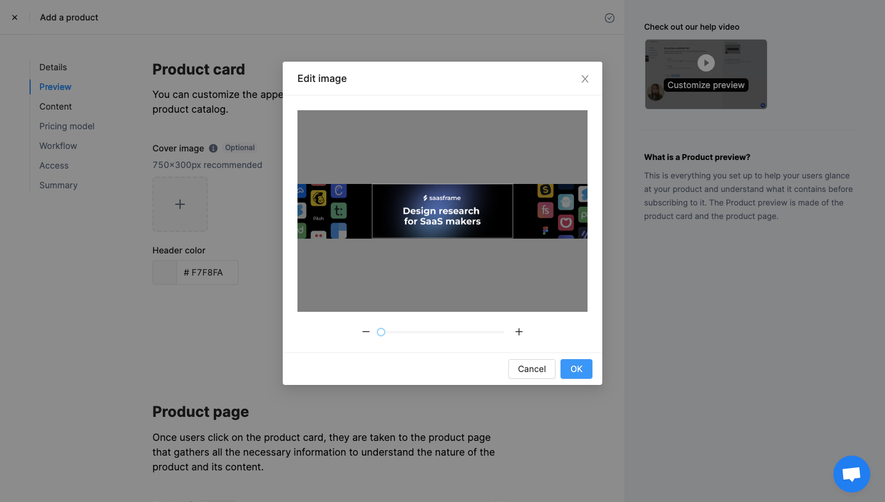
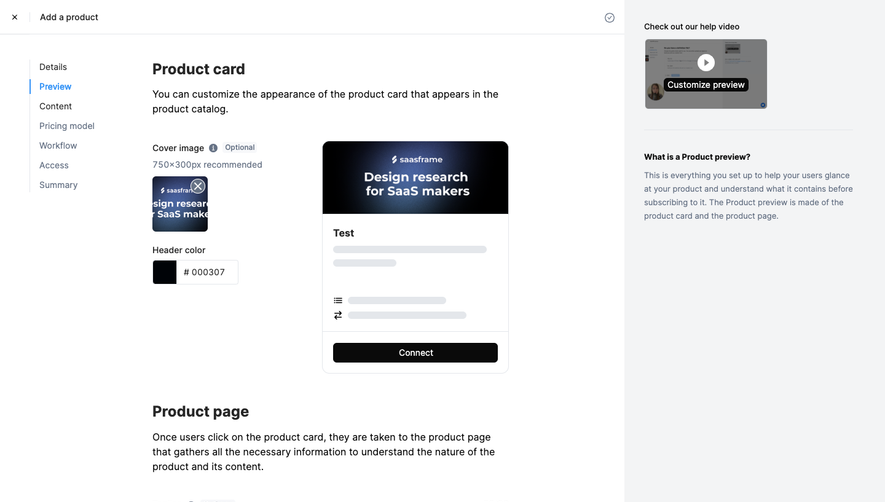
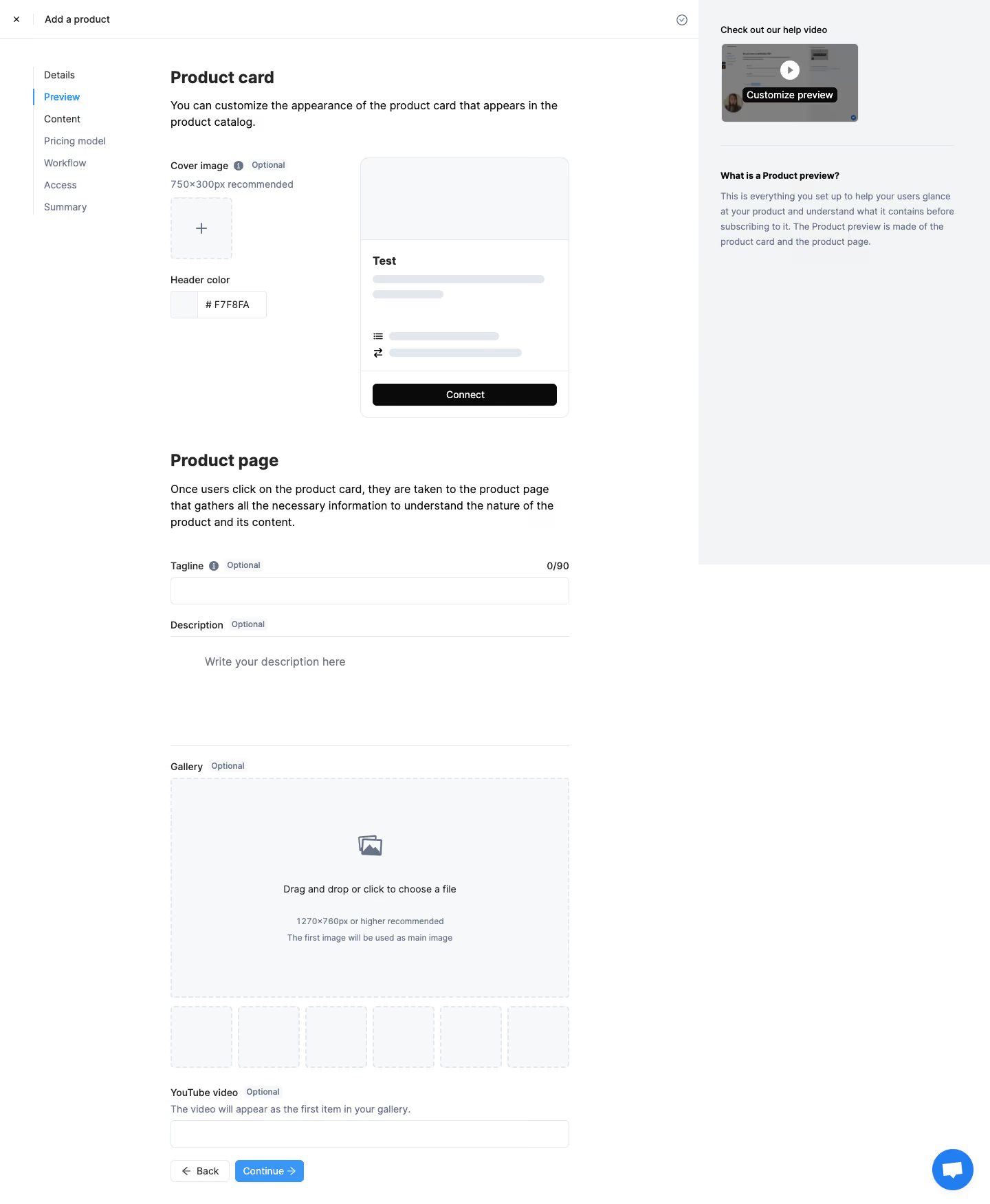
- **Character:** A light product-creation wizard combines a sparse form, illustrative product-card preview and pale contextual-help sidebar.
- **Tone:** Thin cool-gray borders, restrained blue navigation accents and generous whitespace create a functional configuration interface.
### Page composition
- **Capture:** The source measures 1440 × 1751 image pixels. Observed dimensions below approximate CSS only under an unverified 1× capture assumption.
- **Top bar:** A close control and Add a product label sit above the working area, with a small completion/status icon toward the right.
- **Three regions:** A narrow wizard menu occupies the left, a roughly 580 px form column sits in the middle and a pale help panel fills the right.
- **Product-card setup:** Heading/explanation precede cover upload and header-color controls beside a sample card.
- **Product-page setup:** A second heading introduces tagline, description, gallery upload, thumbnail slots and optional video field.
- **Bottom actions:** Back and blue Continue controls align at the lower-left edge of the form.
### Information hierarchy
- **Active step:** Preview is blue in the seven-item wizard menu, with a slim blue vertical marker.
- **Section headings:** Bold Product card and Product page labels separate appearance configuration from detailed page content.
- **Optional fields:** Small Optional badges and muted helper text qualify individual controls.
- **Preview:** The sample card shows a pale cover, title, gray content placeholders and black Connect action.
- **Help:** A small video thumbnail and explanatory text clarify the purpose of the preview.
### Typography
- **Family:** A neutral sans serif is visible; exact identity is unverified.
- **Section headings:** Approximately 26 px, bold, with 32 px leading.
- **Body:** Approximately 16 px with 24 px line height.
- **Labels/menu:** Approximately 14 px, medium/regular; helper text and optional badges use smaller muted type.
- **Preview title:** A short bold title sits above placeholder lines; button text is centered and compact.
### Colors & surfaces
- **Measured foundation:** ICC-aware sRGB sampling yields white #FFFFFF, pale #F3F4F5 and #F7F8FA.
- **Measured borders:** #E4E7EB defines controls, preview edges and dashed upload outlines.
- **Measured text:** Near-black #0A0A0A and #262626 anchor headings; muted #667285 supports helper copy.
- **Accent:** Bright blue marks the active wizard step, Continue button and chat launcher.
- **Preview contrast:** A black action strip stands out against the otherwise pale sample card.
### Components
- **Wizard menu:** Seven vertically stacked labels use a fine left guide and a blue active segment.
- **Cover upload:** A small dashed square contains a plus sign; a nearby dimension recommendation appears as helper copy.
- **Color control:** A small swatch and hexadecimal-value field form one bordered unit.
- **Sample card:** A roughly 305 × 380 px observed rounded card contains a pale header, title/content placeholders, icon rows and bottom action area.
- **Text fields:** A full-width tagline field includes a right-aligned character count; the description editor is a broad ruled blank area.
- **Gallery upload:** A large dashed rectangle contains an image icon, drop/click instruction and size guidance. Six empty thumbnail slots follow.
- **Help panel:** A small video poster with play icon sits above a divider and explanatory heading/paragraph.
- **Footer controls:** Compact outlined Back and filled-blue Continue buttons include directional arrows.
### Visual rhythm
- **Form alignment:** Section headings, labels, editors and upload regions share stable left/right edges.
- **Section spacing:** Large gaps distinguish product-card, product-page and gallery groups.
- **Preview balance:** The compact control cluster sits beside the larger card preview, leaving substantial whitespace.
- **Thumbnail cadence:** Equal dashed slots form a regular horizontal row beneath the gallery target.
### Responsive
- **Evidence boundary:** Only a desktop state is shown; responsive behaviors are recommendations.
- **Column collapse:** Move wizard navigation and help into compact accessible panels; stack preview beneath its controls.
- **Upload layout:** Let gallery thumbnails wrap and keep the main drop target fluid.
- **Editor access:** Preserve readable field widths and reachable bottom actions on small screens.
### Adaptation guidance
- **Preview workflow:** Reuse a live visual preview beside appearance controls, followed by detailed content fields.
- **Optional clarity:** Keep optional badges and size guidance adjacent to their inputs.
- **Accessible upload:** Provide keyboard/touch file selection and explicit labels beyond drag-and-drop instructions.
- **State boundaries:** No upload, preview refresh or continuation result is verified.
- **Scale calibration:** Validate observed pixels against the target CSS viewport before implementing dimensions.
Use this context to reproduce the reference's visual language: layout, typography, colors, spacing, borders, radii, and distinctive elements. The screenshot takes priority if descriptions conflict.
## Direction
{{preferences.fidelityInstructions}}
## Output
{{output.instructions}}
Deliver a polished, cohesive design with precise alignment, hierarchy, and spacing. Produce the requested visual artifact, not just a description. If unsupported, explain the limitation.
.webp)


.avif)