.webp)
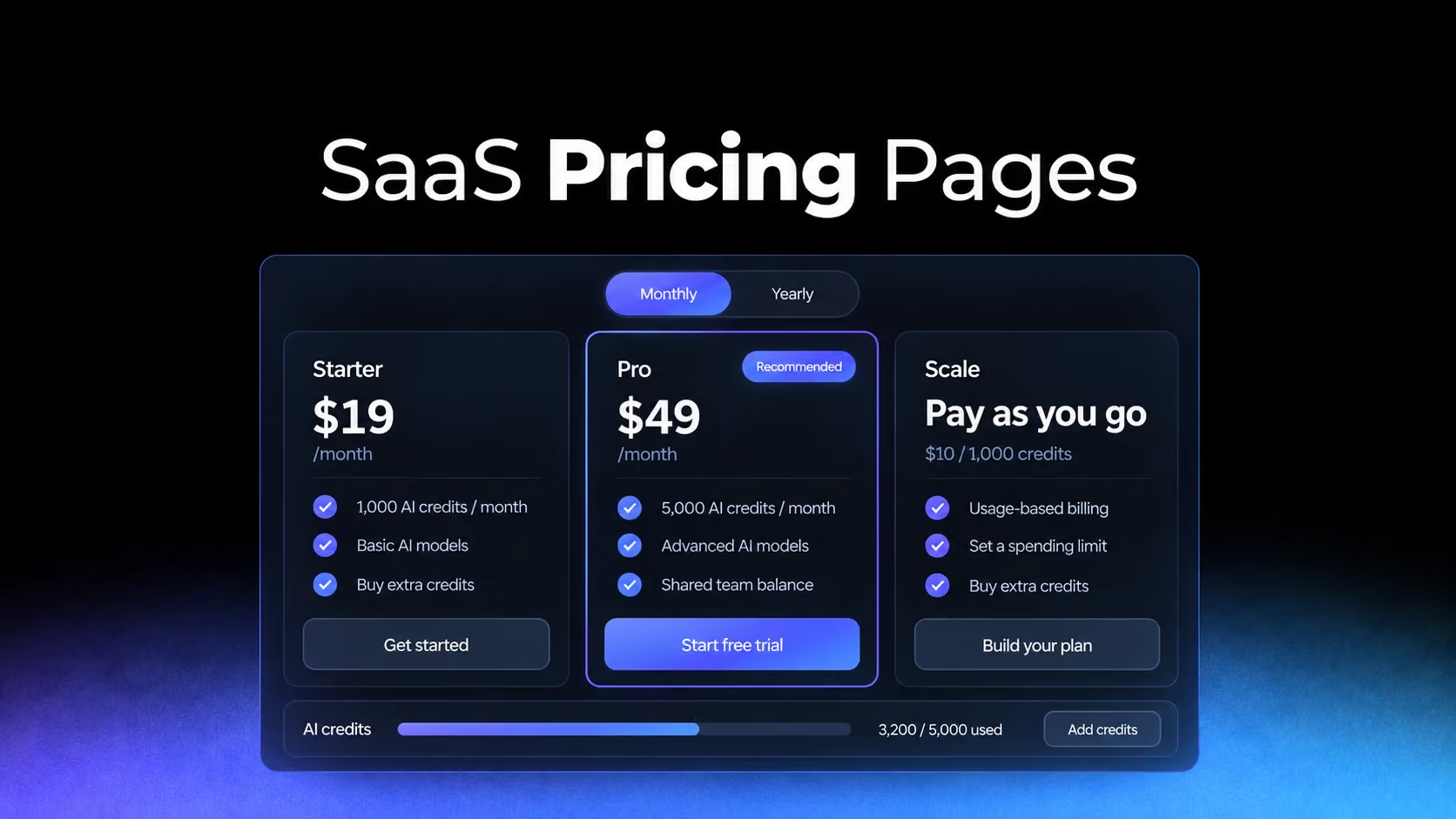
A SaaS pricing page is where a product promise becomes a purchasing decision. The visitor may already understand what the software does. Now they need to know whether the right version fits their team, their budget, and the way they expect to use it.
That decision is becoming harder. A single subscription can involve several seat types, usage allowances, AI credits, optional add-ons, and different commitments. A tidy row of pricing cards can conceal more complexity than it resolves.
For designers, the challenge in 2026 is to make that complexity understandable without turning the page into a billing manual.
A useful SaaS pricing page answers five questions: who each plan is for, what it includes, how the bill is calculated, what happens at the limits, and what the buyer should do next. Its visual hierarchy should follow those questions.
The following ten patterns offer a practical direction for SaaS pricing page design. Some are established approaches with renewed relevance; others address the extra complexity of AI and usage-based products. The live product references were reviewed in September 2026. Captures from the SaaSFrame library are labeled as archived design examples; their prices and packaging may differ from current offers.
1. Plan descriptions explain the moment a team needs to upgrade
Names such as Starter, Pro, and Business suggest a hierarchy, but they do little to explain where a particular team belongs. A freelancer working with enterprise clients may need advanced permissions. A large team with a simple workflow may not need the most expensive package.
The useful distinction is the problem that makes the next plan necessary.
On Notion’s pricing page, the plan descriptions distinguish individual organization, collaboration for small teams, and more advanced business workflows. The descriptions give readers a way into the comparison before they inspect individual features.
For your own page, make the first sentence under each plan name describe a recognizable situation. “For teams coordinating several client projects” is more informative than “For ambitious teams.” It helps the visitor connect the package to work they actually do.
Then choose the features that explain the transition. If the paid plan adds approval workflows, say what becomes possible: reviewing work before it reaches a client. The feature name can remain underneath for buyers who need the precise capability.
This approach also exposes weak packaging. If two plans need essentially the same description, the distinction may depend on a limit or billing detail that should be stated directly.
Design takeaway: Write the reason to choose each plan before writing its feature list. Use that reason to decide which details deserve prominence.
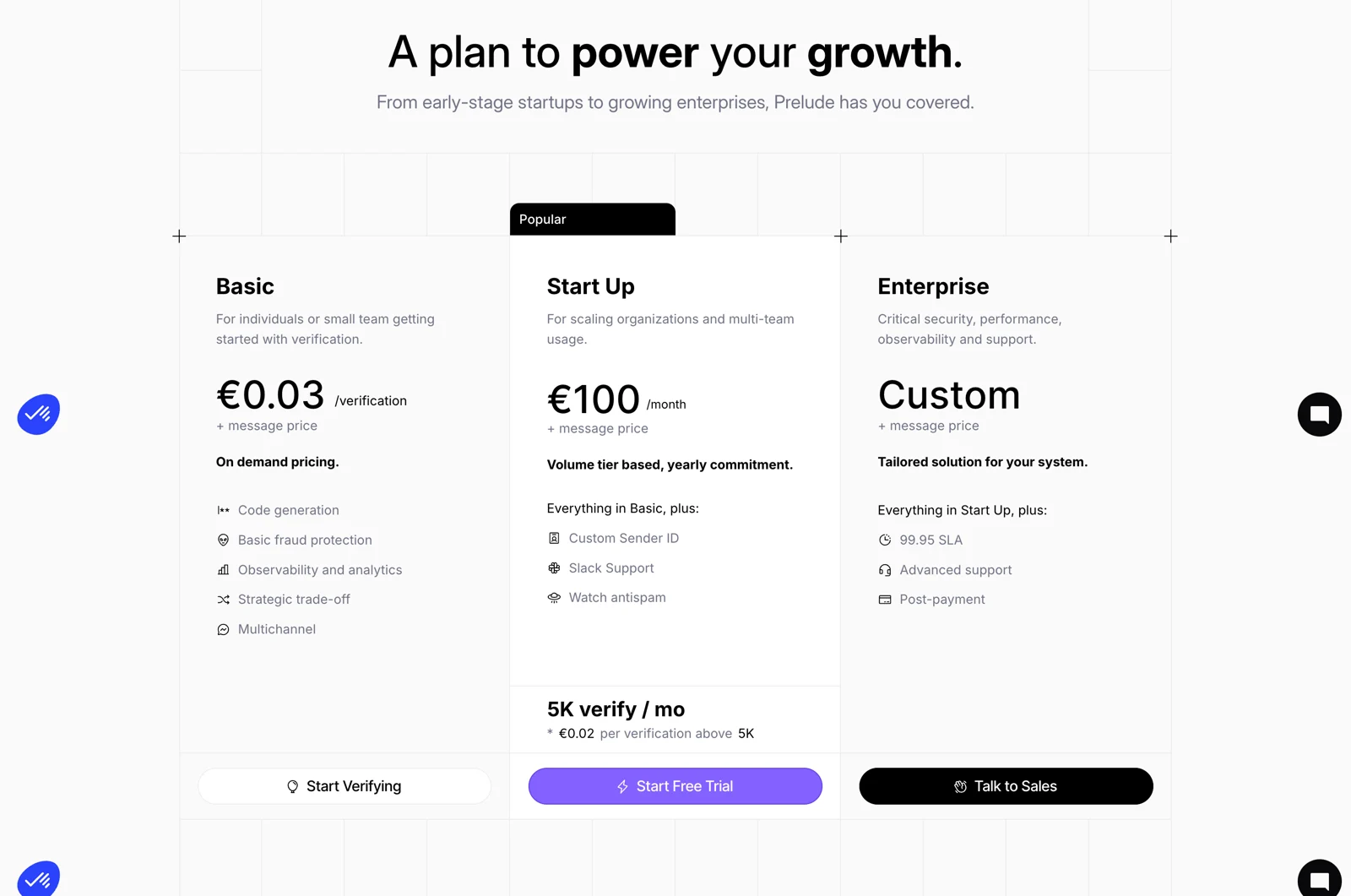
Another useful design reference is Prelude’s archived pricing page. Its Basic, Start Up, and Enterprise cards attach a short description to each audience, giving readers an initial way to place themselves before comparing the feature lists.
2. The billing unit gets as much attention as the headline price
A price has little meaning without a unit. A monthly workspace subscription, a monthly seat, and a charge per completed task can produce very different invoices even when their headline numbers look similar.
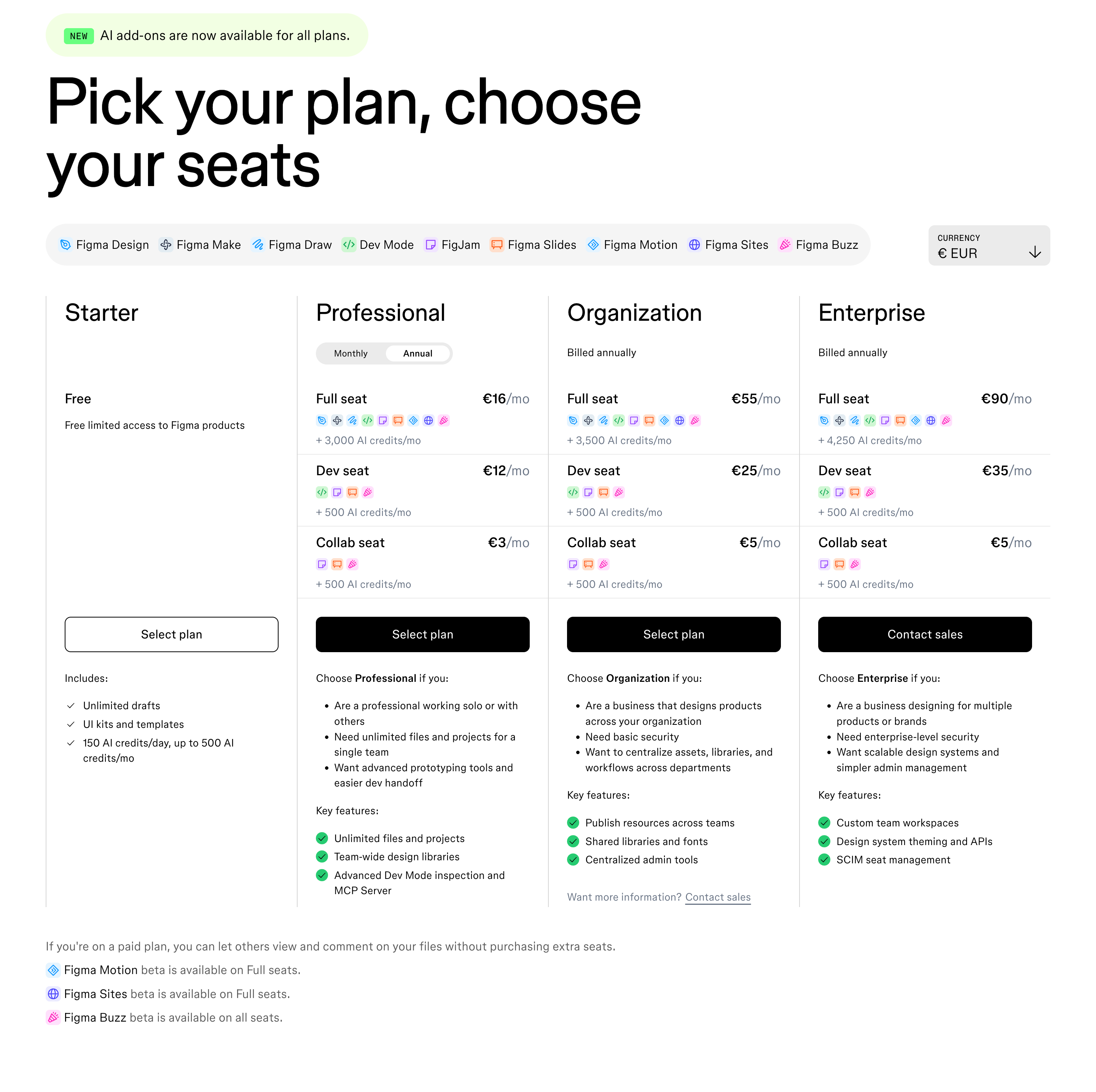
Figma’s pricing page distinguishes Full, Dev, and Collab seats within its paid plans. That structure makes the purchasing decision about both the plan and the kind of access each teammate needs. It also explicitly explains that viewing and commenting do not require purchasing additional seats on paid plans.
The lesson is broader than seat pricing: define the thing being purchased at the point where you show its cost.
If you charge per user, clarify which users count. If you charge per project, explain whether archived projects count. If your unit is an active contact, explain what makes a contact active and when that count resets.
These definitions should not depend entirely on a tooltip. A buyer should be able to understand the basic billing model while scanning the card. Use a short explanation beside the price, with a link to the fuller rules where necessary.
There is a tradeoff: presenting several seat types inside every card increases density. When most buyers use one seat type, show that common case clearly and offer a separate explanation for mixed teams.
Design takeaway: Pair every price with its unit, billing period, and the most important counting rule. Treat those details as purchasing information, rather than fine print.
3. Annual billing shows the commitment, not just the monthly equivalent
The monthly/yearly toggle is familiar enough to feel self-explanatory. Yet it often changes two things at once: the displayed monthly equivalent and the amount the customer must commit to paying.
Those are different decisions.
Slack’s pricing page presents monthly and annual per-user rates with their billing conditions. The important design principle is that a buyer can associate a rate with the payment arrangement that produces it.
For an annual subscription paid upfront, show the monthly equivalent alongside the annual amount. For example, an illustrative plan could read:
$20 per user/month, billed annually. $240 per user charged each year.
If annual commitment is invoiced monthly, say that instead. “Annual” describes the commitment; it does not always describe the payment schedule.
The toggle should update every affected detail consistently: prices, savings, invoice totals, and the wording near the CTA. A selected annual option paired with a monthly-looking checkout summary creates an avoidable moment of doubt.
Savings labels deserve the same care. Specify what the discount is compared with, and distinguish ongoing annual savings from a temporary promotion. A short-lived introductory offer should not visually replace the ordinary renewal price.
Defaulting to annual billing can make sense for a product with a long evaluation horizon. It still needs to be obvious which option is selected.
Design takeaway: Make the commitment legible before emphasizing the discount. Show what the buyer will owe and when, wherever your billing model allows it.
4. Usage-based pricing explains the bill as a sequence
Hybrid subscriptions create a particular communication problem: the plan card can accurately display one price while still failing to explain the likely invoice.
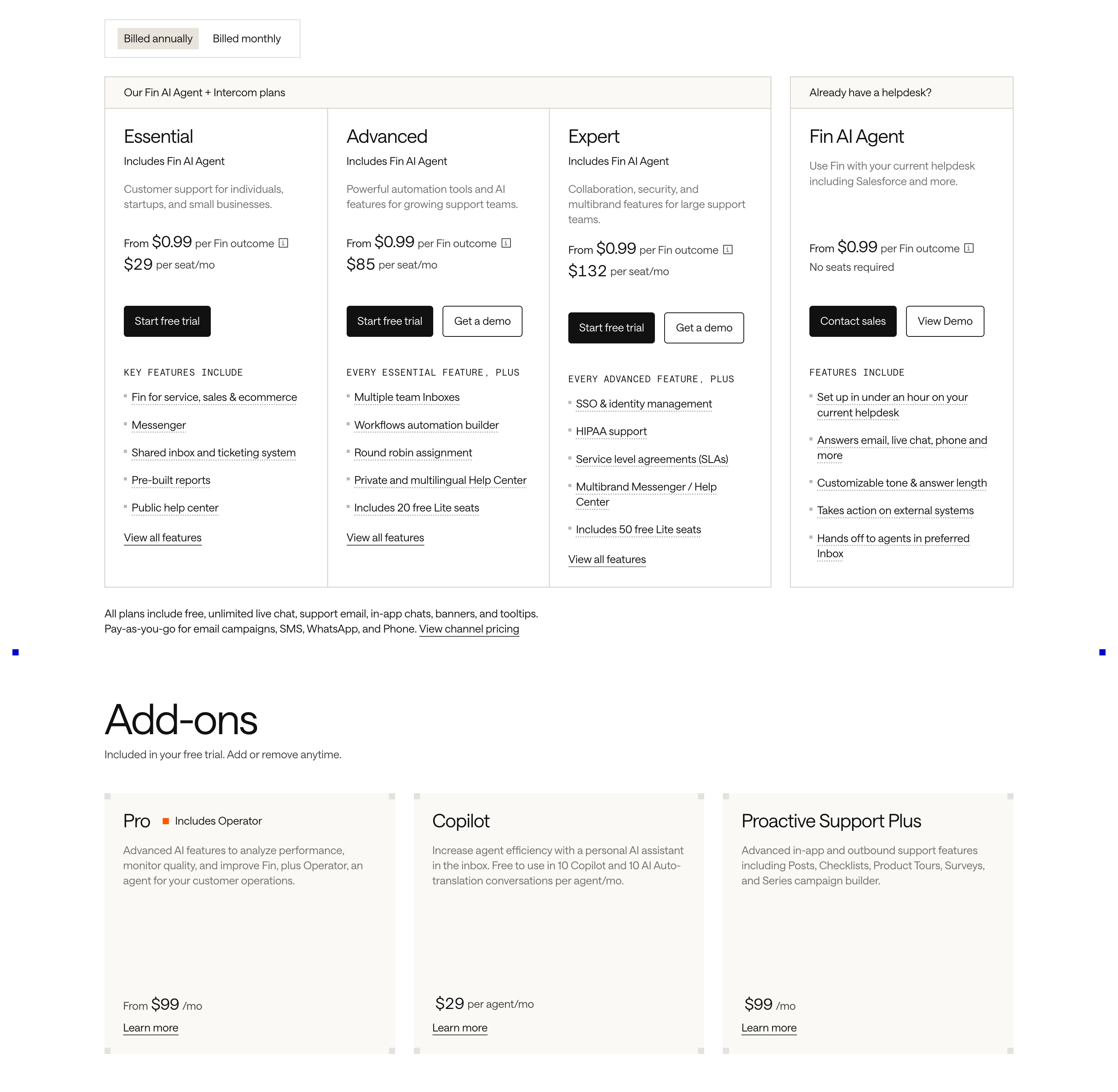
Intercom’s pricing page combines per-seat plan pricing with charges for Fin outcomes and other usage. It also distinguishes optional add-ons and provides a cost-estimation route.
For a buyer, this creates several questions: What is fixed? What is included? What grows with usage? What is optional?
Answer them in that order. A clear pricing explanation can follow a simple sequence:
Base subscription + billable seats + usage beyond any included allowance + selected add-ons.
Only include the components that actually apply to your product. A formula that looks comprehensive but misrepresents the billing rules is worse than a longer explanation.
Then show one worked scenario. For a hypothetical automation product, that might be a team with five users and 12,000 monthly runs. Explain which runs are included, which are charged, and whether volume tiers change the rate.
The scenario gives readers a way to check their understanding. It should use realistic assumptions and remain clearly labeled as an example.
This pattern works especially well when the headline plan price is only a starting point. It is less useful for a genuinely flat subscription, where adding an elaborate formula would manufacture complexity.
Design takeaway: Explain the order in which charges accumulate. Make it possible to reconstruct a plausible bill without contacting sales.
5. AI allowances translate credits into recognizable work
An AI credit is a billing abstraction. Buyers want to know whether their team can draft ten documents, generate several prototypes, or run a recurring workflow without immediately purchasing more.
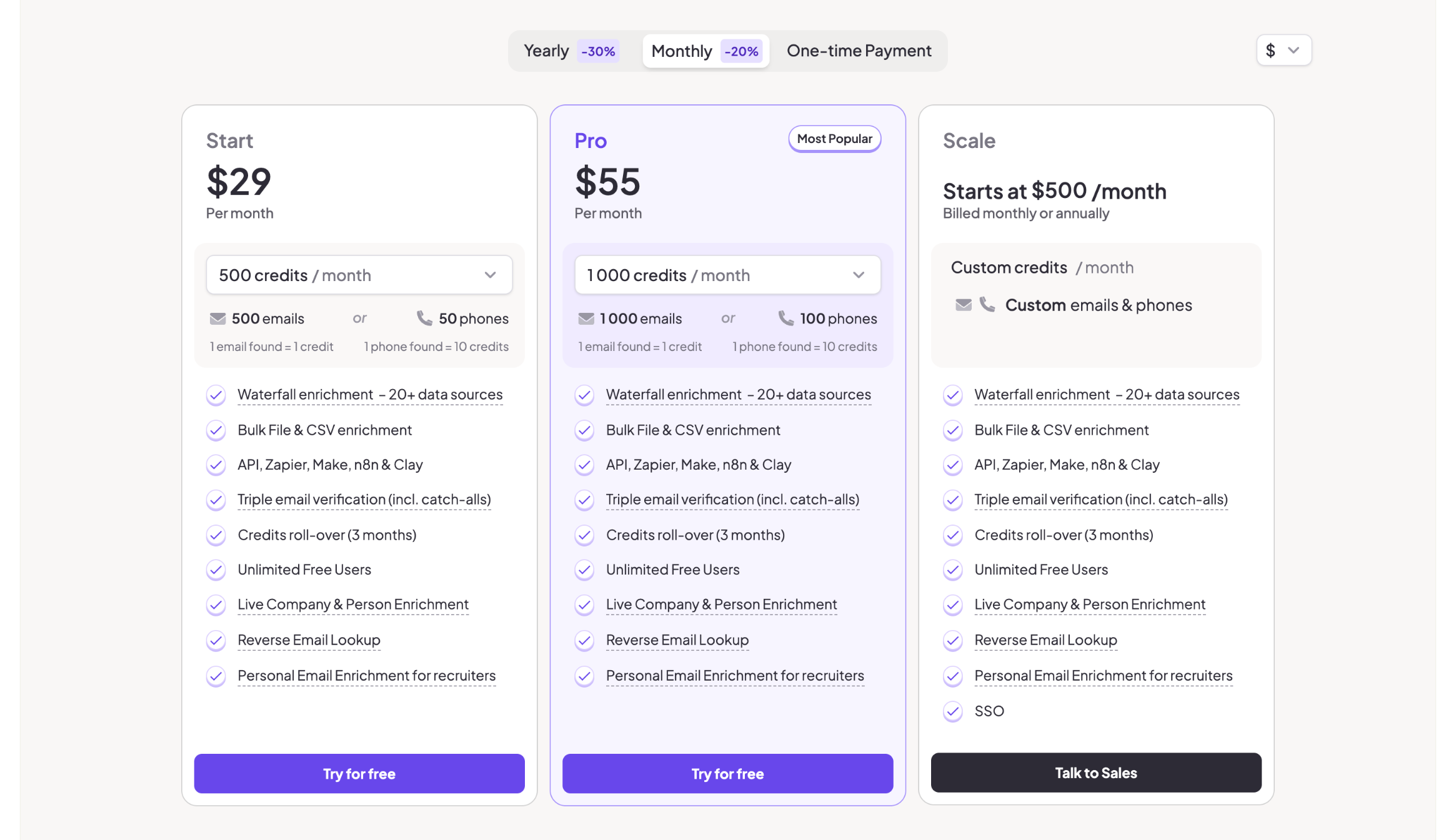
Figma’s pricing page lists included AI credits and separate options for obtaining additional credits. That makes the allowance visible, but the wider design challenge is translating an abstract unit into useful expectations.
Avoid treating “AI included” as a complete explanation. It can mean access to a feature, a limited trial, a recurring allowance, or usage that incurs additional charges.
For each relevant plan, distinguish access from consumption. Explain who receives the allowance, whether it is shared, when it renews, and what happens when it runs out. If credits expire or do not roll over, state that near the allowance.
When consumption varies by model or task, show representative scenarios rather than a false universal conversion. A small text edit and a complex generation may not cost the same amount. Any task estimate should name its assumptions and acknowledge the variation.
The buyer also needs a fallback: does the feature pause, become slower, draw from a purchased balance, or start charging automatically? These outcomes materially change the decision.
The point is not to make AI pricing look simpler than it is. It is to make the uncertainty visible and manageable.
Design takeaway: Translate credits into work where you can do so accurately, and explain the allowance rules where you cannot.
6. Spending controls become part of the value proposition
For a usage-based product, affordability depends on more than the unit rate. Buyers also need to know how much control they have over the final bill.
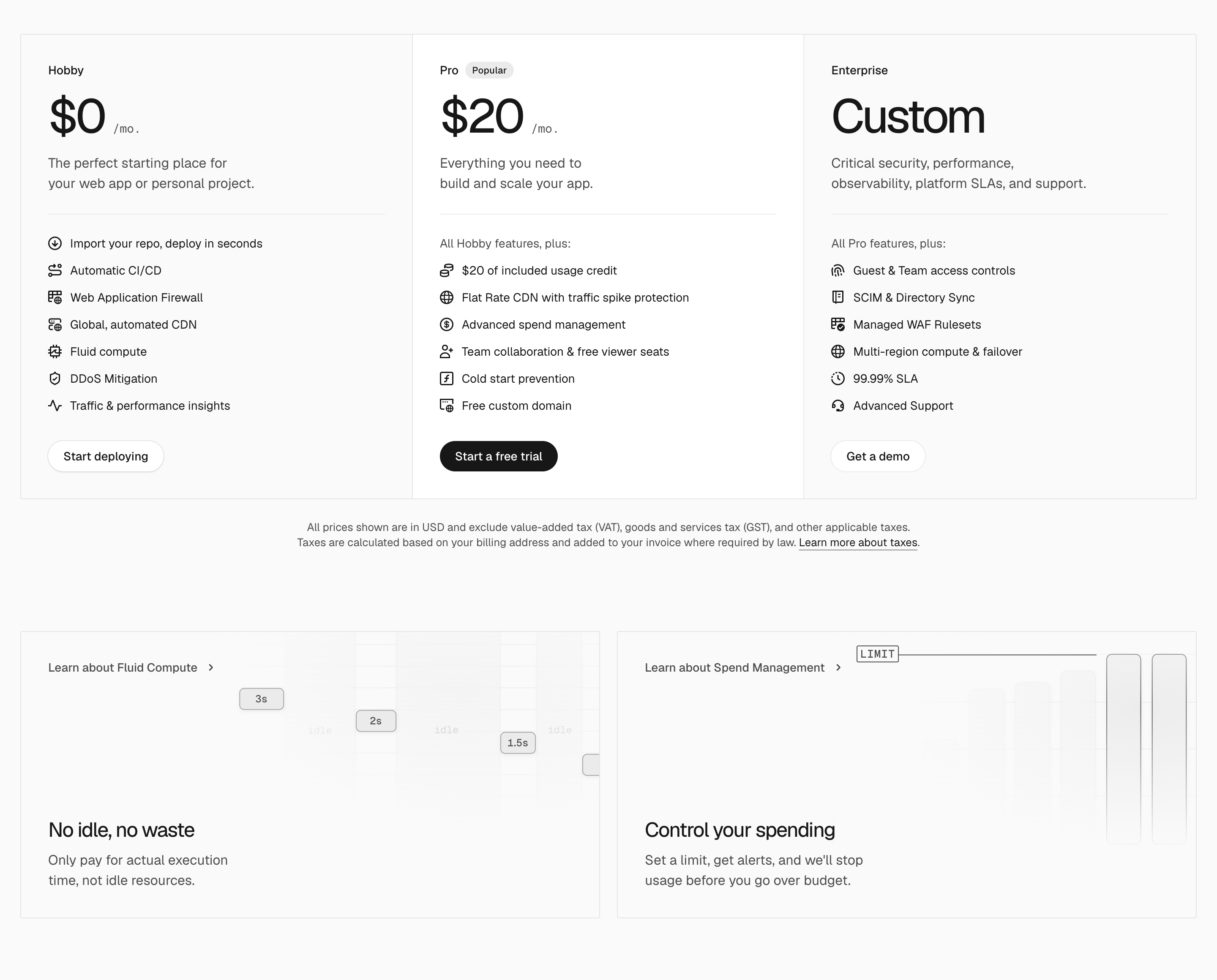
Vercel’s pricing page brings spend management into the pricing conversation, including budget notifications and the option to configure a hard limit that pauses projects. The useful distinction is between learning about a rising bill and preventing further usage.
A pricing page should preserve that distinction. An alert does not cap spending. A hard limit may protect the budget but interrupt a service. A prepaid balance may limit exposure while creating a replenishment task.
Explain which controls exist and what they do. If reaching a cap pauses processing, say so. If limits apply only to certain resources, identify that scope. If there can be a delay before enforcement, the detailed documentation should explain it.
These controls belong near the variable-cost explanation, where a reader is likely to wonder about exposure. Burying them in a general security section misses the question they answer.
This is also a useful research direction when reviewing design references: look for pages that explain the consequences of growth, rather than only the price of getting started.
Design takeaway: Show both the rate and the buyer’s control over consumption. Explain the operational consequence of each spending safeguard.
7. Pricing cards summarize the decision; comparison tables resolve the exceptions
A pricing card and a comparison table serve different reading modes. The card helps a visitor shortlist a plan. The table helps them check whether that choice satisfies specific requirements.
Trying to make the cards carry every detail produces walls of small text. Making them too sparse pushes the whole decision into a long matrix.
Figma separates its plan overview from a fuller comparison, with controls for seat type and the level of feature detail. The structure is a useful example of separating an initial choice from deeper verification.
For your own page, keep the overview focused on the features that change the buying decision. Put exhaustive specifications underneath, grouped by meaningful concerns such as collaboration, administration, integrations, and support.
Use consistent row labels. If one plan has seven days of retention and another has ninety, compare those values directly. A checkmark in both columns would hide the distinction that matters.
Do not rely entirely on phrases such as “Everything in Pro, plus.” They save space, but force readers to reconstruct a package by looking backward through several cards. The detailed comparison should let them verify a selected plan independently.
Expandable categories can reduce visual weight, provided the labels let readers find the right requirement. Critical restrictions should remain visible before expansion.
Design takeaway: Let cards explain the choice and tables verify it. Give each layer enough information to perform its own job.
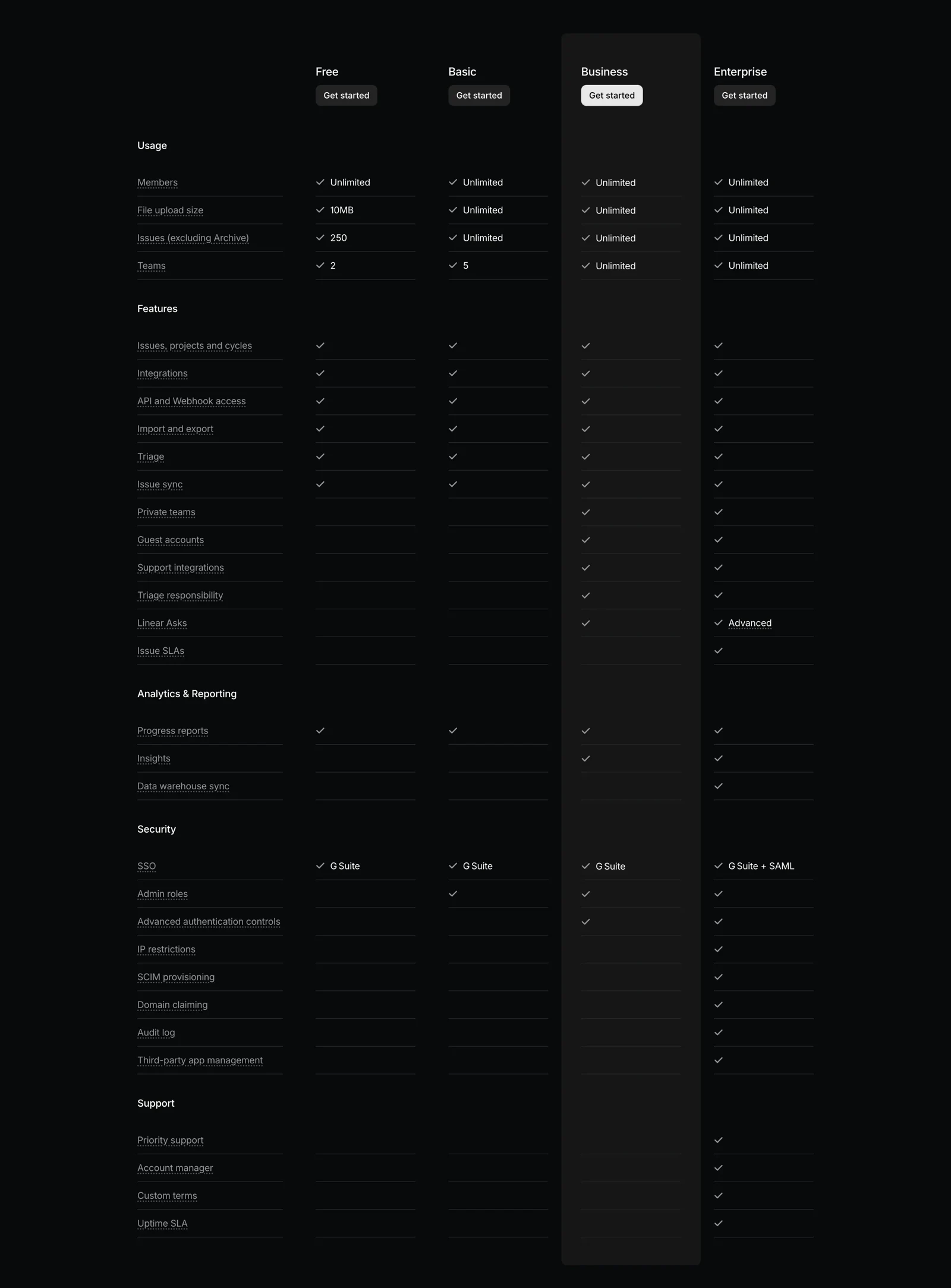
Linear’s July 2024 pricing page offers an archived example of the verification layer. Its detailed matrix groups usage, features, analytics, security, and support, making the category structure part of the comparison.
8. Recommendations explain who should choose the highlighted plan
A colored border or “Most Popular” badge can steer attention toward a plan. It does not explain whether that plan fits the visitor.
Notion marks its Business plan as recommended. The design question that follows is useful for any pricing page: what information helps the reader assess that recommendation?
A contextual label can do more work than a generic superlative. “For teams that need approval workflows” supplies a reason. “Best value” leaves the reader to define value for themselves.
If you use a popularity claim, it should reflect real data, with a defensible scope. A newly launched package should not inherit that label because the design template includes it.
The highlighted plan should also remain comparable with its neighbors. An oversized card may attract attention while making shared rows harder to scan. A stronger CTA, restrained accent, and concise explanation can establish hierarchy without changing the underlying alignment.
There are situations where no single recommendation is appropriate. A product serving solo creators and regulated enterprises may need clear audience routes rather than a universal winner.
For complex products, a short plan-finder can help, but it should explain its recommendation and let users compare alternatives. It should not become a lead form disguised as advice.
Design takeaway: Make the recommendation accountable to a need. Visual emphasis should support the reasoning a buyer can inspect.
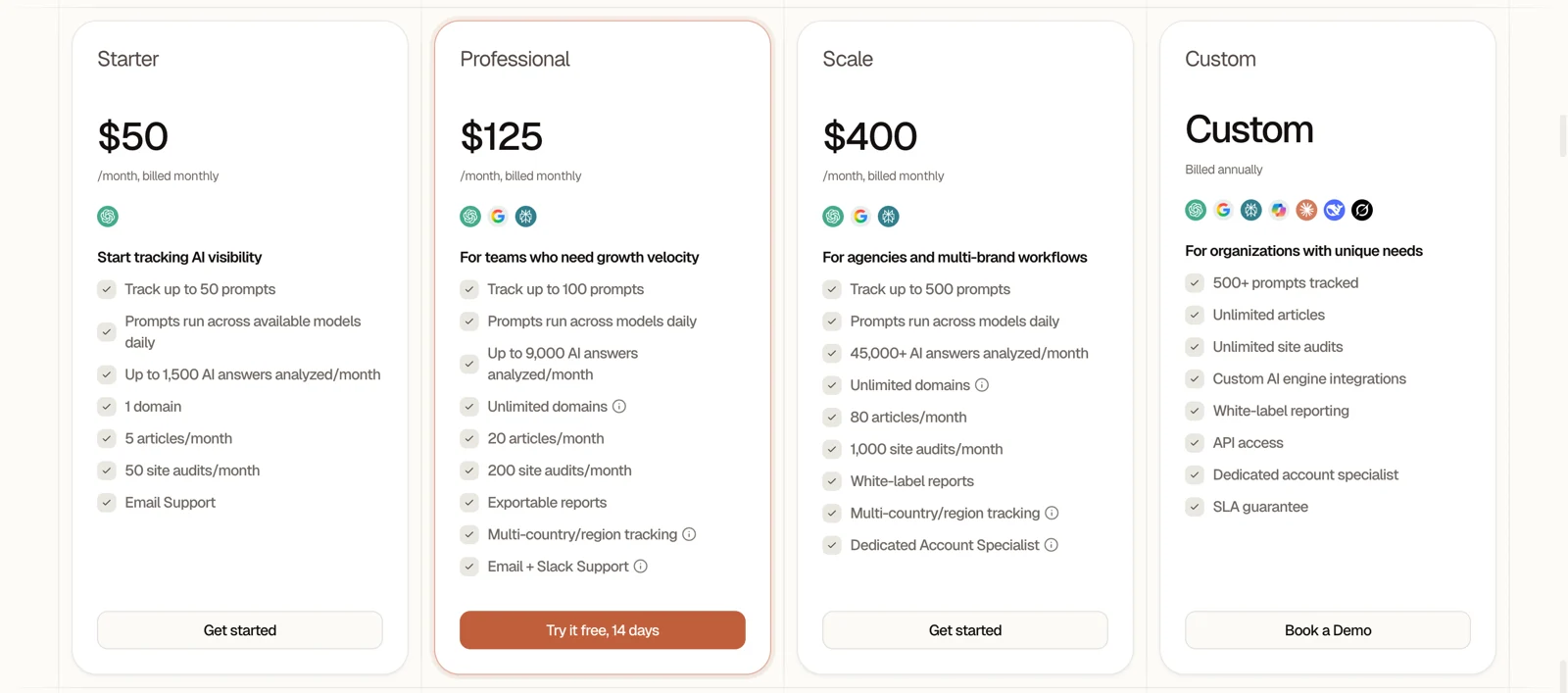
In Searchable’s archived pricing page, the Professional card receives a warmer border and stronger CTA, while the cards keep a comparable structure. Audience descriptions distinguish initial tracking, growth, agency workflows, and custom needs. That combination lets the visitor inspect the alternatives even when one offer receives more emphasis.
9. Enterprise pricing describes a different buying process
An enterprise package is often presented as an expensive plan with the price removed. That misses the practical reason many teams need it: procurement, security review, rollout support, or contractual terms.
Stripe’s pricing page distinguishes standard pricing from a custom pricing route. It is a useful reminder that negotiated purchasing can deserve its own path rather than an empty space in a plan grid.
For a SaaS product, the enterprise section should identify the requirements that trigger that route. Those might include identity management, deployment options, invoicing, a service-level agreement, or onboarding support. Only name what the product actually offers.
Then explain the next step. Is the CTA for a product demo, a pricing discussion, or a procurement conversation? Will the buyer need to share team size, usage, or security requirements?
This clarity matters because contacting sales carries a time cost. The visitor should know what the conversation will help them decide.
If you publish a starting price, clarify the applicable scope. If you do not, explain what affects the quote. Avoid presenting a fictional estimate merely to fill the visual gap.
Keep the self-serve route visible for buyers whose needs do not require negotiation. A growing team should not have to enter a sales process simply because the page makes the enterprise CTA look like the only credible option.
Design takeaway: Design the enterprise section around purchasing requirements and a clear next step, with enough information to justify the conversation.
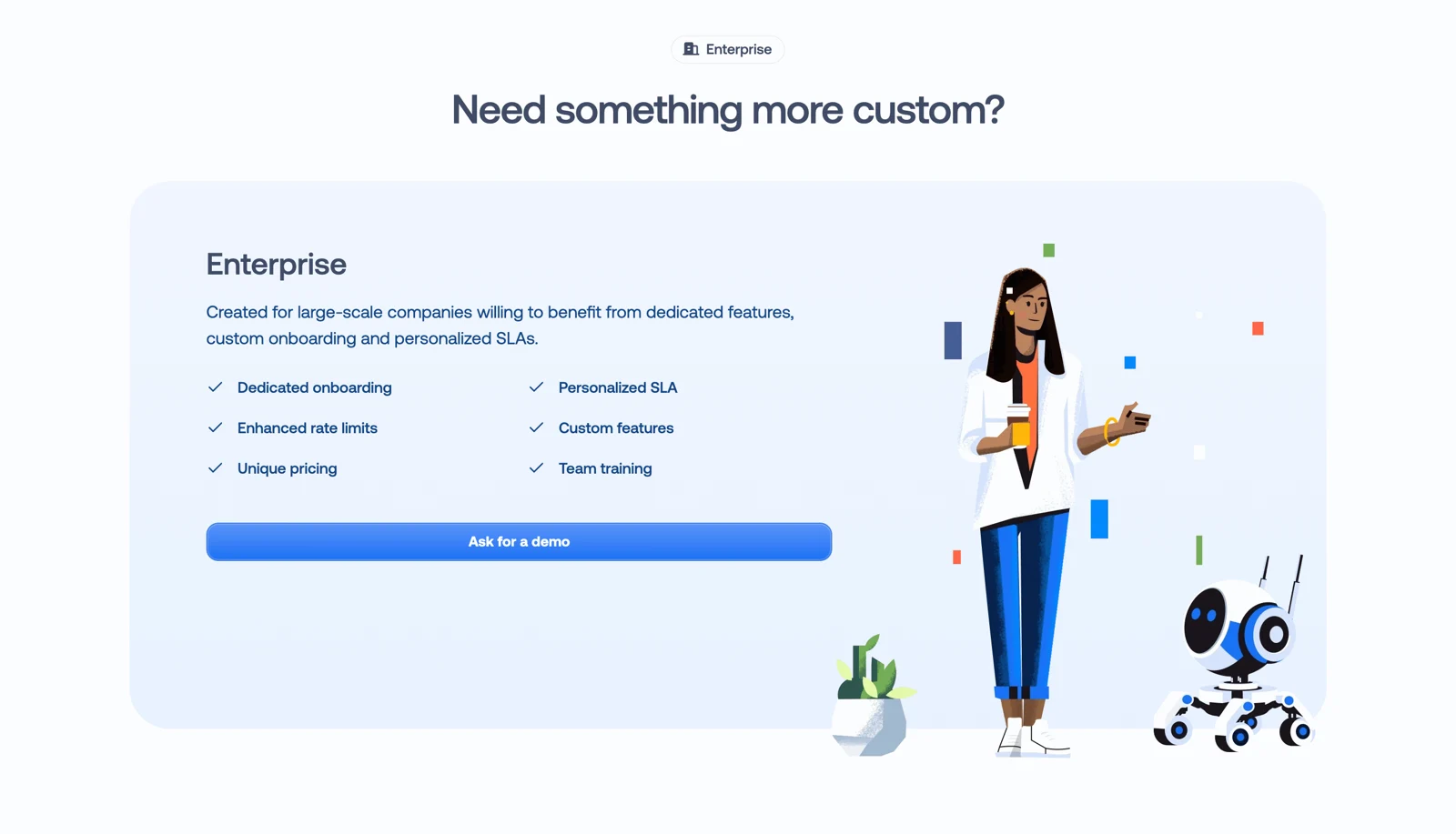
Crisp’s archived pricing page makes the enterprise route concrete with dedicated onboarding, personalized SLAs, custom features, and team training. The section gives buyers reasons to investigate the custom offer before asking for a demo.
10. FAQs and trust signals answer the objection nearest to the purchase
At the pricing stage, a buyer’s uncertainty is often operational: Can we downgrade? What happens to our data? Will adding a teammate create an immediate charge? Can finance pay by invoice?
Notion’s pricing FAQ addresses billing mechanics including members, guests, plan changes, and cancellation. These are the kinds of questions that determine whether a buyer can confidently commit.
A useful FAQ should reflect recurring questions from sales, support, and onboarding. Prioritize answers that could change the purchasing decision, and put important conditions close to the relevant price or CTA as well.
For a trial, that could mean its duration, whether payment details are required, and what happens at the end. For a usage-based plan, it could mean overages and limits. For annual billing, it could mean renewal and downgrade timing.
Trust signals should follow the same logic. A testimonial from a comparable team discussing rollout may help a buyer assessing implementation effort. A recognizable logo establishes familiarity, but does not explain whether the same plan will suit their needs.
Avoid making buyers search the FAQ for a condition that changes the headline offer. The FAQ expands the explanation; it should not reverse it.
Design takeaway: Place concise reassurance beside the action it supports, then use the FAQ for fuller answers and edge cases.
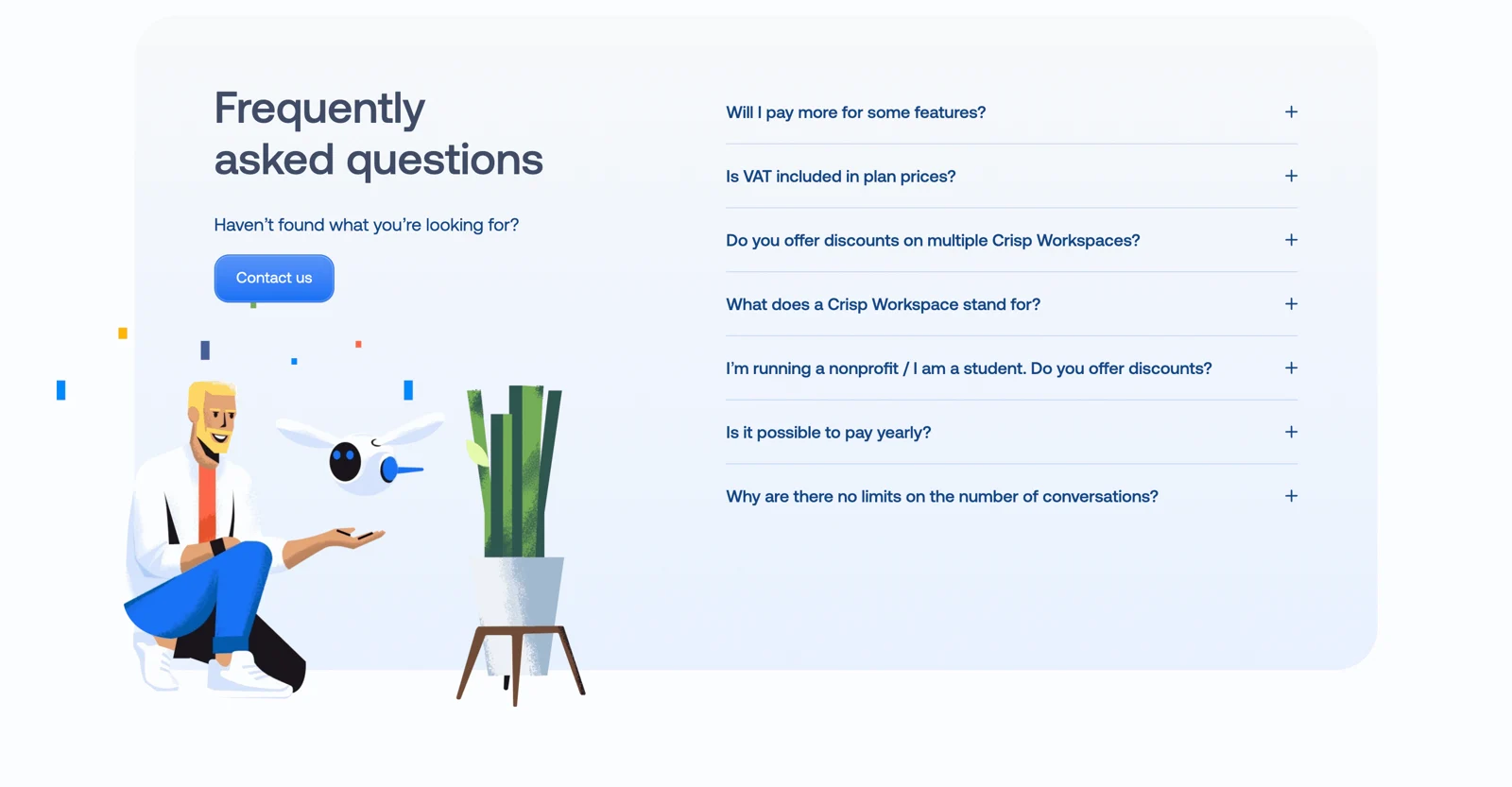
The Crisp pricing FAQ in SaaSFrame’s archive focuses on questions such as VAT, additional feature costs, the meaning of a workspace, and yearly payment. These questions show how a FAQ can help buyers interpret the offer they have just compared.
How to turn these patterns into a coherent pricing page
The order of the page should reflect the order of the decision. A practical starting structure is:
- Explain the offer. Introduce the product’s value and the basic billing model.
- Let buyers select relevant billing options. Show the currency, interval, and any necessary product or audience choice.
- Present the plans. Give each a clear audience, price unit, important limits, and next step.
- Explain variable costs. Add usage examples, add-ons, or an estimator when the billing model requires them.
- Support detailed comparison. Group the specifications that help buyers verify their shortlist.
- Resolve purchasing concerns. Include relevant evidence, billing answers, and the enterprise route.
This is a starting point, not a universal template. A single-plan product may need one offer and a billing selector. An infrastructure platform may need a rate explanation much earlier. A product with sharply different audiences may need segmentation before any plan cards appear.
Preserve comparison on mobile
Stacking desktop cards solves the width problem, but can make buyers scroll repeatedly to compare prices and limits. Keep the same information order in every card, make the billing selection easy to find, and provide a deliberate way to compare shortlisted plans.
A selected-plan view can help with a large matrix. Horizontal scrolling can also work if the feature labels remain understandable and the ability to scroll is apparent. Test the actual decision, rather than only whether the layout fits the screen.
Check the page with a realistic buying scenario
Ask someone unfamiliar with your pricing to choose a plan for a specific team and estimate its cost. For example: “You have eight teammates, two occasional collaborators, and this expected monthly usage. Which plan would you choose, and what would you pay?”
Where they hesitate tells you more than asking whether the page looks clear.
- Which plan fits our work? Audience, upgrade reason, and decisive features
- What does the displayed price buy? Billing unit, interval, and counting rules
- What will we owe? Commitment, applicable charges, and example totals
- What happens as usage grows? Allowances, overage rules, and controls
- Can we satisfy internal requirements? Administration, security, support, and procurement options
- What happens after clicking? Trial, checkout, demo, or sales process
Frequently asked questions about SaaS pricing page design
What should a SaaS pricing page include?
A SaaS pricing page should explain the available plans, who they suit, the price and billing unit, key features and limits, and how to purchase or evaluate the product. Add annual commitment details, usage charges, add-ons, and enterprise requirements when relevant. The goal is to make a realistic buying decision possible, rather than fit every feature into the first screen.
How many pricing plans should a SaaS product display?
Display enough plans to represent meaningful differences in customer needs. Three plans can be easy to compare, but there is no universal optimum. A single paid offer can suit a focused product; a broader platform may need several packages or separate product routes. Remove distinctions that exist only to create a visually familiar pricing grid.
Should annual billing be selected by default?
It can be, provided the selected interval and commitment are clear. Show the amount and payment schedule associated with the displayed rate. Whether annual or monthly billing should be the default depends on how customers evaluate and purchase the product. Test the choice against successful activation and retention, as well as the initial purchase.
How should a pricing page present AI credits?
Show the allowance, who receives or shares it, when it resets, and what happens when it is exhausted. Where task consumption can be estimated reliably, include representative examples with their assumptions. If consumption varies significantly, explain the drivers of that variation and how users can monitor or control spending.
When does a pricing calculator help?
A calculator helps when buyers need to combine several variables, such as seats and usage, to estimate a bill. It should expose its assumptions and preserve the underlying rates. For simple flat pricing, a calculator may add effort without improving understanding. A clearly labeled estimate should not be presented as a guaranteed invoice.
How can a team measure whether a pricing redesign works?
Track the path from pricing-page visits to relevant actions, then to activation and paid retention. For a sales-led product, include qualified conversations and closed deals. Combine those outcomes with usability sessions and billing-related support questions. More CTA clicks alone do not establish that buyers understand the offer or choose an appropriate plan.
Design for a buyer who needs to explain the purchase to someone else
A useful final test is whether the visitor can summarize the decision to a teammate: “This plan covers our workflow, this is how the cost is calculated, and these are the conditions we need to watch.”
That is the standard worth designing toward. Visual polish helps people read the offer, but the offer itself needs to survive comparison, budget review, and actual use.
When researching your next pricing page, compare how different products explain the same decision. Start with SaaSFrame’s pricing page examples, then explore pricing patterns and plan comparison interfaces. Build a reference set around the billing model and buyer questions your product needs to explain. That makes the research useful long before you start choosing card styles.