Context Menu
0
A contextual action menu opened from an item, row, selection, or right-click interaction.
.webp)
A context menu exposes actions for a particular object or selection at the point where the user is working. It can appear from a right-click, an overflow button, or another explicit trigger. The essential property is scope: every action should make it clear which item will change and what the change means.
This pattern is useful in dense SaaS interfaces, including tables, file lists, editors, and diagram canvases. It keeps secondary commands near their target without placing every action permanently on screen. That space saving only works if users can discover the menu, operate it with different input methods, and recover from consequential actions.
A context menu differs from primary navigation because it acts on something already in view. “Duplicate” should duplicate the relevant record or object; “Open” should open the selected item. If the same menu contains global account settings or unrelated product destinations, its scope becomes harder to infer.
Define how the target is established. On a table, opening a row menu might target that row even when other rows are selected. On a canvas, the selection can include several shapes. Decide whether the action applies to the invoked object or the current selection and communicate the distinction.
The menu should reflect what the object can actually support. A folder, document, and read-only record may need different commands. Consistency means preserving familiar language and order across comparable actions, not showing identical options regardless of capability.
The FlowMapp user-flow capture shows a selected “Select picture” node with a floating toolbar. Its overflow menu presents duplicate, layering, and delete actions beside that selection. The selected outline, local toolbar, and adjacent menu reinforce the same target.
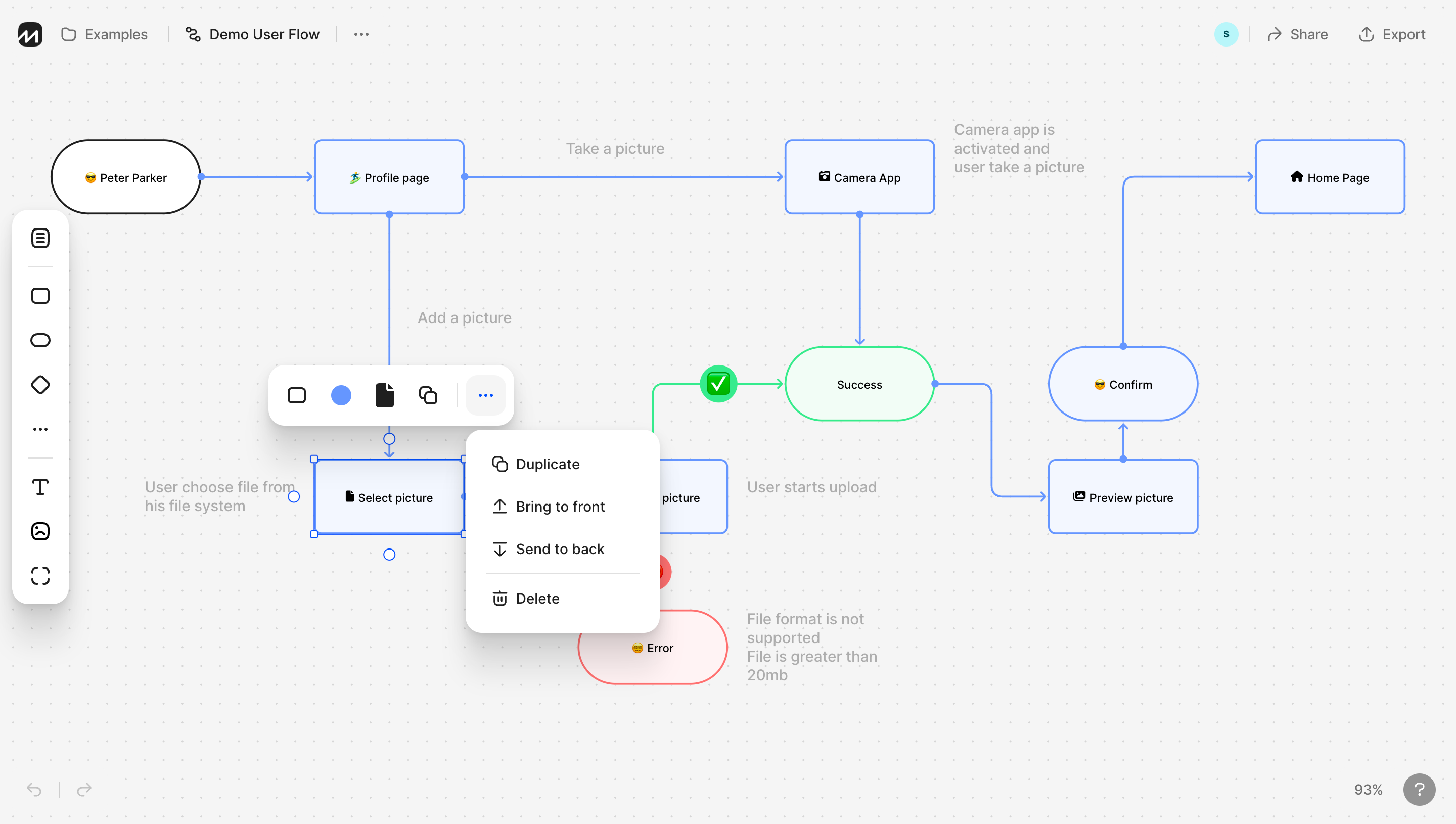
The reference is especially useful because the surrounding flow remains visible. Users can see which object the commands concern and how it relates to nearby nodes. The screenshot does not prove a right-click trigger, keyboard behavior, or what happens after duplication; it shows an explicit overflow route in a selection context.
When adapting this structure, keep the target recognizable while the menu is open. Do not remove the selected outline or place the panel so far away that its association is lost. On a dense canvas, spatial attachment can help, but text and stable selection should also explain scope.
A context menu is well suited to secondary commands, but it should not become the only route to the product's main task. If users repeatedly edit a status or assign an owner, a visible control may be more efficient. Use the menu to complement direct manipulation rather than hide necessary work.
Order commands around the object lifecycle. Opening, editing, duplicating, moving, and removing can form recognizable groups. Place destructive actions separately when that helps users distinguish their consequences. Dividers should reflect a meaningful relationship.
Avoid vague verbs such as “Manage” when an action has a precise result. “Move to folder” gives more useful information than “Organize.” Keep the wording aligned with the product's nouns so users do not have to translate between a table's “records” and a menu's “items.”
The FlowMapp reference places layering commands beside duplication and deletion. These operations concern the same object, but they change different things. Moving an object in the stacking order affects the composition; duplicating changes the object set; deleting removes something.
For your interface, group actions so these differences remain legible. A personal display preference and a shared record change should not appear interchangeable. If a view action only affects the current user, make that scope clear where confusion is likely.
Commands with meaningful downstream effects may need a detail surface after selection. “Delete” can open a confirmation that names the object and consequence. The context menu itself should remain compact rather than attempting to explain every possible dependency in a tiny row.
When several objects are selected, construct the action set around their shared capabilities. Some operations may support the whole group; others require a single target. Do not keep an apparently available action that will silently apply to only one arbitrary item.
Use a visible count or scope statement when group actions become consequential. “Delete 8 records” is more informative than the same generic label used for one record. If selected objects have mixed permissions, explain how ineligible items are handled before the user commits.
If opening a context menu changes selection, make that change visible. Users should not discover after acting that their previous group was replaced by the clicked row. Compare this decision with bulk actions, where selection scope is the primary task rather than a secondary menu detail.
Right-click can accelerate work for experienced desktop users, but it is not a sufficient discovery strategy. An overflow button or other visible route helps touch users and people who do not expect custom context behavior. It also clarifies that the product offers object-specific commands.
Give icon-only triggers useful labels in the underlying interface, including the object context when several identical buttons appear. A page full of controls all announced as “More” can make navigation unnecessarily difficult. The label should help users distinguish which row they are acting on.
Long press may be an additional touch shortcut, but it should not carry the whole interaction. Consider platform conflicts, accidental activation, and the absence of a visible cue. A deliberate button usually makes the route easier to understand and test.
For a true action menu, follow a consistent keyboard model and ensure the expanded state is exposed appropriately. Users need a practical way to enter the choices, move between them, activate one, and dismiss the surface. Keep the selected object and return location stable.
The W3C menu and menubar guidance explains the interaction conventions for menus. Its semantics should match the implemented component. A panel containing a form or substantial descriptive content may need a different model even if it opens from an overflow button.
Dismissal should cancel menu navigation, not undo prior work or execute the highlighted command. After a menu action removes its trigger, return focus to a meaningful nearby item or task control. Returning to an element that no longer exists leaves the user without context.
Menus near page edges need placement that preserves the relationship to their trigger while avoiding clipped actions. Check the bottom row of a table, a canvas corner, and enlarged text. The final item in a menu should not require inaccessible scrolling beyond the viewport.
If submenus are needed, keep their purpose and opening behavior understandable. Deep nested menus increase pointer precision demands and make touch adaptation harder. A dedicated move or configuration dialog may work better than a long hierarchy of hover-dependent panels.
On mobile, adapt the presentation while preserving scope. A sheet can work if it names the target and provides a clear close route. Do not turn a local action menu into a generic full-screen navigation surface that obscures what will change.
Closing the menu is not proof that the command succeeded. Show the actual result near the task, using feedback proportionate to the action. A duplication should reveal a recognizable new object; a failed move should preserve enough context for correction.
If an operation is asynchronous, prevent repeated activation from creating accidental duplicates. Explain progress without locking unrelated work unnecessarily. For partial failures on a selection, report what changed and what remains instead of showing an unqualified success message.
Recovery matters most for destructive operations. Use an appropriate confirmation or undo route according to whether the change can be reversed. Do not promise undo if the underlying operation cannot restore the object or its relationships.
Ask users to open a row menu while other rows are selected and predict the target of a command. Repeat on a canvas with overlapping objects and mixed permissions. These tasks reveal scope problems that spacing adjustments alone cannot solve.
Include pointer, keyboard, and touch operation; viewport-edge placement; unavailable actions; long labels; asynchronous failure; and deletion of the focused object. Verify every command against the actual target rather than testing only whether the menu opens.
Explore the SaaSFrame context-menu collection and compare dropdown menus for selection tasks. A successful context menu makes the target, action, and recovery legible at the same time.
Does a context menu have to open on right-click? No. An explicit overflow button can expose the same scoped action set. Right-click can supplement that route when it fits the platform.
Should a row menu act on the whole selection? Only when the interface communicates that model. Decide the rule deliberately and show the target or count before a consequential action.
When should an action leave the menu? Use a dedicated surface when the task needs substantial input, explanation, confirmation, or recovery. The menu should provide the entry point, not compress the entire task.