.webp)
Thank you! Your submission has been received!
Oops! Something went wrong while submitting the form.
Get SaaSFrame Pro
Monthly
$18
Quarterly
$48
Yearly
$180
Upgrade to access this feature
Browse all screens & flows
Filter and search screens & flows
Access Figma files
Access mobile versions
Bookmark screens & flows
Join now
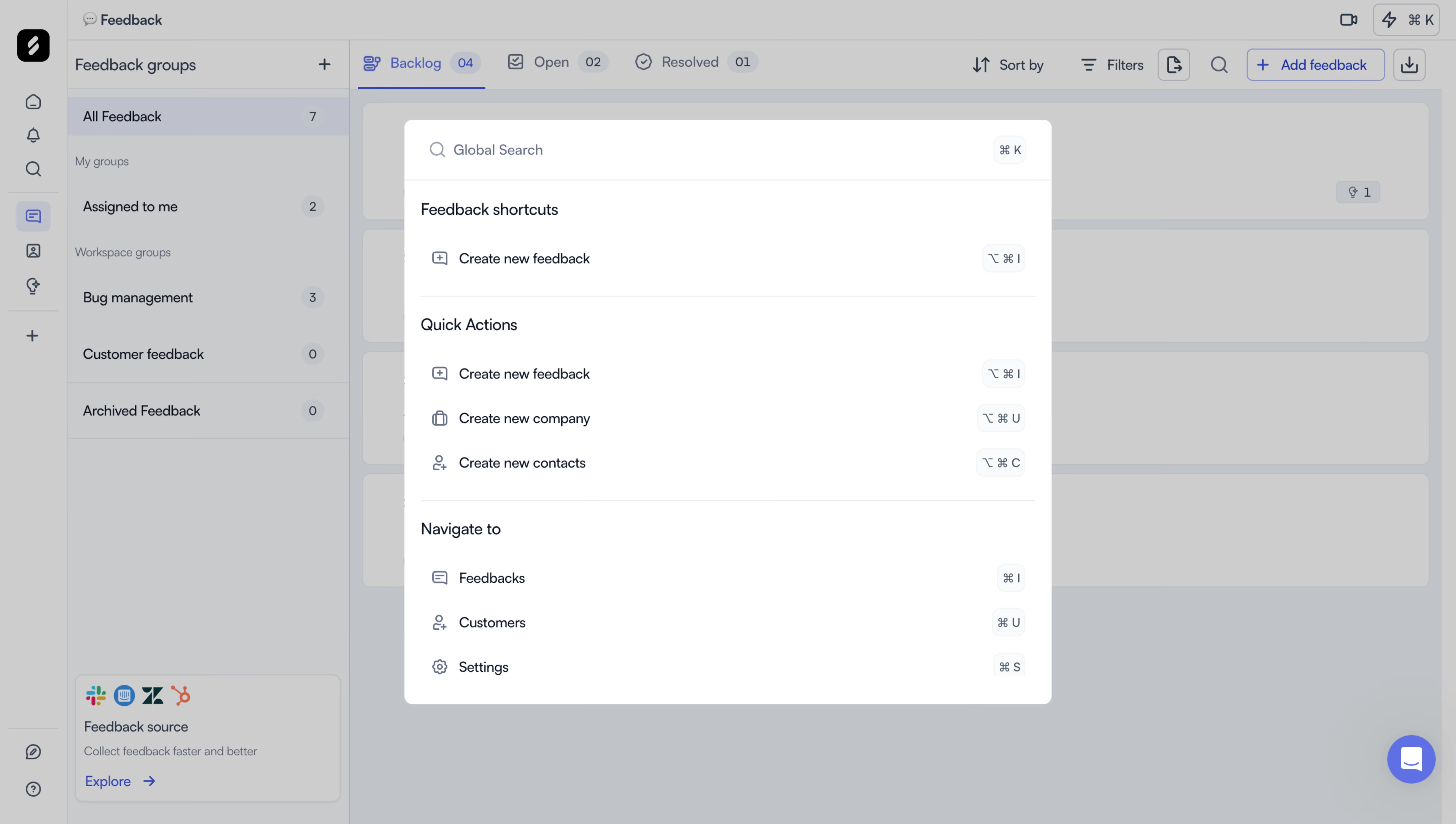
Zeda.io Search Modal

Zeda.io
AI-powered product discovery and strategy software
Designed by
No items found.

Bookmark
Bookmark

Design with AI
Thank you! Your submission has been received!
Oops! Something went wrong while submitting the form.
# Design from Reference: Zeda.io Search Modal
Create an original, high-fidelity visual design inspired by the reference. Prioritize composition, typography, colors, spacing, and component styling over technical implementation.
## Reference
- **Product:** Zeda.io
- **Category:** Search Modal
- **Screenshot:** https://cdn.prod.website-files.com/5e9dc792e1210c5325f7ebbc/6acadc535c79bb17f221b06d_6acadbb3c6c5c12a38e6fe14_cms-7dfb4746c3b99049cbddff53.webp
Analyze the screenshot first. If inaccessible, request it rather than guessing.
## Content
{{content.instructions}}
{{content.data}}
Preserve essential messaging and factual accuracy. Adapt structure and copy length for visual balance; never invent product claims.
## Visual Design
### Overall aesthetic
- **Character:** A white command/search palette floats above a dimmed feedback-management workspace. Restrained blue accents, fine separators and small keyboard badges produce a compact productivity-tool aesthetic.
- **Image basis:** Source dimensions are 5760 × 3260, inspected at 1400 × 792. Measurements below refer to the inspection image; the source is approximately four times larger, and CSS scale/device pixel ratio are unverified.
### Page composition
- **Workspace:** A narrow icon rail and a roughly 272 px feedback-group sidebar precede the main feedback canvas. Status tabs and sorting/filtering actions run across the top.
- **Modal:** A centered white panel spans approximately x389–1011 and y115–677, about 622 × 562 px. Softly rounded corners distinguish it from the gray overlay.
- **Palette header:** A search icon and Global Search placeholder align left; a small command-key badge aligns right in a roughly 58 px high search row.
- **Palette body:** Feedback shortcuts, Quick Actions and Navigate to sections contain one, three and three rows respectively. Thin rules separate the groups.
### Information hierarchy
- **Primary task:** The search row is the first visual entry point, followed by grouped shortcuts for creating content and navigating the application.
- **Rows:** Small outline icons precede concise labels; keyboard combinations sit at the opposite edge, making mouse and keyboard paths equally discoverable.
- **Background context:** The selected backlog tab and feedback sidebar remain recognizable through the overlay, while their content is visually subordinate.
- **Observed state:** The search field is empty and no result row is visibly selected. No query results, loading state or error message is shown.
### Typography
- **Group headings:** Approximately 15–16 px medium sans-serif text introduces each palette section.
- **Action labels:** Approximately 13–14 px regular dark text, with roughly 20 px line-height.
- **Search and keys:** Search placeholder text is around 13–14 px and muted; keyboard badges use compact approximately 11–12 px glyphs.
- **Workspace roles:** Background navigation uses approximately 13–14 px labels and smaller section headings. Typeface identity and actual CSS metrics are unverified.
### Colors & surfaces
- **Measured surfaces:** White #FFFFFF defines the palette. Pale #F9FAFB appears among small utility surfaces.
- **Measured overlay:** Grays #CDCDCD, #C0C4C7 and #C8C9CA dominate the dimmed workspace; these are composited screenshot colors, not verified underlying theme tokens.
- **Measured detail:** Muted #BDC1CC appears among borders and subdued interface elements. Dark navy text and gray-blue icons structure the palette.
- **Accent:** Blue is visible in the selected workspace tab, actions and chat launcher. Within the palette, emphasis relies mostly on hierarchy and spacing.
### Components
- **Search row:** A full-width top row has around 24 px horizontal inset, a leading magnifier, placeholder and right-aligned key badge, with a thin bottom separator.
- **Command rows:** Roughly 43 px high rows combine an approximately 16 px outline icon, label and right-aligned shortcut badge.
- **Shortcut badges:** Small pale rounded rectangles have fine borders, about 7 px corners and compact horizontal padding.
- **Group dividers:** Light horizontal rules stop short of the panel edges, aligning with the content inset.
- **Workspace controls:** The background contains tab counts, filter/sort controls, feedback creation and a lower-right circular chat control. Their subdued appearance results from the modal overlay.
- **States:** No focused border, hovered row or selected keyboard result is visible.
### Visual rhythm
- **Alignment:** Icons, labels and shortcut badges form three consistent vertical tracks.
- **Grouping:** Larger gaps and headings distinguish command categories, while rows within a group repeat tightly.
- **Density:** The palette is compact but spacious enough for scanable labels; broad dimmed margins isolate it from a dense workspace.
- **Geometry:** Small corner radii, fine rules and pale badges keep the palette visually lightweight.
### Responsive
- **Evidence limit:** Only a wide workspace with an open palette is observed.
- **Recommended palette:** Use viewport-safe margins and a maximum height with scrolling on smaller screens.
- **Recommended rows:** Allow labels to wrap or shorten gracefully while retaining accessible names; hide redundant keyboard hints on touch layouts if appropriate.
- **Recommended behavior:** Keep focus inside the palette, support keyboard navigation and provide a clear dismissal mechanism. These behaviors cannot be verified from the screenshot.
### Adaptation guidance
- **Preserve:** Retain grouped commands, consistent row alignment and visible keyboard shortcuts.
- **Build:** Reuse search-header, command-group, action-row and key-badge components with shared spacing.
- **State design:** Define focused input, selected result, no-results and loading appearances explicitly.
- **Validate:** Confirm font metrics, modal contrast, focus management and small-screen row usability.
Use this context to reproduce the reference's visual language: layout, typography, colors, spacing, borders, radii, and distinctive elements. The screenshot takes priority if descriptions conflict.
## Direction
{{preferences.fidelityInstructions}}
## Output
{{output.instructions}}
Deliver a polished, cohesive design with precise alignment, hierarchy, and spacing. Produce the requested visual artifact, not just a description. If unsupported, explain the limitation.

.avif)
Category
Tech Stack

Added on
August 10, 2023
Similar screens





Upgrade to SaaSFrame Pro now to see similar examples.
Monthly
$18 /month
Billed $18 monthly
Browse all screens & flows
Filter and search screens & flows
Search text in screenshots
Access Figma files
Access mobile versions
Join now
Quarterly
$16 /month
Billed $48 quarterly
Browse all screens & flows
Filter and search screens & flows
Search text in screenshots
Access Figma files
Access mobile versions
Join now
Yearly
$15 /month
Billed $180 yearly
Browse all screens & flows
Filter and search screens & flows
Search text in screenshots
Access Figma files
Access mobile versions
Join now