.avif)


1. Header - At the top of the page is a header with the Wistia logo, a navigation menu, and a search bar. 2. Introduction - The introduction section, "Video Integrations for Your Business" gives a brief description of what the integrations page is all about. 3. Filter options - There are three filter options, "Popular integrations", "All Integrations", and "By Category". Users can filter the integrations display based on these options. 4. Integrations - The main body of the page is a grid display all available integrations. Each integration display includes the integration name, a logo, a brief description, and a button to learn more. 5. Category sections - After the integrations section, there are three category sections: "Lead Generation & Sales", "Website & Engagement", and "Marketing Automation". In each section, there is a brief description followed by a list of the integrations relevant to that category. 6. Partner section - The partner section includes a grid of partner logos and a brief description of the Wistia Partner Program. 7. Footer - At the bottom of the page is a footer with links to the Wistia blog, support, and social media accounts.
.webp)
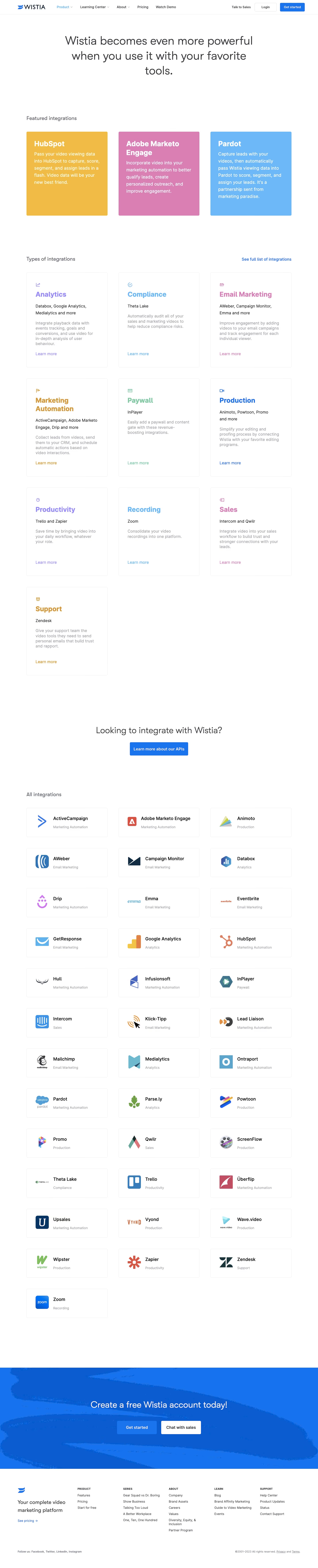
Wistia Integrations Page

Wistia
Video marketing software for business
Designed by
No items found.
Category
Patterns
No items found.
Tech Stack
Added on
March 16, 2023