Generate a new design based on this screen using your own content.
Thank you! Your submission has been received!
Oops! Something went wrong while submitting the form.
# Design from Reference: Wise Payment Request Sent
Create an original, high-fidelity visual design inspired by the reference. Prioritize composition, typography, colors, spacing, and component styling over technical implementation.
## Reference
- **Product:** Wise
- **Category:** Success
- **Screenshot:** https://cdn.prod.website-files.com/5e9dc792e1210c5325f7ebbc/6aca27e6aca7079066e8e785_6aca2701aca7079066e89ea4_cms-23758c0ca0379df936c31501.webp
Analyze the screenshot first. If inaccessible, request it rather than guessing.
## Content
{{content.instructions}}
{{content.data}}
Preserve essential messaging and factual accuracy. Adapt structure and copy length for visual balance; never invent product claims.
## Visual Design
Use this context to reproduce the reference's visual language: layout, typography, colors, spacing, borders, radii, and distinctive elements. The screenshot takes priority if descriptions conflict.
## Direction
{{preferences.fidelityInstructions}}
## Output
{{output.instructions}}
Deliver a polished, cohesive design with precise alignment, hierarchy, and spacing. Produce the requested visual artifact, not just a description. If unsupported, explain the limitation.
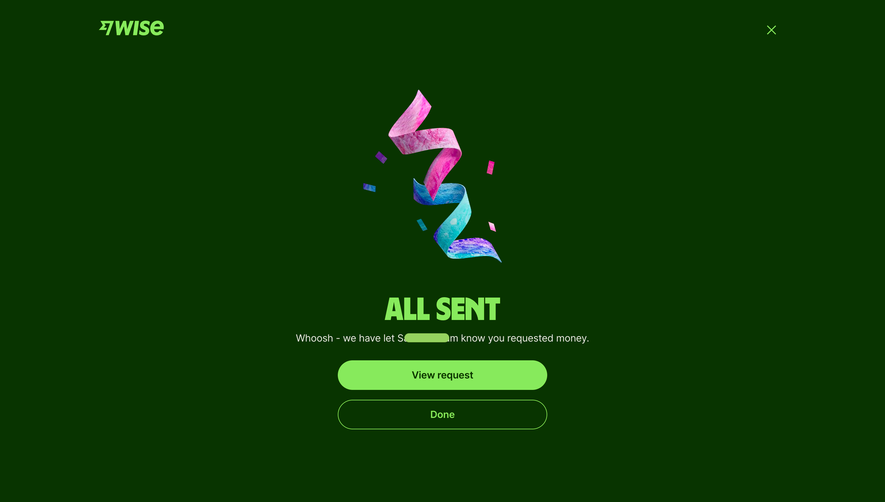
This Wise confirmation screen is a masterclass in celebration UI. That deep forest green background immediately sets it apart from the typical white or light gray success states we see everywhere. The 3D confetti ribbon illustration is vibrant, almost holographic, with pink and blue gradients that pop hard against the dark canvas. It feels fun without being childish.
Bold and Confident Typography
"ALL SENT" in that chunky italic slab serif is doing heavy lifting here. It's loud, celebratory, and impossible to miss. The supporting copy underneath is small and conversational. "Whoosh - we have let S[redacted]m know you requested money." That little "Whoosh" adds personality most fintech apps wouldn't dare attempt.
Two Clear Exits
The dual CTA approach is smart. Solid lime green "View request" button for the primary action, outlined "Done" button below for users who just want to bounce. The hierarchy is crystal clear. Both buttons use generous padding and rounded corners that feel tappable. The whole layout is vertically centered and breathes well. No clutter, just confidence.
.webp)





.avif)