Overall Style and Aesthetic
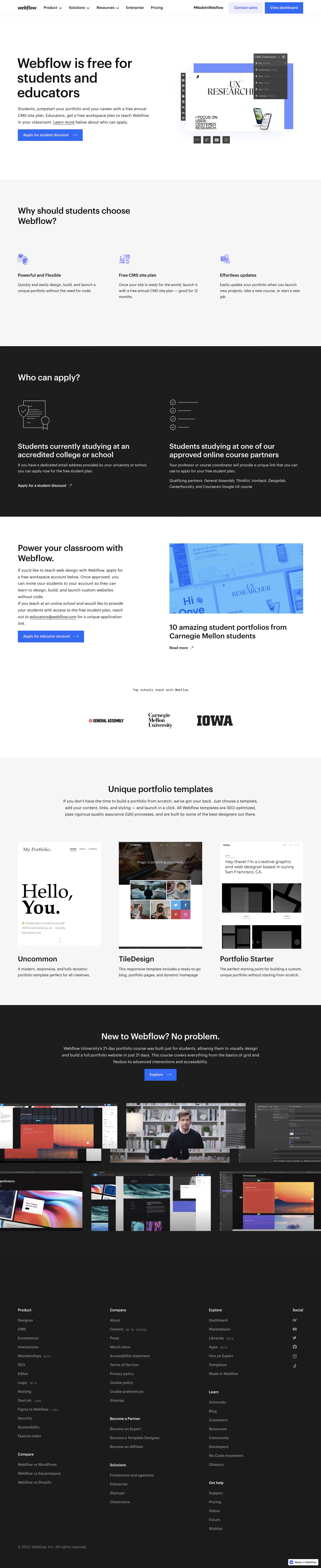
Webflow for Classroom embraces a modern, minimalistic aesthetic characterized by generous white space and a vibrant, youthful energy. The visual language feels innovative yet approachable, leveraging a playful, education-focused atmosphere that underscores the product’s relevance for students and educators alike. Layout and Structure
The page opens with a compelling hero section featuring bold headline text, a crisp CTA button, and an illustrative background that visually encapsulates classroom creativity. Below, clear and digestible feature sections are separated by generous padding and eye-catching backgrounds, followed by interactive elements like testimonials and FAQs. The footer is neatly organized, offering relevant links without visual clutter. Visual Elements
Illustrations take center stage—dynamic, colorful, and slightly whimsical, they bring concepts to life and guide the eye across the page. Genuine photography intersperses the layout, showcasing diverse classroom settings. Simple yet effective iconography punctuates the features, while on-scroll animations—such as fading text and sliding elements—add a layer of interactivity without overwhelming the user. Color Palette and Typography
A striking palette blends bold purples and pinks with clean whites and subtle grays, creating strong contrast and visual warmth. Typography is modern and functional: the sans-serif heading font delivers clarity, while body text remains readable and friendly, using a soft hierarchy that guides attention to CTAs and key information. User Experience Patterns & Unique Choices
Sticky navigation ensures users never lose their bearings, with prominent, clearly labeled CTAs throughout. Microinteractions, such as hover effects and animated icons, make the experience engaging. Thoughtful, student-centered visuals build trust and relatability—distinctive for an education-focused SaaS product—while concise copy and intuitive forms help users stay focused and informed throughout their journey..webp)




.avif)