Design with AI
Generate a new design based on this screen using your own content.
# Design from Reference: Userflow User Onboarding
Create an original, high-fidelity visual design inspired by the reference. Prioritize composition, typography, colors, spacing, and component styling over technical implementation.
## Reference
- **Product:** Userflow
- **Category:** User Onboarding
- **Screenshot:** https://cdn.prod.website-files.com/5e9dc792e1210c5325f7ebbc/6acbc94c1790037d3e059367_6acbc665c7093021f22c4494_cms-1f78a602ccedfe88c92aae87.webp
Analyze the screenshot first. If inaccessible, request it rather than guessing.
## Content
{{content.instructions}}
{{content.data}}
Preserve essential messaging and factual accuracy. Adapt structure and copy length for visual balance; never invent product claims.
## Visual Design
### Overall aesthetic
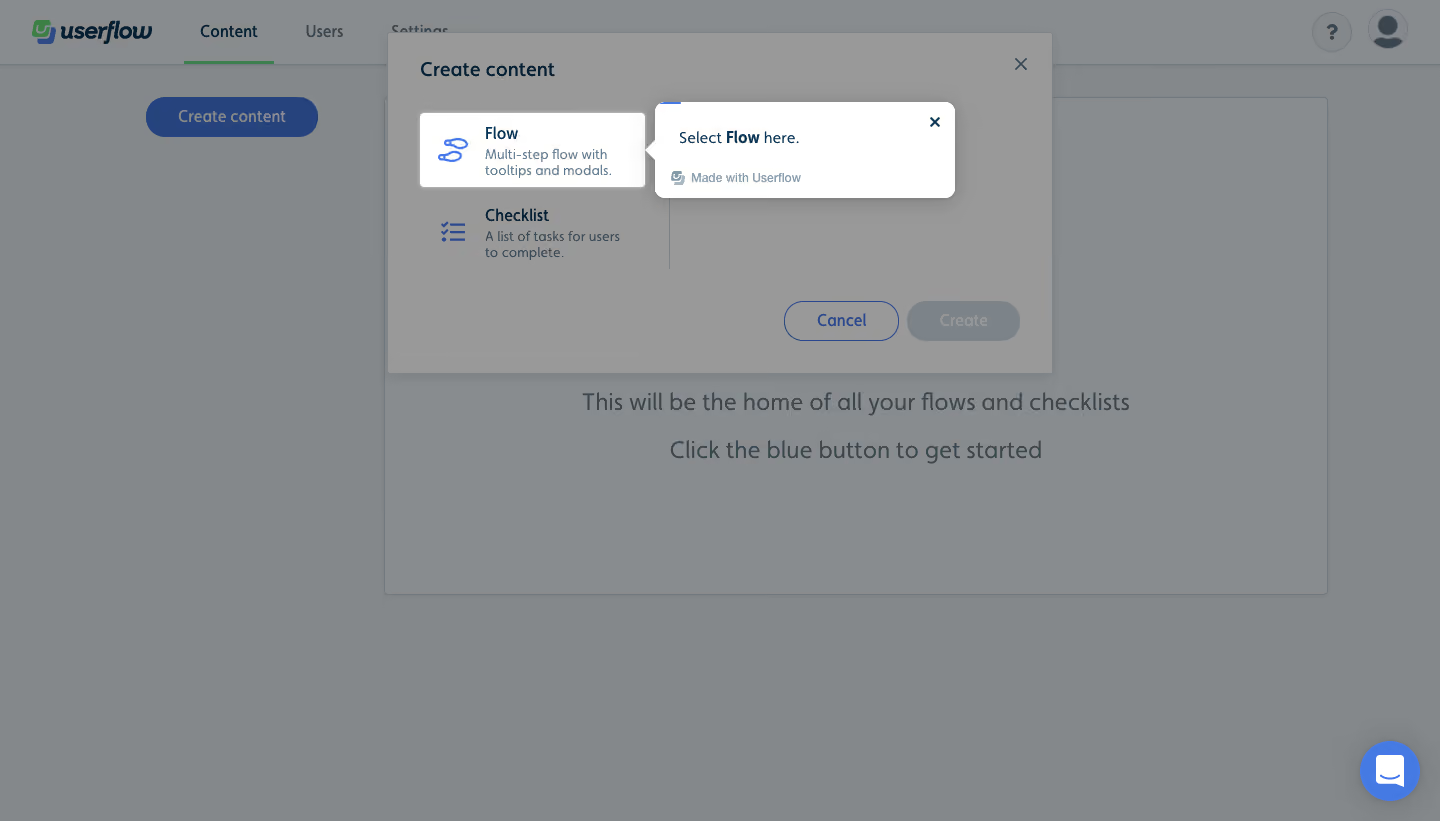
- **Style:** Guided onboarding overlay on a content-creation modal within a light application.
- **Focus:** Gray veil dims the workspace and modal while a bright Flow option and white instructional popover remain prominent.
### Page composition
- **Canvas:** Source 1440 × 821 pixels, inspected at 1400 × 798. CSS scale is unverified.
- **Background:** Top brand/navigation row and a large empty-content panel with a blue creation button.
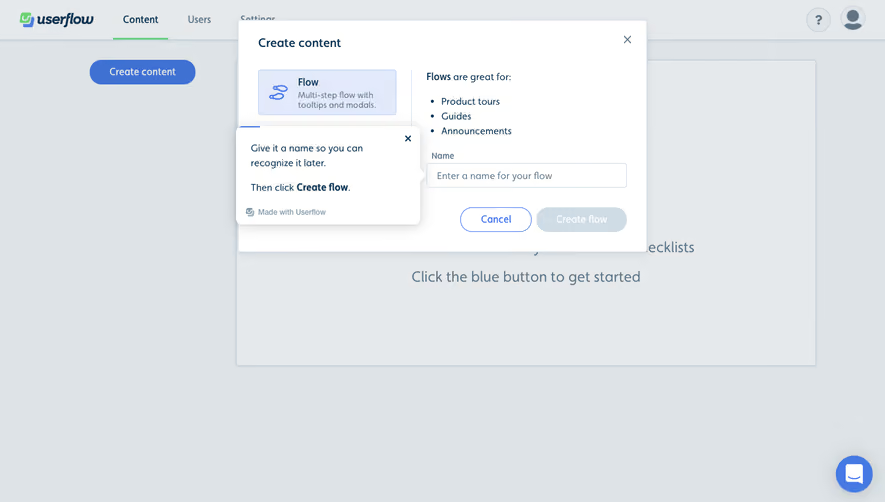
- **Creation modal:** Approximately 646 × 332px near x377, y31, with heading, two content-type options and lower actions.
- **Spotlight:** Flow option is highlighted as a white rectangle near x408, y109.
- **Tour popover:** Approximately 292 × 94px sits immediately right of the target, with left pointer, instruction, close control and small attribution.
- **Support:** Blue chat launcher remains lower right.
### Information hierarchy
- **Creation context:** Create content heading identifies the underlying modal.
- **Choice:** Flow and Checklist each pair an icon, title and short explanation.
- **Tour instruction:** Select Flow here is the active instruction, with Flow bolded.
- **Actions:** Underlying Cancel and muted Create controls remain visible through the veil.
- **Background state:** Empty content area explains where future flows/checklists will appear.
### Typography
- **Modal heading:** Approximately 20px medium sans serif.
- **Option titles:** Around 16px medium; descriptions around 14px/16px.
- **Tour copy:** Approximately 14px regular, with bold target term.
- **Attribution:** Around 12px muted. Exact font family is unverified.
### Colors & surfaces
- **Measured veil:** #84888B, #898C8E and #999999 dominate dimmed regions; nearby #989898 and #84888A occur in transitions.
- **Measured foreground/accent:** #26437E blue and #7C848A muted control tone.
- **Measured bright surface:** #FFFFFF spotlight/popover.
- **Other accents:** Blue option icon and chat control; small green navigation underline behind veil.
- **Depth:** Popover has rounded corners and a diffuse shadow, distinct from the dimmed modal.
### Components
- **Creation modal:** Pale shell with thin boundary, small corner radius and about 31px heading inset.
- **Flow target:** Approximately 219 × 73px bright tile with blue flow icon and two-line description.
- **Checklist option:** Similar icon/text structure below, without the bright spotlight treatment.
- **Popover:** Approximately 9px radius, left triangular pointer and small close cross upper right.
- **Modal buttons:** Rounded outline Cancel and muted filled Create, approximately 110px wide each.
- **States:** Intermediate guided step is visible; option selection and Create activation are not demonstrated.
### Visual rhythm
- **Target placement:** Tour card sits roughly 10px right of highlighted option.
- **Modal spacing:** Large gap separates option area from bottom-right actions.
- **Background:** Empty panel copy is centered and widely spaced beneath the modal.
- **Focus hierarchy:** Bright target and instruction sharply contrast with the uniformly dimmed surroundings.
### Responsive
- **Observed scope:** Desktop only; responsive tour placement is unverified.
- **Recommended tour:** Reposition popover above/below the target when horizontal space is insufficient.
- **Recommended modal:** Use viewport gutters and internal scrolling if necessary.
- **Recommended controls:** Keep dismissal and underlying creation choices keyboard accessible.
### Adaptation guidance
- **Preserve:** One highlighted target and concise instruction.
- **Implementation:** Recalculate target/popover bounds on resize and scroll.
- **Interaction:** Define selection, dismissal, focus restoration and progression explicitly.
- **Accessibility:** Announce the tour instruction and provide named close/control targets.
Use this context to reproduce the reference's visual language: layout, typography, colors, spacing, borders, radii, and distinctive elements. The screenshot takes priority if descriptions conflict.
## Direction
{{preferences.fidelityInstructions}}
## Output
{{output.instructions}}
Deliver a polished, cohesive design with precise alignment, hierarchy, and spacing. Produce the requested visual artifact, not just a description. If unsupported, explain the limitation.
.webp)



.avif)