Design with AI
Generate a new design based on this screen using your own content.
# Design from Reference: Userbot User Onboarding
Create an original, high-fidelity visual design inspired by the reference. Prioritize composition, typography, colors, spacing, and component styling over technical implementation.
## Reference
- **Product:** Userbot
- **Category:** User Onboarding
- **Screenshot:** https://cdn.prod.website-files.com/5e9dc792e1210c5325f7ebbc/6acbc7527369a31d47fc6da1_6acbc5cc4d71070f5fd61131_cms-4b0415ff29087050d311a866.webp
Analyze the screenshot first. If inaccessible, request it rather than guessing.
## Content
{{content.instructions}}
{{content.data}}
Preserve essential messaging and factual accuracy. Adapt structure and copy length for visual balance; never invent product claims.
## Visual Design
### Overall aesthetic
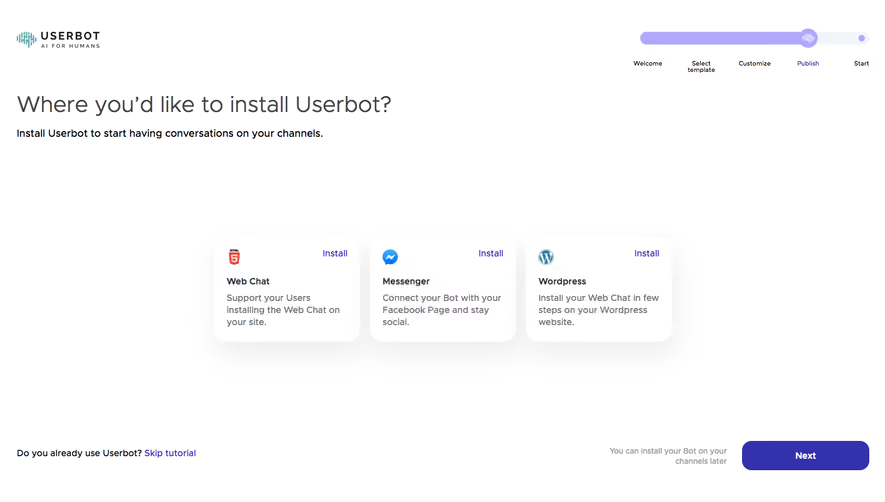
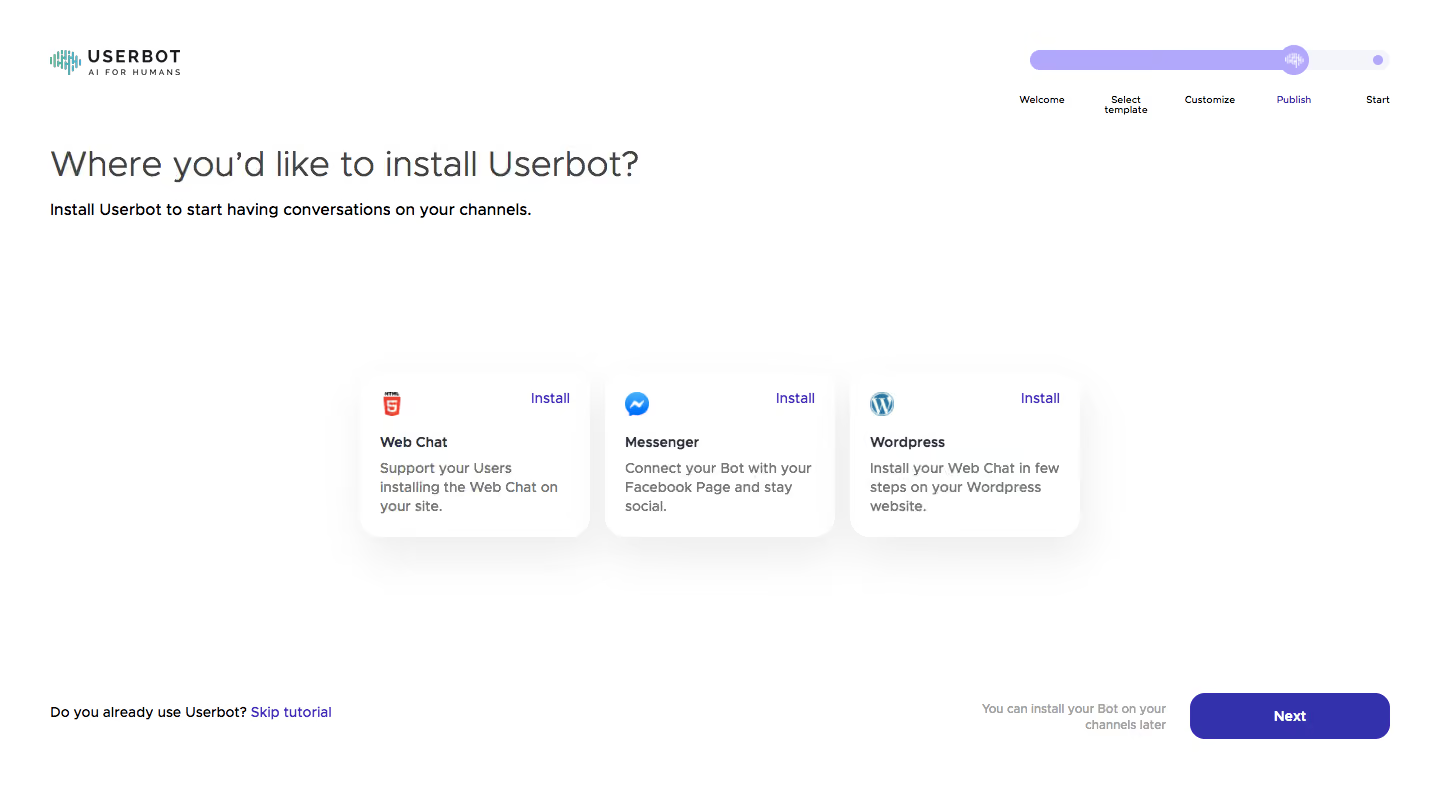
- **Character:** Sparse installation-channel onboarding with three soft elevated cards and a small purple progress tracker.
### Page composition
- **Canvas:** 1440 × 789 screenshot px.
- **Structure:** Brand upper left, five-stage progress upper right, large left-aligned question/deck, centered three-card channel row and bottom skip/helper/Next controls.
### Information hierarchy
- **Priority:** Installation question leads; Web Chat, Messenger and Wordpress cards each expose an Install link. Publish is highlighted in progress.
### Typography
- **Family:** Rounded geometric sans serif, exact font unverified.
- **Scale:** Estimated screenshot question 34 px, card titles/body 14–16 px and progress labels 10–12 px.
### Colors & surfaces
- **Sampled palette:** White #FFFFFF, deep purple #3331AB and lavender #B1A8FC.
- **Treatment:** Very faint shadows under white cards, dark gray text and restrained provider-logo color.
### Components
- **Cards:** Three equal approximately 230 × 165 screenshot px panels with 24 px corners, icon top left and Install top right.
- **Progress:** Long rounded lavender track with circular markers and labels below.
- **Footer:** Rounded purple Next button, muted helper and blue Skip tutorial link.
### Visual rhythm
- **Spacing:** Large open space above/below card row; approximately 16 px card gaps and generous outer margins.
### Responsive
- **Observed:** Desktop only.
- **Adaptation:** Stack cards, move progress above the question and keep Next/Skip visible after content.
### Adaptation guidance
- **Preserve:** Simple channel comparison and spacious guided setup.
- **Replace:** Use supported installation destinations and actual setup stages.
Use this context to reproduce the reference's visual language: layout, typography, colors, spacing, borders, radii, and distinctive elements. The screenshot takes priority if descriptions conflict.
## Direction
{{preferences.fidelityInstructions}}
## Output
{{output.instructions}}
Deliver a polished, cohesive design with precise alignment, hierarchy, and spacing. Produce the requested visual artifact, not just a description. If unsupported, explain the limitation.
.webp)



.avif)