Design with AI
Generate a new design based on this screen using your own content.
# Design from Reference: Tona Create Screenshot Routine
Create an original, high-fidelity visual design inspired by the reference. Prioritize composition, typography, colors, spacing, and component styling over technical implementation.
## Reference
- **Product:** Tona
- **Category:** Add & Edit
- **Screenshot:** https://cdn.prod.website-files.com/5e9dc792e1210c5325f7ebbc/6acb634aadcf005a3c5c322f_6acb6296b79140e81e487024_cms-ffa9d1cdbbd99d0debf85fb4.webp
Analyze the screenshot first. If inaccessible, request it rather than guessing.
## Content
{{content.instructions}}
{{content.data}}
Preserve essential messaging and factual accuracy. Adapt structure and copy length for visual balance; never invent product claims.
## Visual Design
### Overall aesthetic
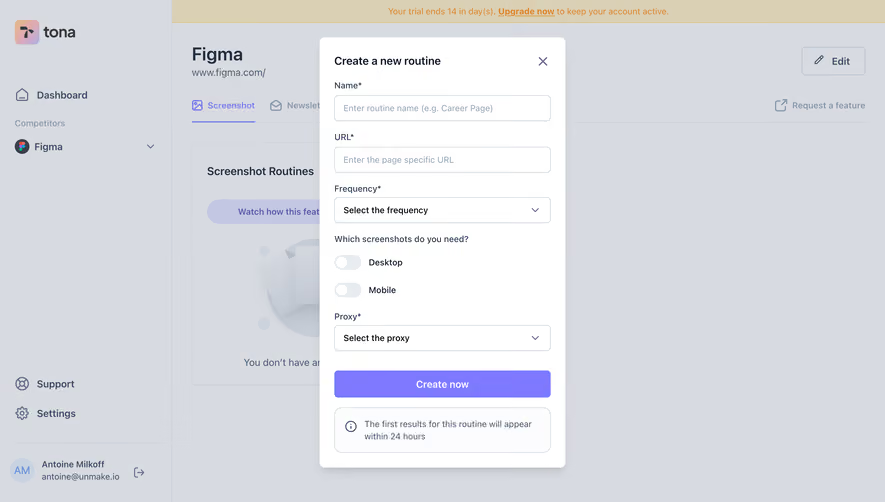
- **Style:** A narrow white routine-creation modal over a dimmed competitor-monitoring workspace, with lavender action and simple form controls.
- **Character:** Functional and calm, using clear labels, compact fields, and a small timing-information callout.
### Page composition
- **Capture and scale:** 2880 × 1642 screenshot pixels, consistent with estimated 2× capture. Following dimensions are estimated CSS pixels.
- **Backdrop:** The underlying app has a sidebar, trial banner, competitor title, Screenshot/Newsletter tabs, and empty screenshot-routine panel.
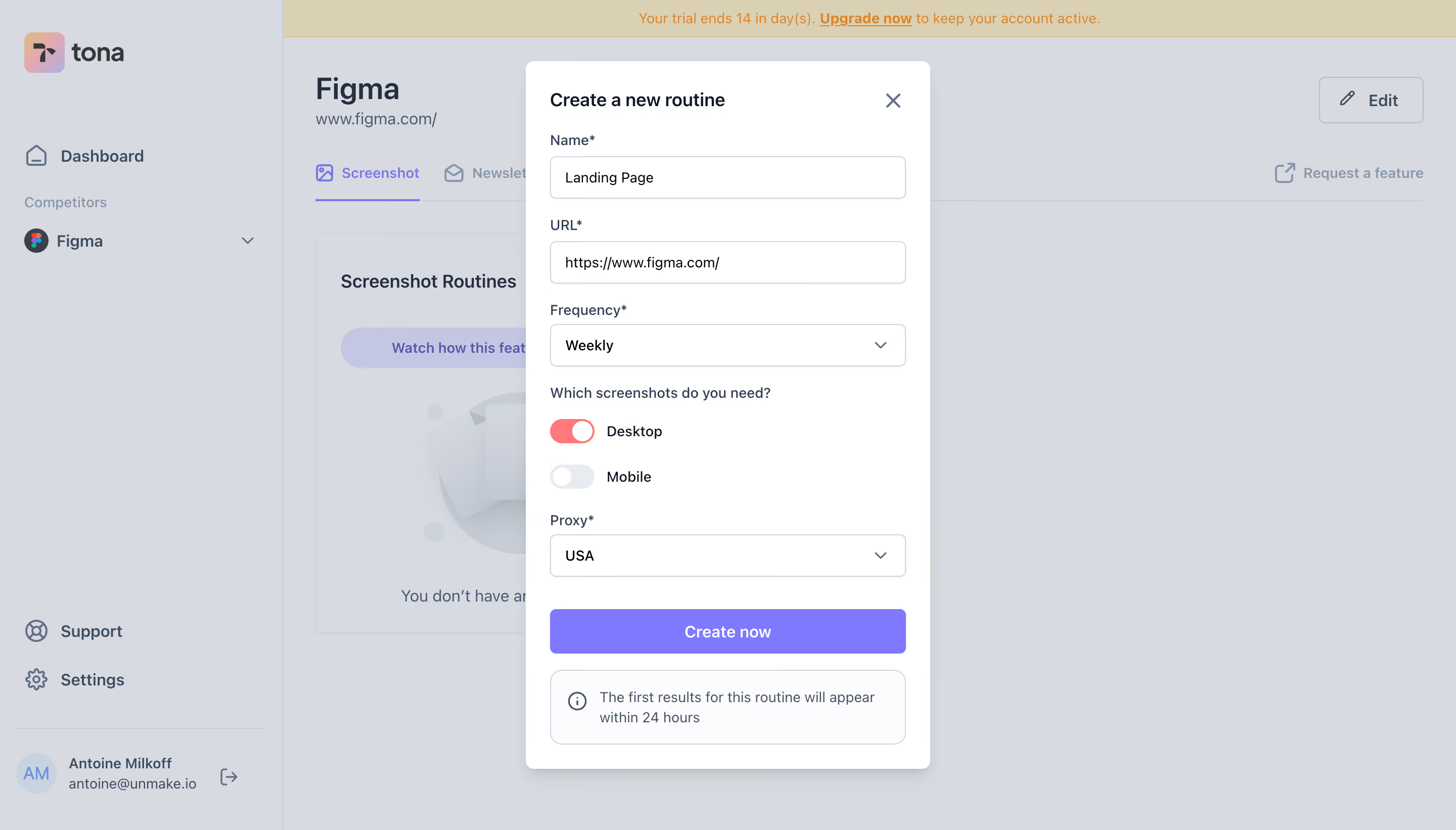
- **Modal:** A centered roughly 400 px-wide white dialog contains title/close, name, URL, frequency, desktop/mobile toggles, proxy selector, Create now action, and informational footer box.
### Information hierarchy
- **Form order:** Routine identity and URL precede scheduling, target device choices, and location/proxy.
- **State:** Desktop is visibly enabled in coral; Mobile is pale and off.
- **Completion:** The lavender full-width creation action precedes a separate note about first-result timing.
### Typography
- **Family:** Neutral sans serif; exact identity unverified.
- **Roles:** Modal title approximately 18 px CSS semibold; labels/values around 14 px; callout about 14 px with 20 px line-height.
- **Action:** Create now uses centered white semibold text around 16 px.
### Colors & surfaces
- **Surfaces:** Sampled sRGB #FFFFFF defines dialog; #FCFCFD supports pale details. #D7DBE1 and #D6DAE0 are dimmed-background composites.
- **Accent:** Sampled lavender #7F79FF fills the primary action. Coral marks the enabled device toggle; exact coral hex unverified.
- **Backdrop details:** Sampled #DAD0B3 reflects the dimmed trial banner, not the original banner token.
### Components
- **Dialog:** Small approximately 8 px outer radii, soft lower shadow, and about 24 px padding.
- **Fields:** Name/URL/selects span the inner width, approximately 42 px high, with fine cool-gray borders and 5 px radii.
- **Device controls:** Two separate small switches align vertically beside device labels, with white thumbs.
- **Action/callout:** The full-width button is roughly 44 px high. The lower outlined rounded box pairs an information icon and two-line note.
- **Close:** A muted X sits at top right without a large button surface.
### Visual rhythm
- **Spacing:** Use approximately 18–22 px between field groups, 12 px between device choices, and 30 px before creation.
- **Alignment:** All labels, inputs, button, and callout share one left/right edge.
### Responsive
- **Observed state:** Desktop only.
- **Recommended reflow:** Constrain dialog to viewport margins, enable vertical scrolling on short screens, and keep device labels associated with toggles.
### Adaptation guidance
- **Preserve:** Retain the narrow sequential form, distinct device toggles, lavender primary action, and separate timing note.
- **Adapt:** Use actual scheduling/proxy choices and accurate result timing.
- **Avoid:** Do not copy the reference URL or invent selector options and post-creation behavior.
Use this context to reproduce the reference's visual language: layout, typography, colors, spacing, borders, radii, and distinctive elements. The screenshot takes priority if descriptions conflict.
## Direction
{{preferences.fidelityInstructions}}
## Output
{{output.instructions}}
Deliver a polished, cohesive design with precise alignment, hierarchy, and spacing. Produce the requested visual artifact, not just a description. If unsupported, explain the limitation.
.webp)



.avif)