.webp)
Thank you! Your submission has been received!
Oops! Something went wrong while submitting the form.
Get SaaSFrame Pro
Monthly
$18
Quarterly
$48
Yearly
$180
Upgrade to access this feature
Browse all screens & flows
Filter and search screens & flows
Access Figma files
Access mobile versions
Bookmark screens & flows
Join now
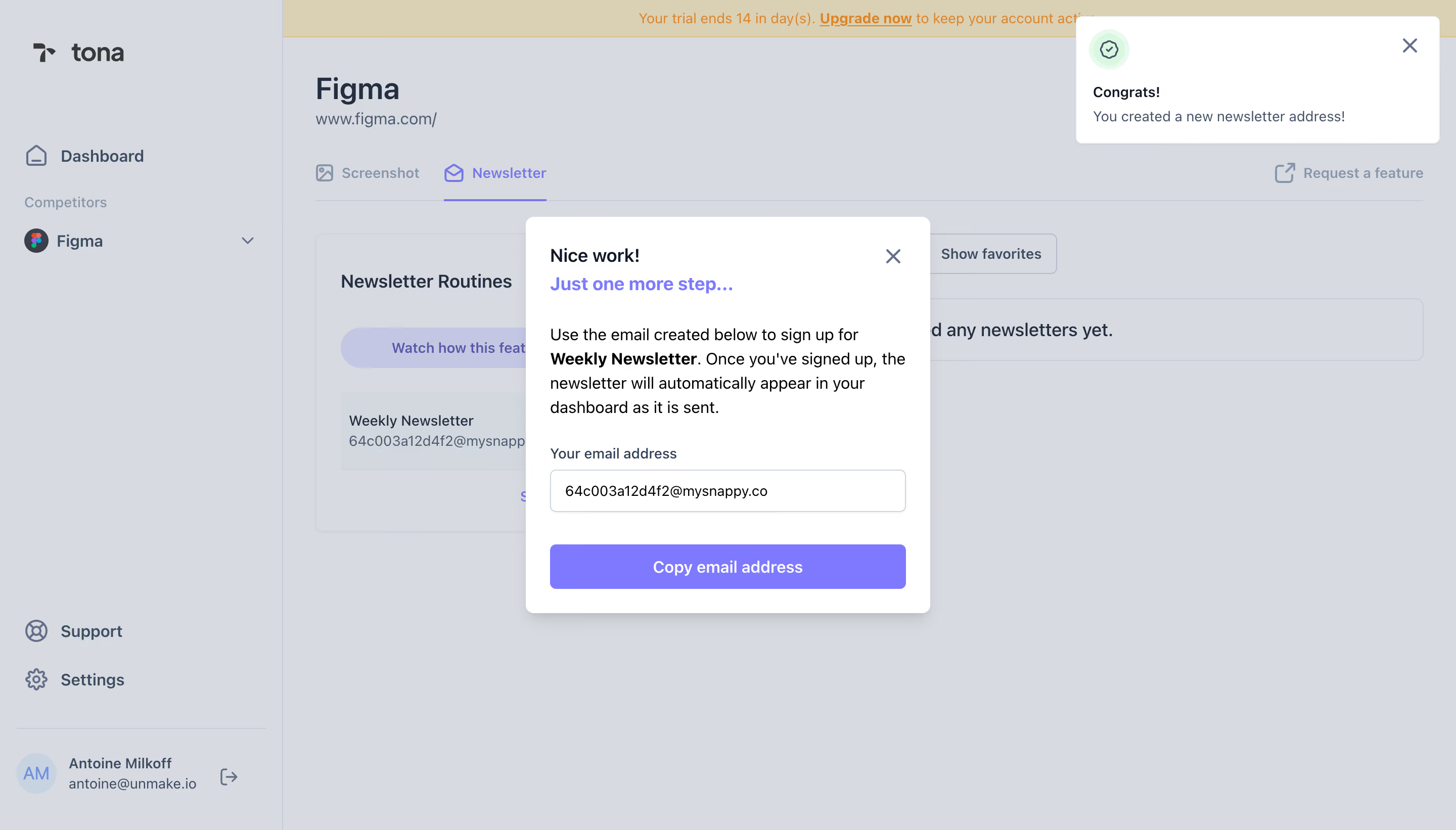
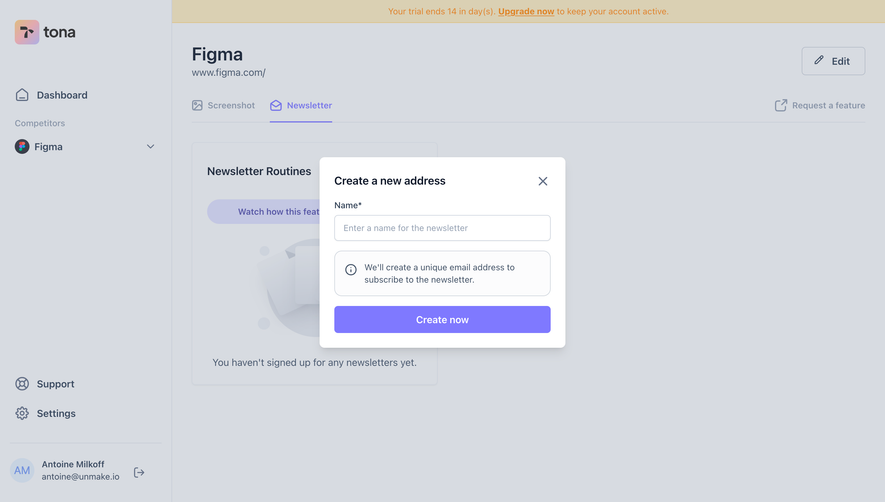
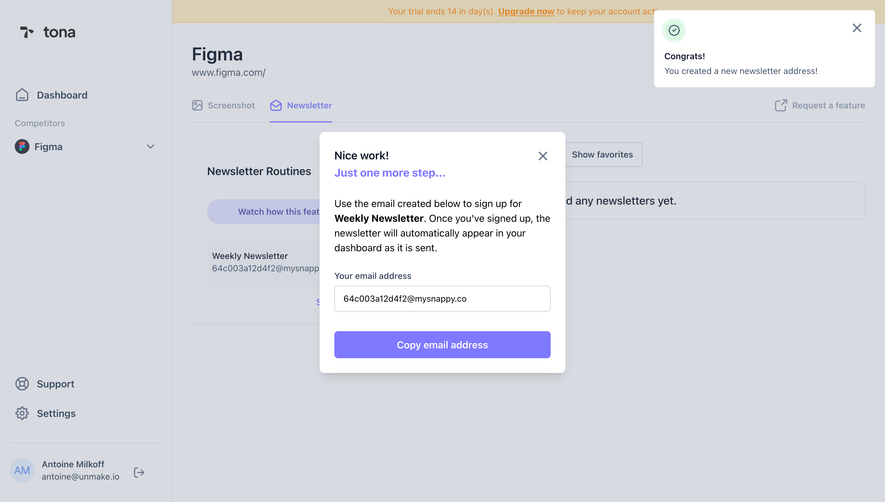
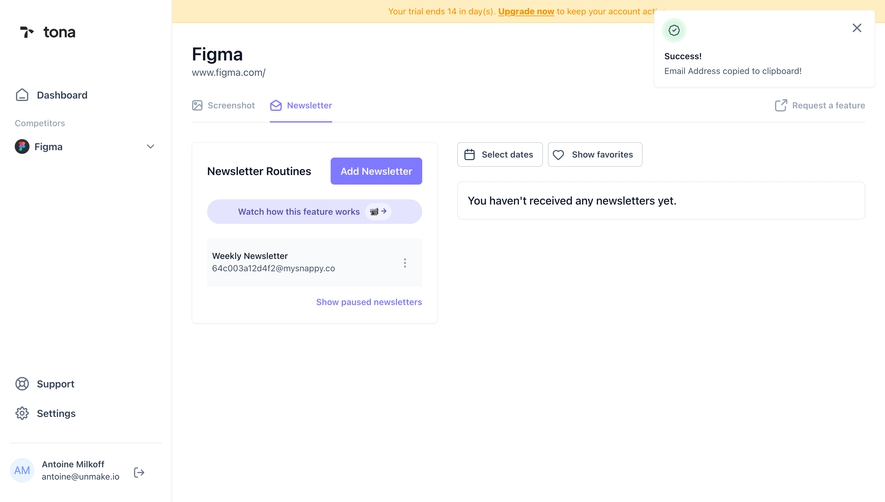
Tona Add A Newsletter

Tona
Competitor monitoring on autopilot
Designed by
No items found.

Bookmark
Bookmark

Design with AI
Thank you! Your submission has been received!
Oops! Something went wrong while submitting the form.
# Design from Reference: Tona Add A Newsletter
Create an original, high-fidelity visual design inspired by the reference. Prioritize composition, typography, colors, spacing, and component styling over technical implementation.
## Reference
- **Product:** Tona
- **Category:** Add & Edit
- **Screenshot:** https://cdn.prod.website-files.com/5e9dc792e1210c5325f7ebbc/6acb6451b206c0d3f8f06393_6acb629d5391d62536b42200_cms-11097e70a43a3305b73e450d.webp
Analyze the screenshot first. If inaccessible, request it rather than guessing.
## Content
{{content.instructions}}
{{content.data}}
Preserve essential messaging and factual accuracy. Adapt structure and copy length for visual balance; never invent product claims.
## Visual Design
### Overall aesthetic
- **Style:** Light newsletter-tracking dashboard with a centered white instruction modal and a separate success notification.
- **Character:** Violet actions and headings, slate text and a pale overlay create a focused setup-completion step.
- **Capture:** The image measures 2880 × 1642 pixels. CSS estimates assume a 2× capture, equivalent to approximately 1440 × 821 CSS pixels; actual scale and font identity are unverified.
### Page composition
- **Underlying shell:** A roughly 280-CSS-pixel sidebar contains brand, dashboard, competitor entry and lower support/account controls.
- **Background page:** A competitor title, website, screenshot/newsletter tabs and newsletter-routine panel remain visible beneath the overlay.
- **Trial banner:** A thin warm strip spans the top of the content area.
- **Modal:** A centered white panel approximately 400 × 392 pixels begins near x520, y214.
- **Modal sequence:** Two-line success/progression heading, explanatory paragraph, labeled address field and full-width copy action.
- **Toast:** A white notification approximately 360 × 126 pixels sits at upper right with a green success symbol and close icon.
### Information hierarchy
- **Immediate next step:** The modal explains that one external subscription step remains after address creation.
- **Target newsletter:** Bold text within the explanation identifies the selected newsletter.
- **Generated address:** A labeled field presents the destination address as the key piece of data.
- **Primary action:** Copy email address is the strongest modal control.
- **Success feedback:** The toast confirms creation independently from the instructional modal.
- **Background state:** The newsletter tab is selected and the underlying feed appears empty.
- **State scope:** No copied confirmation or received newsletter is shown.
### Typography
- **Family:** A neutral sans-serif is visible; exact identity is unverified.
- **Modal heading:** Approximately 18-pixel CSS size, bold, with 28-pixel line height.
- **Explanation:** Approximately 16 pixels with 24-pixel line height.
- **Field label:** Approximately 14 pixels, medium weight.
- **Address value:** Approximately 14 pixels, regular.
- **Copy action:** Approximately 16 pixels, semibold, white.
- **Toast:** Bold short title around 14 pixels and muted body around 14 pixels.
### Colors & surfaces
- **Measured modal/toast:** White #FFFFFF fills the foreground surfaces.
- **Measured overlay appearance:** Cool gray #D7DBE1 dominates the dimmed background; it is a composited screenshot color.
- **Measured accent:** Violet #7F79FF fills the copy button and emphasized heading text.
- **Measured supporting tones:** #C3C7E3 appears among muted violet background controls; #C7CDD7 supports boundaries.
- **Measured trial surface:** Warm beige #DAD0B3 appears in the dimmed top banner.
- **Text:** Black supports modal instructions; slate-gray labels and background text are softer.
- **Depth:** The modal casts a subtle lower shadow; the toast uses a fine boundary and small corner rounding.
### Components
- **Modal frame:** Approximately 400 pixels wide, with 8-pixel corners and 24-pixel padding.
- **Close control:** A slate X aligns to the upper-right inside the panel.
- **Heading treatment:** A dark first line is followed by a violet second line.
- **Address field:** Approximately 352 × 42 pixels, white with a fine gray outline and 6-pixel corners.
- **Copy button:** Approximately 352 × 44 pixels, violet-filled with small rounded corners.
- **Success toast:** A pale-green circular badge icon sits above/alongside short success text, with dismissal at right.
- **Background tabs:** Newsletter uses violet text, icon and underline; Screenshot remains muted.
- **Routine panel:** A background list item contains the selected newsletter and generated-address metadata.
- **State scope:** The literal generated address is account data rather than a reusable design token.
### Visual rhythm
- **Modal spacing:** A large gap separates the heading from instructions; smaller gaps connect label, field and action.
- **Shared edges:** Paragraph, input and button align to consistent 24-pixel insets.
- **Foreground separation:** The centered modal and upper-right toast occupy distinct regions.
- **Background suppression:** The light-gray overlay reduces contrast while retaining page context.
- **Action anchoring:** The full-width copy control provides a clear endpoint for the modal.
### Responsive
- **Recommendation — modal:** Use fluid width with safe side gutters.
- **Recommendation — address:** Keep long generated values readable through wrapping or controlled horizontal scrolling.
- **Recommendation — toast:** Reposition notifications so they do not cover the modal on narrow screens.
- **Recommendation — action:** Preserve a large copy target and provide explicit copied feedback.
- **Recommendation — focus:** Label the dialog and manage dismissal/focus restoration. No mobile layout is evidenced.
### Adaptation guidance
- **Preserve the handoff explanation:** Clearly distinguish address creation from the user's remaining newsletter-signup step.
- **Keep data actionable:** Place the generated address directly above a copy control.
- **Separate confirmation and instruction:** Retain concise success feedback without replacing the next-step guidance.
- **Reuse violet emphasis:** Apply the accent to progression text and the main action.
- **Define unseen states:** Copy success, invalid subscription and incoming-newsletter states require separate design.
- **Avoid copying generated data:** Treat the displayed address and personal sidebar details as example content.
Use this context to reproduce the reference's visual language: layout, typography, colors, spacing, borders, radii, and distinctive elements. The screenshot takes priority if descriptions conflict.
## Direction
{{preferences.fidelityInstructions}}
## Output
{{output.instructions}}
Deliver a polished, cohesive design with precise alignment, hierarchy, and spacing. Produce the requested visual artifact, not just a description. If unsupported, explain the limitation.

.avif)
Category
Tech Stack

Added on
July 25, 2023

Similar screens





Upgrade to SaaSFrame Pro now to see similar examples.
Monthly
$18 /month
Billed $18 monthly
Browse all screens & flows
Filter and search screens & flows
Search text in screenshots
Access Figma files
Access mobile versions
Join now
Quarterly
$16 /month
Billed $48 quarterly
Browse all screens & flows
Filter and search screens & flows
Search text in screenshots
Access Figma files
Access mobile versions
Join now
Yearly
$15 /month
Billed $180 yearly
Browse all screens & flows
Filter and search screens & flows
Search text in screenshots
Access Figma files
Access mobile versions
Join now