.webp)
Thank you! Your submission has been received!
Oops! Something went wrong while submitting the form.
Get SaaSFrame Pro
Monthly
$18
Quarterly
$48
Yearly
$180
Upgrade to access this feature
Browse all screens & flows
Filter and search screens & flows
Access Figma files
Access mobile versions
Bookmark screens & flows
Join now
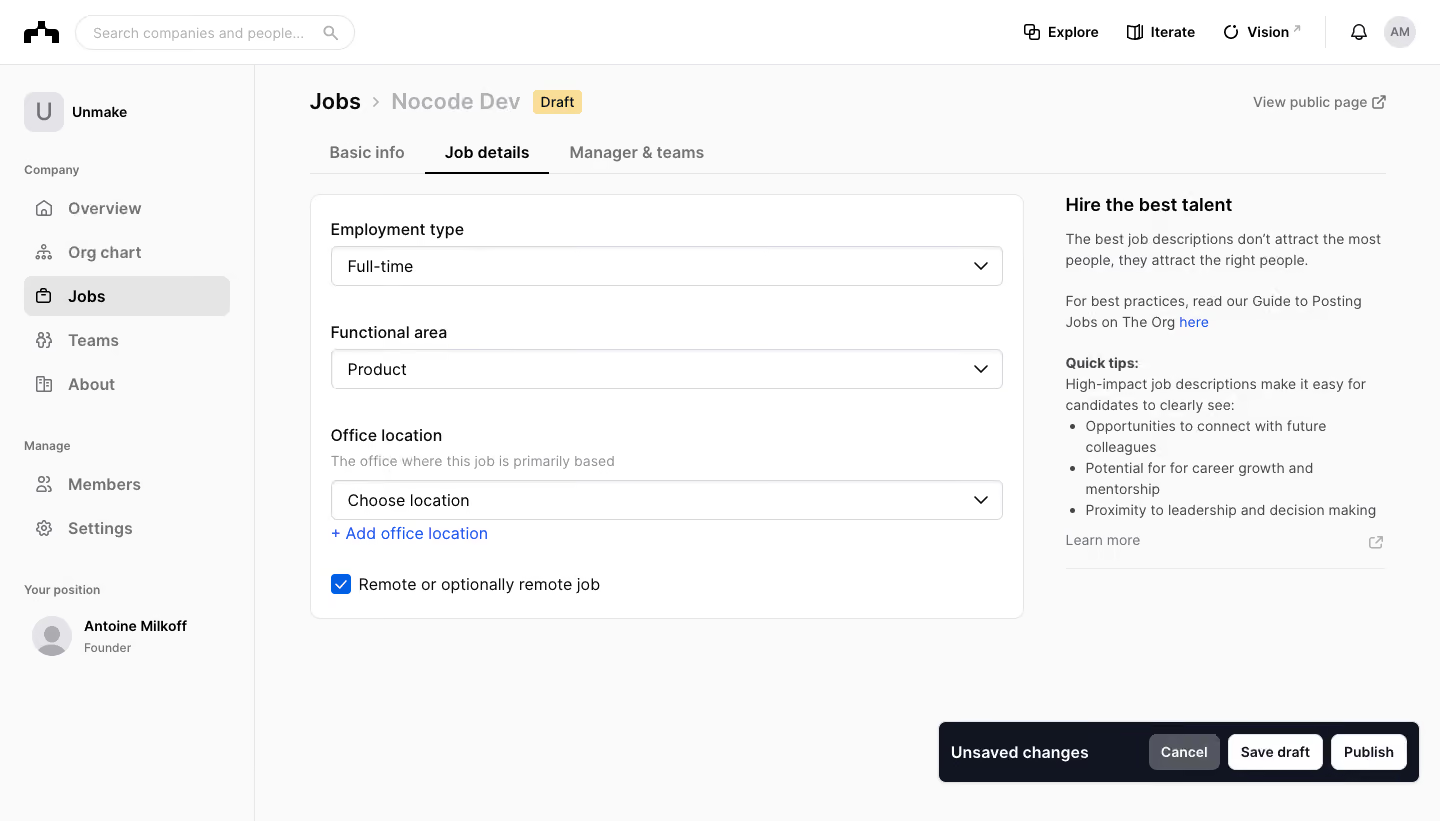
The Org Create Job Offer

The Org
Org Chart, Teams, Culture & Jobs
Designed by
No items found.

Bookmark
Bookmark

Design with AI
Thank you! Your submission has been received!
Oops! Something went wrong while submitting the form.
# Design from Reference: The Org Create Job Offer
Create an original, high-fidelity visual design inspired by the reference. Prioritize composition, typography, colors, spacing, and component styling over technical implementation.
## Reference
- **Product:** The Org
- **Category:** Add & Edit
- **Screenshot:** https://cdn.prod.website-files.com/5e9dc792e1210c5325f7ebbc/6acbbc706325e7e23e4c9642_6acbbbba5fa786bc87a9aca7_cms-ba07dfb55d8b3a55108023c3.webp
Analyze the screenshot first. If inaccessible, request it rather than guessing.
## Content
{{content.instructions}}
{{content.data}}
Preserve essential messaging and factual accuracy. Adapt structure and copy length for visual balance; never invent product claims.
## Visual Design
### Overall aesthetic
- **Character:** Light job-editing workspace with a persistent company sidebar, large white form card and contextual guidance column.
- **Action emphasis:** A dark floating unsaved-changes bar anchors the lower right, while blue links and checkbox state provide limited accent color.
- **Scale:** The capture measures 1440 × 821 image px. Sizes below refer to image estimates; CSS scale is unverified.
### Page composition
- **Shell:** A top search/navigation bar spans the viewport; a roughly 255 px company sidebar contains company destinations and account context.
- **Page header:** A Jobs breadcrumb, draft job title and yellow Draft badge sit above three tabs. View public page aligns at the upper right.
- **Form column:** A white bordered card approximately 714 px wide holds employment type, functional area, office location and remote-work setting.
- **Guidance:** A narrower right column contains a bold hiring-guidance heading, explanatory copy, a linked guide and a short bullet list.
- **Bottom bar:** A near-black rounded strip at the lower right contains Unsaved changes, Cancel, Save draft and Publish controls. No publication is performed.
### Information hierarchy
- **Resource state:** The breadcrumb and draft badge identify an unpublished job; Job details is the active tab.
- **Form sequence:** Employment type and functional area have selected values. Office location remains at a choice prompt, followed by an add-location link.
- **Remote state:** A checked blue checkbox indicates remote or optionally remote work in the visible form.
- **Guidance hierarchy:** A bold title and Quick tips label organize supporting advice without enclosing it in a competing card.
- **Action hierarchy:** The floating bar makes unsaved state explicit. Save draft and Publish are separate controls; the capture does not establish their outcome.
### Typography
- **Family:** Neutral sans-serif; precise font identity is unverified.
- **Page heading:** Breadcrumb/job text is approximately 24 px at medium-to-bold weight; the draft job label is muted.
- **Tabs and fields:** Tabs, form labels and selected values are around 16–17 px, with heavier weight for active tabs.
- **Guidance:** Heading is approximately 20 px bold; body and bullets about 15 px with 22 px leading.
- **Secondary roles:** Helper copy and public-page link are smaller and muted. Action captions use approximately 14–16 px bold text.
### Colors & surfaces
- **Measured canvas:** ICC-aware sRGB sampling yields #FAFAFA for large background areas and #FFFFFF for the form surface.
- **Measured dark tone:** #111421 appears in strong interface regions including the unsaved-state treatment.
- **Measured borders/neutrals:** #E5E5E5, #E4E4E7 and #D7D8DC define light rules/controls; #53565E is a muted foreground.
- **Accent use:** Bright blue marks add-location/link text and the checked remote setting. A pale yellow badge identifies Draft.
- **Depth:** The main card uses a thin outline and roughly 10 px corners; the bottom state bar has a soft shadow.
### Components
- **Tabs:** Basic info, Job details and Manager & teams share a horizontal baseline. The active middle tab has a dark underline.
- **Select controls:** Three wide outlined dropdowns, approximately 670 × 40 image px, use dark values, pale borders, small corners and right chevrons.
- **Location group:** A muted helper line sits above the dropdown; a blue Add office location link follows below.
- **Checkbox:** A blue square with white check precedes the remote-work label, with generous separation from the preceding field group.
- **Guidance block:** Plain paragraphs, a blue inline link, three bullets and a lower Learn more row form the right-side help module.
- **Unsaved bar:** Approximately 480 × 60 image px with 7–8 px corners. Cancel is gray; Save draft and Publish are light buttons with dark text.
- **Sidebar selection:** Jobs is marked by a pale-gray rounded row, dark icon and bold label.
### Visual rhythm
- **Main layout:** Roughly 56 px separates sidebar and content start. The form and guidance columns align at the top.
- **Field spacing:** Large approximately 36–40 px gaps separate field groups, while label/input and helper/link gaps remain compact.
- **Card padding:** About 20 px insets align labels, controls and checkbox.
- **State anchoring:** The bottom bar occupies otherwise blank space beneath the form rather than expanding the form card.
### Responsive
- **Evidence limit:** Only desktop is shown; these are recommendations.
- **Columns:** Move guidance below the form and collapse the company sidebar at narrow widths.
- **Controls:** Keep dropdowns fluid and labels visible; wrap the remote setting naturally.
- **Action bar:** Reflow unsaved text and buttons without covering form content, and retain a clear distinction between saving a draft and publishing.
- **Tabs:** Allow horizontal scrolling or wrapping with an obvious selected state.
### Adaptation guidance
- **Reusable pattern:** Pair structured job-detail fields with contextual writing guidance and a persistent unsaved-state action group.
- **State clarity:** Preserve the draft badge and expose save feedback explicitly; do not infer publication from the available Publish button.
- **Accessibility:** Provide semantic tabs, labeled selects and checkbox, visible focus and status announcements after saving.
- **Content discipline:** Keep advice concise and adjacent to relevant fields while avoiding duplication of the main form labels.
Use this context to reproduce the reference's visual language: layout, typography, colors, spacing, borders, radii, and distinctive elements. The screenshot takes priority if descriptions conflict.
## Direction
{{preferences.fidelityInstructions}}
## Output
{{output.instructions}}
Deliver a polished, cohesive design with precise alignment, hierarchy, and spacing. Produce the requested visual artifact, not just a description. If unsupported, explain the limitation.

.avif)
Category
Patterns
No items found.
Tech Stack


Added on
February 22, 2023




Similar screens






Upgrade to SaaSFrame Pro now to see similar examples.
Monthly
$18 /month
Billed $18 monthly
Browse all screens & flows
Filter and search screens & flows
Search text in screenshots
Access Figma files
Access mobile versions
Join now
Quarterly
$16 /month
Billed $48 quarterly
Browse all screens & flows
Filter and search screens & flows
Search text in screenshots
Access Figma files
Access mobile versions
Join now
Yearly
$15 /month
Billed $180 yearly
Browse all screens & flows
Filter and search screens & flows
Search text in screenshots
Access Figma files
Access mobile versions
Join now