Design with AI
Generate a new design based on this screen using your own content.
# Design from Reference: Swell Onboarding Email Flow
Create an original, high-fidelity visual design inspired by the reference. Prioritize composition, typography, colors, spacing, and component styling over technical implementation.
## Reference
- **Product:** Swell
- **Category:** Onboarding Email
- **Screenshot:** https://cdn.prod.website-files.com/5e9dc792e1210c5325f7ebbc/6acbca83f1e28b554221d041_6acbc8f2d6be908889c75750_cms-38ff6471d75e6e4622cb8be8.webp
Analyze the screenshot first. If inaccessible, request it rather than guessing.
## Content
{{content.instructions}}
{{content.data}}
Preserve essential messaging and factual accuracy. Adapt structure and copy length for visual balance; never invent product claims.
## Visual Design
### Overall aesthetic
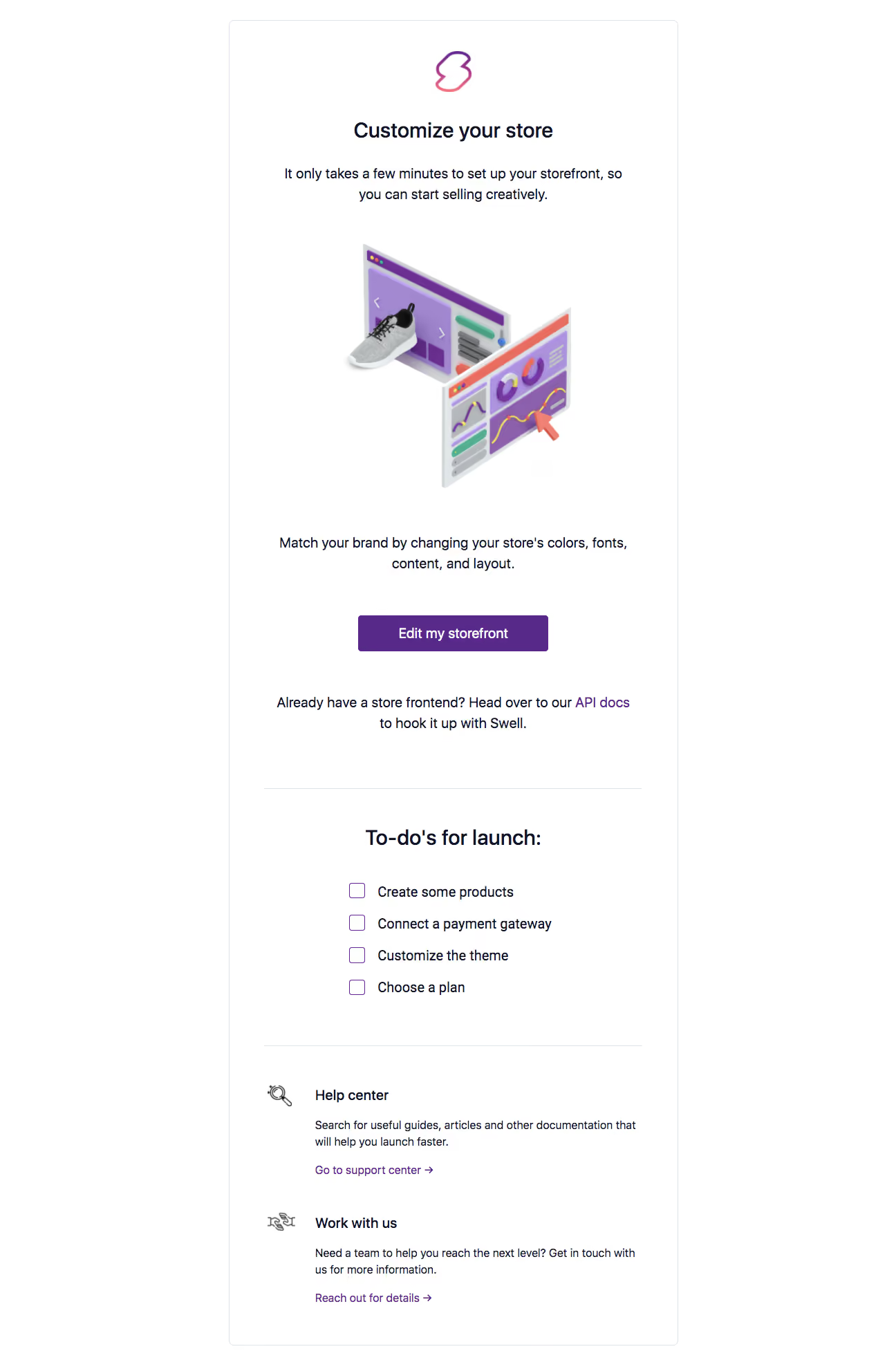
- **Character:** A spacious onboarding email focused on storefront customization, using a white bordered panel, purple actions and a colorful isometric product illustration.
- **Tone:** Helpful and instructional, progressing from one primary action to launch preparation and support resources.
### Page composition
- **Capture:** The source is 1296 × 1980 image pixels; both readable portions were inspected. Measurements refer to image pixels, with CSS scale unverified.
- **Frame:** A roughly 650-pixel-wide white panel begins near x=331 and has a thin pale border with small rounded corners.
- **Opening:** A centered gradient brand symbol sits above the headline and a two-line introduction. A large isometric storefront/dashboard illustration fills the middle.
- **Action region:** Centered explanatory copy leads to a purple button and a secondary paragraph containing an API-docs link.
- **Lower regions:** A horizontal rule introduces four launch checklist rows; another rule separates two left-aligned help/service blocks.
### Information hierarchy
- **Main purpose:** “Customize your store” is the primary heading; the introduction and illustration explain the setup task.
- **Primary action:** “Edit my storefront” is the only filled button and sits prominently below the illustration.
- **Alternative path:** An inline purple API-docs link supports users with an existing frontend.
- **Preparation and support:** A bold launch heading precedes four outlined checkbox-like items, followed by Help center and Work with us resource blocks.
### Typography
- **Family:** A conventional clean sans serif is visible; its exact identity is unverified.
- **Heading roles:** Main and checklist headings are approximately 30 image pixels, bold, with compact line height.
- **Body:** Centered copy is around 20 pixels with a 30-pixel line height; lower resource descriptions are approximately 17 pixels with 24-pixel line height.
- **Controls:** Button text is about 20 pixels and semibold; resource titles are similarly sized, while their purple text links are smaller.
### Colors & surfaces
- **Measured palette:** ICC-aware sRGB sampling yields #FFFFFF for the dominant canvas, purple #572988 for the action, dark navy #111426 for text and pale border #E0E2EA.
- **Illustration accents:** Lavender, coral, teal and yellow appear within the isometric storefront and analytics panels.
- **Surface restraint:** The outer panel has no prominent shadow. Thin pale rules separate sections, and the primary button uses only a small radius around 4 pixels.
### Components
- **Hero illustration:** Two overlapping isometric browser panels show a shoe storefront and purple analytics dashboard, with a large coral cursor and soft dimensional shading.
- **CTA:** An approximately 275 × 52-pixel purple rectangle is centered within the panel.
- **Checklist:** Four roughly 22-pixel empty purple-outlined squares precede launch tasks for products, payments, theme and plan selection. The screenshot does not establish that these are interactive.
- **Resource blocks:** Small monochrome line icons sit to the left of title, paragraph and arrow-ended purple link groups.
- **Section dividers:** Approximately 548-pixel horizontal rules align with the main inner padding.
### Visual rhythm
- **Spacing:** The upper half uses generous 40–60-pixel gaps between heading, illustration, copy and action.
- **Alignment:** Introductory elements are centered; checklist rows form a narrower left-aligned stack; support blocks use a consistent icon/text grid.
- **Lower cadence:** Repeated title/description/link groups and clear dividers make the longer email easy to scan.
### Responsive
- **Recommendation:** Make the frame fluid with 20–24 CSS-pixel gutters, scale the illustration proportionally and allow headings to wrap.
- **Recommendation:** Keep checklist labels and resource descriptions readable rather than shrinking the whole panel. No phone rendering is visible.
### Adaptation guidance
- **Preserve:** Retain the single customization action, secondary developer path, launch checklist and two support options.
- **Implement:** Use email-safe spacing and a linked CTA with a descriptive label; provide alternative text for the dimensional illustration.
- **Clarity:** Treat checklist marks as informational unless actual interaction is implemented, and keep support links visually distinct from body copy.
Use this context to reproduce the reference's visual language: layout, typography, colors, spacing, borders, radii, and distinctive elements. The screenshot takes priority if descriptions conflict.
## Direction
{{preferences.fidelityInstructions}}
## Output
{{output.instructions}}
Deliver a polished, cohesive design with precise alignment, hierarchy, and spacing. Produce the requested visual artifact, not just a description. If unsupported, explain the limitation.
.webp)


.avif)