Design with AI
Generate a new design based on this screen using your own content.
# Design from Reference: Supernotes User Onboarding
Create an original, high-fidelity visual design inspired by the reference. Prioritize composition, typography, colors, spacing, and component styling over technical implementation.
## Reference
- **Product:** Supernotes
- **Category:** User Onboarding
- **Screenshot:** https://cdn.prod.website-files.com/5e9dc792e1210c5325f7ebbc/6acb6e9b2837b9f3168fb49c_6acb6d69516caa34e805904a_cms-83fd45f0ab4e84f208b108f9.webp
Analyze the screenshot first. If inaccessible, request it rather than guessing.
## Content
{{content.instructions}}
{{content.data}}
Preserve essential messaging and factual accuracy. Adapt structure and copy length for visual balance; never invent product claims.
## Visual Design
### Overall aesthetic
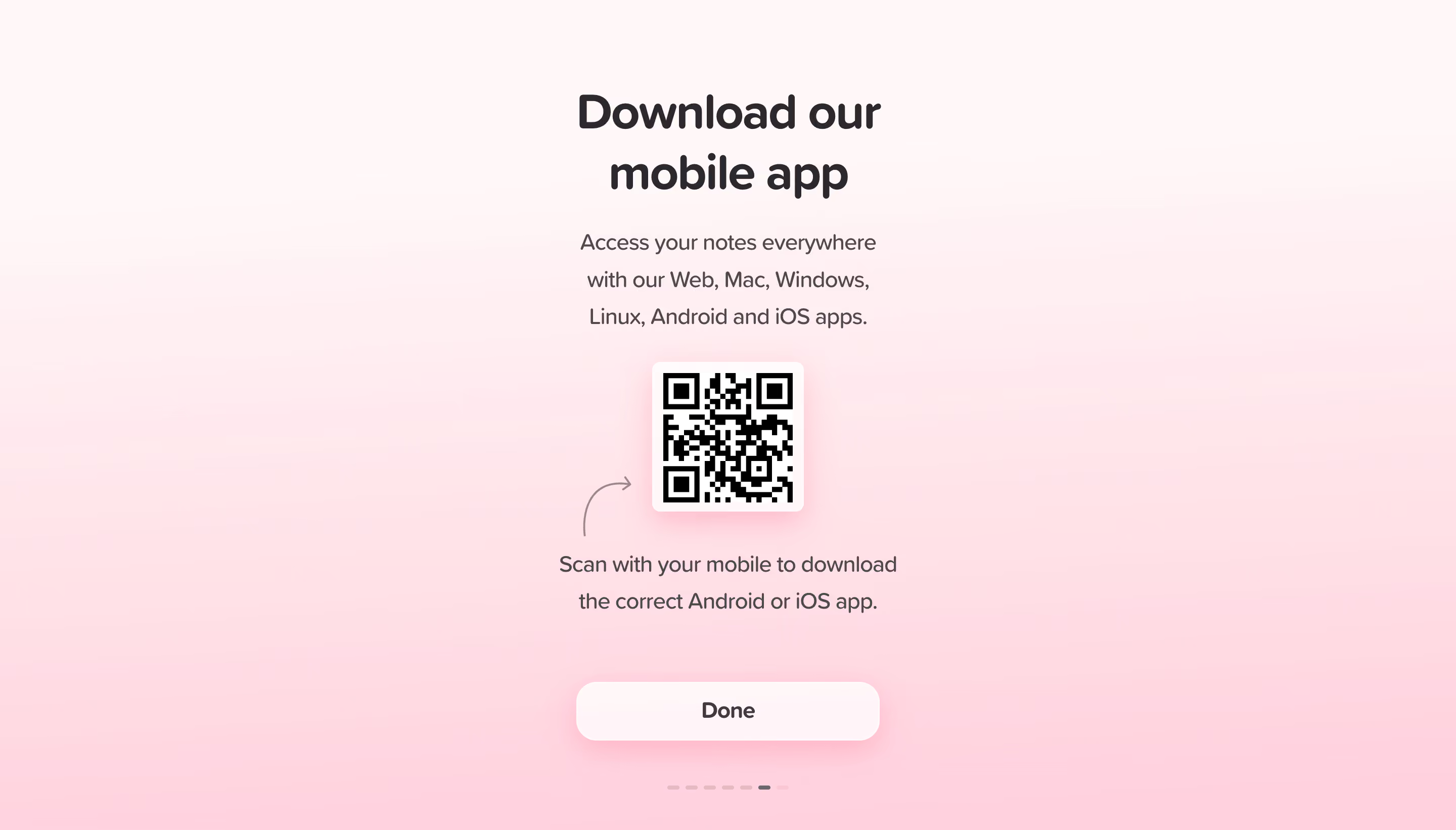
- **Character:** Soft, friendly final onboarding slide with warm pink gradient, oversized centered type and a practical QR download step.
### Page composition
- **Canvas:** 2880 × 1642 screenshot px; CSS estimates assume 2× capture.
- **Structure:** Narrow centered vertical column: two-line download heading, short platform-support paragraph, square QR tile, scan instruction, wide Done button and progress dashes.
### Information hierarchy
- **Priority:** Download heading leads; QR code is the visual focal point, while Done provides a clear completion path.
### Typography
- **Family:** Rounded humanist sans serif with soft terminals; exact identity unverified.
- **Scale:** Estimated CSS heading 46–48 px, supporting text 22 px, button 22 px bold; body line height approximately 36 px.
### Colors & surfaces
- **Sampled palette:** Warm near-white #FFF8F8 transitioning through pinks #FFE1E7, #FFDAE3 and #FFD2DF.
- **Treatment:** Dark charcoal text, white QR frame and translucent pale button; diffuse pink shadows provide soft depth.
### Components
- **QR tile:** White rounded square approximately 150 CSS px wide, black code and pronounced soft pink shadow; small curved hand-drawn arrow points toward it.
- **Button:** Approximately 300 × 58 CSS px, 20 px corners and thin white border.
- **Progress:** Short muted rounded dashes below the button; one dark dash marks the current slide.
### Visual rhythm
- **Spacing:** Estimated CSS gaps 24–40 px between text/QR groups, with a larger pause before the completion button. Strong center alignment keeps the slide calm.
### Responsive
- **Observed:** Desktop onboarding only.
- **Adaptation:** Provide direct app-store links on mobile alongside QR access; fit heading and primary action inside a short viewport without reducing QR readability.
### Adaptation guidance
- **Preserve:** Warm gradient, concise centered instructions and gentle rounded geometry.
- **Replace:** Generate a valid QR destination for the target app and use accurate platform availability.
Use this context to reproduce the reference's visual language: layout, typography, colors, spacing, borders, radii, and distinctive elements. The screenshot takes priority if descriptions conflict.
## Direction
{{preferences.fidelityInstructions}}
## Output
{{output.instructions}}
Deliver a polished, cohesive design with precise alignment, hierarchy, and spacing. Produce the requested visual artifact, not just a description. If unsupported, explain the limitation.
.webp)



.avif)