Design with AI
Generate a new design based on this screen using your own content.
# Design from Reference: Supernotes Empty Dashboard
Create an original, high-fidelity visual design inspired by the reference. Prioritize composition, typography, colors, spacing, and component styling over technical implementation.
## Reference
- **Product:** Supernotes
- **Category:** Empty State
- **Screenshot:** https://cdn.prod.website-files.com/5e9dc792e1210c5325f7ebbc/6acb6e9a2837b9f3168fb47b_6acb6d6bc2b3120253ff2dce_cms-e843b8c26e7b785e1c4bc558.webp
Analyze the screenshot first. If inaccessible, request it rather than guessing.
## Content
{{content.instructions}}
{{content.data}}
Preserve essential messaging and factual accuracy. Adapt structure and copy length for visual balance; never invent product claims.
## Visual Design
### Overall aesthetic
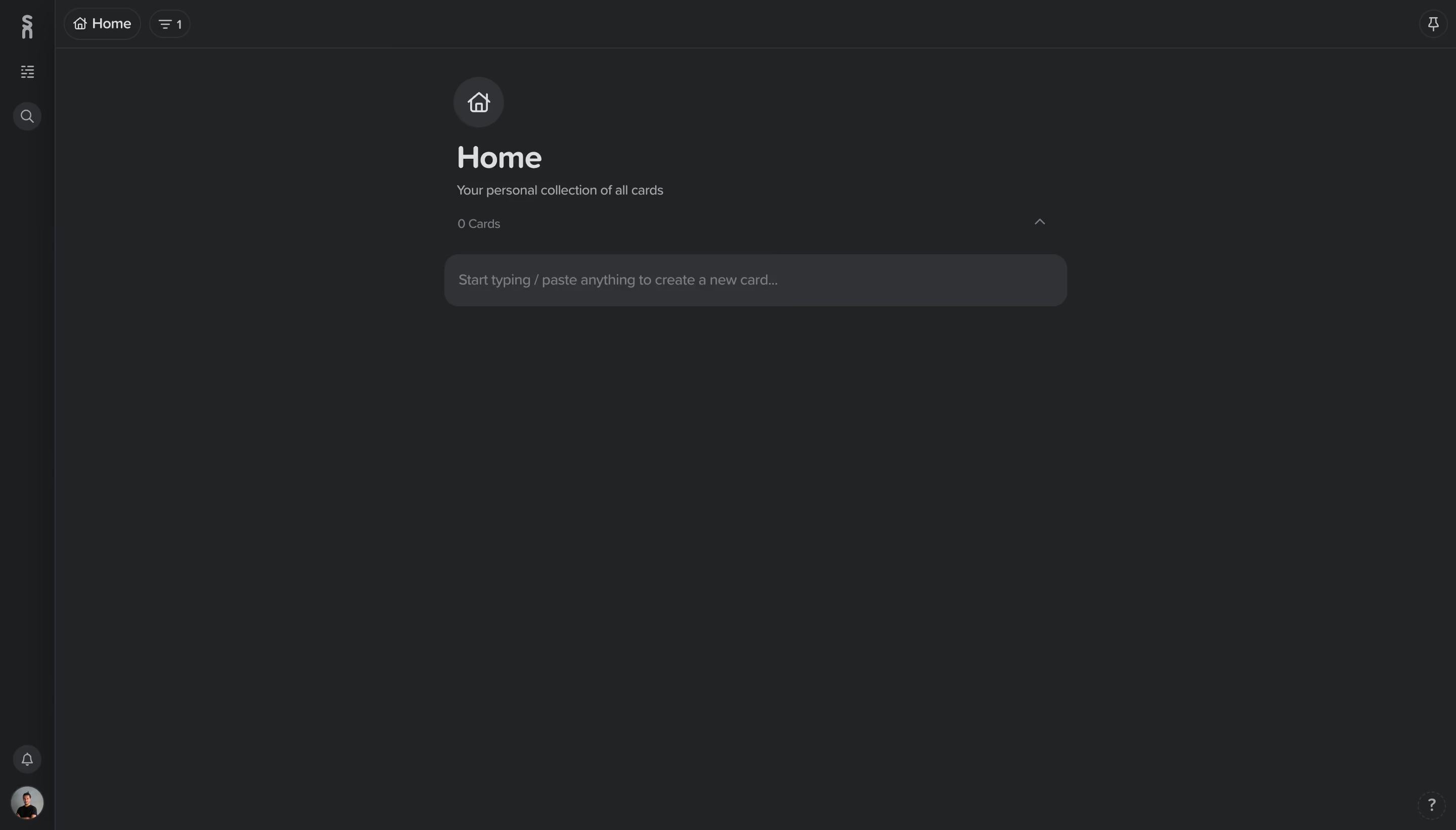
- **Character:** A nearly empty dark notes workspace uses charcoal layers, muted gray type and rounded controls with very little accent color.
- **Evidence scale:** The image measures 2880 × 1642 pixels. CSS dimensions assume an unverified 2× capture density.
### Page composition
- **Navigation rail:** A roughly 54-pixel-wide left strip holds the brand mark, list/search tools, notification control and avatar near the bottom.
- **Top bar:** A thin horizontal bar contains a Home chip and small filter/count chip at left, with a pin icon at the far right.
- **Main column:** A roughly 610-pixel-wide content region begins near x440 CSS pixels, containing a circular home icon, Home title, subtitle, zero-card count and rounded creation prompt.
- **Empty area:** The rest of the canvas remains blank; a small help icon sits lower right.
### Information hierarchy
- **Page identity:** The Home title and circular icon dominate the small content cluster.
- **Empty state:** The subtitle explains the collection, while 0 Cards establishes that nothing is present.
- **Creation cue:** A broad muted input-like bar invites typing or pasting to create a card; no example cards or onboarding illustration are visible.
### Typography
- **Title:** Approximately 30 pixels semibold, with rounded letterforms and compact leading.
- **Supporting copy:** Subtitle and count are around 13 pixels; creation-prompt text is approximately 14 pixels.
- **Top controls:** Home and count-chip text are roughly 12–13 pixels. The exact sans-serif family is unverified.
### Colors & surfaces
- **Measured canvas:** ICC-to-sRGB sampling identifies #222325 as the dominant workspace surface.
- **Measured layers:** #313236 supplies the lighter creation bar and circular icon area; #1D1E20 and #1C1D1F occur in darker navigation/edge layers.
- **Foreground:** Light gray marks the title, with lower-contrast gray for helper copy, count and placeholder.
- **Borders:** Fine dark-gray rules separate rail and top bar; subtle outlines define compact chips without strong shadows.
### Components
- **Icon rail:** Small monochrome line icons are vertically spaced; search and notification icons have circular background discs.
- **Breadcrumb chips:** Home and a filter/count capsule are compact outlined pills at the top left.
- **Creation prompt:** Approximately 615 × 52 pixels with around 15-pixel rounding and 14-pixel horizontal inset.
- **Collection header:** A small upward chevron aligns to the far right of the count row.
- **Utilities:** A circular profile photo anchors the rail; the help control uses a subtle dashed-looking circular outline.
### Visual rhythm
- **Content concentration:** The page header and prompt occupy only the upper central area, leaving most of the screen empty.
- **Vertical cadence:** Icon, title, subtitle, count and prompt form a tight but clearly separated sequence.
- **Stable chrome:** Narrow rail and shallow top bar minimize the framing around the empty workspace.
### Responsive
- **Observed scope:** One desktop empty state is visible; card editing, expanded navigation and populated layouts are not documented.
- **Recommended layout:** Let the content column shrink with padded edges and keep the creation prompt full width.
- **Recommended accessibility:** Retain readable contrast for placeholder/help text and provide accessible names and focus indicators for icon-only tools.
### Adaptation guidance
- **Empty-state pattern:** State the collection purpose and count, then offer one direct creation affordance without filling space with invented content.
- **Dark tokens:** Use a small set of charcoal layers to distinguish chrome, canvas and input; avoid relying on slight tone differences alone for interactive state.
- **Implementation:** Verify typography and density, define input focus and populated-card states separately, and preserve keyboard-first creation behavior if the product supports it.
Use this context to reproduce the reference's visual language: layout, typography, colors, spacing, borders, radii, and distinctive elements. The screenshot takes priority if descriptions conflict.
## Direction
{{preferences.fidelityInstructions}}
## Output
{{output.instructions}}
Deliver a polished, cohesive design with precise alignment, hierarchy, and spacing. Produce the requested visual artifact, not just a description. If unsupported, explain the limitation.
.webp)


.avif)