Generate a new design based on this screen using your own content.
Thank you! Your submission has been received!
Oops! Something went wrong while submitting the form.
# Design from Reference: Superlist User Onboarding
Create an original, high-fidelity visual design inspired by the reference. Prioritize composition, typography, colors, spacing, and component styling over technical implementation.
## Reference
- **Product:** Superlist
- **Category:** User Onboarding
- **Screenshot:** https://cdn.prod.website-files.com/5e9dc792e1210c5325f7ebbc/6acad51a5a5fdf4c30310d87_6acad43e91186b2d49d84158_cms-beb58ca1531f940748f535dc.webp
Analyze the screenshot first. If inaccessible, request it rather than guessing.
## Content
{{content.instructions}}
{{content.data}}
Preserve essential messaging and factual accuracy. Adapt structure and copy length for visual balance; never invent product claims.
## Visual Design
Use this context to reproduce the reference's visual language: layout, typography, colors, spacing, borders, radii, and distinctive elements. The screenshot takes priority if descriptions conflict.
## Direction
{{preferences.fidelityInstructions}}
## Output
{{output.instructions}}
Deliver a polished, cohesive design with precise alignment, hierarchy, and spacing. Produce the requested visual artifact, not just a description. If unsupported, explain the limitation.
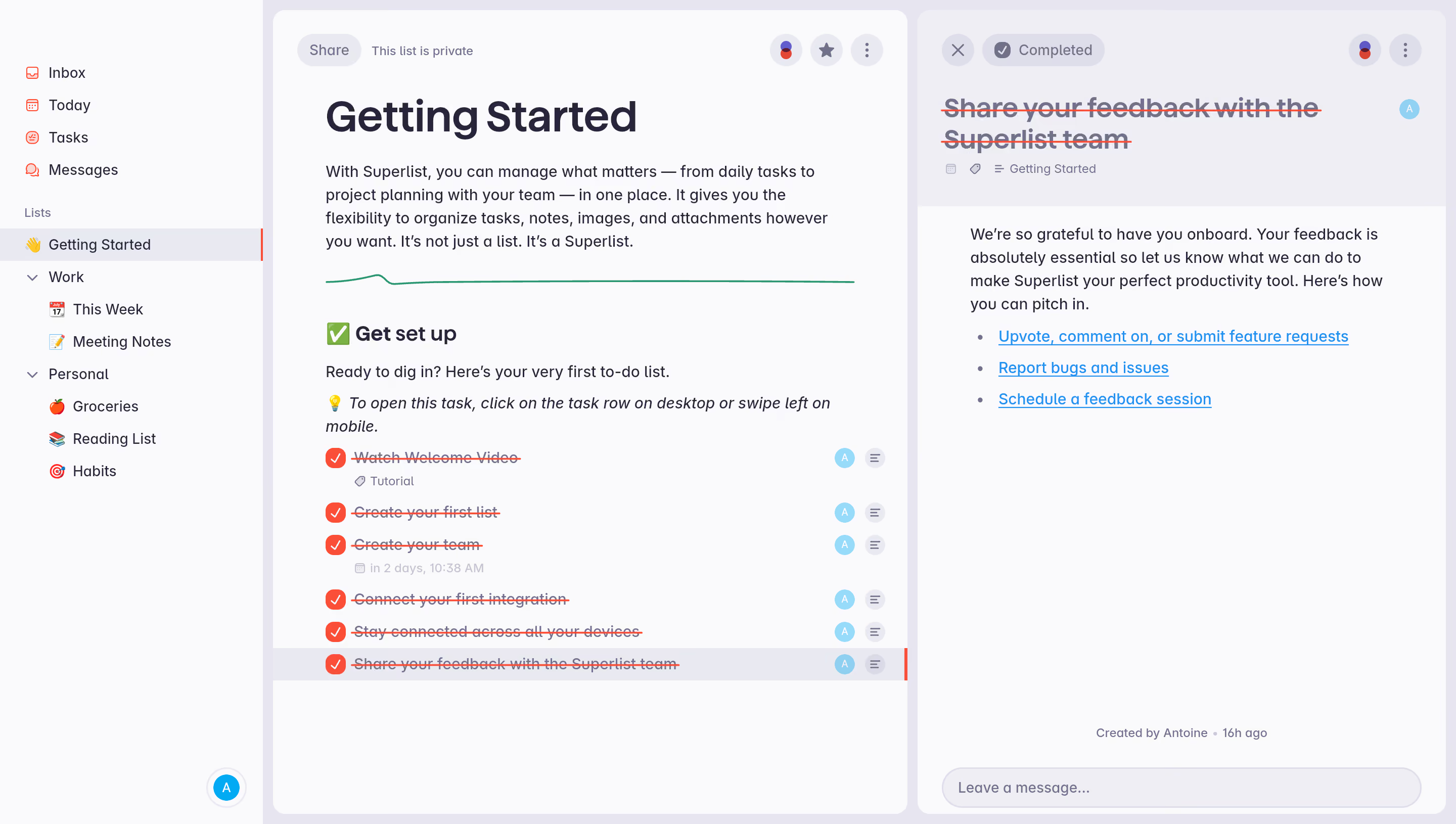
First thing you notice is the three-panel layout. Sidebar, main list, and task detail pane all coexist without fighting for attention. The hierarchy is immediately clear. You know where you are and what to do next.
Color That Works Hard
The palette is almost entirely neutral with soft grays and whites, letting those red completion checkmarks and the blue accent links do all the heavy lifting. The green divider line under the intro text is a subtle but smart touch. It breaks up the welcome copy from the task list without needing a hard border. Typography is bold and confident for headers, lighter for body text. Simple system that scales well.
What Makes It Stand Out
The onboarding approach is genuinely clever. Instead of a separate tutorial flow, they turned the getting started guide into an actual task list you check off. Watch Welcome Video, Create your first list, Create your team. You learn by doing. The right panel showing feedback options with bullet-pointed links feels personal and low-pressure. No modal popups, no forced tours. Just a list that teaches you how to use lists.
.webp)




.avif)