.webp)
Thank you! Your submission has been received!
Oops! Something went wrong while submitting the form.
Get SaaSFrame Pro
Monthly
$18
Quarterly
$48
Yearly
$180
Upgrade to access this feature
Browse all screens & flows
Filter and search screens & flows
Access Figma files
Access mobile versions
Bookmark screens & flows
Join now
Station Onboarding

Station
One app to rule them all
Designed by
No items found.

Bookmark
Bookmark

Design with AI
Thank you! Your submission has been received!
Oops! Something went wrong while submitting the form.
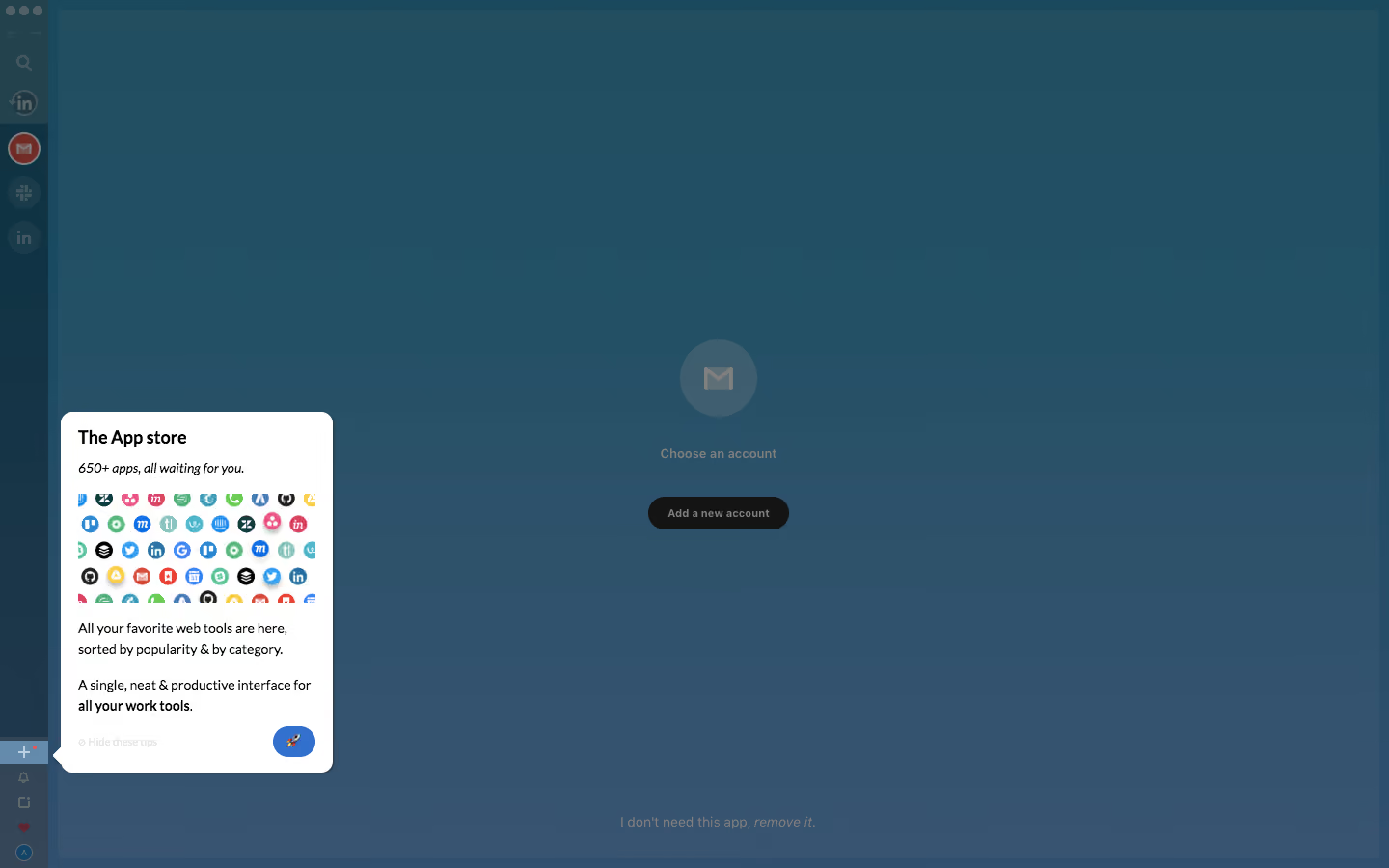
# Design from Reference: Station Onboarding
Create an original, high-fidelity visual design inspired by the reference. Prioritize composition, typography, colors, spacing, and component styling over technical implementation.
## Reference
- **Product:** Station
- **Category:** User Onboarding
- **Screenshot:** https://cdn.prod.website-files.com/5e9dc792e1210c5325f7ebbc/6acbc685edc235600abc9160_6acbc0ceaa23dc1cf5a9f334_cms-8a50534fbf26b0be1f363602.webp
Analyze the screenshot first. If inaccessible, request it rather than guessing.
## Content
{{content.instructions}}
{{content.data}}
Preserve essential messaging and factual accuracy. Adapt structure and copy length for visual balance; never invent product claims.
## Visual Design
### Overall aesthetic
- **Character:** A product-tour overlay dims a desktop app with a teal-blue veil while a bright white teaching card focuses attention on the app-store control.
- **Capture evidence:** The screenshot measures 1440 × 900 pixels. Approximate dimensions refer to image pixels; a near-1× CSS scale is plausible but unverified.
- **Tone:** The small instructional card, colorful app-icon collage and emoji action make onboarding friendly without replacing the underlying workspace.
### Page composition
- **App rail:** A narrow roughly 50px-wide left toolbar contains navigation and service icons, with utility controls near the bottom.
- **Underlying workspace:** A large central pane shows a mail-service icon, account-selection prompt and dark add-account button.
- **Dimming layer:** A blue-teal translucent veil covers nearly the entire interface.
- **Tour card:** A white popover approximately 282 × 374px sits near the lower-left area, anchored by a small pointer to the highlighted plus control.
- **Card sequence:** Title, italic subtitle, app-icon collage, two short explanatory blocks and bottom tour controls form the visible lesson.
### Information hierarchy
- **Focused lesson:** The App store heading is the strongest undimmed text.
- **Supporting message:** An italic line and colorful icon grid introduce the available apps before two explanatory paragraphs.
- **Anchor:** The brighter plus row in the left toolbar identifies the control being explained.
- **Tour action:** A small blue pill containing a rocket emoji sits at the card's lower right.
- **Underlying state:** The dimmed account chooser remains visible for context, but its controls are not the visual focus.
### Typography
- **Family:** A compact sans-serif is visible; exact identity is unverified.
- **Popover heading:** Approximately 18px bold with 24px line-height.
- **Subtitle:** Approximately 13–14px italic.
- **Body:** Approximately 14px with 22px line-height, including a bold concluding phrase.
- **Tour utilities:** Small low-contrast text around 11px appears near the card bottom.
- **Underlying copy:** Account prompts use compact text, visibly subdued by the overlay.
### Colors & surfaces
- **Popover:** Sampled #FFFFFF supplies the undimmed teaching card.
- **Overlay field:** Sampled #214E61, #224F63, #224F64 and #224F62 are prominent in the dimmed teal-blue workspace.
- **Lower variation:** Sampled #2F526B and #35536F contribute to the darker blue-gray lower area.
- **Primary action:** A saturated blue pill contrasts with the white card.
- **Illustration:** Many small service icons contribute localized reds, greens, yellows and blues within the collage.
- **Text:** Near-black card text contrasts with the muted underlying app labels.
### Components
- **Tour popover:** A white rectangle with approximately 12px radius and subtle dark edge/shadow includes a small triangular pointer on its left.
- **Icon collage:** A roughly 245 × 110px clipped grid presents many small circular service marks in regular rows.
- **Anchor highlight:** The plus-control row is brighter than adjacent toolbar areas and includes a small colored notification dot.
- **Tour advance:** A compact blue rounded pill around 44 × 32px uses a centered rocket emoji.
- **Hide-tips control:** A small pale label sits at the card's lower left; its enabled state is not established.
- **Account chooser:** A dimmed circular mail icon, label and dark pill action remain centered behind the overlay.
### Visual rhythm
- **Card padding:** Approximately 18px internal padding gives a compact but readable lesson.
- **Vertical sequence:** Short 12–20px gaps separate heading, collage and explanatory blocks.
- **Asymmetric focus:** The tour card occupies a small lower-left region, leaving the large dimmed workspace visible.
- **Toolbar cadence:** Small circular service icons repeat down the narrow rail, with the highlighted control isolated near the bottom.
### Responsive
- **Evidence limit:** Only a desktop onboarding state is visible; progression, dismissal and narrow-screen positioning are unverified.
- **Popover recommendation:** Reposition the card within viewport bounds while retaining a clear relationship to its anchor.
- **Small-screen recommendation:** Use a bottom sheet or centered lesson if the narrow toolbar leaves insufficient adjacent space.
- **Focus recommendation:** Keep instructional controls keyboard reachable and restore focus to the anchor after dismissal.
### Adaptation guidance
- **Tour model:** Define an explicit anchor, concise lesson and accessible advance/dismiss actions for each step.
- **Overlay:** Use a dimming layer that preserves context while ensuring the card remains readable.
- **Content fidelity:** Keep the app collage illustrative and avoid depending on tiny service marks for essential instructions.
- **Accessibility:** Provide meaningful labels for emoji/icon controls, manage keyboard focus and allow the tour to be dismissed.
- **Behavioral scope:** The screenshot establishes the visible lesson only; no account connection or app installation is implied.
Use this context to reproduce the reference's visual language: layout, typography, colors, spacing, borders, radii, and distinctive elements. The screenshot takes priority if descriptions conflict.
## Direction
{{preferences.fidelityInstructions}}
## Output
{{output.instructions}}
Deliver a polished, cohesive design with precise alignment, hierarchy, and spacing. Produce the requested visual artifact, not just a description. If unsupported, explain the limitation.

.avif)
Category
Patterns
No items found.
Tech Stack



Added on
February 4, 2023





Similar screens





Upgrade to SaaSFrame Pro now to see similar examples.
Monthly
$18 /month
Billed $18 monthly
Browse all screens & flows
Filter and search screens & flows
Search text in screenshots
Access Figma files
Access mobile versions
Join now
Quarterly
$16 /month
Billed $48 quarterly
Browse all screens & flows
Filter and search screens & flows
Search text in screenshots
Access Figma files
Access mobile versions
Join now
Yearly
$15 /month
Billed $180 yearly
Browse all screens & flows
Filter and search screens & flows
Search text in screenshots
Access Figma files
Access mobile versions
Join now