Design with AI
Generate a new design based on this screen using your own content.
# Design from Reference: Specify Account Setup
Create an original, high-fidelity visual design inspired by the reference. Prioritize composition, typography, colors, spacing, and component styling over technical implementation.
## Reference
- **Product:** Specify
- **Category:** Account Setup
- **Screenshot:** https://cdn.prod.website-files.com/5e9dc792e1210c5325f7ebbc/6acbba03d37e66e942ffbcc4_6acb70bc2d777adaad190c37_cms-98defa733011a1a2609c2918.webp
Analyze the screenshot first. If inaccessible, request it rather than guessing.
## Content
{{content.instructions}}
{{content.data}}
Preserve essential messaging and factual accuracy. Adapt structure and copy length for visual balance; never invent product claims.
## Visual Design
### Overall aesthetic
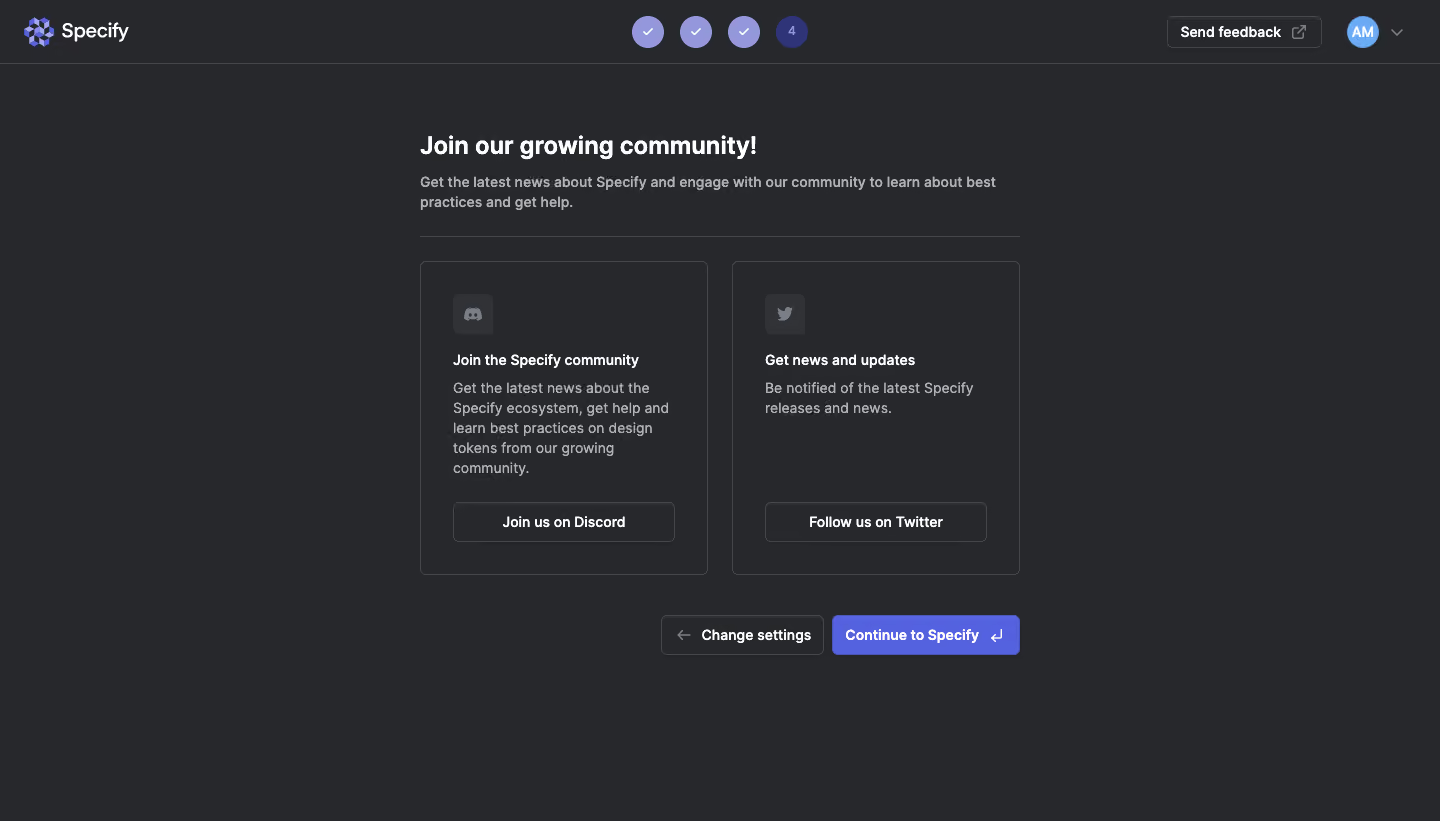
- **Character:** A dark final onboarding step inviting users into community/news channels.
- **Restraint:** Two outlined resource cards and a purple completion action sit directly on charcoal, with no large illustration.
### Page composition
- **Capture:** The source is 1440 × 821 image pixels. A 1× CSS scale is plausible but unverified.
- **Header:** Specify branding sits left, four-step progress centers, and feedback/avatar utilities align right.
- **Content:** A roughly 600-pixel-wide column contains heading, two-line introduction and a divider.
- **Resource cards:** Two equal roughly 288 × 314-pixel cards sit side by side, followed by right-aligned Change settings and Continue to Specify actions.
### Information hierarchy
- **Heading:** “Join our growing community!” leads the content.
- **Cards:** Discord community and Twitter updates each have a small icon, bold title, muted paragraph and outlined action.
- **Progress:** Three completed circles precede the active fourth step.
- **Completion:** Continue to Specify is the strongest action; Change settings is a quiet outlined alternative.
### Typography
- **Family:** A clean sans serif is visible; exact identity is unverified.
- **Heading:** Approximately 24 image pixels, bold.
- **Body:** Around 14 pixels with 20-pixel line height.
- **Card titles/actions:** Approximately 14 pixels, semibold.
- **Hierarchy:** Bright titles alternate with muted gray descriptions rather than many font sizes.
### Colors & surfaces
- **Measured palette:** ICC-aware sRGB samples include background #27282B, border #44474B, action purple #5562E0, pale purple #9597DD and muted gray #AFB2B7.
- **Card icons:** Dark gray icon tiles are slightly lighter than the page.
- **Treatment:** Thin outlines and small radii around 5 pixels define cards/buttons, with minimal shadow.
### Components
- **Community cards:** Each uses approximately 32-pixel padding and a small rounded icon tile near the top.
- **Resource actions:** Full-width outlined buttons align near card bottoms despite different paragraph lengths.
- **Completion controls:** A purple Continue button includes a return-key symbol; the secondary action includes a left arrow.
- **Header tracker:** Circular checkmarks and a numbered active step communicate progress.
### Visual rhythm
- **Spacing:** Roughly 24 pixels separates cards; consistent inner padding aligns title, paragraph and action.
- **Whitespace:** Large margins below the completion controls keep the screen calm.
- **Alignment:** Main heading/divider/cards share edges, while lower controls align right.
### Responsive
- **Recommendation:** Stack the community cards and keep their actions full width on phones.
- **Recommendation:** Wrap the lower action pair without reducing tap targets; simplify header utilities if needed. No mobile state is shown.
### Adaptation guidance
- **Preserve:** Retain optional community resources without obscuring the product-entry action.
- **Implement:** Label external destinations and maintain clear keyboard focus; the screenshot does not establish link behavior.
- **Clarity:** Keep completion visually stronger than secondary community actions.
Use this context to reproduce the reference's visual language: layout, typography, colors, spacing, borders, radii, and distinctive elements. The screenshot takes priority if descriptions conflict.
## Direction
{{preferences.fidelityInstructions}}
## Output
{{output.instructions}}
Deliver a polished, cohesive design with precise alignment, hierarchy, and spacing. Produce the requested visual artifact, not just a description. If unsupported, explain the limitation.
.webp)



.avif)