Design with AI
Generate a new design based on this screen using your own content.
# Design from Reference: Slite Product Update
Create an original, high-fidelity visual design inspired by the reference. Prioritize composition, typography, colors, spacing, and component styling over technical implementation.
## Reference
- **Product:** Slite
- **Category:** Product Update
- **Screenshot:** https://cdn.prod.website-files.com/5e9dc792e1210c5325f7ebbc/6acbbbe4f023ce865170e081_6acbbb255bc1497db666a756_cms-8df5c1097eeab033a29c62bc.webp
Analyze the screenshot first. If inaccessible, request it rather than guessing.
## Content
{{content.instructions}}
{{content.data}}
Preserve essential messaging and factual accuracy. Adapt structure and copy length for visual balance; never invent product claims.
## Visual Design
### Overall aesthetic
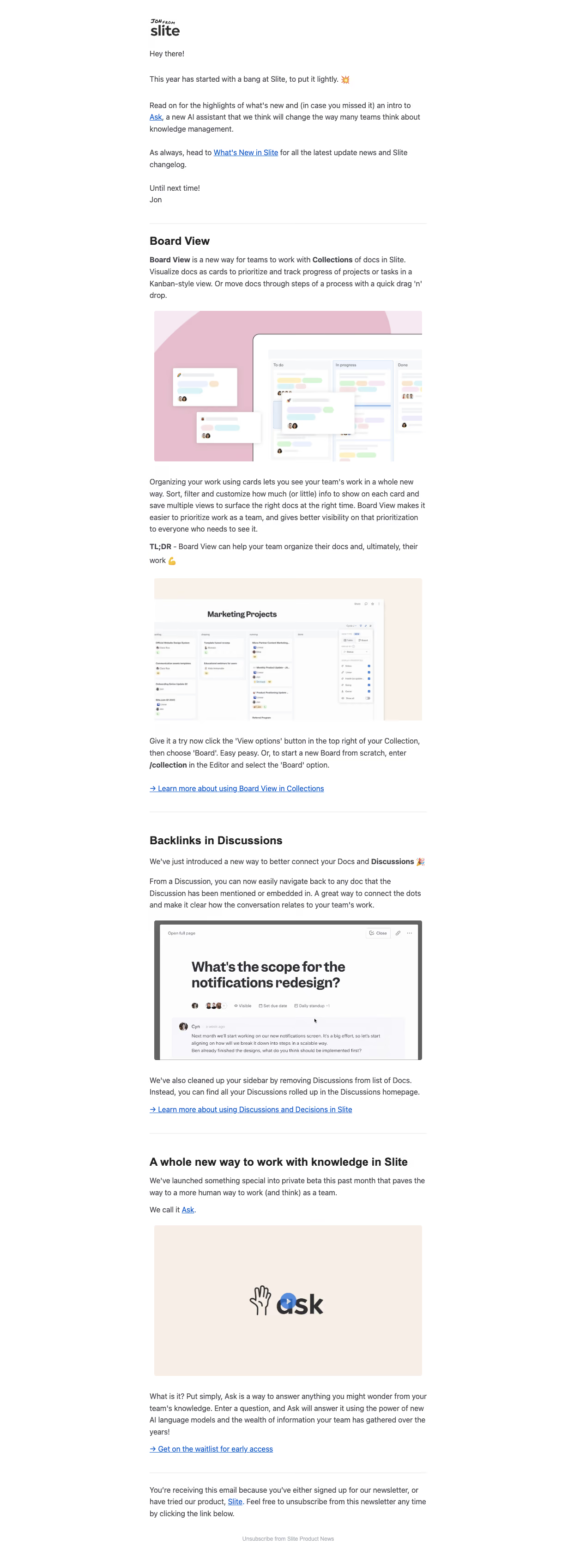
- **Character:** A text-rich product newsletter with a personal introduction, clear feature headings and large supporting screenshots.
- **Restraint:** White space, dark gray text and conventional blue underlined links keep the email editorial rather than promotional.
### Page composition
- **Capture:** The source measures 1243 × 3395 image pixels; all three readable portions were inspected. CSS scale is unverified.
- **Column:** A roughly 600-pixel-wide reading column begins near x=324, with broad white margins.
- **Introduction:** A small handwritten sender/Slite lockup precedes greeting, update summary, inline links and a short sign-off.
- **Feature sequence:** Board View, Backlinks in Discussions and an Ask introduction each occupy a distinct section separated by pale horizontal rules.
- **Ending:** A subscription explanation and small centered unsubscribe line close the message.
### Information hierarchy
- **Feature headings:** Bold section titles introduce explanation, product imagery and resource links.
- **Board View:** This longest section includes a pink illustration, descriptive paragraphs, a bold TL;DR lead-in and a second board screenshot before its documentation link.
- **Discussions:** A short explanation surrounds a large discussion preview and ends in an arrow-led learning link.
- **Ask:** A beige video-preview block, concise explanation and waitlist link introduce the final feature.
- **Footer:** Subscription context remains body-sized, while the unsubscribe line is smaller and muted.
### Typography
- **Family:** A conventional sans serif is used; exact font identity is unverified.
- **Body:** Approximately 16 image pixels with 25–26-pixel line height and dark gray color.
- **Headings:** Feature titles are around 24 pixels and bold; inline feature names and TL;DR use bold body text.
- **Links:** Bright blue underlined text remains at body size, with arrow prefixes on the principal resource links.
- **Footer:** The unsubscribe line is approximately 12 pixels in light gray.
### Colors & surfaces
- **Measured palette:** ICC-aware sRGB sampling yields white #FFFFFF, near-white #FDFDFD, body gray #464850, warm beige #F7EFE7 and pink #E6BECD.
- **Image surfaces:** Additional sampled pale tones #F8F2EB, #F8F7FB and #F6F7F9 appear in product illustrations/screenshots.
- **Structure:** The email has no outer card or shadow; thin pale rules divide content sections.
### Components
- **Board illustration:** A large pink-backed composition shows a kanban interface and floating document cards with pastel tags and tiny avatars.
- **Board screenshot:** A warm neutral frame contains columns, document cards and a right-side view-options panel.
- **Discussion preview:** A dark-framed screenshot shows a large question heading, participant avatars and a conversation panel.
- **Ask preview:** A beige landscape block contains the Ask wordmark, hand icon and blue circular play affordance; playback is not verified.
- **Resource links:** Each feature ends with an explicit text action rather than a filled button.
### Visual rhythm
- **Section cadence:** Rules and 40–50-pixel gaps distinguish feature groups while maintaining a continuous reading column.
- **Media spacing:** Images are slightly inset from the text column and separated from prose by roughly 24–32 pixels.
- **Density:** Short personal opening gives way to detailed feature explanations, with imagery providing pauses.
### Responsive
- **Recommendation:** Use a fluid email column with 20–24 CSS-pixel side gutters and scale screenshots proportionally.
- **Recommendation:** Preserve body readability and offer descriptive alternative text or full-size linked images for small interface details. No mobile rendering is captured.
### Adaptation guidance
- **Preserve:** Retain the personal introduction, ruled feature sections, bold headings and explicit learning links.
- **Build:** Use one reusable feature block supporting multiple images, explanatory paragraphs and a closing text action.
- **Content:** Treat launch/beta statements as captured newsletter content, not current product availability.
Use this context to reproduce the reference's visual language: layout, typography, colors, spacing, borders, radii, and distinctive elements. The screenshot takes priority if descriptions conflict.
## Direction
{{preferences.fidelityInstructions}}
## Output
{{output.instructions}}
Deliver a polished, cohesive design with precise alignment, hierarchy, and spacing. Produce the requested visual artifact, not just a description. If unsupported, explain the limitation.
.webp)


.avif)