Design with AI
Generate a new design based on this screen using your own content.
# Design from Reference: Sidebird Schedule a tweet
Create an original, high-fidelity visual design inspired by the reference. Prioritize composition, typography, colors, spacing, and component styling over technical implementation.
## Reference
- **Product:** Sidebird
- **Category:** Add & Edit
- **Screenshot:** https://cdn.prod.website-files.com/5e9dc792e1210c5325f7ebbc/6acbbb6a151c40fa4074621f_6acbba6cd37e66e942ffeaad_cms-b5f5fdd6314e2103a0c2e71f.webp
Analyze the screenshot first. If inaccessible, request it rather than guessing.
## Content
{{content.instructions}}
{{content.data}}
Preserve essential messaging and factual accuracy. Adapt structure and copy length for visual balance; never invent product claims.
## Visual Design
### Overall aesthetic
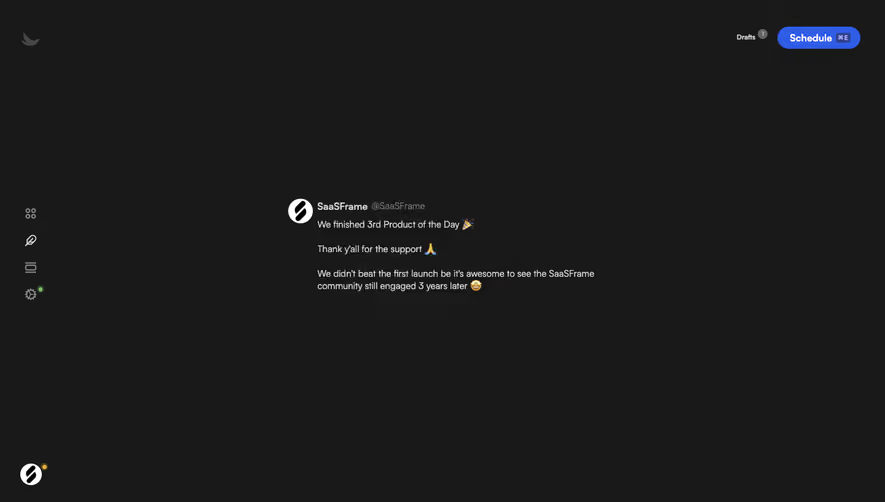
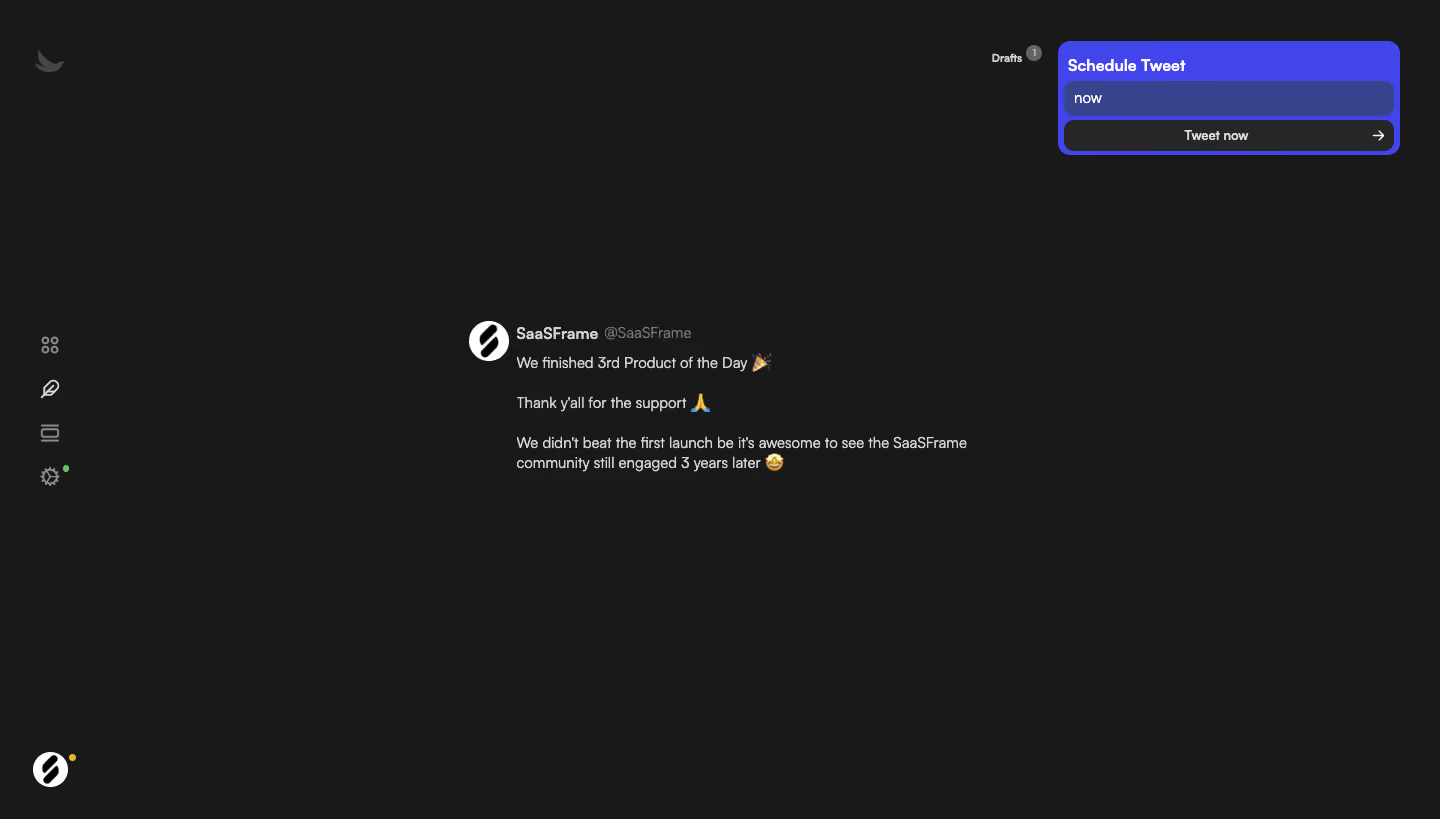
- **Character:** A sparse dark social-post editor uses a nearly black canvas, quiet monochrome navigation and a vivid blue scheduling module.
- **Focus:** The central draft remains unboxed, while the scheduling controls occupy a compact high-contrast block at the upper right.
### Page composition
- **Capture:** The source measures 1440 × 819 image pixels. Observed dimensions below approximate CSS only under an unverified 1× capture assumption.
- **Left rail:** A small bird mark sits near the top, four line icons stack around mid-height and a circular account mark anchors the bottom.
- **Draft region:** A roughly 500 px wide post block sits around the center, with avatar, display name/handle and several short paragraphs.
- **Scheduling region:** A roughly 340 × 115 px module sits at the upper right, with title, timing field and full-width action.
- **Draft count:** A small Drafts label and count badge appear just left of the scheduling block.
### Information hierarchy
- **Scheduling emphasis:** The blue module is the strongest colored region, distinguishing timing and publication controls.
- **Post identity:** A white circular avatar precedes the bold account name and muted handle.
- **Draft text:** Short left-aligned paragraphs and inline emoji define the post content.
- **Navigation:** Gray rail icons remain subdued; small green/yellow dots indicate local status cues.
### Typography
- **Family:** A neutral sans serif is visible; exact identity is unverified.
- **Draft:** Approximately 14–16 px with 20 px line height; account name is heavier than handle and post text.
- **Scheduler:** The title is around 16 px and bold; timing/action labels are around 14 px.
- **Draft count:** Small compact text and a circular numeric badge remain secondary.
### Colors & surfaces
- **Measured base:** ICC-aware sRGB sampling yields #191919.
- **Measured scheduler:** Blue-violet #4145E9 frames the module; darker #38438D fills the timing field.
- **Measured controls:** Charcoal #262626 fills the publication action.
- **Measured text:** White #FFFFFF and light gray #D4D4D4 contrast with quieter gray icons and handle text.
- **Accents:** Emoji and tiny status dots provide small incidental colors.
### Components
- **Scheduling module:** A rounded blue container has approximately 12 px corners and tight inner padding.
- **Timing input:** A full-width darker blue field displays now, with rounded corners and no separate label above it.
- **Publication action:** A charcoal rounded control contains centered Tweet now text and a right arrow.
- **Draft block:** A roughly 40 px circular avatar aligns beside a text column; no border or surrounding card is visible.
- **Icon rail:** Four small line icons use even vertical spacing, with a tiny green dot beside the lower settings-like icon.
### Visual rhythm
- **Whitespace:** Large empty regions separate the draft, navigation and scheduler, creating a focused composition.
- **Paragraph cadence:** Blank lines between short post paragraphs keep the central text readable.
- **Asymmetry:** The centered draft is balanced by the compact upper-right action block and narrow left rail.
- **Control density:** Scheduler elements are tightly grouped compared with the spacious rest of the page.
### Responsive
- **Evidence boundary:** Only a desktop state is shown; responsive behaviors are recommendations.
- **Action relocation:** Move scheduling controls below or above the draft on narrow screens.
- **Text width:** Let the draft fill available width within safe gutters and preserve paragraph breaks.
- **Navigation access:** Collapse the icon rail into accessible compact navigation without hiding account access.
### Adaptation guidance
- **Composer pattern:** Keep content editing visually quiet and group timing/publication controls distinctly.
- **State clarity:** Label timing choices and define scheduled, submitting and error states separately.
- **Data separation:** Treat post content and account identity as dynamic data rather than copying the screenshot.
- **Action boundary:** The capture shows a draft and visible publication control; no posting action or result is verified.
- **Scale calibration:** Validate observed pixels against the intended CSS viewport before implementation.
Use this context to reproduce the reference's visual language: layout, typography, colors, spacing, borders, radii, and distinctive elements. The screenshot takes priority if descriptions conflict.
## Direction
{{preferences.fidelityInstructions}}
## Output
{{output.instructions}}
Deliver a polished, cohesive design with precise alignment, hierarchy, and spacing. Produce the requested visual artifact, not just a description. If unsupported, explain the limitation.
.webp)



.avif)