.webp)
Thank you! Your submission has been received!
Oops! Something went wrong while submitting the form.
Get SaaSFrame Pro
Monthly
$18
Quarterly
$48
Yearly
$180
Upgrade to access this feature
Browse all screens & flows
Filter and search screens & flows
Access Figma files
Access mobile versions
Bookmark screens & flows
Join now
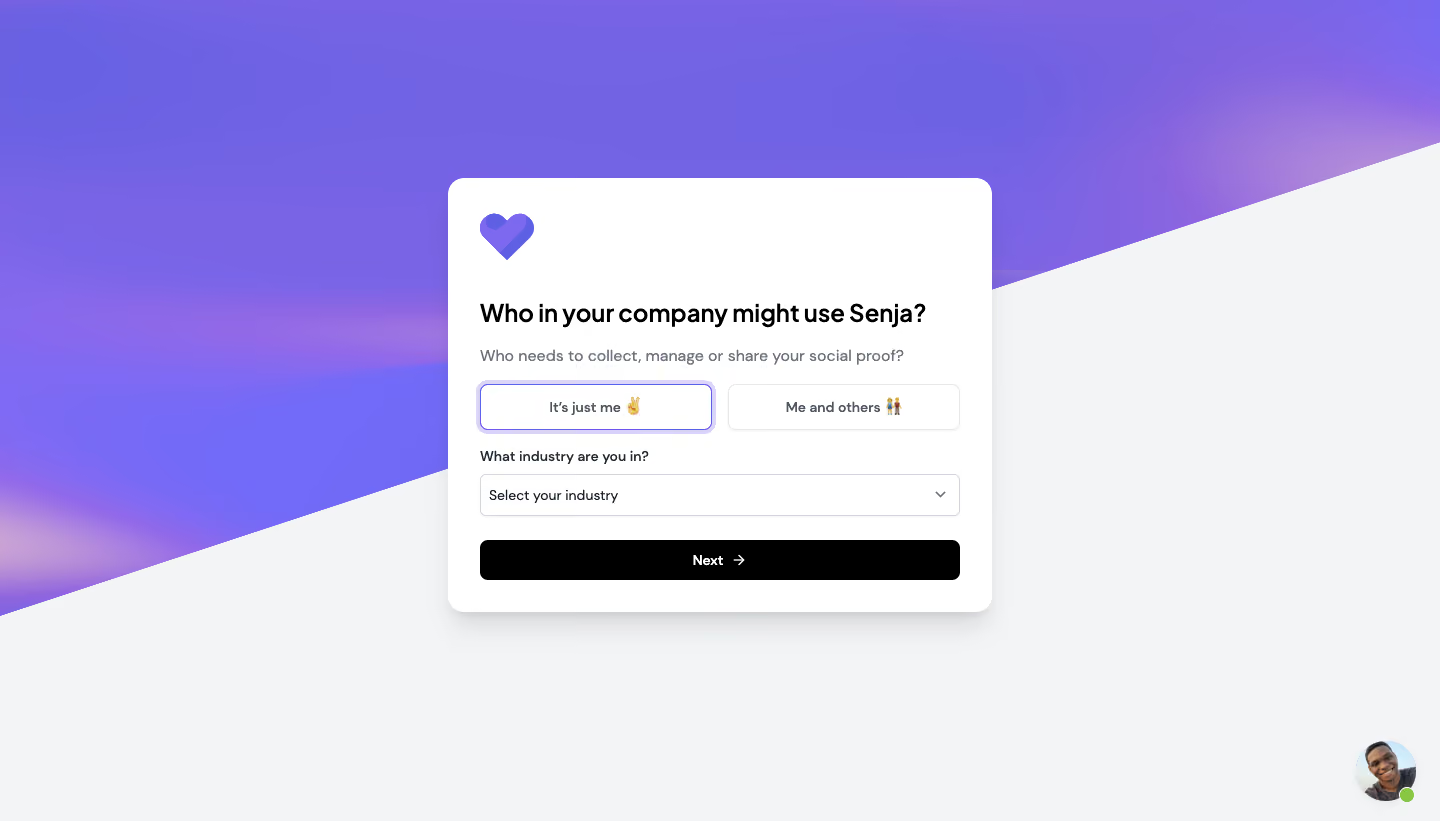
Senja Account Setup

Senja
Collect, Manage & Share Testimonials
Designed by
No items found.

Bookmark
Bookmark

Design with AI
Thank you! Your submission has been received!
Oops! Something went wrong while submitting the form.
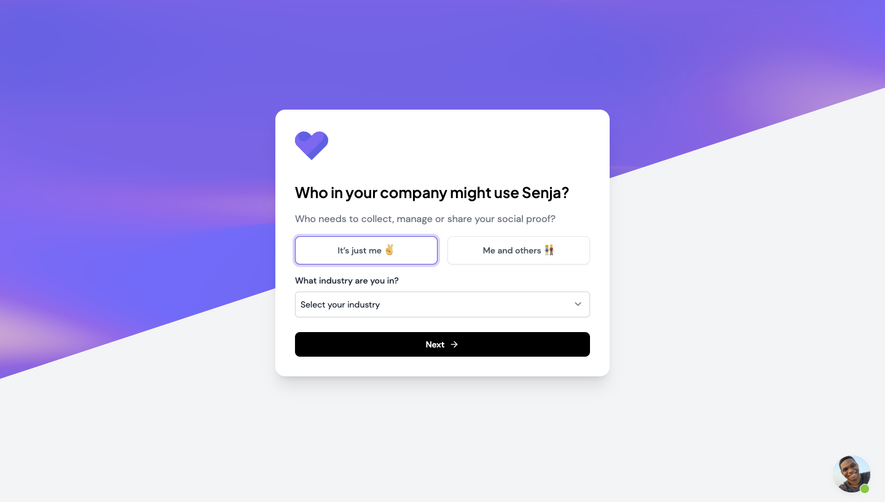
# Design from Reference: Senja Account Setup
Create an original, high-fidelity visual design inspired by the reference. Prioritize composition, typography, colors, spacing, and component styling over technical implementation.
## Reference
- **Product:** Senja
- **Category:** Account Setup
- **Screenshot:** https://cdn.prod.website-files.com/5e9dc792e1210c5325f7ebbc/6acbbbeef023ce865170e1a7_6acbbb348ac954f82b9e2809_cms-eb62772880234f6161b83010.webp
Analyze the screenshot first. If inaccessible, request it rather than guessing.
## Content
{{content.instructions}}
{{content.data}}
Preserve essential messaging and factual accuracy. Adapt structure and copy length for visual balance; never invent product claims.
## Visual Design
### Overall aesthetic
- **Character:** A compact onboarding card floats over a dramatic diagonal purple background, combining a friendly heart logo, clear black heading, lightly outlined controls, and a solid black continuation button.
- **Tone:** Soft gradients, rounded corners, emoji-enhanced choices, and a support avatar make the form approachable.
- **Observed scale:** The source measures 1440 × 821 pixels. Sizes below describe approximate image pixels; CSS estimates assume an unverified 1× capture.
### Page composition
- **Background:** The upper/left portion is filled by a purple gradient with soft pink/lavender glows. A diagonal boundary slopes upward from the lower-left edge toward the upper-right, revealing a pale gray lower/right area.
- **Card placement:** A white rounded card approximately 545 × 435 pixels is centered horizontally, starting near x=448 and y=178.
- **Card sequence:** A small purple heart mark appears first, followed by a bold company-usage question, a muted explanation, two side-by-side choices, an industry selector, and a full-width Next button.
- **Internal width:** Form content occupies roughly 480 pixels with about 32-pixel card padding.
- **Support:** A small circular support portrait with a green availability dot sits near the bottom-right of the page, outside the card.
### Information hierarchy
- **Primary question:** The bold heading asks who in the company may use the product. It is the strongest text and remains on one line in this capture.
- **Clarification:** A muted sentence explains the social-proof workflow beneath the question.
- **Choice state:** The individual-use option is visibly selected with a purple border and pale outer ring; the team-use option has a quiet gray outline.
- **Secondary question:** An industry label and closed selector follow the usage choices.
- **Continuation:** The black full-width Next control is the highest-contrast interactive element.
- **Scope limit:** No earlier step, progress counter, open industry menu, error, or completion state is visible.
### Typography
- **Typeface appearance:** A rounded neutral sans-serif is used throughout. Exact font identity is unverified.
- **Heading:** Approximately 25–27 pixels, semibold/bold, with a line-height around 32 pixels and slightly compact tracking.
- **Supporting sentence:** Around 16 pixels, regular weight, in muted blue-gray.
- **Labels and inputs:** Industry label and select text are approximately 14 pixels. Choice labels are around 13–14 pixels and semibold.
- **CTA:** Next uses roughly 14-pixel semibold white text, centered with a small right arrow.
- **Alignment:** All card text is left aligned except the centered choice and CTA labels.
### Colors & surfaces
- **Measured base:** #F3F4F6 forms the pale outer area; #FFFFFF forms the card and controls.
- **Measured purple:** #7263E5 and nearby #7363E5/#7163E5 occur across the gradient. Sampled #726AF8 contributes to the brighter violet family.
- **Measured black:** #000000 appears in the main text/action treatment.
- **Secondary tones:** Labels and explanatory copy use slate-gray. Borders are very light cool gray; the selected choice uses violet and a pale lavender ring.
- **Depth:** A soft shadow lifts the white card from the background. The selected option has an additional ring, while other fields remain nearly flat.
### Components
- **Heart mark:** A small folded/layered purple heart, around 54 × 48 pixels, sits at the card’s top-left.
- **Usage choices:** Two equal-width outlined buttons, about 232 × 46 pixels, sit in one row with a small gap. One includes a hand emoji; the other includes a group emoji.
- **Selected option:** The first choice has a thin violet border and a thicker translucent lavender outer ring. This is an observed selected appearance, not proof of hover or keyboard focus.
- **Industry selector:** A full-width white control around 480 × 42 pixels shows a prompt and small downward chevron, with a subtle gray outline and slight corner rounding.
- **Next button:** Approximately 480 × 40 pixels, black, with corners around 7 pixels and a white right arrow beside the label.
- **Support launcher:** A circular portrait roughly 60 pixels across has a small green status dot overlapping its lower-right edge.
- **Unshown behavior:** Option switching, selector contents, validation, support chat, and next-step navigation are not established by the static image.
### Visual rhythm
- **Compact stack:** Question, helper text, choices, label/select, and CTA form a clear vertical progression.
- **Consistent edges:** Heading, helper text, selector, and action share the same left/right content boundaries.
- **Brand pause:** A larger gap separates the heart logo from the question than separates related form controls.
- **Background movement:** The diagonal purple field adds energy while the white card remains rectangular and stable.
- **Single accent family:** Purple connects the logo, background, and selected option; black is reserved for strong text and continuation.
### Responsive
- **Evidence limit:** Only a desktop-width onboarding screen is captured. Mobile behavior is unverified.
- **Recommended card:** Use a fluid maximum-width card with 20–24-pixel inner padding and safe viewport gutters.
- **Recommended choices:** Stack the two usage options when labels become cramped, preserving a clear selected state and keyboard navigation.
- **Recommended background:** Keep the gradient decorative and avoid letting diagonal boundaries reduce form contrast.
- **Recommended support:** Reposition the launcher to avoid covering the action on small screens and account for safe-area insets.
- **Recommended semantics:** Implement the usage options as an accessible single-choice group and associate a persistent label with the industry selector.
### Adaptation guidance
- **Preserve the concise profile step:** Ask about individual/team use and industry before offering one forward action.
- **Use explicit selection:** Pair the violet border/ring with an accessible selected state; do not rely on color alone.
- **Build stable controls:** Standardize the card radius, field height, outlines, and black CTA, then verify contrast and focus visibility.
- **Keep decoration separate:** Use the heart and diagonal gradient for brand expression without making them essential to understanding the form.
- **Define missing behavior:** Supply actual industry choices, required-field rules, next-step behavior, and validation from product requirements.
- **Use approved support imagery:** Replace the captured portrait with the appropriate support identity or a neutral launcher asset.
Use this context to reproduce the reference's visual language: layout, typography, colors, spacing, borders, radii, and distinctive elements. The screenshot takes priority if descriptions conflict.
## Direction
{{preferences.fidelityInstructions}}
## Output
{{output.instructions}}
Deliver a polished, cohesive design with precise alignment, hierarchy, and spacing. Produce the requested visual artifact, not just a description. If unsupported, explain the limitation.

.avif)
Category
Patterns
No items found.
Tech Stack


Added on
February 24, 2023



Similar screens



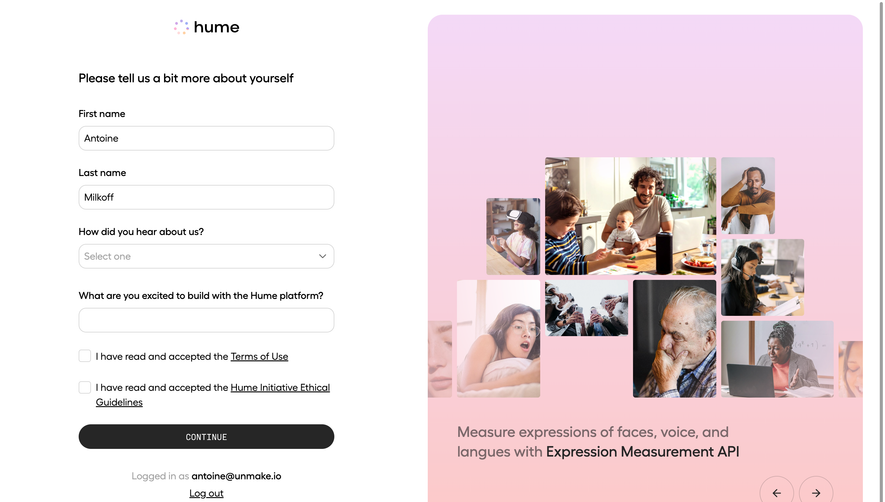

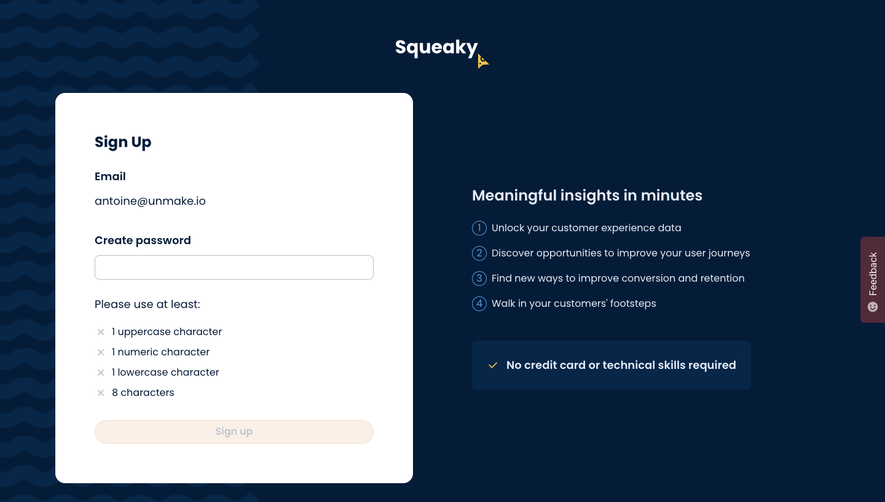

Upgrade to SaaSFrame Pro now to see similar examples.
Monthly
$18 /month
Billed $18 monthly
Browse all screens & flows
Filter and search screens & flows
Search text in screenshots
Access Figma files
Access mobile versions
Join now
Quarterly
$16 /month
Billed $48 quarterly
Browse all screens & flows
Filter and search screens & flows
Search text in screenshots
Access Figma files
Access mobile versions
Join now
Yearly
$15 /month
Billed $180 yearly
Browse all screens & flows
Filter and search screens & flows
Search text in screenshots
Access Figma files
Access mobile versions
Join now